 Cykeo RFID IoT Solution Products R&D Manufacturer

Can I obtain data from RFID via Bluetooth?
1076Learn how to obtain data from RFID tags via Bluetooth for seamless wireless workflows. Discover compatible devices, setup steps, and Cykeo’s Bluetooth-enabled RFID solutions.
MoreAll RFID Product
RFID tool cabinet can help factories schedule tool inspections based on tool identity, usage frequency, inspection history, risk level, and operational requirements. Instead of relying only on calendar reminders, teams can use actual tool activity and status data to plan inspections more consistently.
Tool inspection is easy to postpone when a factory is busy.
A technician returns a tool, places it back into storage, and the next person takes it out again. The tool may continue moving between departments while its inspection status remains unclear.
This can become a problem when inspection is required at regular intervals or after specific events.
For some tools, inspection may be based on time.
For others, usage frequency, working conditions, damage, maintenance activity, or risk level may be more important.
An RFID tool cabinet can provide the identification and transaction history needed to build a more practical inspection scheduling process.
The system can identify the individual tool, record when it was used, track its current status, and connect the tool with inspection records.
RFID does not determine the correct inspection interval by itself. Inspection requirements should come from the organization’s technical procedures, manufacturer recommendations, safety requirements, quality standards, and operational experience.
The value of RFID is providing better visibility and helping teams manage those inspection rules consistently.
RFID tool inspection scheduling is the process of deciding which tools need inspection, when they should be inspected, and what should happen after the inspection.
A simple schedule might say:
Inspect every six months.
But industrial tool management can be more complicated.
A factory may have different requirements for different tools.
For example:
RFID can connect these rules to individual tool records.
The result is a system that can help teams identify upcoming inspections and prevent tools from being used without the required status review.
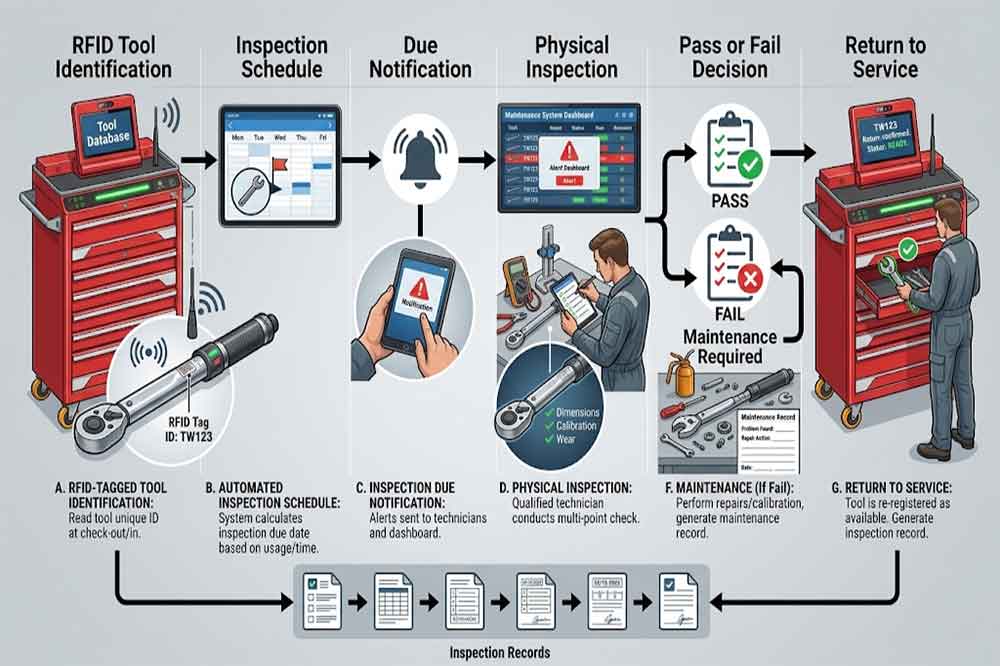
Inspection is often treated as a simple maintenance activity.
In reality, inspection can influence:
A factory may have hundreds or thousands of tools.
Managing inspection dates manually becomes increasingly difficult as the number of tools grows.
Spreadsheets can work for smaller operations, but they may become difficult to maintain when tools move between departments or multiple people update the same records.
An RFID-based system can connect the physical tool with its digital inspection record.
This makes the process easier to track at the individual-tool level.
The first step is identifying the exact tool being inspected.
An RFID tag can be associated with a unique tool record containing information such as:
This is important when several tools have the same model.
Two identical torque tools may have completely different inspection histories.
RFID helps connect the inspection record to the physical tool.
For broader tool data management, see [RFID Tool Cabinet Data Management].
Not every tool should follow the same inspection schedule.
A practical system can classify tools according to their requirements.
For example:
Inspection may focus on physical condition, damage, wear, or missing components.
Inspection may involve more detailed condition checks and may be linked with calibration requirements.
Inspection may be more frequent because failure could create significant operational consequences.
Inspection requirements may be defined by internal procedures or applicable regulations.
Inspection frequency may need to consider actual usage rather than only calendar time.
The rules should be established by qualified personnel.
RFID then helps apply those rules consistently.
Calendar-based inspection is one of the simplest methods.
A tool may require inspection:
The RFID system can store the last inspection date and calculate or display the next planned inspection.
For example:
Last inspection: March 10
Inspection interval: 6 months
Next inspection: September 10
The exact schedule should follow the organization’s established inspection requirements.
RFID simply makes the information easier to manage.
Calendar time is not always the best indicator.
Two identical tools may have very different workloads.
Tool A may be used every day.
Tool B may be used twice a month.
If inspection requirements allow usage-based scheduling, RFID transaction records can provide useful evidence.
Possible usage indicators include:
A factory could establish an internal rule such as:
Inspect the tool after a defined number of uses.
The exact threshold must be determined by the organization’s technical requirements rather than assumed from RFID data.
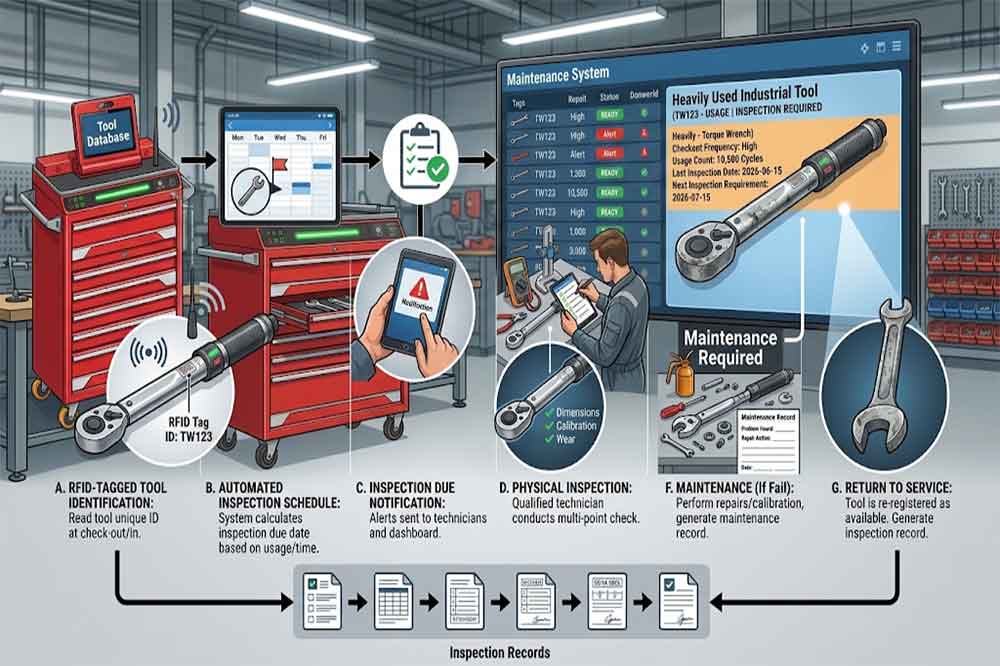
Some operations may use a hybrid approach.
For example:
Inspect every six months or after the defined usage limit, whichever comes first.
This can provide better control for heavily used tools.
Imagine a tool that is normally inspected every six months.
During a major production project, its usage increases sharply.
The usage-based threshold may be reached much earlier.
An RFID system can provide the transaction data needed to identify this change.
This approach is particularly useful when actual tool workload varies significantly between production periods.
A tool should not simply be labeled “inspected.”
A more useful status model might include:
Clear statuses help employees understand whether the tool can be used.
For example:
Tool location: Cabinet A
Physical presence: Yes
Inspection status: Overdue
Availability: Restricted
This is more informative than simply showing that the tool exists.
Manual inspection schedules often fail because nobody notices that a date has arrived.
A digital system can generate alerts for:
Alerts can be directed to appropriate users depending on the workflow.
For example:
Technician: inspection task
Supervisor: overdue notification
Quality team: failed inspection
Manager: recurring overdue report
The goal is not to create an alert for every small event.
Too many notifications can lead to alert fatigue.
For a broader notification strategy, see [RFID Tool Cabinet Alerts and Notifications].
One practical question is:
What should happen if a user tries to take a tool that is overdue for inspection?
The organization can define different policies.
The tool cannot be issued until inspection is completed.
The system allows checkout but displays a warning for authorized users.
Checkout requires an approved exception.
The tool can only be used for defined activities.
The correct approach depends on the tool and organizational requirements.
RFID provides the tool identity and status needed to implement these workflows.
Inspection does not always have to wait for a scheduled date.
A return workflow can include a basic condition check.
For example:
Tool returned → RFID identified → Condition checked → Status updated → Available or restricted
The inspection may look for:
If a problem is discovered, the tool can be moved into an inspection or maintenance workflow.
This helps prevent damaged tools from immediately returning to the available pool.
Inspection and calibration are related but should not be treated as identical.
Inspection generally evaluates the condition or required characteristics of the tool.
Calibration generally concerns measurement accuracy against an appropriate reference.
A measuring instrument may therefore have:
Inspection: Passed
Calibration: Expired
In this situation, the tool may still require calibration before certain uses.
A well-designed RFID system should allow these statuses to remain separate.
For calibration-specific workflows, see [RFID Tool Cabinet for Tool Calibration].
Inspection can identify a problem without necessarily solving it.
For example:
Inspection → Failed → Maintenance → Repair → Inspection → Return to Service
RFID can help connect these stages to the same tool record.
This gives maintenance teams a clearer history.
The tool does not simply disappear from the cabinet.
Instead, its status changes while its history remains visible.
This can help answer:
For maintenance workflows, see [RFID Tool Cabinet Maintenance].
Not every inspection task has the same urgency.
A practical inspection schedule can classify tools according to risk.
For example:
High Priority
Safety-critical or operationally critical tools.
Medium Priority
Important tools with moderate operational impact.
Routine
Common tools with lower risk.
The criteria should be established internally.
RFID can then help organize inspection schedules according to these categories.
This is particularly useful when a maintenance or quality team has a large inspection workload.
Inspection itself consumes labor.
If 300 tools become due during the same week, the inspection team may not have enough capacity.
A better system can distribute inspection workload.
For example:
Instead of scheduling all tools for the same date, planners may group inspections according to:
This turns inspection scheduling into a resource-planning problem rather than a simple date reminder.
Inspection can temporarily reduce available tool capacity.
Suppose a maintenance department has ten identical tools.
If six are removed for inspection at the same time, technicians may suddenly have access to only four.
This can create an operational problem even though all tools are technically being managed correctly.
Inspection scheduling should therefore consider current demand.
For frequently shared tools, planners may stagger inspection.
For example:
Week 1: Tools 1–2
Week 2: Tools 3–4
Week 3: Tools 5–6
The actual schedule should depend on tool requirements and internal procedures.
Inspection planning and demand planning are closely related.
A tool may be due for inspection next week.
At the same time, a major maintenance project may require that tool.
The planning team should know about both events.
Possible actions include:
This is where RFID data becomes particularly useful.
The system can show both tool status and tool activity.
For demand planning, see [RFID Tool Cabinet for Tool Demand Planning].
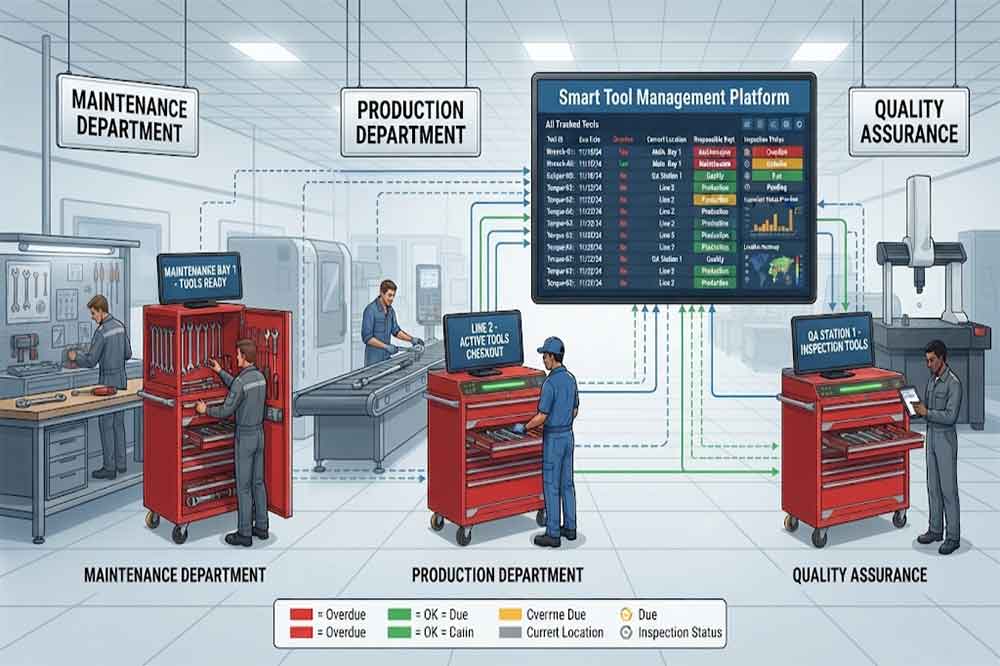
Factories with multiple RFID cabinets may have inspection responsibilities distributed across departments.
For example:
Plant A — Maintenance
Plant B — Production
Plant C — Quality
A centralized system can show:
This reduces the need to maintain separate spreadsheets for every location.
It can also help managers identify tools that are overdue while physically located in another department.
For multi-location management, see [RFID Tool Cabinet for Multi-Location Tool Management].
Inspection records may become important during internal reviews, customer audits, quality investigations, or equipment analysis.
A useful record may include:
The system should preserve the relationship between the physical tool and the digital record.
This is particularly valuable for tools that have long service lives.
For complete tool history, see [RFID Tool Cabinet for Tool Traceability].
A tool that repeatedly fails inspection may require more than another inspection.
For example:
Inspection 1 — Failed
Repair — Completed
Inspection 2 — Passed
Inspection 3 — Failed
This pattern may indicate that the tool should be reviewed for replacement or retirement.
RFID provides the individual tool history needed to identify these patterns.
Managers can then compare:
For replacement planning, see [RFID Tool Cabinet for Tool Replacement Planning].
A practical inspection dashboard can show several useful categories.
Tools approaching their inspection date.
Tools that have passed their required inspection date.
Tools currently being checked.
Tools that require corrective action.
Tools that cannot return to normal use.
Tools available after successful inspection.
Critical tools requiring closer attention.
The dashboard should focus on actions rather than simply showing large amounts of data.
Inspection data can reveal more than individual tool problems.
Over time, management may discover patterns such as:
These patterns may lead to changes in:
RFID becomes useful not only for tracking but also for improving the management process.
For larger organizations, inspection records may need to connect with existing enterprise systems.
Possible integration points include:
RFID Tool Cabinet → Tool Management Software → CMMS
or:
RFID Tool Cabinet → Integration Layer → ERP / MES / Quality System
The integration may synchronize:
The exact integration method depends on the existing architecture.
For integration planning, see [RFID Tool Cabinet Software Integration].
Before applying inspection scheduling to thousands of tools, test the process with a representative group.
Choose tools with different requirements:
Test whether the system can:
For pilot planning, see [RFID Tool Cabinet Pilot Project].
Different tools can have different inspection requirements.
Where permitted, usage and operational conditions may also be relevant.
Inspection and calibration should remain separate statuses when both are required.
Removing many shared tools for inspection at the same time can create shortages.
A failed inspection should lead to a defined next step.
Excessive notifications can cause users to ignore important alerts.
Inspection history can be valuable when evaluating recurring problems.
Checkout restrictions should match the organization’s actual risk and workflow requirements.
Before deploying an RFID inspection workflow, confirm:
RFID can support scheduling by storing inspection dates, usage records, and tool status. The actual inspection rules should be defined by qualified personnel and company procedures.
Yes, where the organization’s inspection procedure allows it. RFID transaction data can help count usage events or identify frequently used tools.
Yes. A system can be configured to block checkout, display a warning, or require approval, depending on the organization’s risk and workflow requirements.
No. Inspection and calibration can have different purposes and requirements. A system should maintain separate statuses when both are required.
Yes. RFID tool records can potentially connect with CMMS platforms to synchronize tool information, inspection tasks, maintenance work orders, and status data.

Cykeo’s RFID Smart Tool Cabinet enables 10-second tool audits, user access control & real-time alerts for construction/oil/gas. Features 21.5″ touchscreen, IP54 steel body & -30°C~60°C operation. Supports SAP/Oracle integration.

Cykeo’s Intelligent Weighing Tool Cabinet combines weight sensors & RFID for 100% tool accountability. Features solar/4G options, IP54 steel-glass body & nuclear/rail compliance. Supports SAP/Oracle integration.

Cykeo’s solar-powered RFID Inventory Tool Cabinet enables 5-second audits for remote sites. Features 160W solar, Android 7.1, 4G & extreme temp operation for oil/energy/mining sectors.

Cykeo’s industrial RFID Tool Cart features 14″ touchscreen, 400+ tool scanning, and carbon steel construction for aviation MRO, power plants and construction sites. 5-second inventory scans.

Cykeo CYKEO-TC RFID multi-drawer tool cart manages 300+ tools via UHF RFID, features fingerprint/face recognition, Android/Windows OS, and SAP integration for nuclear/railway/fire safety sectors. IP54 rated for harsh environments.

Cykeo CYKEO-GTC4 RFID tool inventory cart manages 300+ tools via UHF RFID, features instant scanning, fingerprint/face recognition, and SAP integration for nuclear/railway/fire safety sectors. IP54 rated for harsh environments.

Cykeo CYKEO-GTC7 RFID aviation maintenance cart features military-grade build, blockchain audits, and predictive tool alerts for aircraft MRO. Achieves EASA/FAA compliance.

Cykeo CYKEO-GTC7A RFID real-time tool tracking cart features 99.9% accuracy, FOD prevention, and SAP integration for aviation/plant maintenance. Military-grade construction.

Cykeo CYKEO-GTC4B RFID mobile tool cart delivers 300-tool verification in 7 seconds with modular drawers, ≤150W power, and SAP integration for industrial/aviation use.

Cykeo CYKEO-GTC4C RFID workshop tool control cart delivers 300-tool inventory in 3 seconds with 10hr battery, SAP integration, and FOD prevention for industrial workshops.

Cykeo’s CYKEO-GTC4A multi-drawer RFID tool cart delivers 7-second aviation tool inventories, 10-hour battery, and dual authentication. ISO 18000-6C compliant for MRO/manufacturing.

Cykeo’s MIL-STD RFID tool tracking cart scans 300 tools in 7 seconds, with -20°C~60°C operation and FOD prevention for aviation/energy industries.

Cykeo’s space-saving RFID tool management cabinet offers 1000-tool capacity, ≤5s scans, and 24/7 unmanned operation for manufacturing/assembly plants.

Cykeo’s RFID industrial tool cabinet offers modular shelves, 21.5″ touchscreen, and voice guidance for manufacturing/energy sectors. 24/7 operation with ≤80W power.

Cykeo’s RFID secure tool cabinet features 4 lockable compartments, ≤150W power, and 24/7 monitoring for pharma/aerospace/electronics industries.

Cykeo’s RFID aviation tool cabinet features triple authentication, 14″ HD touchscreen, and thermostatic control for aircraft MRO/FAA compliance.

Cykeo’s RFID tool tracking system delivers self-service check-in/out, real-time alerts, and multilingual interface for correctional/military security.

Cykeo’s off-grid RFID tool inventory system features solar/wind power, -30°C~60°C operation, and military-grade durability for mining/energy/military sectors.

Cykeo’s industrial RFID tool accountability cabinet delivers 99.9% scan accuracy, adjustable shelves, and 24/7 operation for automotive/aerospace manufacturing.

Cykeo’s RFID multi-drawer tool cabinet features 5 adjustable drawers, biometric access, and 99.9% scan accuracy for automotive/aerospace manufacturing.

Cykeo’s RFID Automated Tool Cabinet delivers military security, adjustable shelving, and Java/C# SDK integration for defense/aerospace manufacturing.

Cykeo’s RFID scalable tool cabinet features multi-unit management, voice guidance, and semi-outdoor durability for automotive/construction/logistics.

Cykeo CYKEO-GT1B industrial RFID tool storage cabinet features Impinj R2000 UHF technology, 1,000+ tool capacity, IP54 protection, and Windows/Android OS for manufacturing/aviation MRO. Includes auto check-in/out and SAP/Oracle sync.

Cykeo CYKEO-GT3C industrial RFID tool checkout system Cabinet features millimeter-wave scanning, 280-layer storage, dual OS, and 99.9% accuracy for aviation/semiconductor sectors. Supports auto check-in/out and real-time SAP sync.


Cykeo CYKEO-GT3D RFID smart tool cabinet offers 5-second inventory scanning for 300+ tools, dual authentication, and 24/7 automated management for industrial facilities.

Discover the CYKEO-B1A Industrial RFID Backpack featuring advanced tool tracking technology with 25cm RF shielding, 7-day battery life, and wearable design for field maintenance professionals.
RFID Industry Writer | IoT & Asset Tracking Analyst
James writes about RFID technology, asset tracking, and the practical challenges of digital transformation across warehousing, retail, manufacturing, and logistics.
His work focuses on how RFID is applied in real-world operations—improving inventory visibility, automating workflows, and helping businesses manage assets with greater accuracy and efficiency.
He regularly covers topics including UHF RFID, smart cabinets, RFID portals, tool tracking, warehouse automation, and industrial IoT trends..
Learn how to obtain data from RFID tags via Bluetooth for seamless wireless workflows. Discover compatible devices, setup steps, and Cykeo’s Bluetooth-enabled RFID solutions.
More
In the era of efficient and precise warehouse management, RFID access control technology, with its unique non-contact identification advantage, is gradually becoming a key tool for optimizing inventory control, accelerating inbound and outbound pr...
More
Explore the technical advantages of CYKEO UHF RFID Fixed Reader. Learn how its integration-friendly design and secondary development support empower solution providers across logistics, manufacturing, and access control industries.
More
Discover how long do led tennis court lights last and how RFID inventory tagging system improves accuracy, reduces loss, and enables real-time inventory control.
More