 Cykeo RFID IoT Solution Products R&D Manufacturer

How to Build an RFID Tool Tracking System Step by Step Industrial Guide
90Learn how to build an RFID tool tracking system step by step. From RFID tags to tool cabinets and software integration, this guide covers everything you need.
MoreAll RFID Product
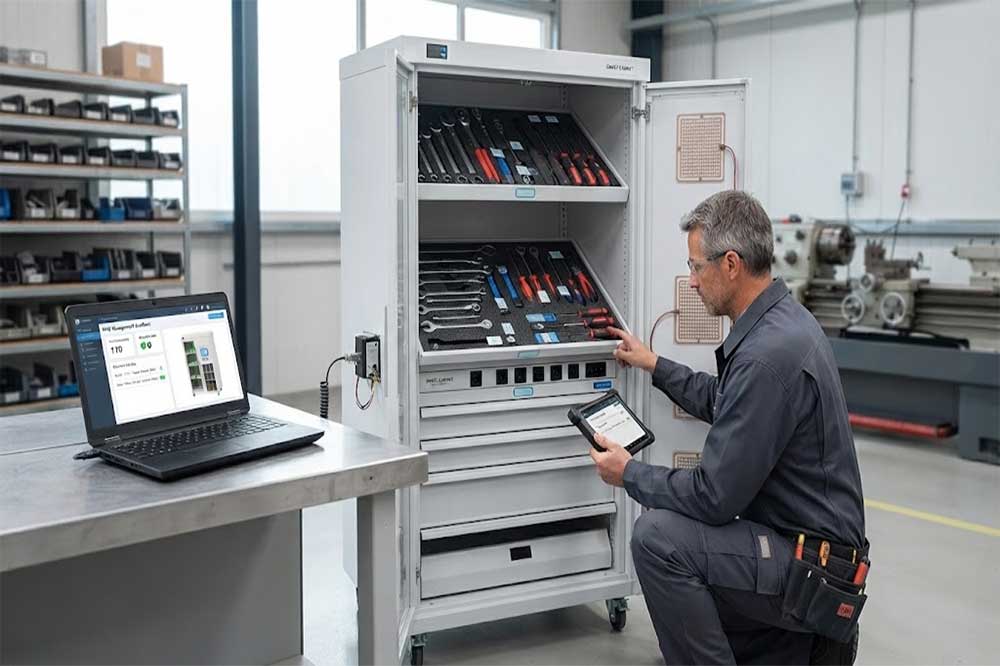
RFID tool cabinet is designed to automate tool storage, tracking, checkout, return, and inventory. But like any industrial system, its performance can change over time because of tag damage, tool movement, hardware conditions, software configuration, network issues, or changes in the working environment.
Regular maintenance helps keep RFID reading performance and tool records consistent. When a problem occurs, a structured troubleshooting process can also prevent unnecessary hardware replacement.
A smart tool cabinet combines several components:
A problem in one part can affect the entire workflow.
For example, a tool may appear to be missing from the software even though it is physically inside the cabinet. The problem may not be the software itself. The RFID tag could have moved, become damaged, or entered a weak reading position.
That is why maintenance should examine the complete system rather than focusing on one component immediately.
The maintenance frequency depends on the operating environment and usage level.
A simple schedule can include:
Operators can check whether:
Technical staff can review:
A more detailed inspection can include:
High-use industrial environments may require more frequent inspections.
RFID tags are attached directly to tools, so they are exposed to daily handling.
Common problems include:
When a tool is not detected, compare it with another correctly working tool.
Check whether the RFID tag is still firmly attached and whether its position has changed.
For metal tools, confirm that the selected tag is suitable for metal surfaces.
A replacement tag should also be registered in the software before the tool returns to normal operation.
One of the most common issues is inconsistent RFID detection.
Start with a simple question:
Does the system fail to read one specific tool, or does it fail to read many tools?
If only one tool is affected, inspect its tag and mounting position.
If many tools are affected, investigate:
This distinction can significantly shorten troubleshooting time.
A tool that is physically inside the cabinet but absent from the software may have several possible causes.
Confirm that the tag is registered and functioning.
A small change in tag orientation can sometimes affect RFID performance.
The tool may be positioned outside the effective reading zone.
Confirm that the reader is powered and communicating correctly.
The RFID tag ID may be associated with the wrong tool record.
New shelves, metal partitions, tools, or equipment can change the RFID environment.
A useful troubleshooting method is to test the same tool at different positions inside the cabinet.
The opposite problem can also occur.
The cabinet may detect a tool that should not be included in the transaction.
Possible causes include:
Increasing reader power is not always the right solution.
For a tool cabinet, controlled reading is generally more useful than simply maximizing reading distance.
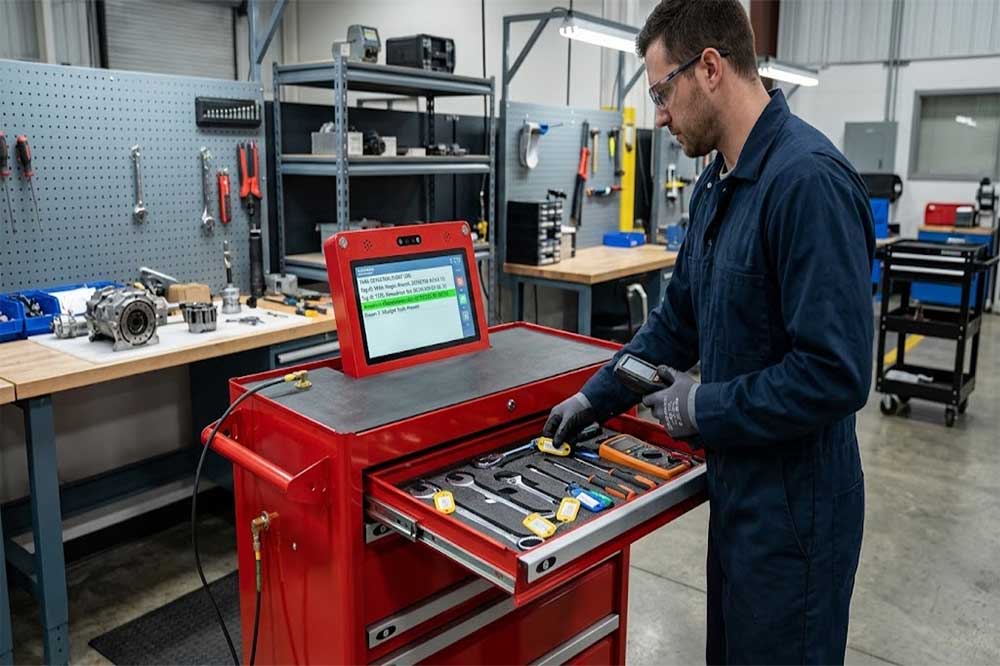
Industrial users may remove or return several tools together.
A system that works perfectly with one tool should therefore be tested with realistic combinations.
For example, test:
If some combinations produce inconsistent results, review tag placement and antenna coverage before changing the entire RFID system.
This is especially important for an RFID tool tracking system used in busy maintenance areas.
When multiple tools suddenly stop being detected, inspect the hardware.
Check:
A loose connector can create intermittent problems that are difficult to reproduce.
For troubleshooting, record when the problem occurs and which cabinet section is affected. A consistent pattern can help identify whether the issue is related to a specific antenna or storage zone.
RFID performance is only one part of cabinet maintenance.
The physical cabinet should also be inspected.
Check:
Repeated opening and closing can gradually affect mechanical components.
If a cabinet door does not close correctly, RFID transactions may also become inconsistent depending on how the system detects cabinet access.
An RFID tool cabinet often records who accessed a tool.
If users report authentication problems, check:
Also verify that employee changes are reflected in the system.
When employees transfer departments or leave the organization, their permissions should be updated promptly.
This helps maintain the accountability expected from an RFID tool control system.
A software record may sometimes differ from the physical cabinet.
For example:
Physical cabinet: 20 tools
Software record: 19 tools
Do not immediately assume that the RFID hardware has failed.
Review:
An RFID tool inventory management system depends on accurate transaction data. A single incorrect or missing event can create an inventory discrepancy.
If the cabinet hardware works but information is not reaching the management platform, investigate the network.
Possible causes include:
A useful diagnostic approach is to separate the system into layers:
Cabinet → RFID Hardware → Controller → Network → Server → Application
Test each layer independently instead of changing several settings at once.
Software maintenance should include more than updating the application.
Regularly review:
Old or duplicate tool records can make inventory management confusing.
When a tool is permanently removed, its record should be handled according to the organization’s data-retention process rather than simply deleting information without documentation.
A troubleshooting log can become a valuable technical reference.
Record:
After several months, repeated problems may become visible.
For example, if the same cabinet section repeatedly produces reading errors, the problem may be related to antenna placement, cabinet structure, or the local working environment.
Consider professional technical service when:
Avoid replacing the RFID reader immediately unless testing indicates that the reader is actually responsible.
A structured diagnosis can reduce unnecessary component replacement and downtime.
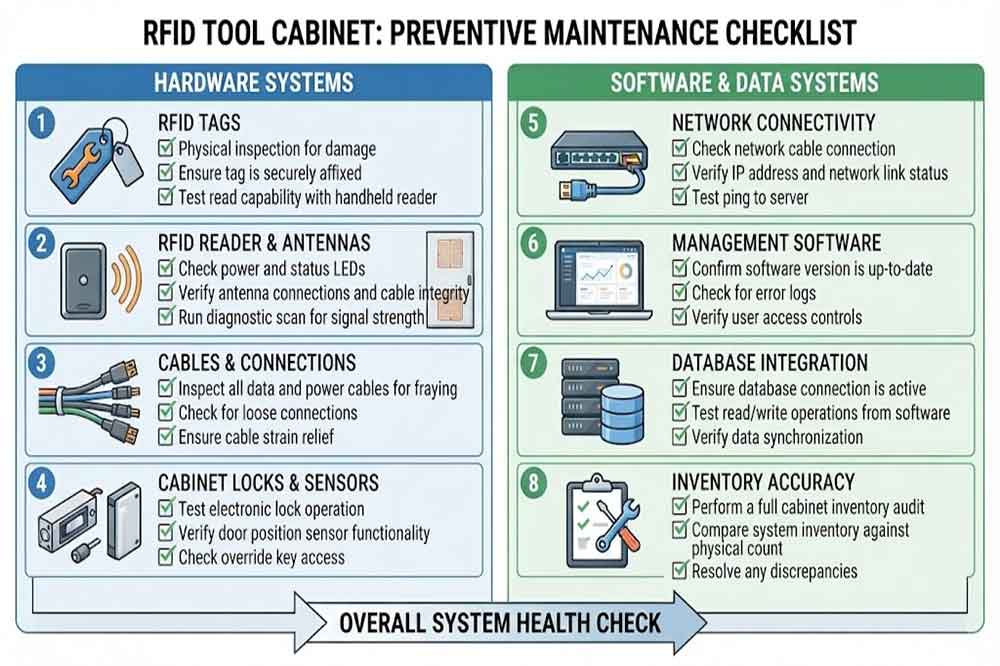
A practical preventive maintenance checklist can include:
| Item | Inspection |
|---|---|
| RFID Tags | Attachment and condition |
| RFID Reader | Power and communication |
| Antennas | Position and connections |
| Cabinet | Doors, drawers, locks |
| Sensors | Detection status |
| Network | Communication stability |
| Software | Logs and transactions |
| Database | Tool and user records |
| Access Control | Permissions |
| Inventory | Physical vs. digital records |
| Backup | Data recovery readiness |
This checklist can be adapted according to the cabinet design and operating environment.
Good maintenance starts with good deployment.
Use suitable RFID tags for the actual tool materials. Keep the cabinet layout stable when possible. Document tag positions and reader configurations. Train operators to report unusual behavior instead of making unauthorized hardware changes.
For larger installations, standardize:
Standardization makes it easier to manage multiple cabinets across different departments or facilities.
RFID tool cabinet maintenance should cover RFID tags, readers, antennas, mechanical components, user authentication, software, network communication, and inventory records.
When a problem occurs, start with the simplest possible cause and move through the system layer by layer. Testing one tool versus multiple tools, checking physical conditions, and reviewing transaction records can often identify the source faster than replacing hardware immediately.
A clear preventive maintenance plan also helps keep an RFID tool management system reliable as tool quantities, users, and production requirements change.
Basic checks can be performed daily, while detailed hardware, software, and inventory inspections can be scheduled weekly or monthly. The exact frequency depends on usage and operating conditions.
Possible causes include damaged tags, unsuitable tag placement, antenna coverage, reader configuration, tool orientation, or incorrect software records. Test the affected tool separately before changing hardware.
The RFID reading area may be too broad, or antenna positioning and reader settings may need adjustment. Nearby tagged tools can also contribute to unwanted reads.
Check whether the issue affects all tools or only specific combinations. Then inspect RFID tags, antenna connections, reader status, tag orientation, cabinet structure, and software communication.
Professional service may be appropriate when hardware communication repeatedly fails, locks or sensors malfunction, RFID performance changes significantly, or software integration problems continue after basic troubleshooting.

Cykeo’s RFID Smart Tool Cabinet enables 10-second tool audits, user access control & real-time alerts for construction/oil/gas. Features 21.5″ touchscreen, IP54 steel body & -30°C~60°C operation. Supports SAP/Oracle integration.

Cykeo’s Intelligent Weighing Tool Cabinet combines weight sensors & RFID for 100% tool accountability. Features solar/4G options, IP54 steel-glass body & nuclear/rail compliance. Supports SAP/Oracle integration.

Cykeo’s solar-powered RFID Inventory Tool Cabinet enables 5-second audits for remote sites. Features 160W solar, Android 7.1, 4G & extreme temp operation for oil/energy/mining sectors.

Cykeo’s industrial RFID Tool Cart features 14″ touchscreen, 400+ tool scanning, and carbon steel construction for aviation MRO, power plants and construction sites. 5-second inventory scans.

Cykeo CYKEO-TC RFID multi-drawer tool cart manages 300+ tools via UHF RFID, features fingerprint/face recognition, Android/Windows OS, and SAP integration for nuclear/railway/fire safety sectors. IP54 rated for harsh environments.

Cykeo CYKEO-GTC4 RFID tool inventory cart manages 300+ tools via UHF RFID, features instant scanning, fingerprint/face recognition, and SAP integration for nuclear/railway/fire safety sectors. IP54 rated for harsh environments.

Cykeo CYKEO-GTC7 RFID aviation maintenance cart features military-grade build, blockchain audits, and predictive tool alerts for aircraft MRO. Achieves EASA/FAA compliance.

Cykeo CYKEO-GTC7A RFID real-time tool tracking cart features 99.9% accuracy, FOD prevention, and SAP integration for aviation/plant maintenance. Military-grade construction.

Cykeo CYKEO-GTC4B RFID mobile tool cart delivers 300-tool verification in 7 seconds with modular drawers, ≤150W power, and SAP integration for industrial/aviation use.

Cykeo CYKEO-GTC4C RFID workshop tool control cart delivers 300-tool inventory in 3 seconds with 10hr battery, SAP integration, and FOD prevention for industrial workshops.

Cykeo’s CYKEO-GTC4A multi-drawer RFID tool cart delivers 7-second aviation tool inventories, 10-hour battery, and dual authentication. ISO 18000-6C compliant for MRO/manufacturing.

Cykeo’s MIL-STD RFID tool tracking cart scans 300 tools in 7 seconds, with -20°C~60°C operation and FOD prevention for aviation/energy industries.

Cykeo’s space-saving RFID tool management cabinet offers 1000-tool capacity, ≤5s scans, and 24/7 unmanned operation for manufacturing/assembly plants.

Cykeo’s RFID industrial tool cabinet offers modular shelves, 21.5″ touchscreen, and voice guidance for manufacturing/energy sectors. 24/7 operation with ≤80W power.

Cykeo’s RFID secure tool cabinet features 4 lockable compartments, ≤150W power, and 24/7 monitoring for pharma/aerospace/electronics industries.

Cykeo’s RFID aviation tool cabinet features triple authentication, 14″ HD touchscreen, and thermostatic control for aircraft MRO/FAA compliance.

Cykeo’s RFID tool tracking system delivers self-service check-in/out, real-time alerts, and multilingual interface for correctional/military security.

Cykeo’s off-grid RFID tool inventory system features solar/wind power, -30°C~60°C operation, and military-grade durability for mining/energy/military sectors.

Cykeo’s industrial RFID tool accountability cabinet delivers 99.9% scan accuracy, adjustable shelves, and 24/7 operation for automotive/aerospace manufacturing.

Cykeo’s RFID multi-drawer tool cabinet features 5 adjustable drawers, biometric access, and 99.9% scan accuracy for automotive/aerospace manufacturing.

Cykeo’s RFID Automated Tool Cabinet delivers military security, adjustable shelving, and Java/C# SDK integration for defense/aerospace manufacturing.

Cykeo’s RFID scalable tool cabinet features multi-unit management, voice guidance, and semi-outdoor durability for automotive/construction/logistics.

Cykeo CYKEO-GT1B industrial RFID tool storage cabinet features Impinj R2000 UHF technology, 1,000+ tool capacity, IP54 protection, and Windows/Android OS for manufacturing/aviation MRO. Includes auto check-in/out and SAP/Oracle sync.

Cykeo CYKEO-GT3C industrial RFID tool checkout system Cabinet features millimeter-wave scanning, 280-layer storage, dual OS, and 99.9% accuracy for aviation/semiconductor sectors. Supports auto check-in/out and real-time SAP sync.


Cykeo CYKEO-GT3D RFID smart tool cabinet offers 5-second inventory scanning for 300+ tools, dual authentication, and 24/7 automated management for industrial facilities.

Discover the CYKEO-B1A Industrial RFID Backpack featuring advanced tool tracking technology with 25cm RF shielding, 7-day battery life, and wearable design for field maintenance professionals.
RFID Industry Writer | IoT & Asset Tracking Analyst
James writes about RFID technology, asset tracking, and the practical challenges of digital transformation across warehousing, retail, manufacturing, and logistics.
His work focuses on how RFID is applied in real-world operations—improving inventory visibility, automating workflows, and helping businesses manage assets with greater accuracy and efficiency.
He regularly covers topics including UHF RFID, smart cabinets, RFID portals, tool tracking, warehouse automation, and industrial IoT trends..

Learn how to build an RFID tool tracking system step by step. From RFID tags to tool cabinets and software integration, this guide covers everything you need.
More
How to read RFID tag with iPhone in real use. Learn what iPhone can’t do alone, and how CYKEO makes UHF RFID reading work via Bluetooth.
More
RFID cable tags vs barcode labels: compare cost, efficiency, durability, and ROI. Find out which solution is better for industrial asset tracking and cable management.
More
Compare fixed, integrated, and handheld RFID readers in real industrial use cases. Learn which RFID reader type fits warehouse, parking, logistics, and asset tracking projects for system integrators and distributors.
More