RFID tool cabinet can automatically identify tools, but identification alone does not create a complete tool management system.
For industrial applications, RFID events often need to move from the cabinet to management software, where they can be connected with employees, tool records, work orders, inventory, maintenance schedules, and other business data.
That is where software integration becomes important.
A well-designed RFID tool cabinet system can act as a data collection point between physical tools and an organization’s existing digital systems.
1. What Is RFID Tool Cabinet Software Integration?
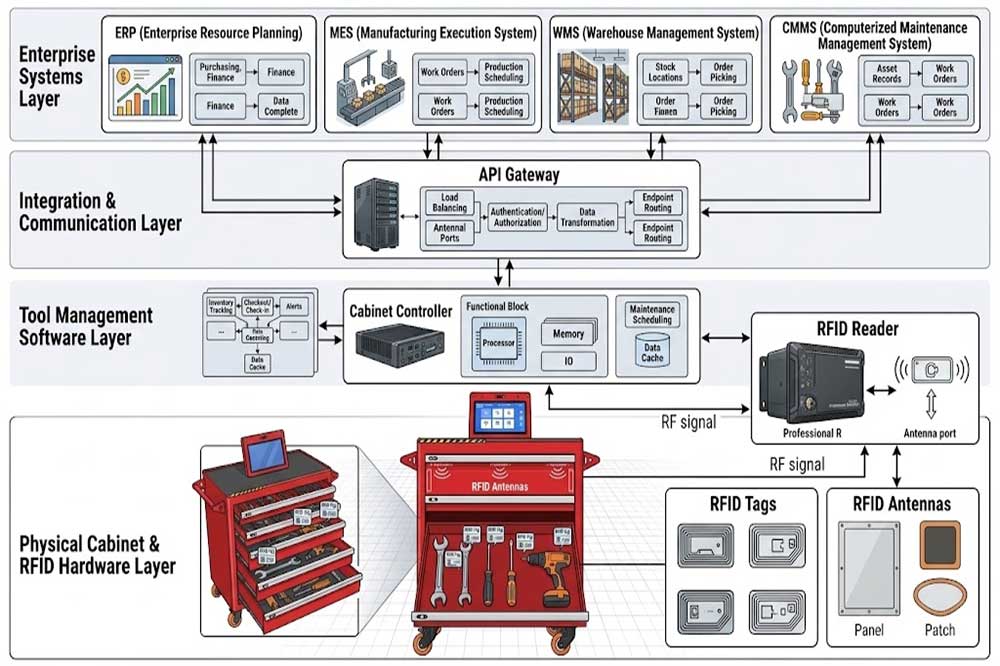
RFID tool cabinet software integration connects the cabinet’s RFID hardware and tool management application with other software platforms.
A simplified data flow looks like this:
RFID Tag → RFID Reader → Cabinet Software → API → Business System
The RFID reader identifies a tagged tool. The cabinet software processes the event and associates the RFID tag with a tool record.
The system can then send relevant information to another platform.
Depending on the project, the transferred information may include:
Tool ID
RFID tag ID
User ID
Cabinet ID
Storage position
Check-out time
Return time
Tool status
Access event
Inventory event
Work-order reference
The exact data structure depends on the customer’s software architecture.
2. Why Integrate an RFID Tool Cabinet With Existing Software?
A standalone cabinet can manage local tool transactions, but many companies already have systems responsible for production, maintenance, inventory, and employee information.
Duplicating the same data in multiple systems can create unnecessary work.
Integration can help connect tool activity with existing workflows.
For example:
Maintenance Work Order → Required Tool → Tool Checkout → Tool Usage Record → Tool Return
This creates a connection between physical tool movement and the maintenance process.
The purpose is not necessarily to replace existing enterprise software. In many projects, the RFID cabinet becomes another data source within the existing IT environment.
3. Common Systems Connected to RFID Tool Cabinets
ERP Systems
ERP platforms can contain information about purchasing, assets, departments, employees, and other business processes.
Tool information from an RFID cabinet may be connected to relevant asset or department records.
MES Systems
Manufacturing execution systems manage production activities.
An RFID tool event can potentially be associated with a production task, workstation, or manufacturing process.
WMS Systems
Warehouse management systems focus on inventory and material movement.
An RFID cabinet can provide tool movement information that needs to be synchronized with warehouse records.
CMMS Systems
Maintenance departments often use CMMS platforms to manage work orders, equipment maintenance, spare parts, and technician activities.
Tool checkout information can potentially be connected with a maintenance work order.
Custom Software
Some companies operate proprietary production or maintenance platforms.
In these projects, API-based integration can provide a practical way to exchange RFID cabinet data.
4. Build a Clear System Architecture
Before connecting software, define which system owns each type of information.
For example:
Data
Possible System Owner
Tool Master Data
Tool Management System
Employee Data
HR System
Work Orders
CMMS
Production Tasks
MES
Inventory Data
WMS
Tool Events
RFID Cabinet System
Reporting
Central Platform
This prevents multiple systems from independently changing the same information without coordination.
A clear architecture is especially important when several RFID cabinets are deployed across different departments.
5. RFID Events and Business Data
The RFID cabinet produces events.
For example:
User 1025 removed Tool 0068 at 09:35.
On its own, this is simply an RFID transaction.
After integration, the same event could become:
Employee 1025 checked out Tool 0068 for Maintenance Work Order 45821 at 09:35.
The second record has more business meaning.
This is one of the main reasons companies integrate RFID hardware with existing software.
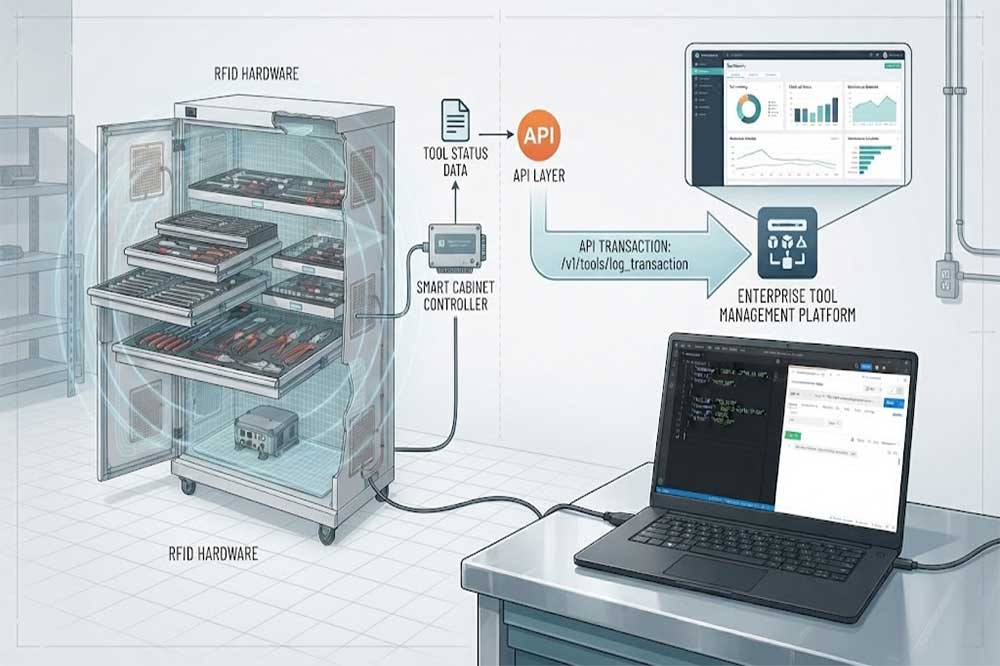
6. API Integration for RFID Tool Cabinets
An API can allow different software systems to exchange data.
A typical integration may involve:
RFID Cabinet Platform → REST API → Customer Software
Depending on the system, API functions may support operations such as:
Retrieve tool information
Retrieve RFID tag information
Create checkout records
Create return records
Query inventory
Query user transactions
Receive cabinet events
Update tool status
Synchronize user information
The available API functions depend on the specific RFID cabinet software.
For B2B projects, API documentation should be reviewed before implementation begins.
7. REST API and Web-Based Integration
REST APIs are commonly used when web-based systems need to exchange structured data.
For example, a cabinet platform could expose an event endpoint that allows an external system to receive or query tool transactions.
A simplified workflow could look like:
RFID Event → Software Processing → API Request → Customer Server → Database
The customer system can then use the event for its own workflow.
Authentication, data format, endpoint design, error handling, and security requirements should be defined during the integration stage.
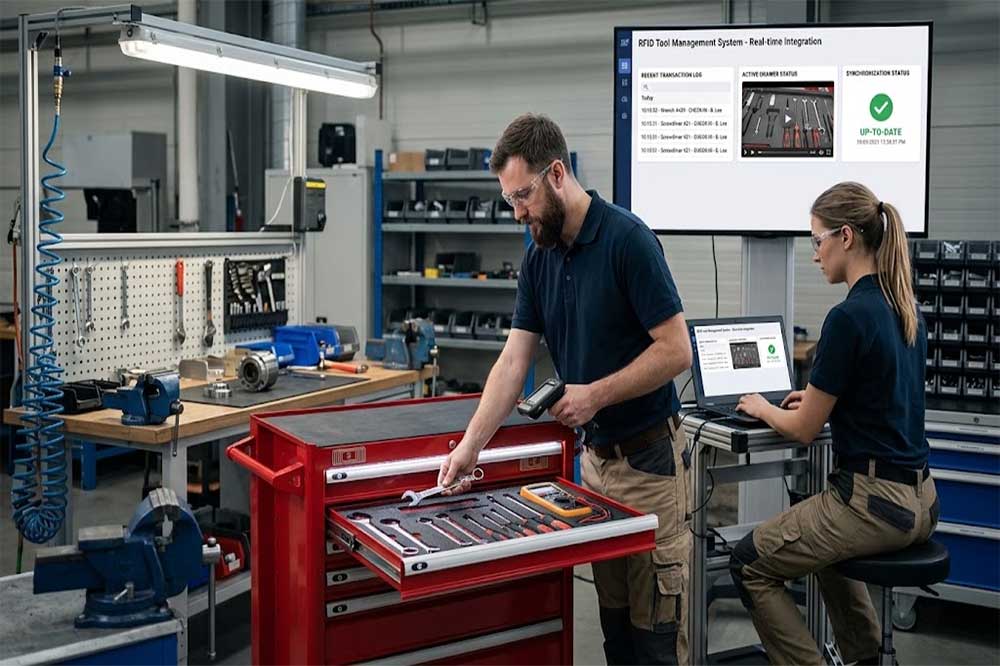
8. Real-Time vs. Scheduled Synchronization
Not every piece of information needs to be transferred immediately.
Real-Time Integration
Real-time communication can be useful when a tool event needs immediate action.
Examples include:
Unauthorized tool access
Tool checkout
Tool return
Restricted tool access
Inventory alerts
Scheduled Synchronization
Some data can be synchronized periodically.
Examples include:
Employee lists
Tool master data
Department information
Historical reports
The right approach depends on how quickly the customer system needs the information.
A hybrid architecture is also possible.
9. User and Employee Data Synchronization
An RFID cabinet needs to identify users.
There are two common approaches.
Local User Management
Users are created directly in the tool management platform.
This approach can be suitable for smaller deployments.
External User Synchronization
User information can be synchronized from an existing employee management or enterprise system.
This can reduce duplicate data entry in larger organizations.
When employees change departments or leave the company, the synchronization process should also handle permission changes.
10. Tool Master Data Synchronization
The same principle applies to tool information.
A tool may already exist in a company’s asset or maintenance database.
Instead of creating a completely separate record, the RFID system can use an existing tool identifier.
For example:
ERP Tool ID: TW-000245 RFID Tag ID: E2003412 Cabinet Location: Cabinet-02 / Drawer-04
This mapping allows the RFID system to identify the physical tool while the enterprise system maintains its broader business information.
11. Connecting RFID Tool Cabinets With CMMS Work Orders
Maintenance is one of the practical areas where integration can provide additional value.
Consider a technician receiving a work order:
Work Order: WO-2026-08125 Equipment: Production Machine A Required Tool: Torque Wrench
The technician accesses the RFID cabinet.
The tool is checked out and the RFID system records:
Technician
Tool
Time
Cabinet
Transaction
The event can then be associated with the work order.
After the tool is returned, the system records the return event.
This creates a more complete maintenance history.
12. Connecting With MES Production Workflows
In manufacturing environments, tools may be associated with specific production tasks.
An MES integration can potentially connect:
Production Order → Workstation → Operator → Tool → Transaction
This can be useful where tool availability or tool usage needs to be monitored as part of production operations.
The exact integration should be designed around the customer’s manufacturing process rather than forcing every tool event into the MES.
13. Connecting With WMS and Inventory Systems
Tool cabinets can also be deployed inside warehouses or central tool rooms.
A WMS integration may synchronize:
Tool location
Tool availability
Movement records
Department ownership
Storage information
However, not every RFID event needs to become a warehouse transaction.
Define which events have business significance before building the interface.
This keeps the integration simpler and reduces unnecessary data traffic.
14. Database and Data Mapping
Data mapping is one of the most important parts of integration.
Consider the following example:
RFID System
Customer System
Tag ID
RFID Asset ID
Tool ID
Equipment ID
User ID
Employee Number
Cabinet ID
Storage Location
Checkout Time
Transaction Time
Tool Status
Asset Status
Both systems need a clear relationship between these fields.
Before development begins, create a data mapping document showing:
Field name
Data type
Required/optional status
Source system
Destination system
Update frequency
Example value
This simple step can prevent many integration misunderstandings later.
15. Error Handling and Offline Operation
Industrial systems should also consider communication failures.
What happens if the cabinet loses network access?
The cabinet may continue collecting local events depending on the system design.
When communication returns, stored events can potentially be synchronized with the central platform.
The integration design should define:
Retry behavior
Duplicate-event handling
Failed requests
Offline storage
Recovery process
Synchronization status
These details may not be visible during a normal demonstration, but they become important during real production use.
16. Data Security and Access Permissions
RFID tool management data may contain employee and operational information.
Integration should therefore consider:
API authentication
User permissions
Network security
Data encryption
Access logs
Server permissions
Data retention
Backup procedures
Different users may also require different access levels.
For example, a technician may only need to view their own transactions, while a manager may need department-level reporting.
17. Reporting After Integration
Once RFID cabinet data is connected to other systems, reporting can become more useful.
Possible reports include:
Tool usage frequency
Tool checkout history
Tool availability
User activity
Department usage
Missing tools
Overdue returns
Cabinet utilization
Inventory status
These reports can help managers identify patterns rather than relying only on individual checkout records.
18. Testing an RFID Software Integration
Integration testing should be completed before production deployment.
A practical test plan can include:
Test 1: User synchronization
Create or update a user and confirm the change reaches the RFID system.
Test 2: Tool synchronization
Add a tool and verify its RFID tag mapping.
Test 3: Checkout event
Remove a tool and confirm that the external system receives the transaction.
Test 4: Return event
Return the tool and verify the updated status.
Test 5: Invalid transaction
Test unauthorized or invalid operations.
Test 6: Network interruption
Disconnect communication and verify how the system handles failed synchronization.
Test 7: Duplicate events
Confirm that repeated messages do not create incorrect duplicate records.
19. Common RFID Tool Cabinet Integration Problems
Duplicate Tool Records
The same physical tool may have different IDs in different systems.
Solution: Define a master identifier and clear data mapping.
Delayed Data
Events may arrive later than expected.
Solution: Review synchronization frequency, network conditions, and processing logic.
Incorrect User Information
Employee data may not match between platforms.
Solution: Establish a reliable user-data source.
Missing Transactions
A network interruption may prevent an event from reaching the external system.
Solution: Define local storage, retry, and synchronization rules.
API Compatibility Problems
The customer’s software may use different data structures.
Solution: Review API documentation and data requirements before development.
20. Start With a Small Integration Pilot
Large enterprise integrations should not always begin with every cabinet and every department.
A controlled pilot can include:
One RFID tool cabinet
A limited number of tools
A small group of users
One external software platform
Several real work orders
Test the complete data flow first.
Once the process is stable, additional cabinets and departments can be added.
This approach also makes it easier to identify problems in API design, user permissions, data mapping, and operational workflows.
Conclusion
RFID tool cabinet software integration connects physical tool activity with the digital systems already used by an organization.
The most important work happens before coding: defining data ownership, mapping tool and user identifiers, deciding which RFID events matter, selecting real-time or scheduled synchronization, and planning error handling.
For industrial projects, a well-designed integration can turn an RFID cabinet from a standalone storage device into a connected part of the company’s tool management, maintenance, warehouse, or production workflow.
The best starting point is usually a small pilot with real tools and real transactions. Once the data flow works reliably, the solution can be expanded across departments and additional RFID smart tool cabinets.
RFID cabinet becomes more useful when it works as part of a broader RFID tool managementworkflow instead of operating as an isolated storage device.
Companies planning the physical deployment should also consider RFID tool cabinet installation, because reader, antenna, tag, and network configuration can affect the data eventually sent to enterprise software.
After deployment, RFID Tool Cabinet Maintenance helps keep RFID hardware, software communication, and tool records consistent over time.
Frequently Asked Questions
1. Can an RFID tool cabinet connect to ERP?
Yes. An RFID cabinet can potentially exchange tool, user, transaction, or inventory data with an ERP through APIs or other supported integration methods.
2. Can RFID cabinets integrate with CMMS?
Yes. Tool checkout and return events can potentially be associated with maintenance work orders, technicians, and equipment records through software integration.
3. Does RFID integration require an API?
Not always. The method depends on the cabinet system and customer’s software architecture. APIs are commonly used for modern system-to-system data exchange.
4. What happens if the RFID cabinet loses network access?
The behavior depends on the system design. Some systems can temporarily store events locally and synchronize them after communication is restored. Offline behavior should be defined during integration planning.
5. Should RFID integration be tested before deployment?
Yes. A pilot can test user synchronization, tool mapping, checkout and return events, network interruptions, duplicate messages, permissions, and data consistency before full deployment.
Cykeo’s RFID Smart Tool Cabinet enables 10-second tool audits, user access control & real-time alerts for construction/oil/gas. Features 21.5″ touchscreen, IP54 steel body & -30°C~60°C operation. Supports SAP/Oracle integration.
Cykeo’s industrial RFID Tool Cart features 14″ touchscreen, 400+ tool scanning, and carbon steel construction for aviation MRO, power plants and construction sites. 5-second inventory scans.
Cykeo CYKEO-TC RFID multi-drawer tool cart manages 300+ tools via UHF RFID, features fingerprint/face recognition, Android/Windows OS, and SAP integration for nuclear/railway/fire safety sectors. IP54 rated for harsh environments.
Cykeo CYKEO-GTC4 RFID tool inventory cart manages 300+ tools via UHF RFID, features instant scanning, fingerprint/face recognition, and SAP integration for nuclear/railway/fire safety sectors. IP54 rated for harsh environments.
Cykeo CYKEO-GTC7A RFID real-time tool tracking cart features 99.9% accuracy, FOD prevention, and SAP integration for aviation/plant maintenance. Military-grade construction.
Cykeo CYKEO-GTC4B RFID mobile tool cart delivers 300-tool verification in 7 seconds with modular drawers, ≤150W power, and SAP integration for industrial/aviation use.
Cykeo CYKEO-GTC4C RFID workshop tool control cart delivers 300-tool inventory in 3 seconds with 10hr battery, SAP integration, and FOD prevention for industrial workshops.
Cykeo’s off-grid RFID tool inventory system features solar/wind power, -30°C~60°C operation, and military-grade durability for mining/energy/military sectors.
Cykeo’s RFID multi-drawer tool cabinet features 5 adjustable drawers, biometric access, and 99.9% scan accuracy for automotive/aerospace manufacturing.
Cykeo CYKEO-GT1B industrial RFID tool storage cabinet features Impinj R2000 UHF technology, 1,000+ tool capacity, IP54 protection, and Windows/Android OS for manufacturing/aviation MRO. Includes auto check-in/out and SAP/Oracle sync.
Cykeo CYKEO-GT3C industrial RFID tool checkout system Cabinet features millimeter-wave scanning, 280-layer storage, dual OS, and 99.9% accuracy for aviation/semiconductor sectors. Supports auto check-in/out and real-time SAP sync.
Discover the CYKEO-B1A Industrial RFID Backpack featuring advanced tool tracking technology with 25cm RF shielding, 7-day battery life, and wearable design for field maintenance professionals.
RFID Industry Writer | IoT & Asset Tracking Analyst
James writes about RFID technology, asset tracking, and the practical challenges of digital transformation across warehousing, retail, manufacturing, and logistics.
His work focuses on how RFID is applied in real-world operations—improving inventory visibility, automating workflows, and helping businesses manage assets with greater accuracy and efficiency.
He regularly covers topics including UHF RFID, smart cabinets, RFID portals, tool tracking, warehouse automation, and industrial IoT trends..
how to choose the right fixed RFID reader and integrate it with RFID antennas for warehouse automation, asset tracking, and industrial management.This guide helps RFID solution providers and system integrators about rfid integrator issue.
Thinking about how to make your own RFID reader? We break down the real steps, costs, and why you'll probably end up integrating a module instead of building from scratch.
Choosing the right UHF RFID antenna is critical for system performance. Learn how polarization, gain, and beam width affect RFID deployments for warehouses and industrial environments.
 Cykeo RFID IoT Solution Products R&D Manufacturer