 Cykeo RFID IoT Solution Products R&D Manufacturer

Key Advantages of rfid event solutions
59Discover professional rfid event solutions for real-time UHF asset tracking, tool management, attendee control, and automated event inventory with Cykeo.
MoreAll RFID Product
Installing RFID tool cabinet is more than placing an RFID reader inside a storage cabinet and adding tags to tools. The cabinet, RFID tags, rfid antennas, user authentication, software, and tool workflow need to work together.
A practical installation process starts with the tools and working environment, then moves through cabinet configuration, RFID testing, software setup, and user acceptance testing.
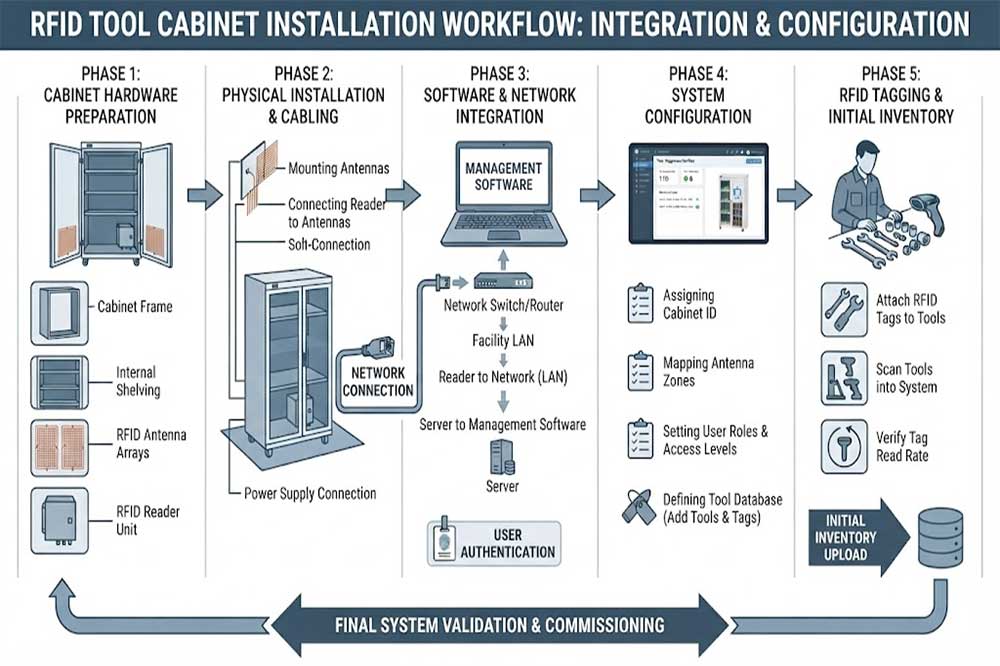
Before installing the cabinet, check where it will be used.
A workshop tool cabinet may be placed beside a maintenance area, production line, warehouse, laboratory, or tool room. Each environment can create different requirements.
Check:
The cabinet should be positioned where employees can easily access tools without blocking normal production activities.
For larger facilities, several cabinets may also need to connect to the same tool management platform.
RFID performance depends heavily on how tags are installed on tools.
Before deployment, create a basic tool list containing:
The RFID tag should be securely attached to the tool without interfering with normal use.
Metal tools can affect RFID communication, so tags designed for metal surfaces may be required. The final tag position should be tested rather than selected only from a product specification sheet.
For frequently handled tools, mechanical protection is also important. A tag that works well in a laboratory may not survive repeated impact or contact with oil, dust, or cleaning chemicals.
The physical layout should match the way employees actually store and retrieve tools.
Depending on the application, the cabinet may contain:
Group similar tools together where practical.
For example, frequently used maintenance tools can be placed in easily accessible positions, while specialized or restricted tools can be stored in controlled sections.
This layout also helps the software map physical storage positions to tool records.
The RFID reader is responsible for communicating with tagged tools, while antennas transmit and receive RFID signals within the cabinet.
During installation, the antenna position should be tested according to the cabinet structure.
Important factors include:
The RFID field should cover the intended tool storage area without creating unnecessary reading zones.
Tools may be placed in different orientations. Test several common positions instead of testing only one ideal placement.
Metal shelves, drawers, tools, and cabinet structures can influence RFID performance. Antenna placement and tag selection may need adjustment.
Employees may return several tools at once. The system should be tested with realistic combinations of tools rather than one tagged tool at a time.
This is particularly important for an automated RFID tool checkout system, where incorrect reads can affect inventory and user accountability.
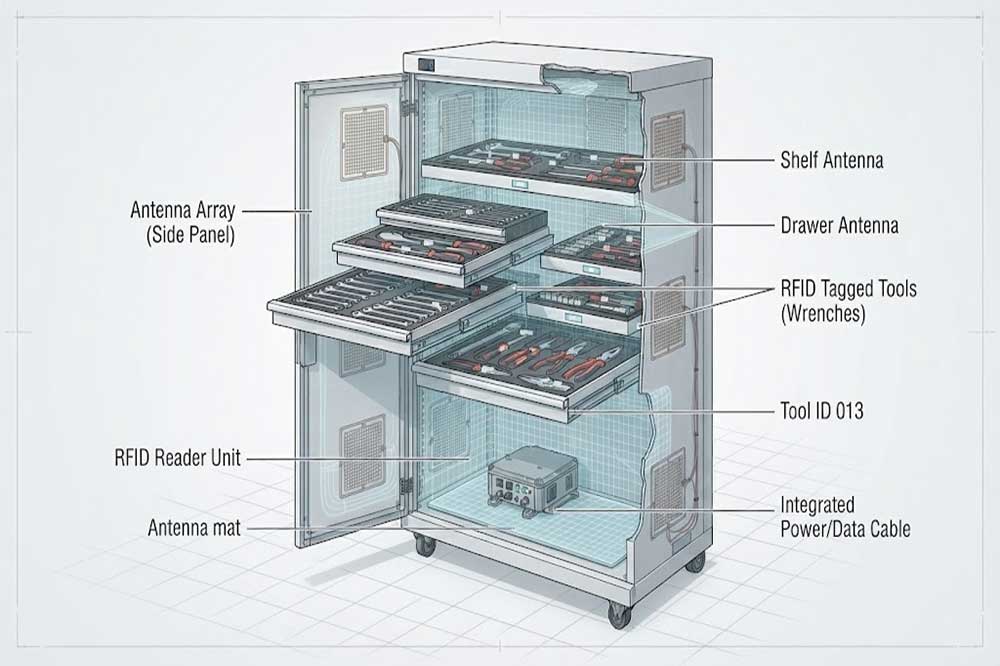
Once the physical installation is complete, connect the RFID hardware to the control system.
A typical setup may include:
RFID Tags → RFID Antennas → RFID Reader → Controller/Network → Software Platform
Depending on the system design, the cabinet may also include:
The exact hardware configuration depends on the cabinet design and the required workflow.
An RFID tool cabinet normally needs to know who is accessing the tools.
Common authentication methods include:
The authentication method should match the working environment.
For example, a maintenance department with frequent tool access may prioritize quick identification. A controlled production area may require stronger access restrictions.
User permissions can then determine which employees or departments can access specific tools.
Hardware installation is only one part of the project.
The software should connect each RFID tag with the correct tool record.
A basic database may contain:
| Field | Example |
|---|---|
| Tool ID | TOOL-00125 |
| Tool Name | Torque Wrench |
| RFID Tag | RFID-00125 |
| Department | Maintenance |
| Storage Location | Cabinet A / Drawer 2 |
| User | Assigned Employee |
| Status | Available |
More advanced systems may also connect tool records with maintenance schedules, calibration records, work orders, or enterprise software.
This creates the foundation for RFID tool management rather than simply RFID-based identification.
Do not move directly from installation to full deployment.
First test the actual workflow.
A typical sequence is:
User Identification → Cabinet Access → Tool Removal → RFID Detection → Software Record Update → Tool Return → RFID Verification
Test both normal and abnormal situations.
For example:
The purpose is to confirm that the physical operation and software records remain synchronized.
An RFID cabinet should also support inventory operations.
After employees have used the cabinet for several cycles, compare the physical tool count with the software records.
This helps identify:
The process connects directly with RFID tool inventory management, especially in environments where many tools need to be checked regularly.
RFID installation often requires practical adjustment.
If the reader detects tools outside the intended area, the reading zone may need to be reduced or repositioned.
If some tools are not detected, check:
Avoid solving every reading problem simply by increasing reader power. A stronger signal does not automatically produce better cabinet performance. The objective is controlled and reliable identification within the required area.
Before production deployment, ask actual users to operate the cabinet.
Maintenance technicians, warehouse staff, engineers, or tool-room personnel may interact with the cabinet differently from the installation team.
Observe:
Their feedback can reveal practical problems that technical testing alone may not identify.
For larger industrial projects, the RFID tool cabinet may need to exchange data with existing software.
Possible integration targets include:
For example, a maintenance work order may require a specific tool. The tool management platform can use the work-order information to support tool availability and usage records.
The integration method depends on the customer’s software architecture and available APIs.
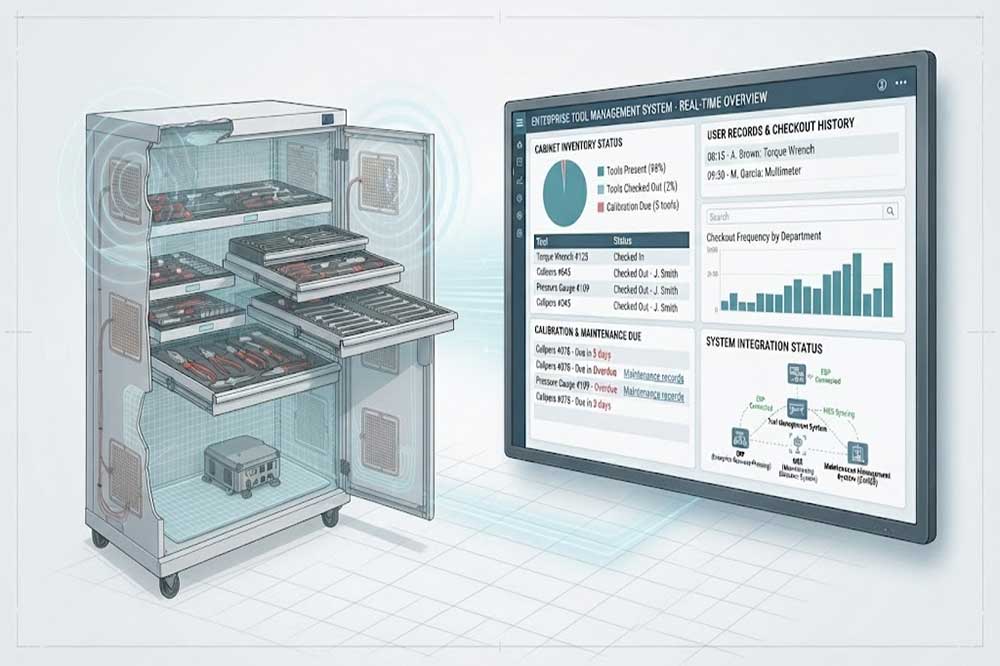
Before going live, confirm the following:
A checklist reduces the risk of discovering basic configuration problems after the system has already entered production.
Check the tag type, tag position, tool orientation, and antenna coverage.
The RFID reading zone may be too broad. Review antenna positioning and reader configuration.
Test realistic tool combinations and inspect the distance and orientation between tags.
Software alerts, user accountability, and clear return procedures can help improve the workflow.
Check RFID events, manual transactions, unregistered tags, and incorrect storage positions.
A successful RFID tool cabinet installation requires coordination between physical storage, RFID hardware, tagged tools, user authentication, and management software.
The best installation process is not simply a hardware setup. It should be tested with the actual tools, actual users, and actual working conditions before full deployment.
For organizations planning a complete RFID tool tracking system, starting with a controlled pilot cabinet can provide useful data for adjusting tag placement, cabinet layout, reading performance, software workflows, and future expansion.

Cykeo’s RFID Smart Tool Cabinet enables 10-second tool audits, user access control & real-time alerts for construction/oil/gas. Features 21.5″ touchscreen, IP54 steel body & -30°C~60°C operation. Supports SAP/Oracle integration.

Cykeo’s Intelligent Weighing Tool Cabinet combines weight sensors & RFID for 100% tool accountability. Features solar/4G options, IP54 steel-glass body & nuclear/rail compliance. Supports SAP/Oracle integration.

Cykeo’s solar-powered RFID Inventory Tool Cabinet enables 5-second audits for remote sites. Features 160W solar, Android 7.1, 4G & extreme temp operation for oil/energy/mining sectors.

Cykeo’s industrial RFID Tool Cart features 14″ touchscreen, 400+ tool scanning, and carbon steel construction for aviation MRO, power plants and construction sites. 5-second inventory scans.

Cykeo CYKEO-TC RFID multi-drawer tool cart manages 300+ tools via UHF RFID, features fingerprint/face recognition, Android/Windows OS, and SAP integration for nuclear/railway/fire safety sectors. IP54 rated for harsh environments.

Cykeo CYKEO-GTC4 RFID tool inventory cart manages 300+ tools via UHF RFID, features instant scanning, fingerprint/face recognition, and SAP integration for nuclear/railway/fire safety sectors. IP54 rated for harsh environments.

Cykeo CYKEO-GTC7 RFID aviation maintenance cart features military-grade build, blockchain audits, and predictive tool alerts for aircraft MRO. Achieves EASA/FAA compliance.

Cykeo CYKEO-GTC7A RFID real-time tool tracking cart features 99.9% accuracy, FOD prevention, and SAP integration for aviation/plant maintenance. Military-grade construction.

Cykeo CYKEO-GTC4B RFID mobile tool cart delivers 300-tool verification in 7 seconds with modular drawers, ≤150W power, and SAP integration for industrial/aviation use.

Cykeo CYKEO-GTC4C RFID workshop tool control cart delivers 300-tool inventory in 3 seconds with 10hr battery, SAP integration, and FOD prevention for industrial workshops.

Cykeo’s CYKEO-GTC4A multi-drawer RFID tool cart delivers 7-second aviation tool inventories, 10-hour battery, and dual authentication. ISO 18000-6C compliant for MRO/manufacturing.

Cykeo’s MIL-STD RFID tool tracking cart scans 300 tools in 7 seconds, with -20°C~60°C operation and FOD prevention for aviation/energy industries.

Cykeo’s space-saving RFID tool management cabinet offers 1000-tool capacity, ≤5s scans, and 24/7 unmanned operation for manufacturing/assembly plants.

Cykeo’s RFID industrial tool cabinet offers modular shelves, 21.5″ touchscreen, and voice guidance for manufacturing/energy sectors. 24/7 operation with ≤80W power.

Cykeo’s RFID secure tool cabinet features 4 lockable compartments, ≤150W power, and 24/7 monitoring for pharma/aerospace/electronics industries.

Cykeo’s RFID aviation tool cabinet features triple authentication, 14″ HD touchscreen, and thermostatic control for aircraft MRO/FAA compliance.

Cykeo’s RFID tool tracking system delivers self-service check-in/out, real-time alerts, and multilingual interface for correctional/military security.

Cykeo’s off-grid RFID tool inventory system features solar/wind power, -30°C~60°C operation, and military-grade durability for mining/energy/military sectors.

Cykeo’s industrial RFID tool accountability cabinet delivers 99.9% scan accuracy, adjustable shelves, and 24/7 operation for automotive/aerospace manufacturing.

Cykeo’s RFID multi-drawer tool cabinet features 5 adjustable drawers, biometric access, and 99.9% scan accuracy for automotive/aerospace manufacturing.

Cykeo’s RFID Automated Tool Cabinet delivers military security, adjustable shelving, and Java/C# SDK integration for defense/aerospace manufacturing.

Cykeo’s RFID scalable tool cabinet features multi-unit management, voice guidance, and semi-outdoor durability for automotive/construction/logistics.

Cykeo CYKEO-GT1B industrial RFID tool storage cabinet features Impinj R2000 UHF technology, 1,000+ tool capacity, IP54 protection, and Windows/Android OS for manufacturing/aviation MRO. Includes auto check-in/out and SAP/Oracle sync.

Cykeo CYKEO-GT3C industrial RFID tool checkout system Cabinet features millimeter-wave scanning, 280-layer storage, dual OS, and 99.9% accuracy for aviation/semiconductor sectors. Supports auto check-in/out and real-time SAP sync.


Cykeo CYKEO-GT3D RFID smart tool cabinet offers 5-second inventory scanning for 300+ tools, dual authentication, and 24/7 automated management for industrial facilities.

Discover the CYKEO-B1A Industrial RFID Backpack featuring advanced tool tracking technology with 25cm RF shielding, 7-day battery life, and wearable design for field maintenance professionals.
RFID Industry Writer | IoT & Asset Tracking Analyst
James writes about RFID technology, asset tracking, and the practical challenges of digital transformation across warehousing, retail, manufacturing, and logistics.
His work focuses on how RFID is applied in real-world operations—improving inventory visibility, automating workflows, and helping businesses manage assets with greater accuracy and efficiency.
He regularly covers topics including UHF RFID, smart cabinets, RFID portals, tool tracking, warehouse automation, and industrial IoT trends..

Discover professional rfid event solutions for real-time UHF asset tracking, tool management, attendee control, and automated event inventory with Cykeo.
More
USB RFID scanner range is affected by much more than reader power. Antenna gain, RFID tag size, tag orientation, metal surfaces, product materials, and the s...
More
How far away can RFID be detected? Compare UHF, HF, and LF RFID ranges, plus the effects of reader power, antenna design, tag orientation, and materials.
More
Discover how RFID chips operate: energy harvesting, signal transmission, and real-world applications. Learn about passive, active, and semi-passive chip designs.
More