Choosing RFID tool cabinet is not simply a matter of selecting the largest cabinet or the RFID reader with the longest reading range. The right solution needs to match the tools, storage layout, user workflow, access requirements, software environment, and working conditions.
A cabinet that performs well with plastic equipment may require a different RFID configuration for dense metal hand tools. Likewise, a small maintenance department may need only basic tool identification, while a large factory may require user authentication, automated checkout, inventory reports, and software integration.
Before purchasing or customizing an RFID tool cabinet, it is useful to evaluate the complete system rather than looking at individual hardware specifications.
1. Start With the Tools You Need to Manage
The first question is not “Which RFID cabinet should we buy?”
It is:
“What tools will the cabinet manage?”
Make a list of the tools that will actually be stored inside the cabinet.
Consider:
Tool quantity
Tool dimensions
Tool weight
Tool material
Tool shape
Tool value
Usage frequency
Cleaning requirements
Maintenance requirements
Calibration status
A cabinet designed for screwdrivers and wrenches may be very different from one designed for testing instruments or large maintenance equipment.
Why Tool Material Matters
Metal is particularly important in RFID applications because it can affect RF performance.
For metal tools, specialized on-metal RFID tags may be required. Tag placement also matters. A tag attached directly to a suitable surface may perform differently from the same tag placed close to another metal component.
Therefore, the tag should be tested on the actual tool rather than selected only from a product specification sheet.
2. Determine How Many Tools the Cabinet Must Hold
Tool quantity affects the physical cabinet design and RFID reading strategy.
A small cabinet may manage several dozen tools, while a larger system may need to organize hundreds of items.
Estimate both the current requirement and possible future growth.
Leaving some spare capacity can make future expansion easier.
However, simply increasing cabinet size does not always improve RFID performance. A larger cabinet may require additional antennas, different antenna positions, or multiple reading zones.
3. Choose the Right Cabinet Structure
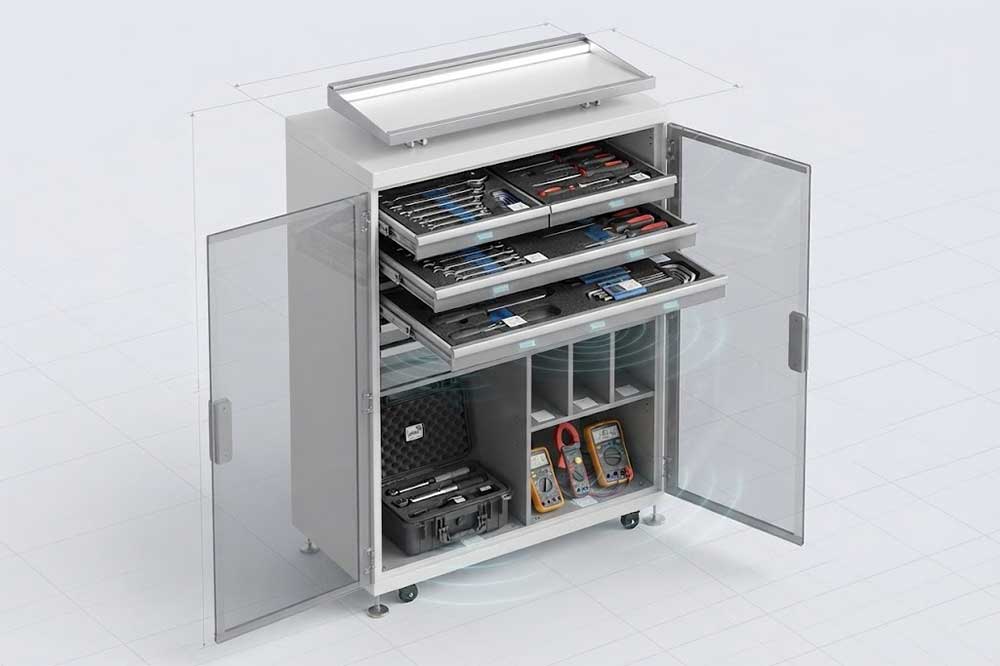
RFID tool cabinets can use different physical storage configurations.
Shelves
Shelves work well for larger tools, cases, and equipment that does not need individual compartments.
Drawers
Drawers provide organized storage for smaller tools and can help technicians quickly locate specific items.
Compartments
Individual compartments can be useful when every tool has a designated storage position.
Mixed Layouts
Some industrial applications require a combination of drawers, shelves, hooks, and compartments.
The cabinet layout should follow the actual workflow.
For example, frequently used hand tools may need easy access, while high-value instruments can be stored in individually controlled compartments.
4. Evaluate RFID Tag Compatibility
The RFID tag is one of the most important parts of the system.
Different tools may require different tag formats.
Common considerations include:
Metal or non-metal surface
Flat or curved surface
Available mounting area
Operating temperature
Cleaning chemicals
Impact resistance
Required service life
Tag attachment method
A tag that works well on a plastic case may not work equally well when attached to a steel wrench.
For industrial applications, the tag should survive the actual working environment rather than only laboratory conditions.
5. Check RFID Reading Performance
RFID reading performance is often discussed in terms of reading distance, but cabinet applications require a different perspective.
The key question is not necessarily:
“How far can the reader detect a tag?”
Instead, consider:
“Can the cabinet reliably identify the tools stored inside it?”
Important factors include:
Reader performance
Antenna quantity
Antenna position
RFID frequency
Tag design
Tool material
Cabinet structure
Tool density
Internal partitions
RF interference
A cabinet containing many closely packed metal tools can present a more challenging environment than an open warehouse.
Real-world testing should therefore be part of the selection process.
6. Decide Whether Multiple-Tool Reading Is Required
Some organizations only need to identify one tool at a time. Others need the cabinet to recognize several tools during one transaction.
For example, a technician may take:
Three wrenches
A torque tool
Two screwdrivers
One testing instrument
An RFID system capable of multiple-tag reading can record the group without requiring each tool to be scanned manually.
This can be useful for maintenance teams and tool rooms with frequent borrowing activity.
However, multiple-tag reading requires careful system design. Tool placement, tag orientation, antenna coverage, and reader configuration all influence the result.
7. Consider User Authentication
If tool accountability is important, the cabinet needs to know who is accessing it.
Possible authentication methods include:
RFID employee cards
NFC cards
PIN codes
Fingerprint recognition
Facial recognition
Mobile applications
Software accounts
The best method depends on the working environment.
For example, a factory may already use employee RFID cards for access control. Using the existing identity system can simplify user authentication.
The system should also support appropriate permissions.
A supervisor may have access to every tool, while a general technician may only access tools assigned to a particular department.
8. Define Your Access Control Requirements
Not every tool requires the same level of protection.
Divide tools into categories such as:
General Tools
Common hand tools can usually be made available to a larger group of employees.
Specialized Tools
Specialized equipment may require department-level authorization.
High-Value Tools
Expensive instruments may require stronger access controls and detailed transaction records.
Restricted Tools
Some equipment may only be used by trained or authorized personnel.
The cabinet software should support the permission structure required by the organization.
For larger deployments, several cabinets may share one central software platform.
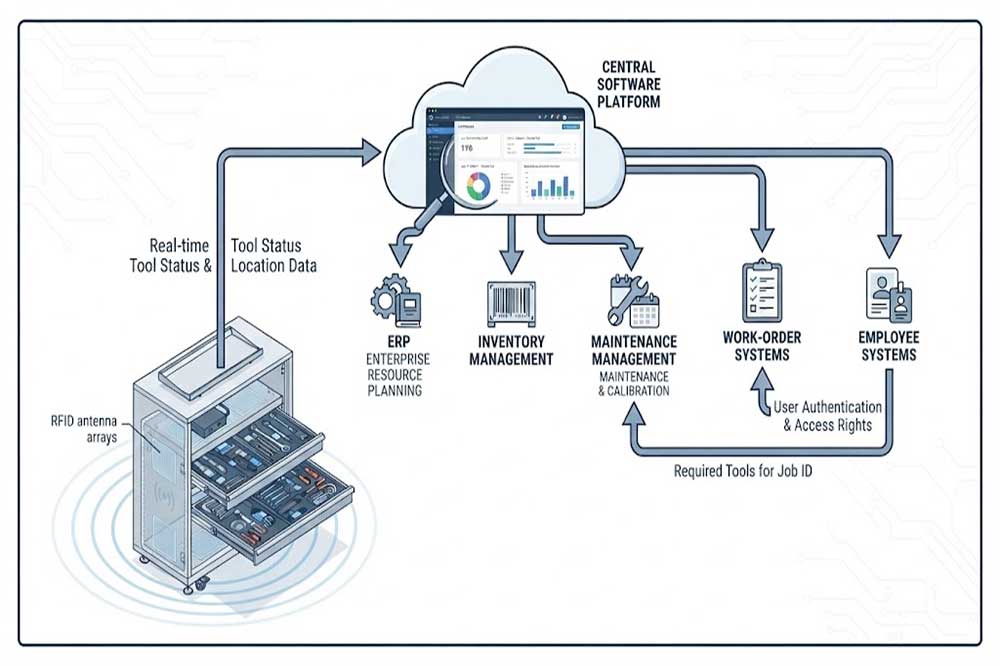
11. Check Software Integration
An RFID tool cabinet should fit into the company’s existing digital environment.
Potential integration targets include:
ERP
MES
WMS
CMMS
Maintenance software
Work-order systems
Employee databases
Access control platforms
Inventory management systems
For example, a maintenance system could create a work order requiring specific tools. The cabinet could then record which tools were actually checked out for that task.
Before purchasing, ask the supplier about:
API availability
Communication protocols
Data formats
SDK availability
Database options
User authentication
Cloud or local deployment
Integration documentation
Integration requirements should be discussed early rather than after the cabinet has already been installed.
12. Consider the Cabinet’s Physical Environment
An industrial tool cabinet may operate in conditions very different from an office.
Consider:
Temperature
Humidity
Dust
Oil
Cleaning chemicals
Vibration
Impact
Power stability
Network availability
For a factory environment, cabinet materials and electronic components should be appropriate for the installation location.
If the cabinet is placed close to heavy machinery or electrical equipment, the RFID system should also be tested under normal operating conditions.
13. Think About Maintenance and Service
An RFID cabinet contains more components than a conventional storage cabinet.
Possible service components include:
RFID reader
Antennas
Electronic lock
Touchscreen
Controller
Power supply
Sensors
Network components
Software
Ask how these components can be inspected or replaced.
A well-designed cabinet should provide reasonable service access without requiring the entire storage system to be dismantled.
Software updates and configuration backups should also be considered.
14. Check Reporting and Alert Functions
Different organizations require different levels of reporting.
Basic reporting may show:
Tool checkout history
Tool return history
Current inventory
User activity
More advanced systems may provide:
Overdue alerts
Missing-tool alerts
Unauthorized access attempts
Tool usage frequency
Department-level usage
Maintenance reminders
Inventory differences
Reports can help managers understand how tools are being used rather than simply showing where tools are stored.
15. Consider Scalability
A tool management project may start with one cabinet and later expand.
Future requirements might include:
More cabinets
More departments
More users
Additional tool categories
Multiple factories
Centralized reporting
ERP integration
Before deployment, check whether the software can manage multiple devices and whether additional cabinets can be added without rebuilding the entire system.
Scalability is particularly important for companies planning a phased RFID deployment.
16. Ask for a Real-World Prototype Test
A demonstration with empty cabinets and sample tags is useful, but it does not replace testing with the actual tools.
A practical evaluation should include:
Actual Tools
Use the tools that will be managed in production.
Actual Tags
Test the selected RFID tags in their final mounting positions.
Actual Cabinet Layout
Use realistic shelves, drawers, compartments, and partitions.
Normal Tool Density
Load the cabinet as it would be during normal operation.
Normal User Behavior
Test opening, removing, replacing, and returning tools.
Software Workflow
Check user authentication, transaction records, inventory updates, and alerts.
This type of prototype testing can reveal issues before large-scale deployment.
RFID Tool Cabinet Selection Checklist
Before making a final decision, review the following checklist:
Selection Area
Questions to Ask
Tools
What types and materials will be stored?
Quantity
How many tools are required now and later?
Tags
Are the RFID tags suitable for the tool surfaces?
Cabinet
Does the layout fit the tools and workflow?
RFID
Can the system reliably identify the required tools?
Multiple Reading
Does the system need to detect several tools at once?
Access
Who can open the cabinet and use each tool?
Software
What inventory and reporting functions are required?
Integration
Does it connect with existing business software?
Environment
Can it operate reliably at the installation site?
Service
How are hardware and software maintained?
Scalability
Can additional cabinets be added later?
Testing
Can the complete system be tested with actual tools?
Common Mistakes When Selecting an RFID Tool Cabinet
Choosing by Cabinet Appearance
A modern-looking cabinet does not necessarily provide suitable RFID performance.
Focusing Only on Reader Specifications
Reader power and theoretical reading range do not tell the complete story. Antenna design, tags, tools, and cabinet structure matter too.
Testing Only Empty Cabinets
An empty cabinet is much easier to read than one filled with dense metal tools.
Ignoring Software
Hardware may work correctly while the actual user workflow remains inconvenient.
Forgetting Future Expansion
A system designed only for today’s tool inventory may become difficult to expand.
Skipping Integration Planning
Software integration is easier when requirements are defined before hardware deployment.
Final Thoughts
Choosing an RFID tool cabinet requires more than comparing cabinet dimensions or RFID reader specifications. The complete solution should match the tools, tags, cabinet layout, reading requirements, user permissions, software workflow, installation environment, and future expansion plans.
For a small workshop, a relatively simple configuration may be sufficient. For a large industrial operation, the system may need multiple reading zones, controlled access, digital inventory, reporting, and integration with existing maintenance or enterprise software.
The most practical approach is to test the complete configuration with real tools before large-scale deployment. This allows companies to evaluate RFID reading performance, user workflow, cabinet design, and software behavior under realistic conditions.
A properly selected RFID tool cabinet can become an important part of a connected [RFID tool management] environment, helping organizations manage shared tools with greater visibility and less manual work.
Cykeo’s RFID Smart Tool Cabinet enables 10-second tool audits, user access control & real-time alerts for construction/oil/gas. Features 21.5″ touchscreen, IP54 steel body & -30°C~60°C operation. Supports SAP/Oracle integration.
Cykeo’s industrial RFID Tool Cart features 14″ touchscreen, 400+ tool scanning, and carbon steel construction for aviation MRO, power plants and construction sites. 5-second inventory scans.
Cykeo CYKEO-TC RFID multi-drawer tool cart manages 300+ tools via UHF RFID, features fingerprint/face recognition, Android/Windows OS, and SAP integration for nuclear/railway/fire safety sectors. IP54 rated for harsh environments.
Cykeo CYKEO-GTC4 RFID tool inventory cart manages 300+ tools via UHF RFID, features instant scanning, fingerprint/face recognition, and SAP integration for nuclear/railway/fire safety sectors. IP54 rated for harsh environments.
Cykeo CYKEO-GTC7A RFID real-time tool tracking cart features 99.9% accuracy, FOD prevention, and SAP integration for aviation/plant maintenance. Military-grade construction.
Cykeo CYKEO-GTC4B RFID mobile tool cart delivers 300-tool verification in 7 seconds with modular drawers, ≤150W power, and SAP integration for industrial/aviation use.
Cykeo CYKEO-GTC4C RFID workshop tool control cart delivers 300-tool inventory in 3 seconds with 10hr battery, SAP integration, and FOD prevention for industrial workshops.
Cykeo’s off-grid RFID tool inventory system features solar/wind power, -30°C~60°C operation, and military-grade durability for mining/energy/military sectors.
Cykeo’s RFID multi-drawer tool cabinet features 5 adjustable drawers, biometric access, and 99.9% scan accuracy for automotive/aerospace manufacturing.
Cykeo CYKEO-GT1B industrial RFID tool storage cabinet features Impinj R2000 UHF technology, 1,000+ tool capacity, IP54 protection, and Windows/Android OS for manufacturing/aviation MRO. Includes auto check-in/out and SAP/Oracle sync.
Cykeo CYKEO-GT3C industrial RFID tool checkout system Cabinet features millimeter-wave scanning, 280-layer storage, dual OS, and 99.9% accuracy for aviation/semiconductor sectors. Supports auto check-in/out and real-time SAP sync.
Discover the CYKEO-B1A Industrial RFID Backpack featuring advanced tool tracking technology with 25cm RF shielding, 7-day battery life, and wearable design for field maintenance professionals.
RFID Industry Writer | IoT & Asset Tracking Analyst
James writes about RFID technology, asset tracking, and the practical challenges of digital transformation across warehousing, retail, manufacturing, and logistics.
His work focuses on how RFID is applied in real-world operations—improving inventory visibility, automating workflows, and helping businesses manage assets with greater accuracy and efficiency.
He regularly covers topics including UHF RFID, smart cabinets, RFID portals, tool tracking, warehouse automation, and industrial IoT trends..
How the Cykeo CK‑T9HF HF RFID security gate enhances asset protection, theft prevention, and real-time inventory tracking in libraries, archives, and industrial environments. High-density tag detection, rapid scanning, and seamless API integration.
Learn how RFID reader modules perform in real industrial environments and how to avoid common integration problems involving antennas, metal interference, SDKs, and multi-tag reading.
 Cykeo RFID IoT Solution Products R&D Manufacturer