All RFID Product

RFID Tool Cabinet for Tool Calibration and Inspection Management

RFID Tool Calibration Is More Than a Date

In many factories, calibration management starts with a sticker on the tool.

The sticker may show:

  • Calibration date
  • Next calibration date
  • Calibration number
  • Inspection status
  • Service information

This works for a small number of tools.

The situation becomes more complicated when a maintenance department manages hundreds or thousands of instruments across several locations.

A technician may see a tool in a cabinet but not immediately know:

  • Is it calibrated?
  • When does calibration expire?
  • Has it passed its latest inspection?
  • Is it currently under maintenance?
  • Who used it last?
  • Is it approved for this type of work?

RFID tool cabinet can connect the physical tool with a digital record.

That does not make calibration automatic. Instead, it gives the organization another way to control access to the tool and maintain visibility of its status.


1. Identify Which Tools Need Calibration or Inspection

Not every tool requires the same level of control.

A typical maintenance department may contain:

  • Torque wrenches
  • Multimeters
  • Electrical testers
  • Pressure gauges
  • Measuring instruments
  • Precision tools
  • Specialized testing equipment
  • Inspection devices

Some may require formal calibration.

Others may only require routine inspection.

The first step is therefore to classify tools according to actual company requirements.

For example:

Tool CategoryPossible Control
Standard hand toolsBasic condition check
Torque toolsPeriodic calibration
Measuring instrumentsCalibration
Electrical testersInspection and calibration
Specialized equipmentMaintenance schedule
Damaged toolsRestricted use

The RFID system should reflect the organization’s actual procedures rather than applying the same rule to every tool.

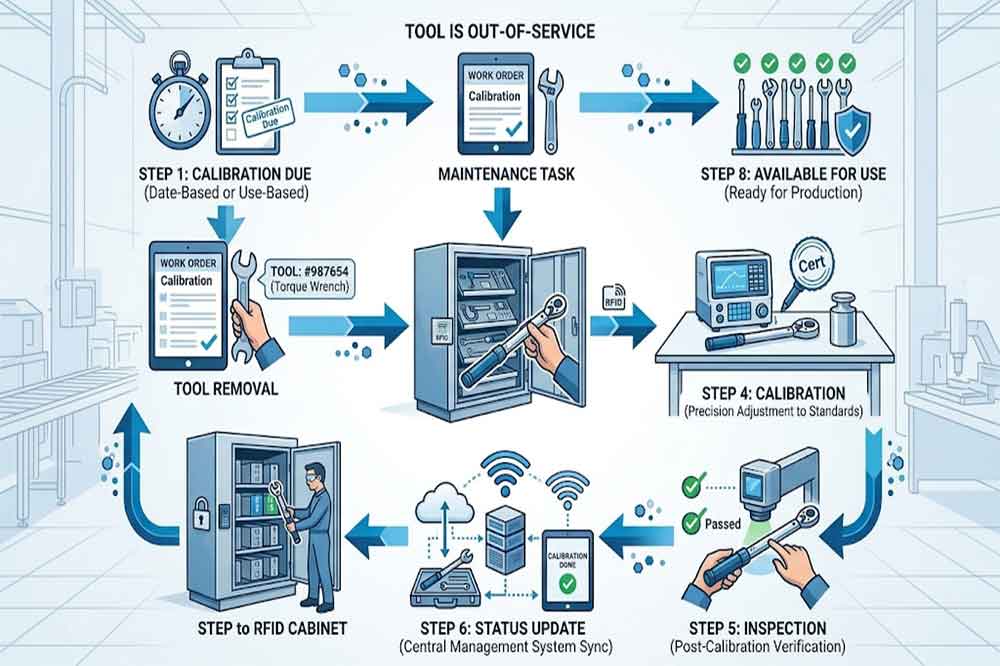
RFID tool workflow from calibration due date to inspection and return

2. Create a Digital Tool Record

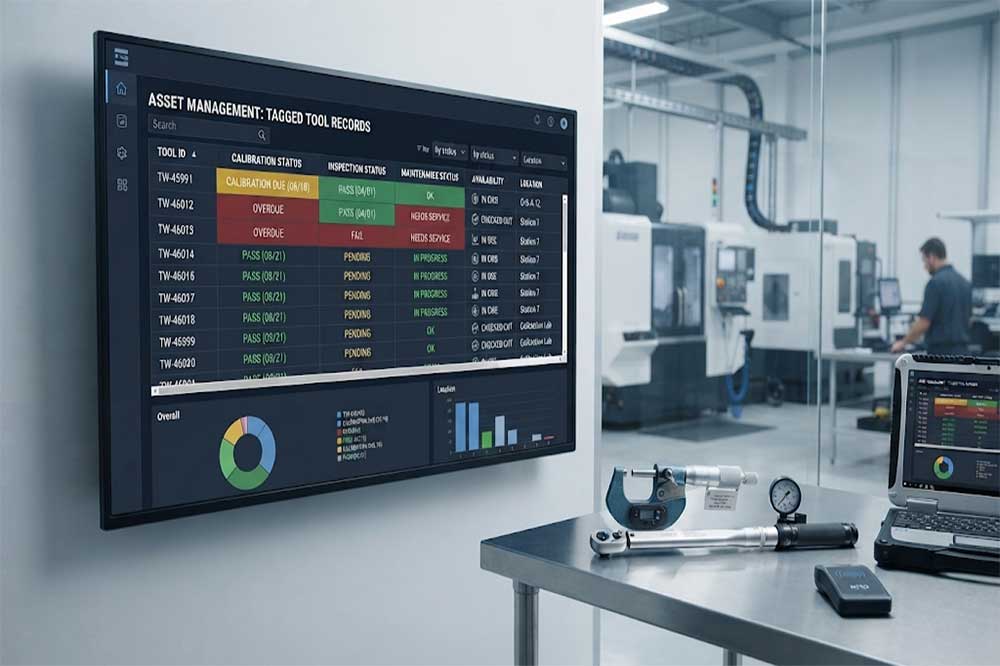
Each managed tool can have a unique digital record.

Depending on the system, the record may include:

  • Tool ID
  • Tool name
  • Tool category
  • RFID tag ID
  • Cabinet location
  • Department
  • Current user
  • Calibration status
  • Calibration date
  • Next calibration date
  • Inspection status
  • Maintenance status
  • Tool condition
  • Transaction history

This provides more information than a physical label alone.

For larger operations, these records can be connected with the company’s existing tool management or maintenance software.

This also relates to [RFID tool cabinet software integration].


3. Connect RFID Identification With Calibration Status

RFID identification and calibration management solve different problems.

RFID answers:

“Which tool is this?”

The calibration system answers:

“Is this tool currently approved for use?”

Combining these two types of information creates a more useful workflow.

For example:

User Authentication → Tool Identification → Calibration Check → Permission Check → Checkout

If the tool is within its valid calibration period, the checkout can continue according to company rules.

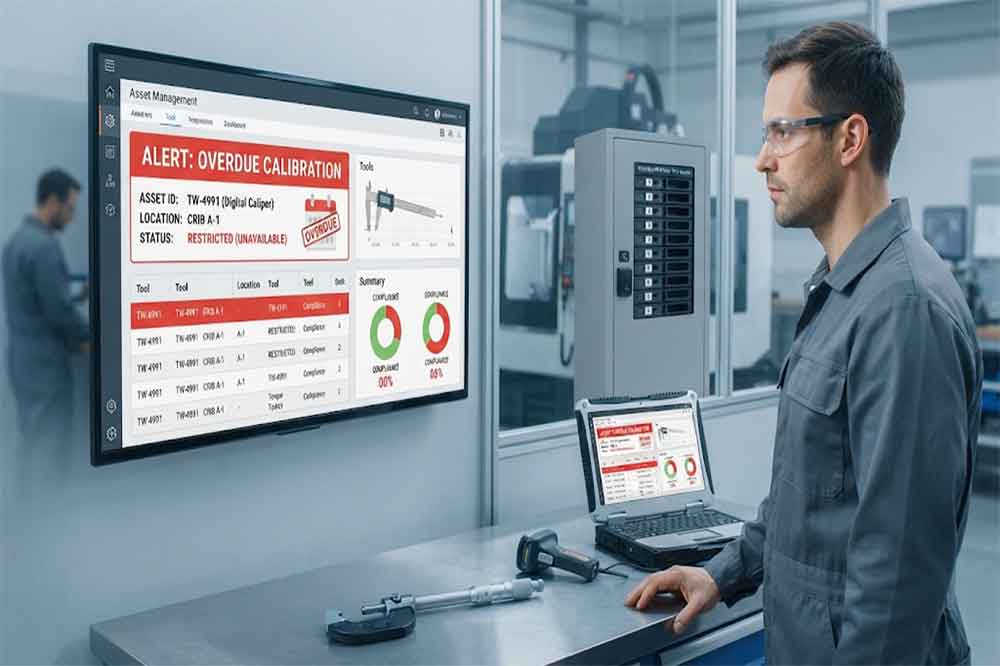
If the tool is overdue, the system can prevent or flag the transaction depending on the configured workflow.

This should be tested against actual company procedures.

Digital tool records showing calibration, inspection, maintenance, and availability status

4. Manage Tools Approaching Calibration Expiry

A tool does not suddenly become a problem only after its calibration expires.

A useful system can help teams identify tools that are approaching their scheduled calibration date.

For example, management software may classify tools as:

  • Calibration valid
  • Calibration due soon
  • Calibration due
  • Calibration overdue
  • Under calibration
  • Calibration failed

The exact statuses depend on the organization’s quality procedures.

A dashboard or report can help maintenance teams identify upcoming work before the tool becomes unavailable.

This can make planning easier when several instruments require calibration during the same period.


5. Restrict Overdue Tools

One of the most important workflow questions is what happens when a tool is overdue.

A system could:

  1. Display a warning
  2. Require supervisor approval
  3. Prevent checkout
  4. Move the tool to a restricted status
  5. Generate an alert
  6. Send the tool for calibration

The correct option depends on the tool and the organization’s quality requirements.

For a critical measuring instrument, preventing use may be appropriate.

For a lower-risk tool, a warning workflow may be sufficient.

The RFID cabinet should support the defined business rule rather than deciding the rule itself.


6. Track Inspection Before a Tool Becomes Available

Calibration is only one part of tool condition management.

A tool may be calibrated but physically damaged.

For example:

  • A torque wrench may have visible damage.
  • A multimeter may have a damaged cable.
  • A measuring instrument may have a cracked housing.
  • A specialized tool may be incomplete.

The return workflow can therefore include an inspection step.

A possible process is:

Tool Return → RFID Identification → Condition Check → Inspection Result → Available / Maintenance / Restricted

This connects naturally with [RFID tool cabinet maintenance].


7. Separate Calibration, Inspection, and Maintenance Status

These terms should not be treated as the same thing.

A tool can be:

Calibrated but damaged

or:

Not damaged but calibration overdue

or:

Calibrated and inspected but currently under maintenance

A more detailed tool record might therefore contain separate fields:

StatusExample
CalibrationValid
InspectionPassed
MaintenanceNot Required
AvailabilityAvailable
LocationCabinet A
UserNone

This structure gives managers a clearer picture of the actual tool condition.

RFID tool management system showing an overdue calibration warning

8. Control Tool Checkout Based on Status

The cabinet workflow can use tool status as part of the checkout decision.

For example:

Normal Tool

User → Authenticate → Tool Access → Checkout

Calibration Due

User → Authenticate → Warning → Checkout or Approval

Calibration Overdue

User → Authenticate → Access Restricted → Contact Supervisor

Under Maintenance

User → Authenticate → Tool Not Available

Inspection Failed

User → Authenticate → Tool Restricted

This approach can help prevent employees from selecting tools that are not currently suitable for the intended workflow.


9. Track Calibration History

Current status is useful, but historical records can also matter.

A tool record may contain:

  • Previous calibration dates
  • Calibration provider
  • Calibration result
  • Certificate number
  • Adjustment records
  • Failed calibration events
  • Next calibration date

The RFID cabinet itself does not need to store every calibration document.

Instead, RFID identification can connect the physical tool to the corresponding digital record.

For organizations with external calibration services, the software may also need a process for updating records after the tool returns.


10. Connect Calibration With Maintenance Workflows

Calibration is often part of a broader maintenance process.

A possible workflow is:

Calibration Due → Create Task → Remove Tool From Available Inventory → Calibration → Upload Result → Update Status → Return to Cabinet

After the tool returns, its RFID identity can help reconnect the physical item with its digital record.

The system can then update the tool as available, restricted, or requiring additional inspection.

The exact process depends on the company’s CMMS, ERP, quality system, or custom application.


11. Support Tool Inspection at Return

A maintenance department may want to inspect tools when they come back to the cabinet.

The inspection may check:

  • Physical condition
  • Completeness
  • Visible damage
  • Accessories
  • Calibration label
  • RFID tag condition
  • Cleanliness
  • Functional status

Not every organization needs all these checks after every use.

Some may inspect tools periodically.

Others may inspect only specialized equipment.

The workflow should therefore be configurable around actual operational requirements.


12. Manage High-Value and Precision Tools Differently

High-value instruments often require more control than ordinary hand tools.

A precision instrument may need:

  • Authorized users
  • Calibration records
  • Inspection records
  • Controlled storage
  • Transaction history
  • Maintenance history

This connects with [RFID tool cabinet for high-value tools].

The cabinet can provide controlled access while the software maintains the associated tool information.

This combination can be useful where tool accountability and quality requirements overlap.


13. Support Quality and Audit Requirements

Some industrial environments need documented evidence that tools were properly controlled.

The relevant information may include:

  • Tool identity
  • Calibration status
  • Calibration history
  • Inspection records
  • User transactions
  • Tool location
  • Maintenance history
  • Restricted status
  • Exception records

RFID can help connect physical tool movement with digital transaction records.

However, RFID itself should not be presented as a complete quality management system.

The organization still needs its own documented procedures and quality controls.


14. Use Reports to Find Calibration Risks

Once tool data is collected, reporting can help identify upcoming issues.

Useful reports may include:

Calibration Due Report

Lists tools approaching their calibration date.

Overdue Calibration Report

Shows tools whose calibration has passed its required date.

Tool Availability Report

Shows which calibrated tools are currently available.

Inspection Exception Report

Shows tools that failed or require inspection.

Maintenance Status Report

Shows tools currently under repair or service.

Usage Report

Shows which tools are frequently checked out.

These reports can connect with [RFID tool cabinet reporting and analytics].


15. Connect Calibration With User Permissions

Not every employee should necessarily be able to use every precision instrument.

The workflow can combine:

User Permission + Tool Status + Work Requirement

For example:

A technician may have permission to access a multimeter.

However, if that multimeter is calibration overdue, the system can still restrict access.

This creates two separate control layers:

Who can use the tool?

and

Is the tool currently available for use?

Keeping these concepts separate makes the system easier to manage.


16. Consider Multiple Locations

Calibration becomes more complicated when tools move between departments.

Imagine a factory with:

  • Maintenance workshop
  • Production line
  • Quality laboratory
  • Electrical department
  • Tool room

A calibrated instrument may move from one location to another.

The system should track the tool’s current location and status.

A workflow could be:

Checkout → Authorized Movement → New Location → RFID Detection → Location Update

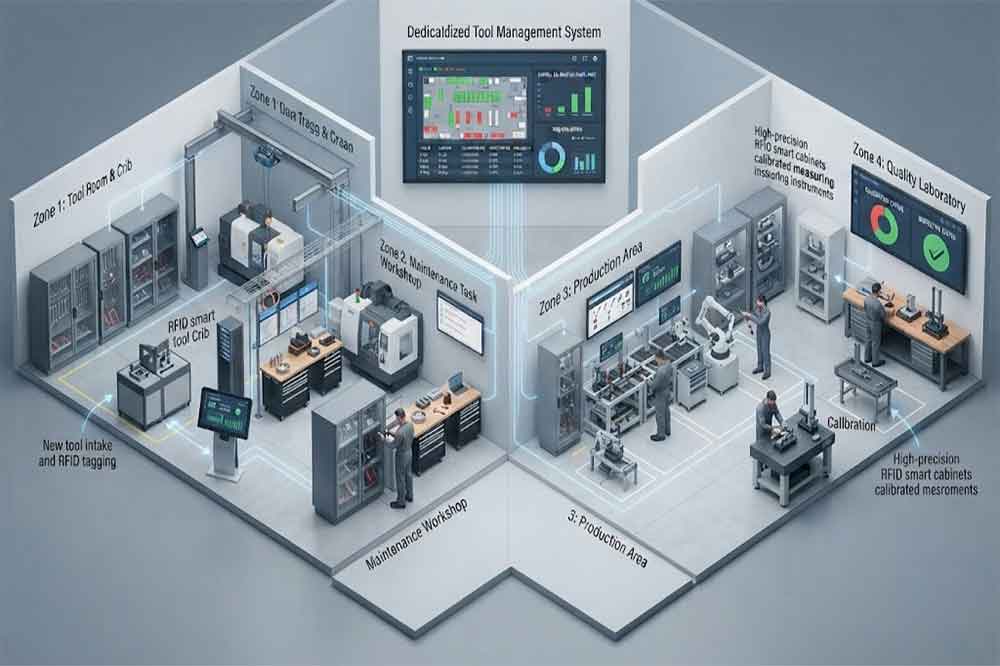
This becomes particularly useful when multiple RFID cabinets share a centralized tool management platform.

See [RFID tool cabinet for multi-location tool management] for the broader multi-location approach.

Centralized RFID system tracking calibrated tools across multiple factory locations

17. Do Not Assume RFID Guarantees Calibration Compliance

RFID can identify a tool.

It cannot determine whether the tool is physically accurate or whether a calibration procedure was performed correctly.

Calibration still requires the appropriate inspection, measurement, equipment, procedures, and qualified personnel.

RFID provides the connection between the physical tool and the digital management record.

This distinction is important when explaining the system to quality managers and engineers.


18. Test the Complete Calibration Workflow

Before deployment, test more than RFID reading.

A practical test should include:

Test 1: Valid Tool

Check out a tool with valid calibration status.

Test 2: Calibration Due Soon

Confirm that the correct warning or workflow appears.

Test 3: Overdue Tool

Verify that the configured restriction works.

Test 4: Damaged Tool

Return a damaged tool and confirm that it enters the correct status.

Test 5: Tool Under Maintenance

Confirm that unavailable tools cannot be accidentally checked out.

Test 6: Calibration Completed

Update the calibration record and confirm that the tool becomes available according to the defined process.

Test 7: Multi-Cabinet Movement

Move the tool to another location and verify that its status and location remain correct.


Common Problems to Avoid

Treating RFID as the Calibration System

RFID identifies the tool. Calibration procedures remain separate.

Using Only a Calibration Sticker

A physical sticker can be useful, but it may not provide real-time access to the complete digital record.

Mixing Tool Statuses

Calibration, inspection, maintenance, and availability should be clearly defined.

Allowing Overdue Tools to Remain Available

If a tool should be restricted, the system workflow should reflect that requirement.

Ignoring Damaged Tools

A tool can be calibrated but still unsuitable for use.

Forgetting Location Changes

A tool’s calibration record is less useful if its current physical location is unknown.

Not Testing Real Tools

Tool materials, RFID tag placement, and cabinet configuration can affect RFID performance.


Practical Calibration and Inspection Checklist

Before deploying the system, confirm:

  • Tools requiring calibration are identified
  • Inspection requirements are documented
  • Each tool has a unique ID
  • RFID tags are matched to tools
  • Calibration status fields are defined
  • Inspection status fields are defined
  • Maintenance status is defined
  • Overdue rules are established
  • Restricted tools have access rules
  • Calibration history is recorded
  • Damaged-tool procedures are defined
  • Calibration reports are available
  • Multi-location movement is tested
  • Software integration is tested
  • Users understand status rules
  • Acceptance testing is completed

Conclusion

An RFID tool cabinet can provide more than simple tool tracking when it is connected to calibration, inspection, maintenance, and availability workflows.

The key is to separate these functions clearly. RFID identifies the physical tool, while the management system records its calibration status, inspection results, maintenance condition, location, and user transactions.

For maintenance and quality teams, this creates a more complete view of tool readiness. A technician can see whether a tool is available, while managers can monitor upcoming calibration work, overdue instruments, restricted tools, and maintenance activities.

The system should still be built around the company’s actual quality and maintenance procedures. RFID does not replace calibration or inspection. It provides the digital connection that can make those processes easier to track and manage.


Frequently Asked Questions

1. Can an RFID tool cabinet track calibration dates?

Yes. The RFID tag can identify the tool, while the connected software stores calibration dates, status, and related records.

2. Can an overdue tool be blocked from checkout?

Yes, if the cabinet and software support the required permission and status workflow. The exact behavior should be configured and tested.

3. Does RFID replace tool calibration?

No. RFID identifies and tracks the tool. Calibration still requires appropriate procedures, equipment, and qualified personnel.

4. Can damaged tools be marked as unavailable?

Yes. A tool can be assigned a restricted, maintenance, or inspection status so it is not treated as normally available.

5. Can calibration records connect with a CMMS?

Yes. Depending on the system, RFID events and tool records can be integrated with CMMS or other enterprise software through available interfaces or APIs.

CYKEO-GT1 RFID Intelligent Tool Cabinet

CYKEO-GT1 RFID Intelligent Tool Cabinet

2025-12-31

Cykeo’s RFID Smart Tool Cabinet enables 10-second tool audits, user access control & real-time alerts for construction/oil/gas. Features 21.5″ touchscreen, IP54 steel body & -30°C~60°C operation. Supports SAP/Oracle integration.

CYKEO-GGT1 Intelligent Weighing  Cabinet

CYKEO-GGT1 Intelligent Weighing Cabinet

2025-12-31

Cykeo’s Intelligent Weighing Tool Cabinet combines weight sensors & RFID for 100% tool accountability. Features solar/4G options, IP54 steel-glass body & nuclear/rail compliance. Supports SAP/Oracle integration.

CYKEO-GT7 OUTDOOR RFIDINTELLIGENT TOOL CABINET​

CYKEO-GT7 OUTDOOR RFIDINTELLIGENT TOOL CABINET​

2025-12-31

Cykeo’s solar-powered RFID Inventory Tool Cabinet enables 5-second audits for remote sites. Features 160W solar, Android 7.1, 4G & extreme temp operation for oil/energy/mining sectors.

CYKEO-GTC7C RFID Tool Cart

CYKEO-GTC7C RFID Tool Cart

2025-12-31

Cykeo’s industrial RFID Tool Cart features 14″ touchscreen, 400+ tool scanning, and carbon steel construction for aviation MRO, power plants and construction sites. 5-second inventory scans.

CYKEO-TC RFID Multi-Drawer Tool Cart

CYKEO-TC RFID Multi-Drawer Tool Cart

2025-12-31

Cykeo CYKEO-TC RFID multi-drawer tool cart manages 300+ tools via UHF RFID, features fingerprint/face recognition, Android/Windows OS, and SAP integration for nuclear/railway/fire safety sectors. IP54 rated for harsh environments.

CYKEO-GTC4 INDUSTRIAL RFID TOOL CART

CYKEO-GTC4 INDUSTRIAL RFID TOOL CART

2025-12-30

Cykeo CYKEO-GTC4 RFID tool inventory cart manages 300+ tools via UHF RFID, features instant scanning, fingerprint/face recognition, and SAP integration for nuclear/railway/fire safety sectors. IP54 rated for harsh environments.

CYKEO-GTC7 RFID Aviation Maintenance Cart

CYKEO-GTC7 RFID Aviation Maintenance Cart

2025-12-30

Cykeo CYKEO-GTC7 RFID aviation maintenance cart features military-grade build, blockchain audits, and predictive tool alerts for aircraft MRO. Achieves EASA/FAA compliance.

CYKEO-GTC7A RFID Real-Time Tool Tracking Cart

CYKEO-GTC7A RFID Real-Time Tool Tracking Cart

2025-12-30

Cykeo CYKEO-GTC7A RFID real-time tool tracking cart features 99.9% accuracy, FOD prevention, and SAP integration for aviation/plant maintenance. Military-grade construction.

CYKEO-GTC4B RFID Mobile Tool Cart

CYKEO-GTC4B RFID Mobile Tool Cart

2025-12-30

Cykeo CYKEO-GTC4B RFID mobile tool cart delivers 300-tool verification in 7 seconds with modular drawers, ≤150W power, and SAP integration for industrial/aviation use.

CYKEO-GTC4C RFID Workshop Tool Control Cart

CYKEO-GTC4C RFID Workshop Tool Control Cart

2025-12-30

Cykeo CYKEO-GTC4C RFID workshop tool control cart delivers 300-tool inventory in 3 seconds with 10hr battery, SAP integration, and FOD prevention for industrial workshops.

CYKEO-GTC4A Multi-drawer RFID Tool Cart

CYKEO-GTC4A Multi-drawer RFID Tool Cart

2025-12-29

Cykeo’s CYKEO-GTC4A multi-drawer RFID tool cart delivers 7-second aviation tool inventories, 10-hour battery, and dual authentication. ISO 18000-6C compliant for MRO/manufacturing.

CYKEO-GTC4D RFID Tool Tracking Cart

CYKEO-GTC4D RFID Tool Tracking Cart

2025-12-29

Cykeo’s MIL-STD RFID tool tracking cart scans 300 tools in 7 seconds, with -20°C~60°C operation and FOD prevention for aviation/energy industries.

CYKEO-GT3A COMPACT RFID TOOL CABINET

CYKEO-GT3A COMPACT RFID TOOL CABINET

2025-12-29

Cykeo’s space-saving RFID tool management cabinet offers 1000-tool capacity, ≤5s scans, and 24/7 unmanned operation for manufacturing/assembly plants.

CYKEO-GT1A INDOOR RFID CABINET

CYKEO-GT1A INDOOR RFID CABINET

2025-12-29

Cykeo’s RFID industrial tool cabinet offers modular shelves, 21.5″ touchscreen, and voice guidance for manufacturing/energy sectors. 24/7 operation with ≤80W power.

CYKEO-GT4A RFID Secure Tool Cabinet

CYKEO-GT4A RFID Secure Tool Cabinet

2025-12-29

Cykeo’s RFID secure tool cabinet features 4 lockable compartments, ≤150W power, and 24/7 monitoring for pharma/aerospace/electronics industries.

CYKEO-GT2B RFID Aviation Tool Cabinet

CYKEO-GT2B RFID Aviation Tool Cabinet

2025-12-29

Cykeo’s RFID aviation tool cabinet features triple authentication, 14″ HD touchscreen, and thermostatic control for aircraft MRO/FAA compliance.

CYKEO-GTC5 PRISON RFID TOOLMANAGEMENT SYSTEM

CYKEO-GTC5 PRISON RFID TOOLMANAGEMENT SYSTEM

2025-12-27

Cykeo’s RFID tool tracking system delivers self-service check-in/out, real-time alerts, and multilingual interface for correctional/military security.

CYKEO-GT3B RFID Tool Inventory System Cabinet

CYKEO-GT3B RFID Tool Inventory System Cabinet

2025-12-27

Cykeo’s off-grid RFID tool inventory system features solar/wind power, -30°C~60°C operation, and military-grade durability for mining/energy/military sectors.

CYKEO-GT3 UHF RFID Tool Cabinet

CYKEO-GT3 UHF RFID Tool Cabinet

2025-12-27

Cykeo’s industrial RFID tool accountability cabinet delivers 99.9% scan accuracy, adjustable shelves, and 24/7 operation for automotive/aerospace manufacturing.

CYKEO-GT4 RFID Multi-Drawer Tool Cabinet

CYKEO-GT4 RFID Multi-Drawer Tool Cabinet

2025-12-27

Cykeo’s RFID multi-drawer tool cabinet features 5 adjustable drawers, biometric access, and 99.9% scan accuracy for automotive/aerospace manufacturing.

CYKEO-GT2  INDUSTRIAL RFID TOOL CABINET​

CYKEO-GT2 INDUSTRIAL RFID TOOL CABINET​

2025-12-27

Cykeo’s RFID Automated Tool Cabinet delivers military security, adjustable shelving, and Java/C# SDK integration for defense/aerospace manufacturing.

CYKEO-GT2A INDUSTRIAL RFID CABINET

CYKEO-GT2A INDUSTRIAL RFID CABINET

2025-12-27

Cykeo’s RFID scalable tool cabinet features multi-unit management, voice guidance, and semi-outdoor durability for automotive/construction/logistics.

CYKEO-GT1B INDUSTRIALRFID TOOL CABINET​

CYKEO-GT1B INDUSTRIALRFID TOOL CABINET​

2025-12-27

Cykeo CYKEO-GT1B industrial RFID tool storage cabinet features Impinj R2000 UHF technology, 1,000+ tool capacity, IP54 protection, and Windows/Android OS for manufacturing/aviation MRO. Includes auto check-in/out and SAP/Oracle sync.

CYKEO-GT3C RFID Tool Checkout System Cabinet

CYKEO-GT3C RFID Tool Checkout System Cabinet

2025-12-27

Cykeo CYKEO-GT3C industrial RFID tool checkout system Cabinet features millimeter-wave scanning, 280-layer storage, dual OS, and 99.9% accuracy for aviation/semiconductor sectors. Supports auto check-in/out and real-time SAP sync.

CYKEO-B1 SMART RFID TOOL BAG

CYKEO-B1 SMART RFID TOOL BAG

2025-12-27

Cykeo CYKEO-B1 RFID smart tool bag features

CYKEO-GT3D RFID TOOL TRACKING CABINET

CYKEO-GT3D RFID TOOL TRACKING CABINET

2025-12-27

Cykeo CYKEO-GT3D RFID smart tool cabinet offers 5-second inventory scanning for 300+ tools, dual authentication, and 24/7 automated management for industrial facilities.

CYKEO-B1A  INDUSTRIAL RFID BACKPACK FOR FIELD M...

CYKEO-B1A INDUSTRIAL RFID BACKPACK FOR FIELD MAINTENANCE

2025-12-27

Discover the CYKEO-B1A Industrial RFID Backpack featuring advanced tool tracking technology with 25cm RF shielding, 7-day battery life, and wearable design for field maintenance professionals.

RFID Tool Cabinet for Tool Calibration and Inspection Management(images 1)

James Wilson

RFID Industry Writer | IoT & Asset Tracking Analyst

James writes about RFID technology, asset tracking, and the practical challenges of digital transformation across warehousing, retail, manufacturing, and logistics.

His work focuses on how RFID is applied in real-world operations—improving inventory visibility, automating workflows, and helping businesses manage assets with greater accuracy and efficiency.

He regularly covers topics including UHF RFID, smart cabinets, RFID portals, tool tracking, warehouse automation, and industrial IoT trends..

PgUp: PgDn:

Relevance

View more