 Cykeo RFID IoT Solution Products R&D Manufacturer

How to Test RFID Tags With Your Phone Without a Scanner
307Learn how to test RFID tags with a smartphone without an RFID scanner. Understand NFC testing limits, suitable RFID tags, common issues, and tips for bulk RFID buyers.
MoreAll RFID Product
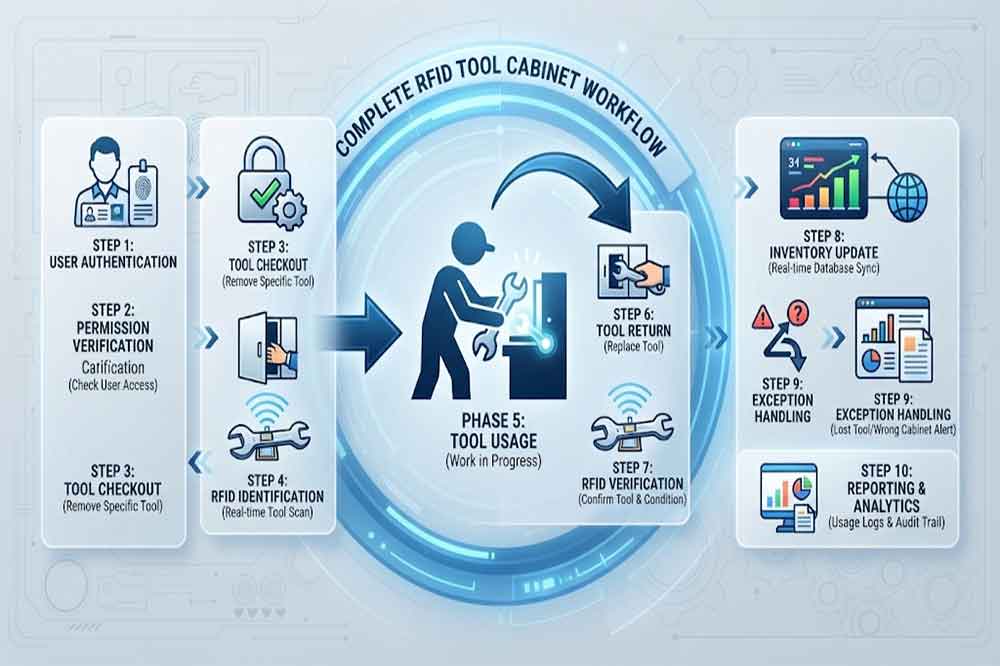
RFID tool cabinet workflow describes what happens when a person interacts with a tool and how that activity is recorded by the system.
A simple workflow might look like:
Authenticate → Select Tool → Check Out → Use Tool → Return Tool → RFID Verification → Update Inventory
But industrial operations are rarely this simple.
A technician may need a restricted tool.
A tool may require calibration.
A supervisor may need to approve an unusual request.
A tool may be returned to another cabinet.
A maintenance job may require several tools at the same time.
A tool may also be damaged during use and need inspection before it becomes available again.
These situations should be considered when designing the workflow.
The goal is not to create the most complicated process. It is to create a process that matches the way employees actually work.
Before installing an RFID cabinet, document the current process.
Ask practical questions:
This information provides the starting point for workflow design.
For organizations moving from manual records, the goal should not be to copy every existing step into a digital system.
Some manual steps may no longer be necessary.
For example, an employee may currently write down a tool number and sign a paper form. If the RFID system can automatically identify the user and tool, that manual record may become unnecessary.
This is one reason [RFID tool management] should be considered as a complete process rather than simply an RFID hardware project.
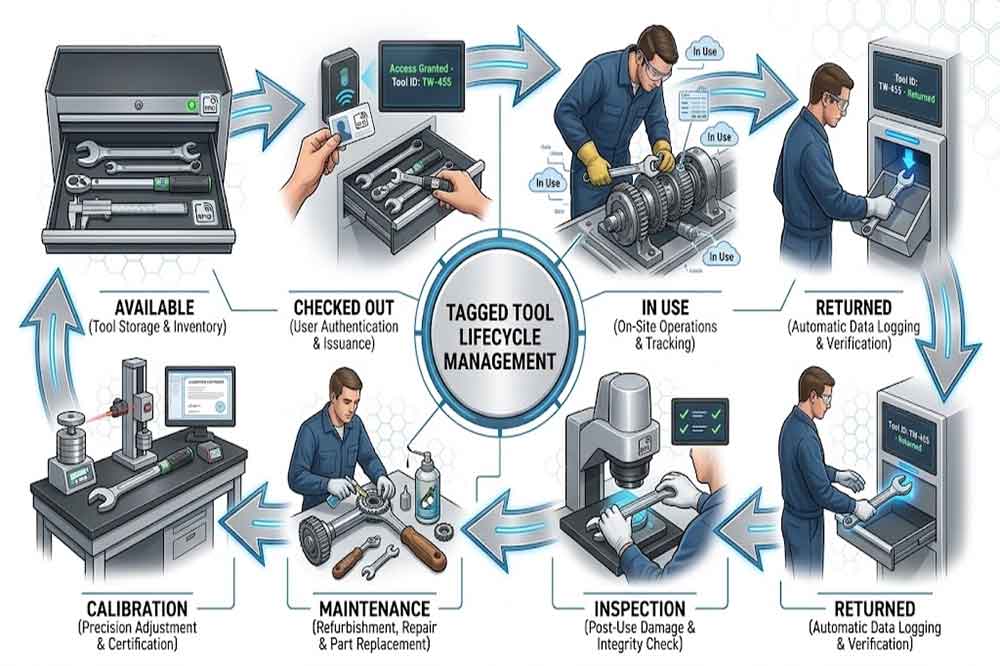
Every managed tool should have a clear status.
A basic tool lifecycle could include:
Available → Checked Out → In Use → Returned → Verified → Available
However, some organizations need additional states.
For example:
Available → Checked Out → Returned → Inspection → Calibration → Available
Another tool may follow:
Available → Checked Out → Damaged → Maintenance → Inspection → Available
Defining these statuses helps prevent confusion.
If a tool is physically inside the cabinet but waiting for calibration, it should not necessarily appear as available to every employee.
The digital status should reflect the actual operational condition of the tool.
The checkout process is one of the most frequently used parts of the system.
A practical workflow might be:
The employee identifies themselves using the supported authentication method.
The system checks whether the employee can access the requested tools.
The employee selects or removes the required tool.
The cabinet identifies the tool and associates it with the user transaction.
The system records the checkout event.
The exact interface depends on the cabinet and software design.
The important point is to keep the process easy enough that employees do not try to bypass it.
For more information about the broader process, see [RFID tool checkout system].
Returns often receive less attention than checkout.
That can create problems.
A good return workflow should answer:
For example:
User Authentication → Tool Return → RFID Detection → Tool Status Check → Inventory Update
If the tool is damaged, the workflow may instead become:
Return → RFID Detection → Damage Report → Inspection → Maintenance → Status Update
The workflow should reflect the actual maintenance process rather than forcing every tool into the same status.
Industrial maintenance rarely involves only one tool.
A technician may need:
The workflow should define whether users can check out multiple tools in one operation.
The RFID cabinet may identify multiple tagged tools during a transaction, but actual performance depends on cabinet design, tag selection, reader configuration, tool materials, and installation.
This should be tested before deployment.
Article [RFID tool cabinet inventory management] can provide additional context about multiple-tool identification and inventory visibility.
Not every tool needs the same permission.
A factory might classify tools into several groups:
| Tool Type | Typical Access |
|---|---|
| Standard hand tools | General users |
| Specialized tools | Authorized technicians |
| High-value tools | Restricted users |
| Calibrated instruments | Qualified users |
| Safety-related equipment | Controlled users |
The system can then apply different access rules.
For example:
User → Authentication → Permission Check → Tool Access
If permission is denied, the workflow should provide a clear next step.
The employee may need to contact a supervisor or request temporary authorization.
For more detailed permission design, connect this article with [RFID tool cabinet access control].
In maintenance environments, a tool is often used because a specific job needs to be completed.
That creates an opportunity to connect the tool workflow with a maintenance work order.
A simplified process could be:
Work Order → Technician → Required Tools → Tool Checkout → Maintenance Work → Tool Return
This can provide additional context for tool usage.
For example, a manager may later want to know which tools were used during a maintenance task.
The exact integration depends on the company’s CMMS, ERP, MES, or custom software.
The RFID system should not be expected to replace the maintenance management platform. Instead, RFID events can become another source of operational data.

Inventory should not be treated as a separate activity from daily tool management.
A cabinet can continuously provide information about the tools expected to be inside.
A basic inventory workflow may be:
RFID Scan → Identify Tools → Compare Expected Inventory → Detect Exceptions → Update Status
Possible exceptions include:
The system can then present these exceptions to authorized employees.
This approach is generally more useful than waiting for a manual inventory count at the end of the month.
A workflow is incomplete if it only describes normal operation.
Industrial environments produce exceptions every day.
Consider the following situations.
The system identifies that the expected tool is not detected.
The supervisor reviews the last transaction and contacts the responsible user if necessary.
The user reports the problem rather than repeatedly forcing the workflow.
The tag can then be inspected or replaced.
The system rejects the transaction and provides the appropriate authorization path.
The tool is moved to an inspection or maintenance status rather than immediately returning to available inventory.
The system should follow the predefined offline or recovery procedure.
The exact solution depends on system architecture.
These procedures should be included in employee training.
Multi-location environments create another important question:
What happens when a tool moves from Cabinet A to Cabinet B?
A controlled workflow might be:
Checkout → Authorized Movement → Arrival at New Location → RFID Detection → Location Update
Without a defined movement process, the tool may physically exist in the factory while the software still shows it at the previous location.
For organizations managing multiple tool cabinets, [RFID tool cabinet for multi-location tool management] provides a useful related topic.
Factories may have two, three, or more shifts.
The workflow should remain consistent between shifts.
For example:
Technician checks out a torque tool.
The tool is still in use.
Another technician takes over the maintenance job.
The system should clearly define whether:
This is a workflow decision, not simply a hardware decision.
A common mistake is adding too many confirmation steps.
If an employee needs to click through several screens just to take a screwdriver, adoption may become difficult.
A good design separates user simplicity from backend complexity.
For regular employees:
Authenticate → Take Tool → Work → Return Tool
For the system:
Authenticate → Permission Check → RFID Event → User Assignment → Tool Status → Inventory Update → Transaction Record
The backend can be sophisticated while the user-facing process remains simple.
One workflow may not be enough.
Authenticate → Checkout → Work → Return
Review → Approve → Monitor → Handle Exceptions
Manage Users → Manage Tools → Configure Permissions → Review Logs
Monitor Connection → Review Events → Check Integration → Resolve Technical Issues
Check Inventory → Review Exceptions → Correct Records → Generate Report
This role-based structure also supports the training approach described in [RFID Tool Cabinet User Training].
The cabinet generates useful events.
Examples include:
These events can be transferred to the management software.
The software may then update:
API design, event mapping, and synchronization should be considered before deployment.
For more technical information, see [RFID tool cabinet software integration].
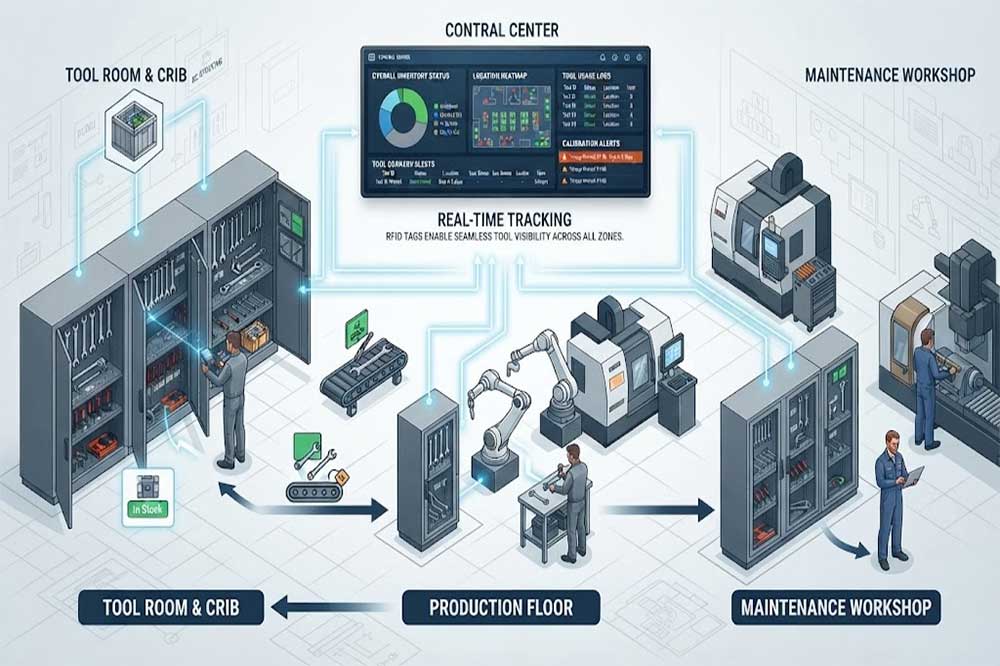
When several cabinets are deployed, standardization becomes more important.
For example, all cabinets could use the same basic process:
Authenticate → Access → Tool Identification → Transaction → Inventory Update
Location-specific differences can then be added where required.
A maintenance department may need calibration workflows.
A production area may need fast tool checkout.
A high-value tool room may require stronger approval.
Standardization makes employee training easier while still allowing departments to maintain practical differences.
This connects with the broader [RFID tool cabinet deployment] strategy.
Workflow testing should happen before employees depend on the system.
A pilot should include normal and abnormal situations.
The [RFID tool cabinet pilot project] should involve real users whenever possible.
Once the workflow is running, collect practical feedback.
Useful indicators may include:
These numbers can show whether the workflow is practical.
However, the target values should come from the company’s actual operation rather than an arbitrary industry benchmark.
Digital systems provide an opportunity to remove unnecessary manual steps.
Missing tools and damaged tags need defined procedures too.
Technicians, supervisors, and administrators have different requirements.
Complex interfaces can encourage users to bypass the system.
Multi-location operations need clear cabinet-to-cabinet movement rules.
A cabinet can technically identify a tag while the overall workflow still fails.
Employees often identify practical workflow problems that were not visible during technical design.
Before deployment, confirm:
RFID tool cabinet is most effective when the hardware, software, users, and management procedures follow a clear workflow.
The basic process may look simple: authenticate, take a tool, use it, and return it. Industrial operations, however, require additional rules for permissions, multiple tools, maintenance, calibration, missing tools, damaged equipment, work orders, shift changes, and multiple locations.
The best workflow is not necessarily the most complicated one. It should reflect the actual working environment while keeping routine operations simple for employees.
Before full deployment, map the existing process, remove unnecessary manual steps, define exceptions, test real workflows, and collect user feedback. This creates a stronger foundation for long-term RFID tool management.
It defines how users, tools, RFID events, software, and management procedures interact from authentication and checkout to return, inventory, and exception handling.
They can share the same basic user identification process, but return procedures should include tool verification, condition checks, and inventory updates where required.
Yes, RFID systems can be designed to identify multiple tagged tools. Actual performance depends on tags, cabinet structure, reader configuration, tool materials, and testing.
The system can flag the missing item, while supervisors review the last transaction, user, location, and other available records to determine the next action.
Yes. Testing with real tools, users, tags, and typical working conditions can identify practical problems before a larger rollout.

Cykeo’s RFID Smart Tool Cabinet enables 10-second tool audits, user access control & real-time alerts for construction/oil/gas. Features 21.5″ touchscreen, IP54 steel body & -30°C~60°C operation. Supports SAP/Oracle integration.

Cykeo’s Intelligent Weighing Tool Cabinet combines weight sensors & RFID for 100% tool accountability. Features solar/4G options, IP54 steel-glass body & nuclear/rail compliance. Supports SAP/Oracle integration.

Cykeo’s solar-powered RFID Inventory Tool Cabinet enables 5-second audits for remote sites. Features 160W solar, Android 7.1, 4G & extreme temp operation for oil/energy/mining sectors.

Cykeo’s industrial RFID Tool Cart features 14″ touchscreen, 400+ tool scanning, and carbon steel construction for aviation MRO, power plants and construction sites. 5-second inventory scans.

Cykeo CYKEO-TC RFID multi-drawer tool cart manages 300+ tools via UHF RFID, features fingerprint/face recognition, Android/Windows OS, and SAP integration for nuclear/railway/fire safety sectors. IP54 rated for harsh environments.

Cykeo CYKEO-GTC4 RFID tool inventory cart manages 300+ tools via UHF RFID, features instant scanning, fingerprint/face recognition, and SAP integration for nuclear/railway/fire safety sectors. IP54 rated for harsh environments.

Cykeo CYKEO-GTC7 RFID aviation maintenance cart features military-grade build, blockchain audits, and predictive tool alerts for aircraft MRO. Achieves EASA/FAA compliance.

Cykeo CYKEO-GTC7A RFID real-time tool tracking cart features 99.9% accuracy, FOD prevention, and SAP integration for aviation/plant maintenance. Military-grade construction.

Cykeo CYKEO-GTC4B RFID mobile tool cart delivers 300-tool verification in 7 seconds with modular drawers, ≤150W power, and SAP integration for industrial/aviation use.

Cykeo CYKEO-GTC4C RFID workshop tool control cart delivers 300-tool inventory in 3 seconds with 10hr battery, SAP integration, and FOD prevention for industrial workshops.

Cykeo’s CYKEO-GTC4A multi-drawer RFID tool cart delivers 7-second aviation tool inventories, 10-hour battery, and dual authentication. ISO 18000-6C compliant for MRO/manufacturing.

Cykeo’s MIL-STD RFID tool tracking cart scans 300 tools in 7 seconds, with -20°C~60°C operation and FOD prevention for aviation/energy industries.

Cykeo’s space-saving RFID tool management cabinet offers 1000-tool capacity, ≤5s scans, and 24/7 unmanned operation for manufacturing/assembly plants.

Cykeo’s RFID industrial tool cabinet offers modular shelves, 21.5″ touchscreen, and voice guidance for manufacturing/energy sectors. 24/7 operation with ≤80W power.

Cykeo’s RFID secure tool cabinet features 4 lockable compartments, ≤150W power, and 24/7 monitoring for pharma/aerospace/electronics industries.

Cykeo’s RFID aviation tool cabinet features triple authentication, 14″ HD touchscreen, and thermostatic control for aircraft MRO/FAA compliance.

Cykeo’s RFID tool tracking system delivers self-service check-in/out, real-time alerts, and multilingual interface for correctional/military security.

Cykeo’s off-grid RFID tool inventory system features solar/wind power, -30°C~60°C operation, and military-grade durability for mining/energy/military sectors.

Cykeo’s industrial RFID tool accountability cabinet delivers 99.9% scan accuracy, adjustable shelves, and 24/7 operation for automotive/aerospace manufacturing.

Cykeo’s RFID multi-drawer tool cabinet features 5 adjustable drawers, biometric access, and 99.9% scan accuracy for automotive/aerospace manufacturing.

Cykeo’s RFID Automated Tool Cabinet delivers military security, adjustable shelving, and Java/C# SDK integration for defense/aerospace manufacturing.

Cykeo’s RFID scalable tool cabinet features multi-unit management, voice guidance, and semi-outdoor durability for automotive/construction/logistics.

Cykeo CYKEO-GT1B industrial RFID tool storage cabinet features Impinj R2000 UHF technology, 1,000+ tool capacity, IP54 protection, and Windows/Android OS for manufacturing/aviation MRO. Includes auto check-in/out and SAP/Oracle sync.

Cykeo CYKEO-GT3C industrial RFID tool checkout system Cabinet features millimeter-wave scanning, 280-layer storage, dual OS, and 99.9% accuracy for aviation/semiconductor sectors. Supports auto check-in/out and real-time SAP sync.


Cykeo CYKEO-GT3D RFID smart tool cabinet offers 5-second inventory scanning for 300+ tools, dual authentication, and 24/7 automated management for industrial facilities.

Discover the CYKEO-B1A Industrial RFID Backpack featuring advanced tool tracking technology with 25cm RF shielding, 7-day battery life, and wearable design for field maintenance professionals.
RFID Industry Writer | IoT & Asset Tracking Analyst
James writes about RFID technology, asset tracking, and the practical challenges of digital transformation across warehousing, retail, manufacturing, and logistics.
His work focuses on how RFID is applied in real-world operations—improving inventory visibility, automating workflows, and helping businesses manage assets with greater accuracy and efficiency.
He regularly covers topics including UHF RFID, smart cabinets, RFID portals, tool tracking, warehouse automation, and industrial IoT trends..

Learn how to test RFID tags with a smartphone without an RFID scanner. Understand NFC testing limits, suitable RFID tags, common issues, and tips for bulk RFID buyers.
More
What does RFID stand for in retail? Learn how Radio Frequency Identification improves inventory accuracy, smart checkout, product tracking, and retail automation.
More
Can RFID read NFC? We explain the technical relationship, which RFID readers are compatible, and why most industrial systems cannot read NFC tags.
More
Discover the maximum read range for industrial UHF RFID tags with handheld scanners. Learn how tag type, environment, and antenna design impact performance.
More