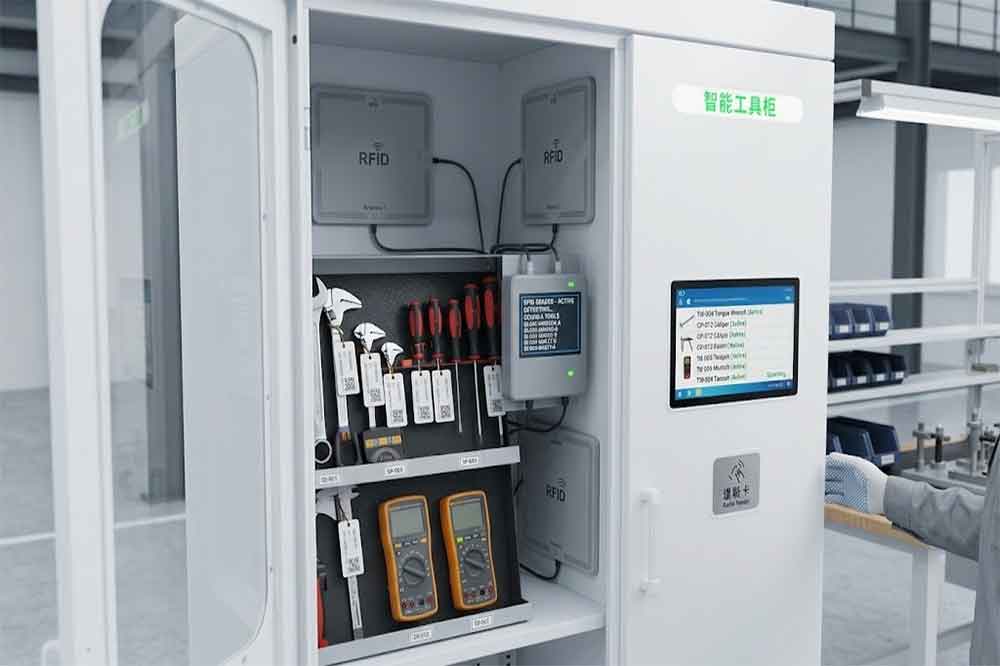
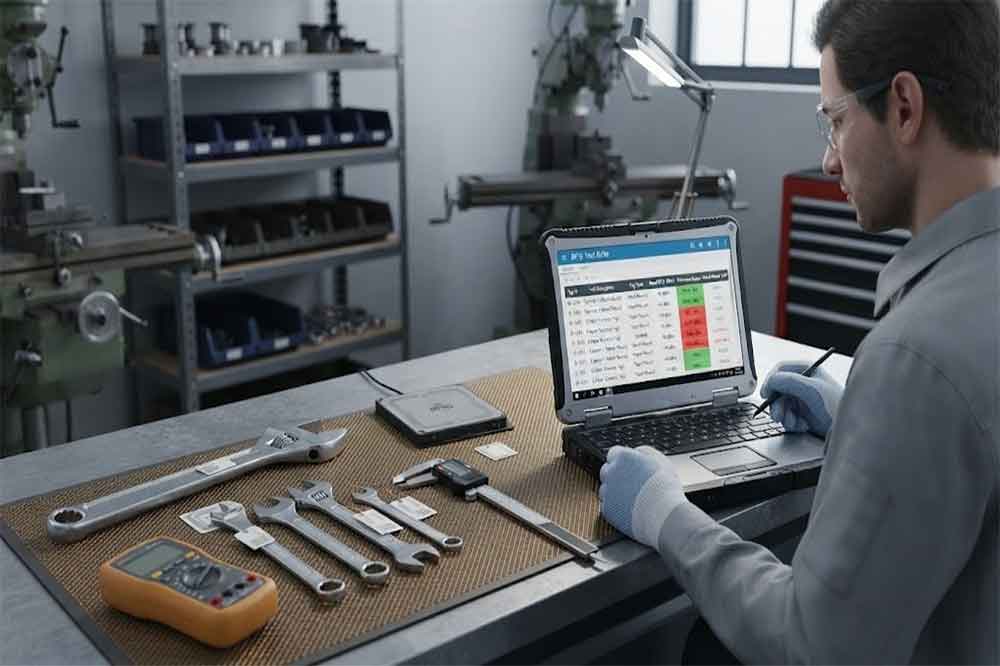
RFID tool cabinet inventory management helps factories keep a clearer record of which tools are stored, checked out, missing, or located in another area. By using RFID identification with cabinet software, tool teams can reduce repetitive manual counting and maintain more up-to-date inventory information.
1. Why Tool Inventory Becomes Difficult
A tool inventory list may look simple when a factory has only a few dozen tools.
The situation changes when hundreds or thousands of tools are distributed across different departments.
Tools can move between:
Tool rooms
Maintenance workshops
Production lines
Quality departments
Warehouses
Service areas
Temporary workstations
A spreadsheet may show what should be available, but it does not always show what is physically present at a particular moment.
This creates a gap between system inventory and physical inventory.
An RFID tool cabinet can help reduce this gap by automatically identifying tagged tools during cabinet access and inventory operations.
2. What Is RFID Tool Cabinet Inventory Management?
RFID tool cabinet inventory management uses RFID technology to identify tools stored inside or associated with a smart cabinet.
Each managed tool can have a unique RFID tag.
The tag can be linked with information such as:
Tool ID
Tool name
Department
Cabinet
Storage location
User
Status
Maintenance information
Calibration information
When the RFID reader detects tagged tools, the software can compare the detected information with the expected inventory.
A simple process is:
RFID identification → Inventory comparison → Exception detection → Status update
This can provide a more dynamic inventory process than manually checking each tool.
3. Traditional Tool Counting vs RFID Inventory
Traditional tool inventory often requires employees to inspect tools one by one.
The process may involve:
Open cabinet → Count tools → Check spreadsheet → Find differences → Update records
This can become repetitive when tool quantities increase.
RFID can change part of the process:
Open cabinet → RFID reads tagged tools → Software compares records → Review exceptions
RFID does not remove the need for human verification.
Instead, it can reduce repetitive identification work and provide a faster starting point for inventory checks.
One important reason factories consider RFID for tool inventory is the ability to identify multiple tagged tools.
A cabinet may contain many tools at the same time.
Depending on the RFID tags, reader configuration, cabinet structure, tool materials, and operating conditions, the system can identify multiple tags during an inventory operation.
This can be useful for:
Daily inventory
Shift handovers
Tool returns
Periodic audits
Cabinet reconciliation
However, the number of tools that can be reliably identified should be validated through actual testing.
RFID performance should not be assumed from theoretical specifications alone.
5. Inventory Status Should Be More Than “In Stock”
A useful tool inventory system should distinguish different states.
For example:
Status
Meaning
Available
Tool is available for use
Checked Out
Tool is currently assigned
Overdue
Tool has not been returned as expected
Missing
Tool cannot be located
Maintenance
Tool is undergoing service
Calibration
Tool is undergoing calibration
Reserved
Tool is allocated for planned work
Transfer
Tool is moving between locations
This gives managers a more useful picture than a simple quantity number.
For example, a database may contain 100 tools, but only 82 may actually be available for immediate use.
Inventory management should therefore distinguish total tools from usable tools.
6. Detecting Missing Tools
Missing tools are one of the most practical reasons for maintaining accurate inventory.
Suppose a cabinet is expected to contain 50 tools.
During an inventory check, the RFID system detects 48.
The two missing tools can then be investigated.
Possible explanations include:
Tool is checked out
Tool is in another cabinet
Tool was moved without recording
Tool is under maintenance
RFID tag is damaged
Tool was incorrectly stored
Tool is genuinely missing
RFID does not automatically explain why a tool is missing.
It provides information that helps staff investigate the difference.
This distinction is important when designing a real inventory workflow.
7. Detecting Unexpected Tools
Inventory management is not only about finding missing tools.
A cabinet may also contain tools that should not be there.
For example, a maintenance cabinet may contain a tool assigned to another department.
An RFID inventory check can compare detected tools with the expected cabinet inventory.
The result may show:
Expected: 50 tools
Detected: 49 expected + 2 unexpected
This tells the manager that the physical inventory does not match the database.
Unexpected tools can then be returned to the correct location or reassigned according to company procedures.
8. Tool Location Visibility
Factories often have more than one tool storage location.
A tool may move from:
Central Tool Room → Maintenance Cabinet → Production Area → Service Workshop
Without digital records, locating the tool may require phone calls or manual searching.
When multiple RFID cabinet are connected to a central platform, each cabinet can be associated with a specific location.
This can provide a clearer picture of where a tool was last recorded.
The system should distinguish between last recorded location and real-time physical location unless continuous location tracking is specifically implemented.
9. Periodic Inventory Checks
Not every factory needs to perform a complete inventory check every hour.
Inventory frequency should match the tool management requirements.
Possible schedules include:
Per shift
Daily
Weekly
Monthly
Before audits
After major maintenance work
After shift handover
High-value or critical tools may require more frequent checks.
Common tools may only require periodic reconciliation.
The objective is to establish an inventory schedule that provides useful visibility without creating unnecessary operational work.
10. Inventory During Shift Handover
Shift changes can create inventory problems.
A technician may finish a shift while several tools are still checked out.
The next technician may assume the tools are available when they are not.
An RFID inventory check can provide a clearer snapshot during handover.
For example:
Shift A ends → Cabinet inventory check → Missing/checked-out tools identified → Shift B receives status information
This can help maintenance and production teams understand the condition of the tool inventory before starting the next shift.
Large factories may operate multiple smart tool cabinets.
A centralized inventory platform can provide a wider view.
For example:
Cabinet A: Maintenance workshop
Cabinet B: Production line
Cabinet C: Quality department
Cabinet D: Warehouse
Instead of checking each location separately, managers can review inventory information through one platform.
This can also help identify whether a missing tool from one cabinet was recently recorded in another.
However, the system should be designed carefully so that tool transfers between cabinets are recorded correctly.
17. Inventory Alerts and Exceptions
Inventory software can use exception information to draw attention to unusual conditions.
Possible alerts include:
Tool missing
Tool overdue
Unexpected tool detected
Tool returned to wrong cabinet
Inventory mismatch
RFID tag not detected
Tool status not updated
Alerts should be configured according to operational needs.
Too many notifications can create alert fatigue.
The useful approach is to prioritize events that require human action.
18. How to Implement RFID Tool Inventory Management
A practical implementation can follow several steps.
Step 1: Define inventory objectives
Determine whether the main goal is daily inventory, missing-tool detection, audit support, or location visibility.
Step 2: Classify tools
Separate general tools, specialized tools, precision equipment, and high-value assets.
Step 3: Select RFID tags
Test tags on actual tool materials and surfaces.
Step 4: Configure cabinet reading
Adjust readers and antennas for the actual cabinet structure.
Step 5: Build tool records
Create unique records for each managed tool.
Step 6: Define inventory statuses
Set rules for available, checked out, missing, maintenance, calibration, and other states.
Step 7: Test inventory accuracy
Compare RFID results with manual physical checks.
Step 8: Connect software
Integrate with existing tool management or enterprise systems when required.
Step 9: Run a pilot
Start with one cabinet or department before expanding.
19. Common Inventory Management Mistakes
Mistake 1: Using One RFID Tag Without Testing
Different tool materials can produce different RFID results.
Mistake 2: Treating Every Missing Tool as Lost
The tool may simply be checked out or stored elsewhere.
Mistake 3: Ignoring Unexpected Tools
Tools placed in the wrong cabinet can create inventory errors.
Mistake 4: Focusing Only on Quantity
Availability and status can be more useful than total quantity.
Mistake 5: Ignoring Tag Maintenance
Damaged or poorly attached tags can affect identification.
Mistake 6: Using Excessive Reading Range
Unwanted reads from nearby tools can create false inventory results.
20. Conclusion
RFID tool cabinet inventory management can help factories move from periodic manual counting toward more structured digital tool visibility.
The system can identify tagged tools, compare physical inventory with database records, detect missing or unexpected tools, and provide status information across one or multiple cabinets.
However, RFID inventory accuracy depends on the complete system, including tags, tool materials, cabinet design, reader configuration, software, and operating procedures.
The best approach is to test actual tools in the actual cabinet environment, establish clear inventory rules, and then expand the system after the workflow has been validated.
Cykeo’s RFID Smart Tool Cabinet enables 10-second tool audits, user access control & real-time alerts for construction/oil/gas. Features 21.5″ touchscreen, IP54 steel body & -30°C~60°C operation. Supports SAP/Oracle integration.
Cykeo’s industrial RFID Tool Cart features 14″ touchscreen, 400+ tool scanning, and carbon steel construction for aviation MRO, power plants and construction sites. 5-second inventory scans.
Cykeo CYKEO-TC RFID multi-drawer tool cart manages 300+ tools via UHF RFID, features fingerprint/face recognition, Android/Windows OS, and SAP integration for nuclear/railway/fire safety sectors. IP54 rated for harsh environments.
Cykeo CYKEO-GTC4 RFID tool inventory cart manages 300+ tools via UHF RFID, features instant scanning, fingerprint/face recognition, and SAP integration for nuclear/railway/fire safety sectors. IP54 rated for harsh environments.
Cykeo CYKEO-GTC7A RFID real-time tool tracking cart features 99.9% accuracy, FOD prevention, and SAP integration for aviation/plant maintenance. Military-grade construction.
Cykeo CYKEO-GTC4B RFID mobile tool cart delivers 300-tool verification in 7 seconds with modular drawers, ≤150W power, and SAP integration for industrial/aviation use.
Cykeo CYKEO-GTC4C RFID workshop tool control cart delivers 300-tool inventory in 3 seconds with 10hr battery, SAP integration, and FOD prevention for industrial workshops.
Cykeo’s off-grid RFID tool inventory system features solar/wind power, -30°C~60°C operation, and military-grade durability for mining/energy/military sectors.
Cykeo’s RFID multi-drawer tool cabinet features 5 adjustable drawers, biometric access, and 99.9% scan accuracy for automotive/aerospace manufacturing.
Cykeo CYKEO-GT1B industrial RFID tool storage cabinet features Impinj R2000 UHF technology, 1,000+ tool capacity, IP54 protection, and Windows/Android OS for manufacturing/aviation MRO. Includes auto check-in/out and SAP/Oracle sync.
Cykeo CYKEO-GT3C industrial RFID tool checkout system Cabinet features millimeter-wave scanning, 280-layer storage, dual OS, and 99.9% accuracy for aviation/semiconductor sectors. Supports auto check-in/out and real-time SAP sync.
Discover the CYKEO-B1A Industrial RFID Backpack featuring advanced tool tracking technology with 25cm RF shielding, 7-day battery life, and wearable design for field maintenance professionals.
RFID Industry Writer | IoT & Asset Tracking Analyst
James writes about RFID technology, asset tracking, and the practical challenges of digital transformation across warehousing, retail, manufacturing, and logistics.
His work focuses on how RFID is applied in real-world operations—improving inventory visibility, automating workflows, and helping businesses manage assets with greater accuracy and efficiency.
He regularly covers topics including UHF RFID, smart cabinets, RFID portals, tool tracking, warehouse automation, and industrial IoT trends..
Learn how to configure UHF RFID readers for library book checkout systems. Optimize settings, integrate with ILS, and ensure seamless patron workflows with Cykeo solutions.
Wondering how far a passive RFID tag can be read? We break down real-world ranges for UHF, HF, and LF tags and what factors actually affect the distance.
How does rfid tracking work? Discover how RFID tags, readers, and software create automated tracking systems for inventory, assets, logistics, and industrial applications.
A practical guide to RFID medical equipment tracking in hospitals. Learn how it actually works, where it helps, and how smart cabinets improve inventory control.
 Cykeo RFID IoT Solution Products R&D Manufacturer