 Cykeo RFID IoT Solution Products R&D Manufacturer

How to Maintain Fixed RFID Readers in High-Dust Environments?
1098Learn how to maintain fixed RFID readers in high-dust environments. Discover Cykeo’s dustproofing strategies, cleaning routines, and firmware updates for reliable performance.
MoreAll RFID Product
RFID tool cabinet access control helps factories manage who can open a cabinet, which tools users can access, and when tools are checked out or returned. By combining user authentication, tool permissions, RFID identification, and transaction records, it provides a more structured way to control shared and restricted tools.
A tool cabinet is not always just a place to store equipment.
In a factory, the same cabinet may contain everyday hand tools, expensive equipment, precision instruments, or tools that should only be used by trained personnel.
Giving every employee unrestricted access may create several problems.
A tool may be removed without a record. A specialized tool may be used by an unauthorized person. A technician may forget to return equipment. Managers may later have difficulty determining who accessed the cabinet.
This is where access control becomes important.
An RFID tool cabinet can combine physical cabinet access with digital user identification and tool management.
The basic idea is simple:
Identify the user → Check permissions → Grant access → Identify tools → Record the transaction
RFID tool cabinet access control is a system that uses user authentication and software permissions to manage access to an RFID-enabled tool cabinet.
Depending on the system design, authentication may use:
After authentication, the system can determine whether the user is allowed to access the cabinet or specific tools.
The cabinet can then record relevant information such as:
This creates a connection between the person, the cabinet, and the tool.

Before managing tool permissions, the system needs to identify the person requesting access.
For example:
Employee arrives → Presents RFID card → System identifies employee → Checks permission → Cabinet unlocks
Authentication should be convenient enough for technicians to use during normal work.
A maintenance technician may access the cabinet many times during a shift. If the authentication process takes too long, employees may try to bypass the system or use alternative storage.
The best authentication method therefore depends on:
A common mistake is treating all employees as having identical access rights.
In practice, tool permissions can be divided into several levels.
Can access common tools used for routine work.
Can access maintenance tools and equipment assigned to their department.
Can access specific tools that require additional training or authorization.
May have broader access and additional management functions.
Can configure users, permissions, tools, and system settings.
This type of role-based structure can make tool access easier to manage.
Access control does not necessarily need to stop at the cabinet door.
A factory may want different levels of control for different tools.
For example:
| Tool Type | Example Permission |
|---|---|
| General hand tools | Most employees |
| Maintenance tools | Maintenance team |
| Precision instruments | Authorized users |
| High-value tools | Restricted users |
| Calibration equipment | Qualified users |
| Special production tools | Assigned department |
The exact permission model depends on the factory’s requirements.
The important point is that the system should match the actual tool management policy.
User authentication answers one question:
Who is accessing the system?
RFID tool identification answers another:
Which tools were removed or returned?
Each managed tool can have a unique RFID tag connected to its software record.
When the tool enters or leaves the cabinet, the RFID system can identify the corresponding tag according to the cabinet’s configuration.
This creates a relationship between:
User + Tool + Time + Cabinet + Transaction
That relationship is useful for both daily tool management and later auditing.
For a broader explanation of RFID identification, see our guide to RFID tool tracking.
A controlled checkout process can be structured like this:
1. User authentication
The employee identifies themselves.
2. Permission verification
The system checks whether the user can access the cabinet or required tools.
3. Cabinet access
The cabinet unlocks according to the configured workflow.
4. Tool removal
The user takes the required tool.
5. RFID identification
The system records the tool transaction.
6. Transaction storage
The software updates the tool’s status.
This process can be much more traceable than simply opening an unlocked cabinet.
For more information about automated checkout workflows, see RFID tool checkout system.
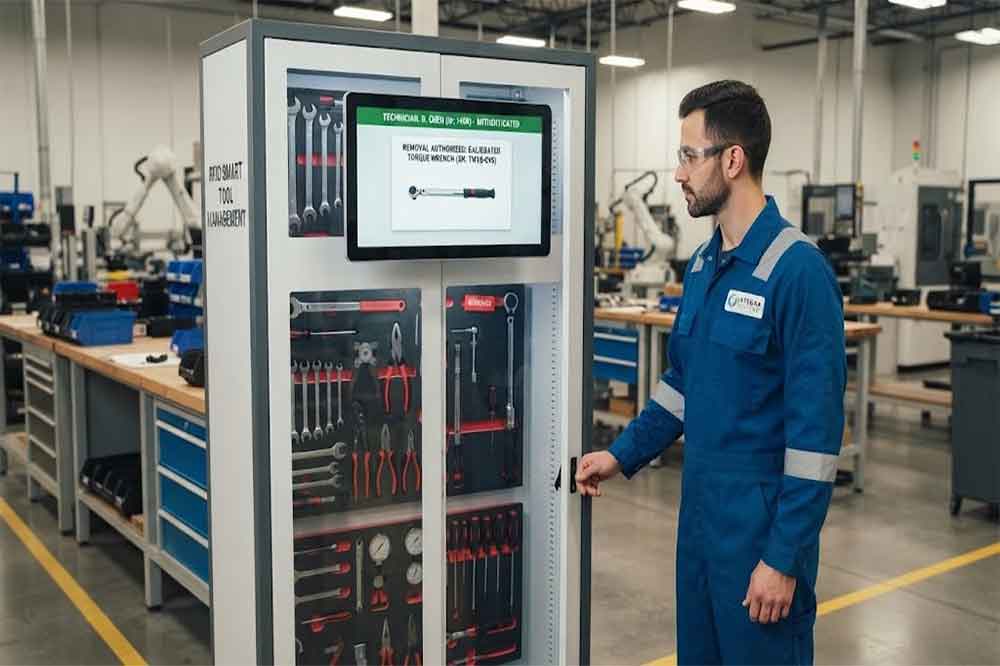
Some tools need tighter access control than ordinary equipment.
Examples include:
A restricted tool can be assigned to a specific group of users.
For example:
Tool A → Maintenance department
Tool B → Quality department
Tool C → Authorized technicians
Tool D → Calibration team
This prevents the tool cabinet from becoming a simple “one permission for everyone” system.
For high-value equipment, see our article on RFID Tool Cabinet for High-Value Tools.
Access control becomes much more useful when every important transaction is recorded.
An audit record may include:
This information can help managers investigate unusual situations.
For example, if a specialized tool is missing, the system may provide a history of recent transactions.
The record does not automatically determine responsibility. It provides factual information that managers can use to investigate the situation.
An RFID tool cabinet can be configured to reject users who do not have the required permissions.
A basic workflow could be:
User authentication → Permission check → Access approved or denied
If access is denied, the system may record:
Depending on the system design, administrators may also configure notifications for repeated unauthorized attempts.
The goal is not necessarily to make the system complicated.
The goal is to make access rules clear and consistently applied.
Factory personnel do not always have permanent responsibilities.
A technician may temporarily support another department.
An external service engineer may need access for one maintenance task.
A contractor may require access during a scheduled project.
The system should therefore support flexible permission management when required.
For example:
Temporary technician → Access to maintenance tools → Valid for a defined period → Permission expires
This can be more practical than manually changing the entire cabinet’s access policy.
Permission changes should also be logged where appropriate.
Large factories may have multiple RFID tool cabinets.
For example:
A centralized software platform can manage user permissions across different cabinets.
A technician may have access to the maintenance cabinet but not the quality department’s precision instruments.
Another employee may have access to production tools but not specialized maintenance equipment.
This creates a more structured access model for larger factories.
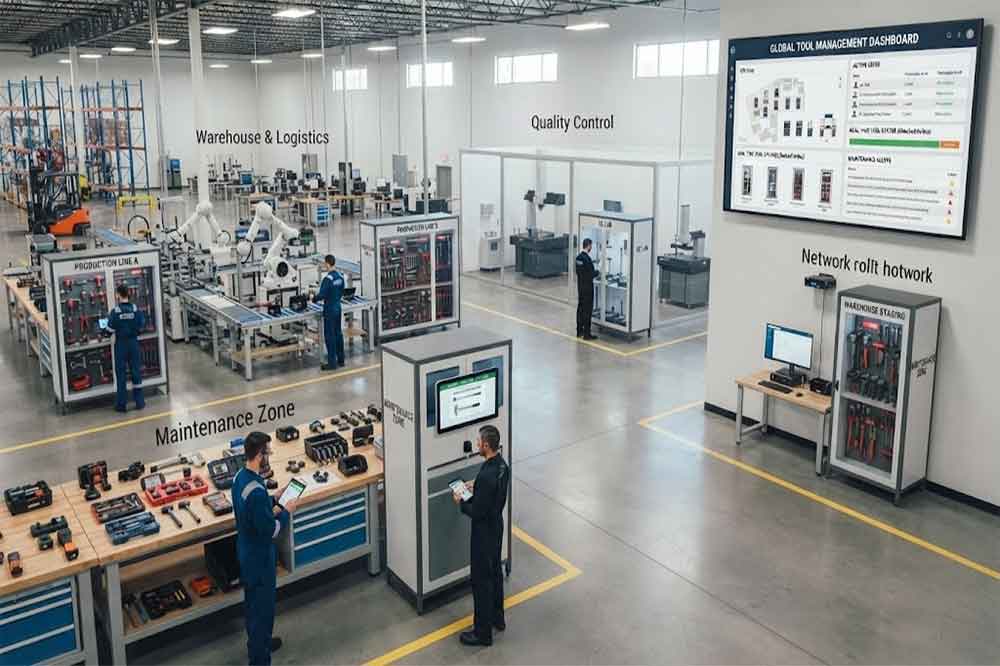
Access control and tool availability are related but not identical.
A user may have permission to use a tool, but the tool may currently be checked out.
For example:
User: Authorized
Tool: Permission granted
Tool status: Already checked out
In this situation, access permission alone does not mean the tool is available.
A complete tool management system should therefore consider both:
Who is allowed to use the tool?
and
Is the tool currently available?
This distinction becomes important when several technicians share limited equipment.
Maintenance departments can connect tool permissions with work activities.
For example:
Maintenance work order → Technician authentication → Authorized tool access → Tool checkout → Maintenance work → Tool return
A CMMS or other maintenance platform may provide the work order information, while the RFID cabinet manages physical tool access and transactions.
The exact workflow depends on the software integration.
For more information, see RFID Tool Cabinet Software Integration.
Precision tools may require additional controls.
A torque wrench, measuring instrument, or testing device may have a calibration status.
A system can potentially associate:
For example, a technician may have permission to use a torque wrench, but the software may show that the tool is currently unavailable because it is awaiting calibration.
This prevents user authorization from being confused with tool readiness.
The RFID system should work alongside the factory’s existing quality and calibration procedures.
Before selecting a system, managers should consider several questions.
How will employees identify themselves?
Can different departments and roles have different permissions?
Can specific tools have different access requirements?
Does the system record access and tool movement?
Can permissions be managed across multiple locations?
Can the system communicate with existing factory software?
What happens if the network connection is temporarily unavailable?
Can authorized administrators update users and permissions easily?
For a broader selection process, see how to choose an RFID tool cabinet.
A technically advanced system can still fail if the access policy is poorly designed.
This reduces the value of permission management.
Employees may avoid using the system if normal access becomes inconvenient.
Contractors and temporary technicians may require different access rules.
Permission does not mean that the tool is currently available.
Employee roles can change, so permissions should be reviewed periodically.
The complete workflow should be tested with actual users and tools.
A factory can introduce access-controlled RFID tool management in stages.
Group employees according to departments and responsibilities.
Separate general, specialized, high-value, and restricted tools.
Determine who can access each cabinet and tool group.
Choose RFID cards, PINs, biometrics, or another suitable method.
Assign RFID tags and connect them to tool records.
Set up readers, locks, software, and user permissions.
Test checkout, return, rejected access, missing tools, and permission changes.
Start with one department before expanding to the wider factory.
RFID tool cabinet access control connects user authentication with physical tool management.
Instead of simply locking a cabinet, the system can determine who is allowed to access tools, identify which tools are removed, record transactions, and provide a history of tool movement.
For factories, the most practical approach is to design permissions around real job responsibilities. General tools, specialized equipment, precision instruments, and high-value tools may require different access rules.
A successful deployment should balance security, convenience, tool availability, accurate RFID identification, and software integration.
It is a system that identifies users and checks their permissions before allowing access to an RFID-enabled tool cabinet or specific tools.
Yes. Permissions can be organized by department, role, user, cabinet, or tool group, depending on the software and system design.
Depending on the system configuration, rejected access attempts can be recorded with information such as user, time, cabinet, and access result.
Yes. A centralized platform can potentially manage users and permissions across multiple cabinets and factory locations.
No. A user can have permission to use a tool while the tool is already checked out. Access control and tool availability should be managed separately.

Cykeo’s RFID Smart Tool Cabinet enables 10-second tool audits, user access control & real-time alerts for construction/oil/gas. Features 21.5″ touchscreen, IP54 steel body & -30°C~60°C operation. Supports SAP/Oracle integration.

Cykeo’s Intelligent Weighing Tool Cabinet combines weight sensors & RFID for 100% tool accountability. Features solar/4G options, IP54 steel-glass body & nuclear/rail compliance. Supports SAP/Oracle integration.

Cykeo’s solar-powered RFID Inventory Tool Cabinet enables 5-second audits for remote sites. Features 160W solar, Android 7.1, 4G & extreme temp operation for oil/energy/mining sectors.

Cykeo’s industrial RFID Tool Cart features 14″ touchscreen, 400+ tool scanning, and carbon steel construction for aviation MRO, power plants and construction sites. 5-second inventory scans.

Cykeo CYKEO-TC RFID multi-drawer tool cart manages 300+ tools via UHF RFID, features fingerprint/face recognition, Android/Windows OS, and SAP integration for nuclear/railway/fire safety sectors. IP54 rated for harsh environments.

Cykeo CYKEO-GTC4 RFID tool inventory cart manages 300+ tools via UHF RFID, features instant scanning, fingerprint/face recognition, and SAP integration for nuclear/railway/fire safety sectors. IP54 rated for harsh environments.

Cykeo CYKEO-GTC7 RFID aviation maintenance cart features military-grade build, blockchain audits, and predictive tool alerts for aircraft MRO. Achieves EASA/FAA compliance.

Cykeo CYKEO-GTC7A RFID real-time tool tracking cart features 99.9% accuracy, FOD prevention, and SAP integration for aviation/plant maintenance. Military-grade construction.

Cykeo CYKEO-GTC4B RFID mobile tool cart delivers 300-tool verification in 7 seconds with modular drawers, ≤150W power, and SAP integration for industrial/aviation use.

Cykeo CYKEO-GTC4C RFID workshop tool control cart delivers 300-tool inventory in 3 seconds with 10hr battery, SAP integration, and FOD prevention for industrial workshops.

Cykeo’s CYKEO-GTC4A multi-drawer RFID tool cart delivers 7-second aviation tool inventories, 10-hour battery, and dual authentication. ISO 18000-6C compliant for MRO/manufacturing.

Cykeo’s MIL-STD RFID tool tracking cart scans 300 tools in 7 seconds, with -20°C~60°C operation and FOD prevention for aviation/energy industries.

Cykeo’s space-saving RFID tool management cabinet offers 1000-tool capacity, ≤5s scans, and 24/7 unmanned operation for manufacturing/assembly plants.

Cykeo’s RFID industrial tool cabinet offers modular shelves, 21.5″ touchscreen, and voice guidance for manufacturing/energy sectors. 24/7 operation with ≤80W power.

Cykeo’s RFID secure tool cabinet features 4 lockable compartments, ≤150W power, and 24/7 monitoring for pharma/aerospace/electronics industries.

Cykeo’s RFID aviation tool cabinet features triple authentication, 14″ HD touchscreen, and thermostatic control for aircraft MRO/FAA compliance.

Cykeo’s RFID tool tracking system delivers self-service check-in/out, real-time alerts, and multilingual interface for correctional/military security.

Cykeo’s off-grid RFID tool inventory system features solar/wind power, -30°C~60°C operation, and military-grade durability for mining/energy/military sectors.

Cykeo’s industrial RFID tool accountability cabinet delivers 99.9% scan accuracy, adjustable shelves, and 24/7 operation for automotive/aerospace manufacturing.

Cykeo’s RFID multi-drawer tool cabinet features 5 adjustable drawers, biometric access, and 99.9% scan accuracy for automotive/aerospace manufacturing.

Cykeo’s RFID Automated Tool Cabinet delivers military security, adjustable shelving, and Java/C# SDK integration for defense/aerospace manufacturing.

Cykeo’s RFID scalable tool cabinet features multi-unit management, voice guidance, and semi-outdoor durability for automotive/construction/logistics.

Cykeo CYKEO-GT1B industrial RFID tool storage cabinet features Impinj R2000 UHF technology, 1,000+ tool capacity, IP54 protection, and Windows/Android OS for manufacturing/aviation MRO. Includes auto check-in/out and SAP/Oracle sync.

Cykeo CYKEO-GT3C industrial RFID tool checkout system Cabinet features millimeter-wave scanning, 280-layer storage, dual OS, and 99.9% accuracy for aviation/semiconductor sectors. Supports auto check-in/out and real-time SAP sync.


Cykeo CYKEO-GT3D RFID smart tool cabinet offers 5-second inventory scanning for 300+ tools, dual authentication, and 24/7 automated management for industrial facilities.

Discover the CYKEO-B1A Industrial RFID Backpack featuring advanced tool tracking technology with 25cm RF shielding, 7-day battery life, and wearable design for field maintenance professionals.
RFID Industry Writer | IoT & Asset Tracking Analyst
James writes about RFID technology, asset tracking, and the practical challenges of digital transformation across warehousing, retail, manufacturing, and logistics.
His work focuses on how RFID is applied in real-world operations—improving inventory visibility, automating workflows, and helping businesses manage assets with greater accuracy and efficiency.
He regularly covers topics including UHF RFID, smart cabinets, RFID portals, tool tracking, warehouse automation, and industrial IoT trends..
Learn how to maintain fixed RFID readers in high-dust environments. Discover Cykeo’s dustproofing strategies, cleaning routines, and firmware updates for reliable performance.
More
explore the working principle, application scenarios, core advantages, and key purchasing considerations of RFID proximity alarm systems
More
Discover whether long-range RFID readers can work through metal or concrete walls. Learn how Cykeo’s systems overcome interference in industrial and construction environments.
More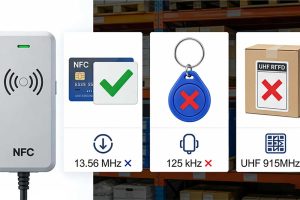
Trying to figure out if your NFC reader is enough? We explain exactly which RFID tags an NFC reader can and cannot read, and why it's not a warehouse solution.
More