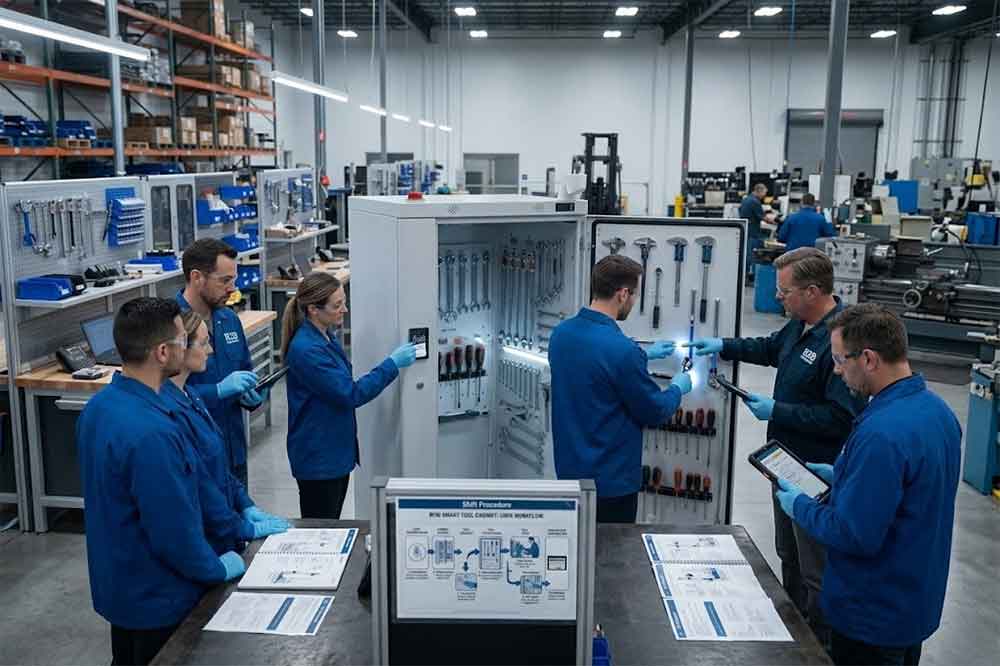
A smart tool cabinet changes how technicians interact with tools.
With traditional storage, an employee may open a drawer, take a wrench or torque tool, and start working. The system may not know who took it or when it should come back.
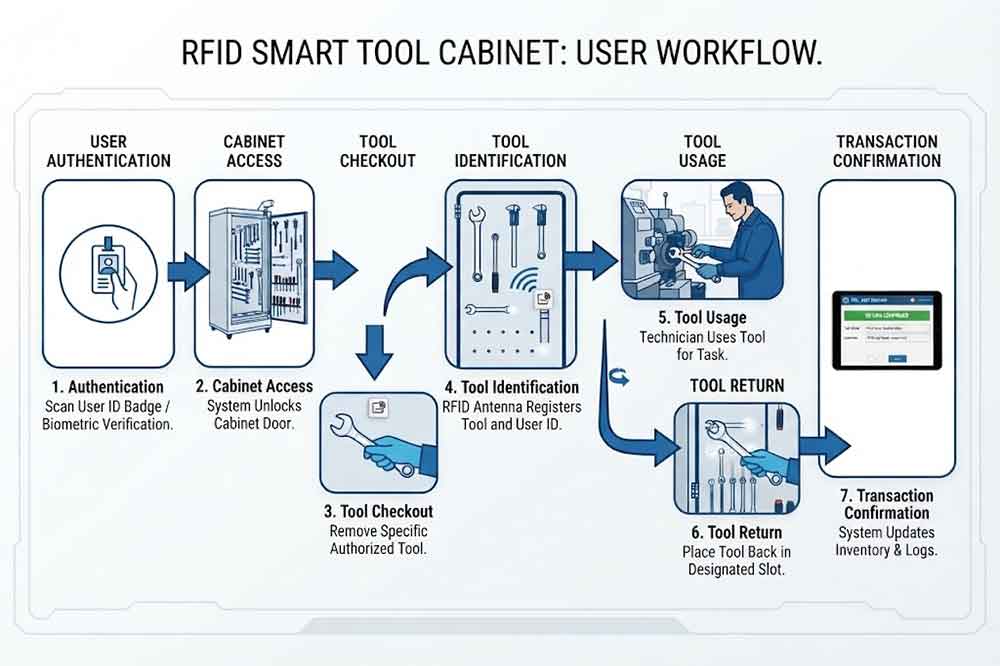
An RFID-enabled cabinet introduces a more structured process.
The user may need to authenticate first. The cabinet identifies tagged tools, records transactions, and sends information to the management system. That creates better visibility, but only when employees follow the intended workflow.
For this reason, user training should be planned before the system goes live.
Training is also closely connected with [RFID tool cabinet deployment]. A cabinet that works technically but is difficult for employees to operate may still create problems during daily production or maintenance work.
1. Start With the Actual User Roles
Not everyone needs the same level of training.
A maintenance technician does not need to understand every API or database function. On the other hand, an administrator may need to configure users, permissions, and reports.
A practical training structure can include four main groups.
Supervisors often become the first point of contact when something goes wrong.
They should know how to handle situations such as:
Overdue tools
Missing tools
Incorrect returns
Damaged RFID tags
Restricted-tool requests
Inventory discrepancies
User permission problems
Supervisors can also review whether employees are actually following the intended workflow.
For example, if a tool is repeatedly checked out without a corresponding return record, the issue may not be a hardware problem. It could indicate a training or workflow problem.
10. Teach Inventory Exception Handling
Employees should understand what inventory information means.
An RFID tool cabinet may provide information about:
Tools currently inside
Tools checked out
Tools expected to be returned
Missing tools
Unexpected tools
Tool locations
Transaction history
The system should not be presented as a magic solution that eliminates every possible inventory discrepancy.
RFID performance depends on cabinet design, tag selection, tool materials, reader configuration, and operating conditions.
Users should know how to report discrepancies instead of trying to manually correct records without authorization.
11. Create a Simple Training Checklist
A short checklist makes training easier to repeat.
Regular User Checklist
Authenticate correctly
Find the required tool
Check out the tool
Confirm the transaction
Return the tool
Confirm the return
Report RFID problems
Report damaged tools
Supervisor Checklist
Review overdue tools
Check inventory
Review transactions
Handle exceptions
Manage user permissions
Review unusual activity
Administrator Checklist
Manage users
Configure permissions
Manage tool records
Review system logs
Support integrations
Maintain configuration records
12. Measure Whether Training Actually Works
Training completion alone does not prove that employees understand the system.
After deployment, managers can monitor operational indicators such as:
Incorrect checkout records
Missing return records
Unusual manual corrections
Repeated authentication problems
RFID tag issue reports
Inventory discrepancies
User support requests
A short review after the first few weeks can identify where additional training is needed.
The reporting data can also connect with [RFID tool cabinet ROI] when the company wants to evaluate the operational impact of the system.
Common Training Mistakes
Several problems appear repeatedly during smart tool cabinet deployment.
Training Only the Technical Team
The IT or engineering team may understand the system well, but daily users still need practical training.
Using Only Demonstrations
Watching a technician operate the cabinet is different from using it independently.
Ignoring Exceptions
Training should include missing tools, unreadable tags, permission problems, and incorrect returns.
Training Only Before Installation
Users may forget procedures before the system becomes part of their daily routine.
No Training for New Employees
Without onboarding, new users may create inconsistent workflows.
Too Much Technical Detail
Regular users generally need simple operating instructions rather than detailed RFID engineering information.
A Practical Training Schedule
A simple training plan could be organized into several stages.
Provide hands-on training for every relevant shift.
Confirm that users can complete checkout and return independently.
After Go-Live
Monitor common questions and system exceptions.
Provide refresher training where necessary.
Ongoing
Add RFID cabinet training to the onboarding process for new employees.
RFID Tool Cabinet Training Checklist
Before considering training complete, confirm that:
All regular users have been trained
All shifts have received training
Supervisors understand exception handling
Administrators understand user permissions
Employees can complete checkout independently
Employees can complete returns correctly
Users understand RFID tag handling
Users know how to report problems
New-user training materials are available
Refresher training is planned
Conclusion
An RFID tool cabinet can automate much of the identification and tracking process, but employees remain an important part of the workflow.
Effective training should focus on real tasks: authentication, tool checkout, tool return, inventory checks, restricted access, and exception handling. Different users should receive different levels of training based on their responsibilities.
For factories deploying multiple cabinets, standardized training is especially useful. It helps technicians across departments and shifts follow the same basic procedures while giving supervisors and administrators the additional knowledge they need.
The goal is not to teach every employee how RFID technology works internally. The goal is to make the smart tool management workflow clear, practical, and repeatable.
Frequently Asked Questions
1. Who needs RFID tool cabinet training?
Regular users, supervisors, administrators, maintenance staff, and technical teams may all need training, but the depth should match their responsibilities.
2. How long does RFID tool cabinet training take?
It depends on system complexity and user roles. Basic users generally need practical workflow training, while administrators and IT teams require more technical instruction.
3. Should employees practice with real tools?
Yes. Real tools help employees understand checkout, return, RFID identification, and exception handling under actual working conditions.
4. Do temporary workers need RFID cabinet training?
Yes, if they use the cabinet. Their access can be limited according to company permissions and security requirements.
5. Is refresher training necessary?
It can be useful after system updates, workflow changes, recurring user errors, or the introduction of new employees and departments.
Cykeo’s RFID Smart Tool Cabinet enables 10-second tool audits, user access control & real-time alerts for construction/oil/gas. Features 21.5″ touchscreen, IP54 steel body & -30°C~60°C operation. Supports SAP/Oracle integration.
Cykeo’s industrial RFID Tool Cart features 14″ touchscreen, 400+ tool scanning, and carbon steel construction for aviation MRO, power plants and construction sites. 5-second inventory scans.
Cykeo CYKEO-TC RFID multi-drawer tool cart manages 300+ tools via UHF RFID, features fingerprint/face recognition, Android/Windows OS, and SAP integration for nuclear/railway/fire safety sectors. IP54 rated for harsh environments.
Cykeo CYKEO-GTC4 RFID tool inventory cart manages 300+ tools via UHF RFID, features instant scanning, fingerprint/face recognition, and SAP integration for nuclear/railway/fire safety sectors. IP54 rated for harsh environments.
Cykeo CYKEO-GTC7A RFID real-time tool tracking cart features 99.9% accuracy, FOD prevention, and SAP integration for aviation/plant maintenance. Military-grade construction.
Cykeo CYKEO-GTC4B RFID mobile tool cart delivers 300-tool verification in 7 seconds with modular drawers, ≤150W power, and SAP integration for industrial/aviation use.
Cykeo CYKEO-GTC4C RFID workshop tool control cart delivers 300-tool inventory in 3 seconds with 10hr battery, SAP integration, and FOD prevention for industrial workshops.
Cykeo’s off-grid RFID tool inventory system features solar/wind power, -30°C~60°C operation, and military-grade durability for mining/energy/military sectors.
Cykeo’s RFID multi-drawer tool cabinet features 5 adjustable drawers, biometric access, and 99.9% scan accuracy for automotive/aerospace manufacturing.
Cykeo CYKEO-GT1B industrial RFID tool storage cabinet features Impinj R2000 UHF technology, 1,000+ tool capacity, IP54 protection, and Windows/Android OS for manufacturing/aviation MRO. Includes auto check-in/out and SAP/Oracle sync.
Cykeo CYKEO-GT3C industrial RFID tool checkout system Cabinet features millimeter-wave scanning, 280-layer storage, dual OS, and 99.9% accuracy for aviation/semiconductor sectors. Supports auto check-in/out and real-time SAP sync.
Discover the CYKEO-B1A Industrial RFID Backpack featuring advanced tool tracking technology with 25cm RF shielding, 7-day battery life, and wearable design for field maintenance professionals.
RFID Industry Writer | IoT & Asset Tracking Analyst
James writes about RFID technology, asset tracking, and the practical challenges of digital transformation across warehousing, retail, manufacturing, and logistics.
His work focuses on how RFID is applied in real-world operations—improving inventory visibility, automating workflows, and helping businesses manage assets with greater accuracy and efficiency.
He regularly covers topics including UHF RFID, smart cabinets, RFID portals, tool tracking, warehouse automation, and industrial IoT trends..
Discover how rfid in hospital improves medical supply management with Cykeo RFID smart cabinets, enabling real-time inventory, 99.9% read accuracy, full traceability, and automated hospital workflows.
A long range RFID scanner helps e-commerce fulfillment centers automatically identify tagged totes, cartons, picking carts, order batches, and return contain...
RFID motherboard is what turns RFID readers and antennas into a real smart cabinet. Learn how it controls inventory, access, sensors, and system integration inside RFID cabinets.
Learn what do rfid mean and how RFID technology enables smart tracking, automated identification, and accurate data management for modern industries with Cykeo.
 Cykeo RFID IoT Solution Products R&D Manufacturer