RFID Tool Cabinet vs. Traditional Tool Storage: Key Differences
Tool storage has a direct effect on maintenance efficiency, production preparation, and workplace organization. In a small workshop, a labeled cabinet and a sign-out sheet may be enough. In a larger factory, however, tools may be shared by several teams, moved between workstations, or used for time-sensitive maintenance tasks.
When tool movement becomes difficult to follow, companies often consider an RFID tool cabinet. This type of cabinet combines RFID tags, readers, antennas, access control, and software to identify tools and record their movement.
Traditional storage and RFID-enabled storage serve the same basic purpose: keeping tools organized and available. The main difference is how much information each system can collect and how much of the process is automated.
What Is Traditional Tool Storage?
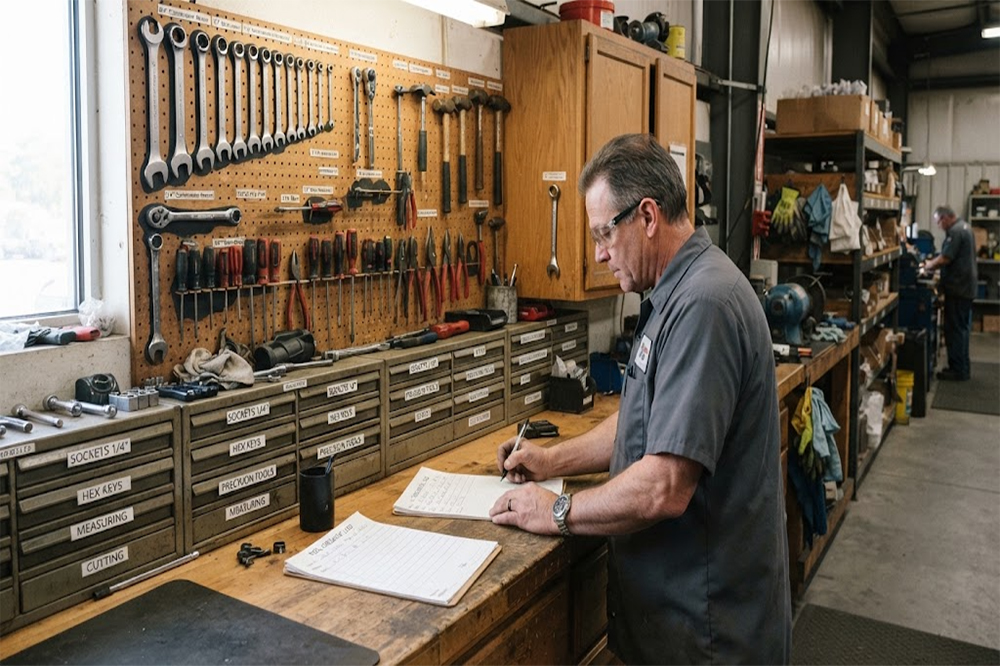
Traditional tool storage usually includes cabinets, drawers, shelves, tool carts, pegboards, lockers, or tool rooms. Tools may be identified using:
Printed labels
Engraved numbers
Color coding
Shadow boards
Barcode labels
Paper sign-out sheets
Spreadsheet records
Manual inspections
The system may work well when the tool quantity is limited and only a few people use the storage area.
For example, a small maintenance team may keep common hand tools in a labeled cabinet. A technician takes the required tools, records the transaction manually, and returns them after the job.
The main limitation is that the system depends heavily on users following the process correctly.
What Is an RFID Tool Cabinet?
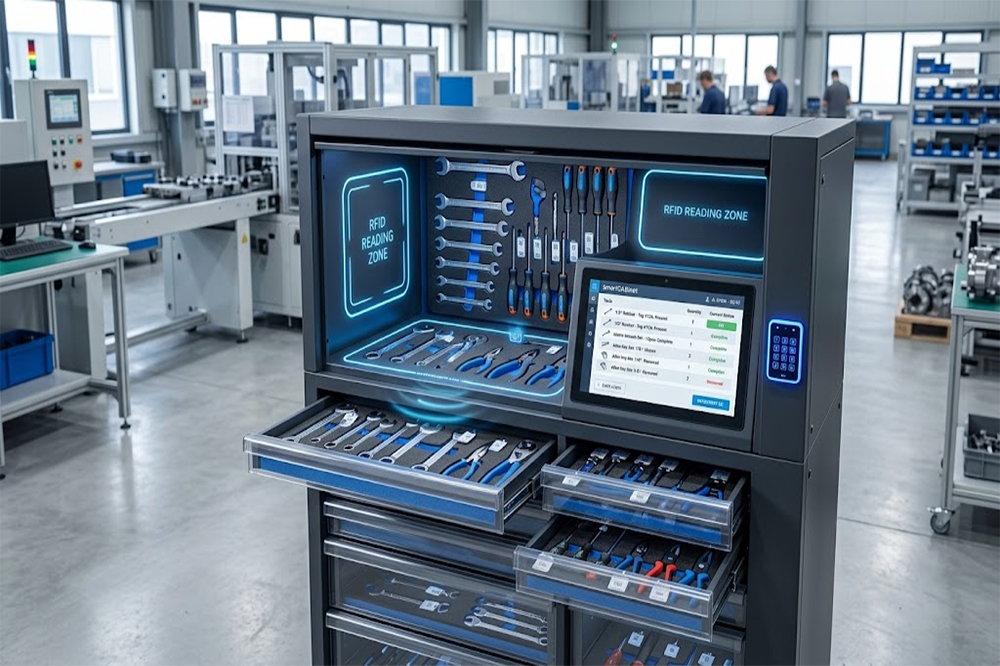
An RFID tool cabinet uses radio frequency identification to identify tagged tools automatically. Each tool receives a unique RFID tag, and the cabinet uses RFID readers and antennas to detect the tags.
When a user accesses the cabinet, the system can record which tools were removed or returned. The software may also update inventory status and connect tool movement with a specific user.
The two approaches differ in several important areas.
Management Area
Traditional Tool Storage
RFID Tool Cabinet
Tool identification
Manual labels or visual recognition
RFID-based automatic identification
Checkout process
Paper, spreadsheet, or verbal record
Automatic transaction recording
User identification
Manual entry or basic key access
RFID card, PIN, biometric, or software login
Inventory checks
Manual counting or visual inspection
Automatic or semi-automatic RFID detection
Tool status
Updated manually
Updated through detected movement
Missing tool investigation
Relies on memory and records
Uses digital transaction history
Access control
Keys or general access
Configurable electronic permissions
Reporting
Manual reports
Digital dashboards and usage records
Integration
Often limited
May connect with ERP, MES, or maintenance software
Initial investment
Usually lower
Usually higher
The appropriate choice depends on tool quantity, user volume, security requirements, and the cost of tool-related delays.
1. Tool Identification
Traditional Storage
Traditional cabinets normally rely on labels, numbers, colors, or tool outlines. Users identify tools by looking at them or checking a list.
This method is simple, but it may become difficult when tools look similar or when several tools are stored together.
RFID Tool Cabinet
An RFID tool cabinet assigns a unique RFID identity to each tool. The system can recognize the tool without requiring the user to type its number or scan a barcode manually.
This is particularly useful for:
Similar-looking tools
Large tool inventories
Shared maintenance equipment
High-value instruments
Tools stored in drawers or compartments
RFID identification still depends on suitable tag placement and reliable reading performance.
2. Tool Checkout and Return
Traditional Storage
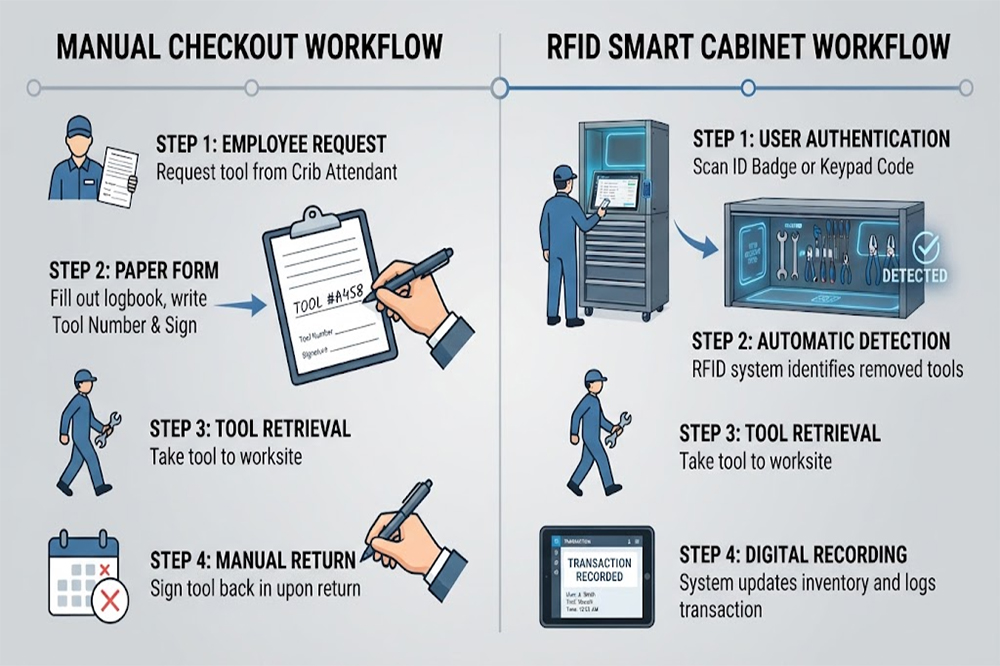
A traditional checkout process may require users to:
Find the tool.
Write down the tool number.
Enter their name.
Record the borrowing time.
Sign the form.
Repeat the process when returning the tool.
In practice, users may forget to complete one or more steps, especially during urgent maintenance work.
RFID Tool Cabinet
An RFID cabinet can connect user authentication with automatic tool detection. When tools are removed, the system records the transaction. When they are returned, the cabinet updates the tool status.
This makes the cabinet suitable for an [RFID tool checkout system] where speed and traceability are important.
3. Inventory Management
Traditional Storage
Traditional inventory checks are usually performed by counting tools manually or comparing the physical cabinet with a spreadsheet.
This may take considerable time when:
The cabinet contains many tools.
Several drawers are used.
Tools are shared between departments.
Some tools are under maintenance.
Tool records are not updated consistently.
RFID Tool Cabinet
An RFID cabinet can detect tagged tools and compare the detected list with the expected inventory. The software may show available, checked-out, overdue, missing, or maintenance-related statuses.
However, the result depends on the cabinet’s RFID design. Metal tools, dense storage, tag orientation, and antenna placement can affect reading performance.
4. User Accountability
Traditional Storage
Traditional storage may use a key, shared access code, or manual sign-out sheet. These methods may not provide a complete record of who used a tool.
When a tool is missing, the manager may need to ask employees or review incomplete paperwork.
RFID Tool Cabinet
An RFID cabinet can require user authentication before access. The system may record:
User identity
Tool ID
Checkout time
Return time
Access location
Tool status
Related work order
This creates a more detailed transaction history and supports a wider [RFID tool management] process.
5. Access Control
Traditional Storage
Traditional cabinets may use keys, padlocks, or general access permissions. Once a person has access to the cabinet, they may be able to use most of the stored tools.
This can be acceptable for common hand tools, but it may not be suitable for restricted or high-value equipment.
RFID Tool Cabinet
An RFID cabinet can assign permissions according to user roles, departments, certifications, or tool categories.
For example:
General technicians can access standard tools.
Qualified engineers can access testing instruments.
Calibration staff can access measurement equipment.
These functions make RFID cabinets useful as part of an [RFID tool control] process.
6. Missing Tool Investigation
Traditional Storage
When a tool is missing, a traditional system may only show that the tool was present during the last manual inventory check. The manager may not know who used it or when it left the storage area.
The investigation often depends on memory, paper records, and workplace communication.
RFID Tool Cabinet
An RFID cabinet can show the last recorded user, transaction time, and tool status. This does not guarantee that the tool can be located everywhere, but it can reduce the uncertainty around its last known movement.
For broader movement records across multiple areas, organizations may combine the cabinet with an [RFID tool tracking] solution.
7. Reporting and Audits
Traditional Storage
Traditional reports are often created manually from paper records or spreadsheets. This can make it difficult to analyze tool usage over time.
Managers may have limited visibility into:
Frequently borrowed tools
Long overdue tools
Repeated access problems
Tool demand by department
Inventory changes
Tool replacement needs
RFID Tool Cabinet
An RFID cabinet can generate digital reports based on transaction and inventory data. Depending on the software, managers may review tool usage, overdue items, access history, and inventory differences.
These reports can support purchasing decisions, workflow planning, audits, and maintenance management.
8. Integration with Other Systems
Traditional tool storage is often operated as a separate process. Users may need to manually copy information into inventory or maintenance software.
An RFID tool cabinet may support integration with:
ERP systems
MES platforms
Maintenance management software
Work-order systems
Warehouse management platforms
Employee databases
Access control systems
For example, a maintenance work order may list the required tools, while the RFID cabinet records which tools were actually borrowed.
Integration capabilities vary by supplier. Companies should confirm available APIs, communication protocols, data formats, and software compatibility before deployment.
When Is Traditional Tool Storage Still Suitable?
Traditional storage may remain practical when:
The tool inventory is small.
Only a few users share the tools.
Tool value is relatively low.
Manual records are consistently maintained.
The storage area has limited access requirements.
The company does not need detailed usage reports.
The cost of automation is difficult to justify.
A simple cabinet can be effective when the workflow is stable and easy to supervise.
When Should a Company Consider an RFID Tool Cabinet?
An RFID tool cabinet may be worth evaluating when:
Many employees share tools.
Tools are frequently borrowed and returned.
Missing tools cause production delays.
High-value equipment requires controlled access.
Manual inventory takes too much time.
Tool usage records are incomplete.
Several departments share one tool room.
The company needs digital reports.
Tool management must connect with maintenance software.
Tool accountability is a formal requirement.
The decision should consider both the operational benefits and the implementation requirements.
Important Implementation Considerations
Before replacing traditional storage with RFID, companies should evaluate:
RFID Tag Selection
Metal tools may require on-metal RFID tags. Tags should be tested on the actual tool surfaces and under real operating conditions.
Cabinet Layout
Drawers, shelves, partitions, and metal structures can affect RFID signal coverage. The storage layout should be designed around the tools being managed.
Reading Performance
Testing should include realistic tool quantities, mixed tool sizes, and normal user behavior. Empty-cabinet testing alone may not represent actual performance.
User Procedures
Employees still need to return tools correctly and follow access procedures. RFID improves records, but it does not replace operational discipline.
Software and Integration
The system should support the required dashboards, permissions, reports, alerts, and software connections.
Maintenance
Readers, antennas, locks, controllers, and software require inspection and maintenance. Service access should be considered during cabinet design.
Final Thoughts
Traditional tool storage and RFID tool cabinets both help organizations store and manage equipment. Traditional systems are often simple, affordable, and suitable for small or low-risk environments. RFID tool cabinets provide more automation, detailed transaction records, controlled access, and better inventory visibility.
The choice depends on the organization’s tool quantity, user volume, workflow complexity, security requirements, and integration needs. RFID is most valuable when tool movement, accountability, and inventory accuracy have a measurable effect on daily operations.
For companies moving toward connected industrial management, an RFID tool cabinet can provide a practical bridge between physical tool storage and digital workflow control.
Cykeo’s RFID Smart Tool Cabinet enables 10-second tool audits, user access control & real-time alerts for construction/oil/gas. Features 21.5″ touchscreen, IP54 steel body & -30°C~60°C operation. Supports SAP/Oracle integration.
Cykeo’s industrial RFID Tool Cart features 14″ touchscreen, 400+ tool scanning, and carbon steel construction for aviation MRO, power plants and construction sites. 5-second inventory scans.
Cykeo CYKEO-TC RFID multi-drawer tool cart manages 300+ tools via UHF RFID, features fingerprint/face recognition, Android/Windows OS, and SAP integration for nuclear/railway/fire safety sectors. IP54 rated for harsh environments.
Cykeo CYKEO-GTC4 RFID tool inventory cart manages 300+ tools via UHF RFID, features instant scanning, fingerprint/face recognition, and SAP integration for nuclear/railway/fire safety sectors. IP54 rated for harsh environments.
Cykeo CYKEO-GTC7A RFID real-time tool tracking cart features 99.9% accuracy, FOD prevention, and SAP integration for aviation/plant maintenance. Military-grade construction.
Cykeo CYKEO-GTC4B RFID mobile tool cart delivers 300-tool verification in 7 seconds with modular drawers, ≤150W power, and SAP integration for industrial/aviation use.
Cykeo CYKEO-GTC4C RFID workshop tool control cart delivers 300-tool inventory in 3 seconds with 10hr battery, SAP integration, and FOD prevention for industrial workshops.
Cykeo’s off-grid RFID tool inventory system features solar/wind power, -30°C~60°C operation, and military-grade durability for mining/energy/military sectors.
Cykeo’s RFID multi-drawer tool cabinet features 5 adjustable drawers, biometric access, and 99.9% scan accuracy for automotive/aerospace manufacturing.
Cykeo CYKEO-GT1B industrial RFID tool storage cabinet features Impinj R2000 UHF technology, 1,000+ tool capacity, IP54 protection, and Windows/Android OS for manufacturing/aviation MRO. Includes auto check-in/out and SAP/Oracle sync.
Cykeo CYKEO-GT3C industrial RFID tool checkout system Cabinet features millimeter-wave scanning, 280-layer storage, dual OS, and 99.9% accuracy for aviation/semiconductor sectors. Supports auto check-in/out and real-time SAP sync.
Discover the CYKEO-B1A Industrial RFID Backpack featuring advanced tool tracking technology with 25cm RF shielding, 7-day battery life, and wearable design for field maintenance professionals.
RFID Industry Writer | IoT & Asset Tracking Analyst
James writes about RFID technology, asset tracking, and the practical challenges of digital transformation across warehousing, retail, manufacturing, and logistics.
His work focuses on how RFID is applied in real-world operations—improving inventory visibility, automating workflows, and helping businesses manage assets with greater accuracy and efficiency.
He regularly covers topics including UHF RFID, smart cabinets, RFID portals, tool tracking, warehouse automation, and industrial IoT trends..
Discover how a UHF RFID scanner improves inventory accuracy, asset visibility, and workflow efficiency. Learn expert insights, real deployment data, and industrial RFID best practices from Cykeo.
How kiosk RFID is used in self-checkout, smart vending, hospitals, and events. Real hands-on experience with its benefits, challenges, and lessons learned.
Discover how rfid chip clothing improves inventory accuracy, retail visibility, and loss prevention. Learn proven RFID apparel tracking strategies from Cykeo experts.
Learn the key differences between RFID passive and active tags, how they work, and where each type is used. Find out which RFID tag suits your project best.
 Cykeo RFID IoT Solution Products R&D Manufacturer