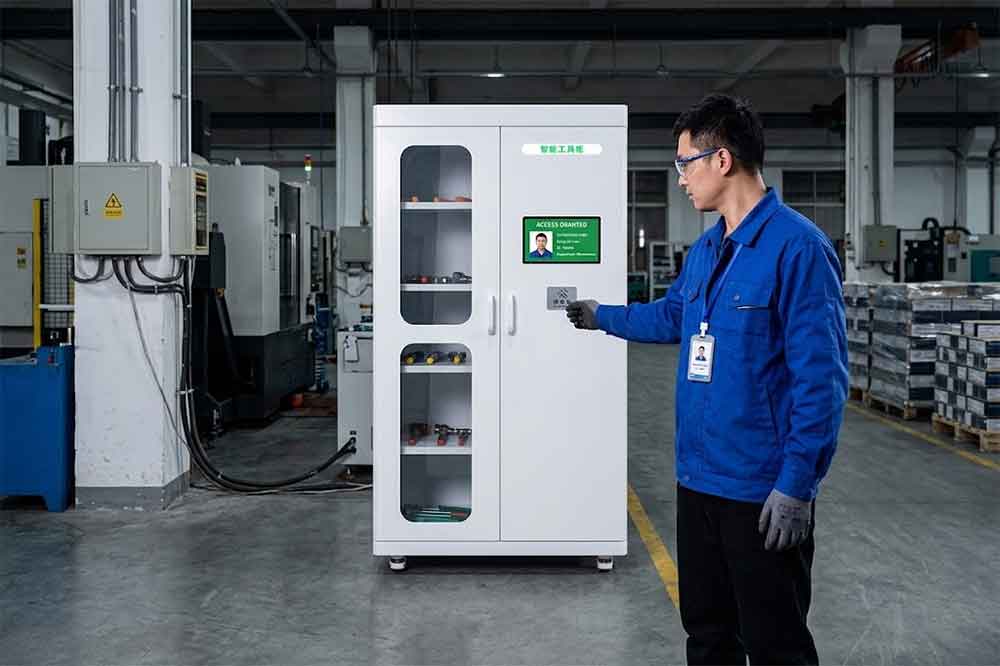
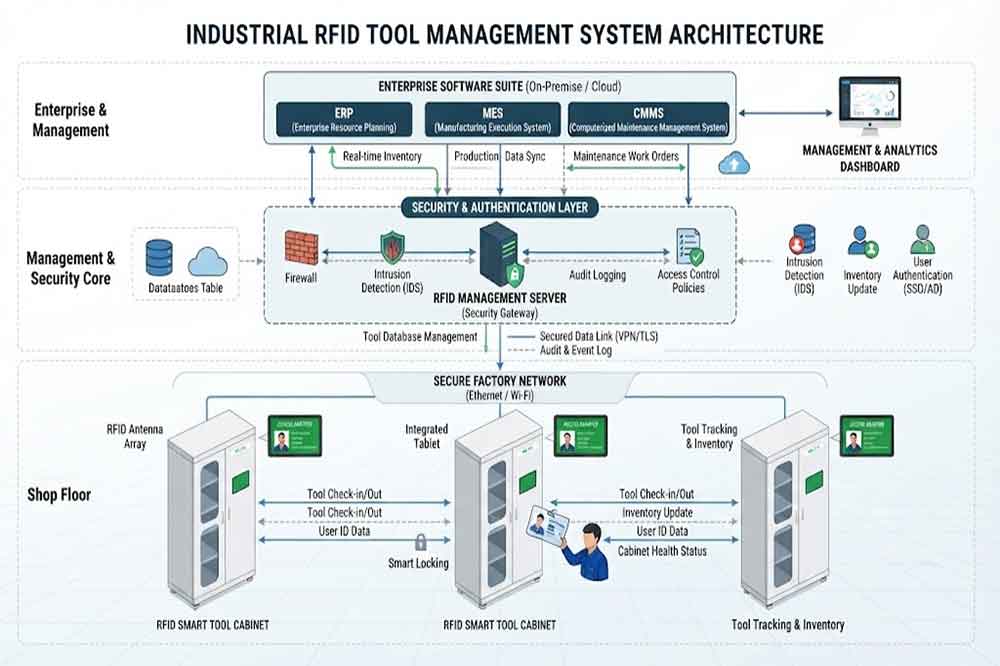
RFID tool cabinet does more than store and identify tools. Once the cabinet is connected to user authentication, tool permissions, inventory records, and enterprise software, security becomes an important part of the overall system.
For industrial organizations, tool cabinet security is not only about preventing unauthorized access. It also involves protecting user accounts, transaction records, communication between devices, and management data.
A well-planned RFID tool cabinet security system should therefore consider the cabinet hardware, RFID identification, user authentication, software, network, permissions, and data records together.
Why RFID Tool Cabinet Security Matters
Traditional tool storage usually depends on physical keys, locks, or employee supervision.
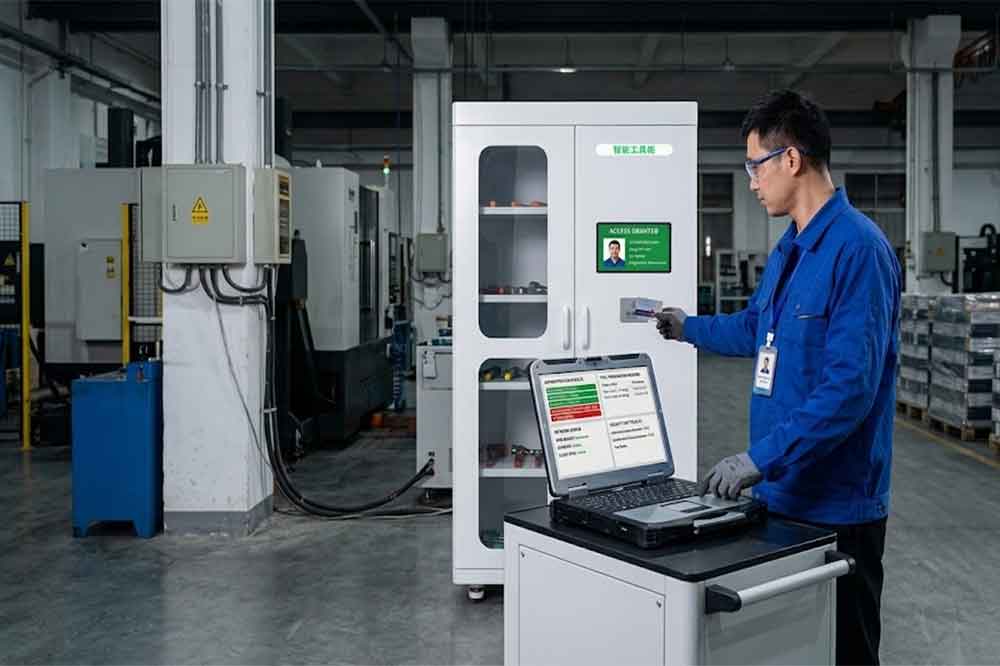
An RFID tool cabinet can introduce a more connected workflow. Users may authenticate themselves before opening a cabinet, and the system can associate tool transactions with specific users and timestamps.
This creates useful records, but it also means more system components need to be managed.
For example, a typical transaction may contain:
User → Cabinet → Tool → Time → Action
If the cabinet is connected to a central management platform, additional information may also include department, location, work order, and tool status.
The system therefore needs to answer two basic questions:
Who is allowed to access the tools?
How should tool and transaction data be protected?
These questions should be considered before deployment rather than after the system is already operating.
Control Who Can Access the RFID Tool Cabinet
User authentication is one of the first layers of security.
Depending on the system, users may authenticate through methods such as employee identification, RFID cards, PINs, biometric devices, or another configured authentication method.
The important point is that the cabinet should be able to associate an access event with a recognized user.
The authentication method should match the factory environment.
A busy production area may require fast identification, while a cabinet containing restricted equipment may require stronger authentication.
Security should not make normal tool access unnecessarily difficult. The workflow needs to balance protection with the speed required by technicians and production teams.
Use Role-Based Tool Permissions
Not every employee needs access to every tool.
A practical RFID tool management system can define different permissions for different user groups.
For example:
User Group
Possible Access
Maintenance Technician
Maintenance tools
Production Operator
Production tools
Engineer
Engineering tools
Quality Staff
Inspection tools
Supervisor
Wider cabinet access
Administrator
System configuration
Permissions can also be more specific.
A user may have permission to access a cabinet but not certain restricted tools inside it.
This distinction is useful when a cabinet contains both general-purpose tools and specialized equipment.
The system should also provide a process for changing permissions when employees change departments or responsibilities.
Protect Restricted and High-Value Tools
Some tools require additional control because of their cost, importance, or operational role.
Examples may include:
Specialized maintenance tools
Precision instruments
Calibration equipment
Production fixtures
Inspection equipment
High-value electronic tools
For these items, a company may want to know not only where the tool is, but also who accessed it and when.
However, RFID does not replace physical security procedures.
For particularly sensitive equipment, organizations may still need physical locks, restricted areas, employee procedures, or other security controls.
Record Every Important Tool Transaction
Transaction records are another important security layer.
A useful record may contain:
User ID
Tool ID
Cabinet ID
Location
Date
Time
Action
Tool status
For example:
User 026 checked out Tool 018 from Cabinet 03 at 14:18.
When the tool is returned, another event can be recorded.
Over time, these records create a history of tool activity.
This can help managers investigate questions such as:
Who last checked out the tool?
When was it removed?
Where was it last detected?
Was it returned?
Which cabinet recorded the transaction?
The goal is not simply to collect historical data. The records should be easy to search when a real operational question occurs.
Protect User Accounts
An RFID tool cabinet connected to software may have multiple users.
These can include:
Technicians
Supervisors
Managers
IT administrators
System integrators
Software developers
Not every account should have the same system permissions.
A technician may only need to use the cabinet.
A supervisor may need access to reports.
An administrator may need to configure users, tools, cabinets, and system settings.
Separating these responsibilities can reduce the risk of accidental configuration changes.
User accounts should also be reviewed regularly. Former employees, transferred employees, temporary workers, and external contractors should not retain unnecessary permissions.
Secure RFID Tool Data
Tool management data may appear simple, but it can become valuable when collected over a long period.
Records may show:
Tool usage patterns
Employee access
Department activity
Tool locations
Checkout frequency
Maintenance activities
Organizations should therefore consider how this information is stored and who can access it.
Access to management software should be limited according to job responsibilities.
Data retention rules should also be defined according to company requirements and applicable policies.
For systems connected to enterprise platforms, data protection requirements should be considered during the integration design.
Protect Communication Between Cabinets and Software
A multi-cabinet RFID deployment may include communication between:
RFID Cabinet → Local Network → Management Platform → Enterprise Software
Every connection becomes part of the system architecture.
Project teams should review:
Network access
Authentication
Communication protocols
API permissions
Server configuration
Device identification
Error handling
The exact technical implementation depends on the RFID cabinet and software platform.
For larger projects, RFID tool cabinet software integration should be planned together with security requirements rather than treating security as a separate task.
Secure API Integration
Many industrial customers already use ERP, MES, WMS, CMMS, or custom software.
If the RFID tool cabinet exchanges information through an API, the integration should define what data can be accessed and which systems are allowed to communicate.
For example, an API may exchange:
Tool ID → User ID → Cabinet ID → Transaction → Timestamp
But not every connected application needs access to every available field.
A well-designed integration should define:
Data ownership
API permissions
Authentication
Data fields
Error handling
Logging
Access limits
The exact security method should be selected by the customer’s IT or cybersecurity team based on the existing infrastructure.
Protect the Cabinet From Unauthorized Physical Access
Software security is only one part of the picture.
The physical cabinet also needs to be considered.
A cabinet installed in an open production area has different physical risks from one installed inside a controlled maintenance room.
Before installation, consider:
Cabinet location
Physical access
Visibility
Mounting
Power supply
Network connection
Environmental conditions
Access to electronic components
The cabinet should be positioned so that unauthorized people cannot easily interfere with the hardware.
For outdoor or demanding industrial environments, the physical protection requirements may also be different from those of an indoor office environment.
Manage Temporary Users
Industrial projects sometimes involve temporary employees, contractors, service engineers, or visitors.
Giving these users permanent access can create unnecessary security risks.
A better approach may be to provide temporary permissions with:
Defined start time
Defined end time
Specific cabinet access
Specific tool permissions
Clear user identification
For example, an external maintenance engineer may need access to one cabinet for a particular service period.
Once the task is complete, the temporary permission can be removed or automatically expire according to the system configuration.
Review Access Permissions Regularly
Permissions should not be treated as a one-time configuration.
Employees change jobs.
Departments change.
Tool responsibilities change.
New cabinets are installed.
Tools may also be moved from one department to another.
A regular permission review can identify users who no longer need access.
A simple review can check:
Current users
User departments
Assigned cabinets
Restricted tools
Temporary permissions
Administrator accounts
Inactive accounts
This is particularly important for factories with many RFID cabinets and large numbers of employees.
Security and Tool Cabinet Reporting
Security events become more useful when they can be reviewed through reports.
For example, managers may want to identify:
Unauthorized access attempts
Repeated failed authentication
Unusual cabinet activity
Tools accessed outside normal workflows
Long-term outstanding tools
Unexpected tool movements
These records can be combined with normal tool transaction data.
Security should be tested before the system is used in daily operations.
A practical test may include:
User Test
Attempt access with an authorized user.
Unauthorized User Test
Attempt access with a user who does not have permission.
Restricted Tool Test
Verify that restricted tools follow the configured access rules.
Account Test
Check whether disabled or expired users can still access the cabinet.
Transaction Test
Confirm that access and tool transactions are recorded correctly.
Network Test
Simulate temporary communication loss and verify system behavior.
Recovery Test
Confirm that the system returns to normal operation after communication is restored.
Testing should use the actual cabinet, RFID tags, software, and representative users whenever possible.
Common RFID Tool Cabinet Security Mistakes
Giving Everyone the Same Permissions
This makes it difficult to control restricted tools.
Keeping Old User Accounts
Inactive accounts can create unnecessary access risks.
Ignoring Temporary Users
Contractors and temporary workers should have clearly defined permissions.
Protecting Software but Ignoring Physical Access
A secure application cannot fully protect a cabinet that is physically accessible to unauthorized people.
Collecting Data Without Access Rules
Management records should be available only to appropriate users.
Skipping Security Tests
Problems are easier to fix during a pilot than after full deployment.
How to Build Secure RFID Tool Cabinet System
A practical approach can follow these steps:
1. Identify the tools
Separate general-purpose, specialized, high-value, and restricted tools.
2. Identify users
Define technicians, supervisors, administrators, contractors, and other user groups.
3. Define permissions
Determine who can access each cabinet and tool category.
4. Design the data structure
Define tool IDs, user IDs, cabinet IDs, locations, and transaction records.
5. Plan software integration
Review ERP, MES, WMS, CMMS, API, and network requirements.
6. Secure physical installation
Select appropriate cabinet locations and protect hardware access.
7. Test security
Test authorized access, unauthorized access, transactions, network failure, and recovery.
8. Review after deployment
Monitor the system and update permissions as users, tools, and workflows change.
Conclusion
RFID tool cabinet security involves much more than locking the cabinet.
A complete approach combines user authentication, tool permissions, transaction records, software access, network communication, physical protection, and regular permission reviews.
For organizations managing many tools or multiple cabinet locations, these security layers can provide better control over who accesses tools and how transactions are recorded.
The right security level depends on the tools, users, environment, and business workflow. A practical RFID tool cabinet system should protect restricted equipment without making everyday tool access unnecessarily complicated.
Testing the complete workflow before deployment is one of the most useful steps. It allows the project team to verify authentication, permissions, RFID identification, transaction records, software communication, and recovery procedures using real operating conditions.
Cykeo’s RFID Smart Tool Cabinet enables 10-second tool audits, user access control & real-time alerts for construction/oil/gas. Features 21.5″ touchscreen, IP54 steel body & -30°C~60°C operation. Supports SAP/Oracle integration.
Cykeo’s industrial RFID Tool Cart features 14″ touchscreen, 400+ tool scanning, and carbon steel construction for aviation MRO, power plants and construction sites. 5-second inventory scans.
Cykeo CYKEO-TC RFID multi-drawer tool cart manages 300+ tools via UHF RFID, features fingerprint/face recognition, Android/Windows OS, and SAP integration for nuclear/railway/fire safety sectors. IP54 rated for harsh environments.
Cykeo CYKEO-GTC4 RFID tool inventory cart manages 300+ tools via UHF RFID, features instant scanning, fingerprint/face recognition, and SAP integration for nuclear/railway/fire safety sectors. IP54 rated for harsh environments.
Cykeo CYKEO-GTC7A RFID real-time tool tracking cart features 99.9% accuracy, FOD prevention, and SAP integration for aviation/plant maintenance. Military-grade construction.
Cykeo CYKEO-GTC4B RFID mobile tool cart delivers 300-tool verification in 7 seconds with modular drawers, ≤150W power, and SAP integration for industrial/aviation use.
Cykeo CYKEO-GTC4C RFID workshop tool control cart delivers 300-tool inventory in 3 seconds with 10hr battery, SAP integration, and FOD prevention for industrial workshops.
Cykeo’s off-grid RFID tool inventory system features solar/wind power, -30°C~60°C operation, and military-grade durability for mining/energy/military sectors.
Cykeo’s RFID multi-drawer tool cabinet features 5 adjustable drawers, biometric access, and 99.9% scan accuracy for automotive/aerospace manufacturing.
Cykeo CYKEO-GT1B industrial RFID tool storage cabinet features Impinj R2000 UHF technology, 1,000+ tool capacity, IP54 protection, and Windows/Android OS for manufacturing/aviation MRO. Includes auto check-in/out and SAP/Oracle sync.
Cykeo CYKEO-GT3C industrial RFID tool checkout system Cabinet features millimeter-wave scanning, 280-layer storage, dual OS, and 99.9% accuracy for aviation/semiconductor sectors. Supports auto check-in/out and real-time SAP sync.
Discover the CYKEO-B1A Industrial RFID Backpack featuring advanced tool tracking technology with 25cm RF shielding, 7-day battery life, and wearable design for field maintenance professionals.
RFID Industry Writer | IoT & Asset Tracking Analyst
James writes about RFID technology, asset tracking, and the practical challenges of digital transformation across warehousing, retail, manufacturing, and logistics.
His work focuses on how RFID is applied in real-world operations—improving inventory visibility, automating workflows, and helping businesses manage assets with greater accuracy and efficiency.
He regularly covers topics including UHF RFID, smart cabinets, RFID portals, tool tracking, warehouse automation, and industrial IoT trends..
how an RFID employee tracking system transforms workplace safety and efficiency. From real-time location awareness to emergency mustering, learn how RFID helps modern teams work smarter — not harder.
The best long range RFID scanner is not necessarily the one with the highest power or longest advertised range. A suitable reader should match the tag, produ...
Wondering how small can an RFID reader be? CYKEO explores compact UHF modules as tiny as 18x21mm, embedded options, and size-versus-performance tradeoffs.
UHF RFID tags offer long-range reading, high-speed identification, and batch scanning capabilities. This article introduces the fundamentals of UHF RFID, its tag types, and key applications in hospital equipment tracking, consumables management, a...
 Cykeo RFID IoT Solution Products R&D Manufacturer