 Cykeo RFID IoT Solution Products R&D Manufacturer

How to Integrate a UHF RFID Tag Reader into Your Existing System
81Learn how to integrate a UHF RFID tag reader into your existing system, including API, SDK, hardware connections, and real-world integration tips for industrial RFID projects.
MoreAll RFID Product
Installing one RFID tool cabinet can be relatively straightforward. Deploying multiple cabinets across maintenance rooms, production areas, warehouses, and different buildings requires a much broader plan.
A successful RFID tool cabinet deployment should standardize hardware, RFID tags, software, user permissions, network communication, testing, training, and maintenance while still allowing each location to follow its own workflow.
The goal is not simply to install more cabinets.
The goal is to create one manageable tool-tracking system that can grow without becoming difficult to operate.
A pilot usually has a limited number of tools and users.
A larger deployment may involve:
This creates new questions.
Where is each tool now?
Which cabinet owns the inventory?
Can an employee use more than one cabinet?
What happens when a tool moves between departments?
How are permissions managed?
How are software updates deployed?
These questions should be answered before adding large numbers of cabinets.
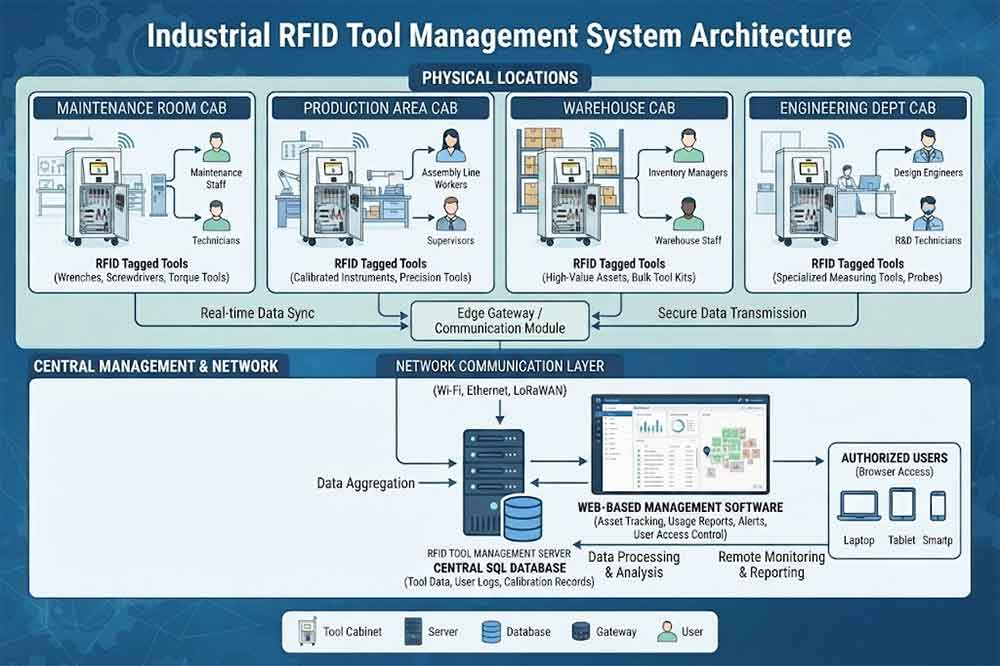
The first deployment step should be reviewing the pilot.
Do not immediately copy the pilot configuration to every location.
Review:
Some changes may be necessary.
For example, one department may use mostly metal hand tools while another stores measuring instruments. The same cabinet configuration may not be ideal for both.
The pilot should become a deployment reference, not an inflexible template.
Before installing multiple cabinets, create a location map.
Identify:
Then identify which tools are currently stored in each location.
This creates a baseline for deciding where RFID cabinets should be installed.
It also helps identify tools that regularly move between locations.
Each cabinet should have a clear digital identity.
For example:
Factory A
→ Maintenance Building
→ Tool Room
→ Cabinet 01
Or:
Factory A
→ Production Area 2
→ Maintenance Station
→ Cabinet 07
This structure becomes important when employees search for a tool or managers review inventory.
A cabinet should not simply appear as “Cabinet 01” in the software without location information.
Clear naming makes reporting and troubleshooting easier.
Every tool should have a unique digital identity.
A typical record can include:
The exact data structure depends on the management system.
The important point is consistency.
A tool should not receive a completely different identification method every time it moves to another department.
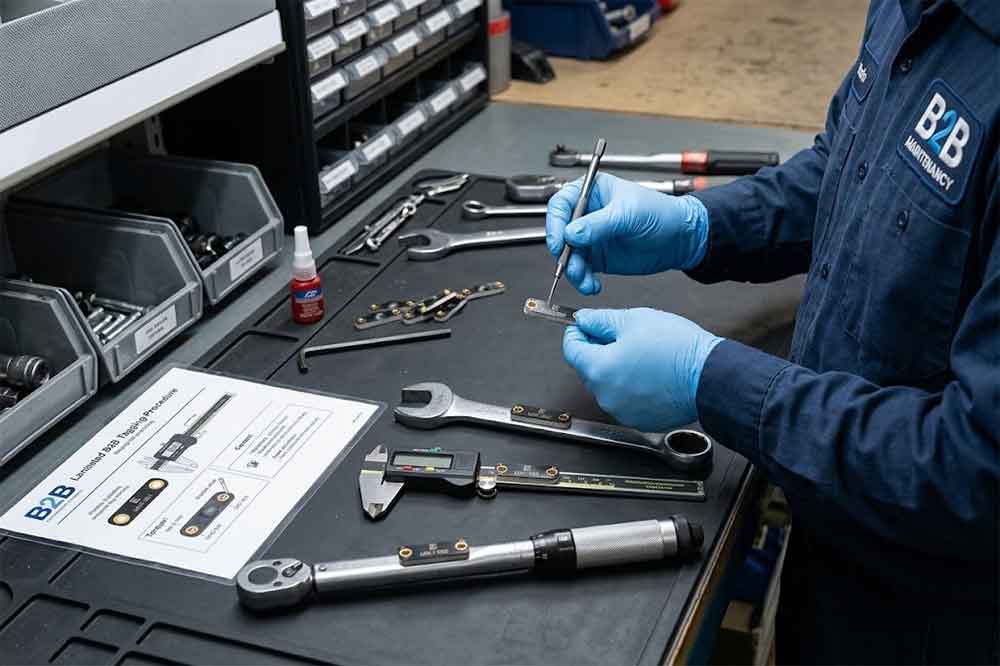
Multi-cabinet deployment makes tagging consistency more important.
Define rules for:
For example, all metal hand tools may use one approved tag type and mounting position.
Measuring equipment may require another tag configuration.
Document these rules before large-scale tagging begins.
Where possible, use a controlled hardware configuration.
Define:
Standard hardware can simplify:
However, standardization should not prevent necessary differences between departments.
A cabinet used for long maintenance tools may require a different internal structure from one used for small precision instruments.
Multiple RFID cabinets need reliable communication with the management system.
The architecture may include:
RFID Cabinet → Local Network → Server → Tool Management Software
Or:
RFID Cabinet → Cloud Platform → Management Interface
The actual architecture depends on the project.
During planning, confirm:
IT should be involved before installation begins.
A multi-cabinet project benefits from centralized information.
Managers may need to see:
A centralized system can provide a broader view than separate cabinet databases.
For example, a technician may search for a specific tool and see that it is not in the local cabinet but is available in another department.
This becomes particularly useful in large factories.
Tools rarely stay in one location forever.
A tool may move from:
Tool Room → Production Line
or:
Maintenance Cabinet A → Maintenance Cabinet B
The system should define how these movements are recorded.
Possible workflows include:
The exact process should match the organization’s workflow.
Without clear movement rules, centralized inventory data can become unreliable.
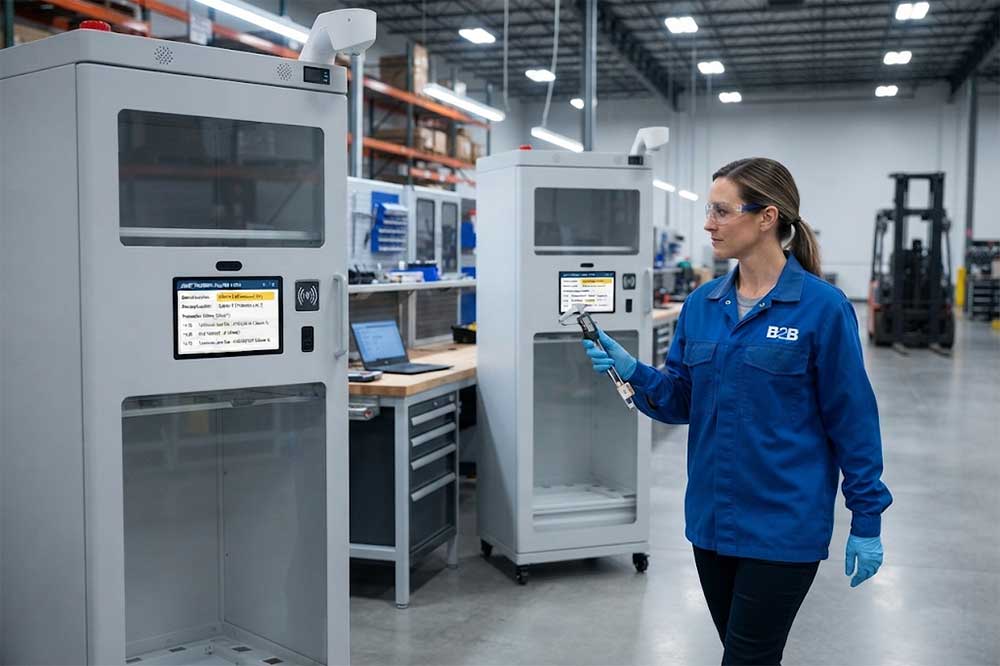
Multi-location deployment creates more complex permission requirements.
For example:
A maintenance technician may access three maintenance cabinets.
A production operator may access only one cabinet.
A supervisor may view several departments.
An administrator may manage the entire system.
Define permissions by:
Temporary workers and contractors should also be considered.
Users should experience a consistent process wherever practical.
For example:
Authenticate → Open → Remove Tool → RFID Detection → Record Transaction
When users move between departments, a consistent workflow reduces training requirements.
However, certain locations may need special rules.
A production-line cabinet may prioritize speed.
A high-value tool cabinet may prioritize stronger authentication.
The system should support these differences without creating completely separate management processes.
Inventory management becomes more valuable when multiple cabinets are connected.
The system should ideally distinguish:
This allows managers to understand the overall tool inventory rather than only the contents of one cabinet.
It can also reduce unnecessary duplicate purchases.
Before buying another tool, managers can check whether the required tool is already available elsewhere.
Large deployments often need enterprise integration.
Potential systems include:
For example, a maintenance work order could identify the tools required for a job.
The tool cabinet system could then record which technician collected those tools.
This creates a connection between:
Work Order → User → Tool → Cabinet → Transaction
The integration should be tested during deployment rather than added after every cabinet has been installed.
A multi-cabinet deployment needs consistent configuration.
Define:
Configuration standards reduce differences between locations.
They also make future cabinet additions easier.
Large projects do not always need to install every cabinet at once.
A phased deployment can be easier to control.
For example:
Phase 1: Main maintenance tool room
Phase 2: Production maintenance areas
Phase 3: Warehouse and engineering
Phase 4: Additional buildings
After each phase, review:
Lessons from one phase can improve the next.
Create a standard installation document.
It can cover:
This reduces differences between installation teams.
It also makes troubleshooting easier later.
Training should be divided by role.
Teach:
Teach:
Teach:
Teach:
Role-based training keeps the information relevant.
Even when the same cabinet model is used, every location should be tested.
Check:
The physical environment can differ between locations.
A successful test in one department does not automatically prove that another location will behave identically.
The first weeks after deployment are important.
Monitor:
Create a simple issue log.
Problems should be categorized so that repeated issues can be identified.
For example, if several cabinets show the same RFID reading problem, the issue may be related to configuration rather than a single cabinet.
Multi-cabinet deployment requires ongoing support.
Define who handles:
Also establish spare-part and replacement procedures.
A centralized support process becomes increasingly important as the number of cabinets grows.
After deployment, reporting should move beyond simple transaction records.
Useful management information may include:
This information can support decisions about cabinet capacity, tool allocation, and future expansion.
The related guide on RFID tool cabinet reporting and analytics covers this topic in more detail.
A scalable deployment should consider future requirements.
Potential expansion may include:
Avoid building a system that only works for the first cabinet.
Define how a new cabinet will be added.
Ideally, the process should be repeatable:
Install → Configure → Register → Test → Train → Go Live
A large first deployment can make it difficult to isolate problems.
Inconsistent tagging can create maintenance and inventory problems.
Different departments may have different tools and workflows.
A tool that moves between cabinets needs a clear location-update process.
Network, API, security, and data requirements should be reviewed early.
Different installation methods can produce inconsistent results.
Some problems only appear after real users begin using the system every day.
RFID tool cabinet deployment becomes more complex as the number of cabinets, tools, users, and locations increases.
The most important step is to treat the project as one connected tool-management system rather than a collection of independent cabinets.
Start with pilot results, standardize tool identification and tagging, define cabinet locations, establish user permissions, design the network and software architecture, and deploy in manageable phases.
Each location should be tested before going live, and the system should continue to be monitored after deployment.
With clear standards and a phased approach, an organization can move from one successful RFID cabinet to a scalable multi-location tool management system.

Cykeo’s RFID Smart Tool Cabinet enables 10-second tool audits, user access control & real-time alerts for construction/oil/gas. Features 21.5″ touchscreen, IP54 steel body & -30°C~60°C operation. Supports SAP/Oracle integration.

Cykeo’s Intelligent Weighing Tool Cabinet combines weight sensors & RFID for 100% tool accountability. Features solar/4G options, IP54 steel-glass body & nuclear/rail compliance. Supports SAP/Oracle integration.

Cykeo’s solar-powered RFID Inventory Tool Cabinet enables 5-second audits for remote sites. Features 160W solar, Android 7.1, 4G & extreme temp operation for oil/energy/mining sectors.

Cykeo’s industrial RFID Tool Cart features 14″ touchscreen, 400+ tool scanning, and carbon steel construction for aviation MRO, power plants and construction sites. 5-second inventory scans.

Cykeo CYKEO-TC RFID multi-drawer tool cart manages 300+ tools via UHF RFID, features fingerprint/face recognition, Android/Windows OS, and SAP integration for nuclear/railway/fire safety sectors. IP54 rated for harsh environments.

Cykeo CYKEO-GTC4 RFID tool inventory cart manages 300+ tools via UHF RFID, features instant scanning, fingerprint/face recognition, and SAP integration for nuclear/railway/fire safety sectors. IP54 rated for harsh environments.

Cykeo CYKEO-GTC7 RFID aviation maintenance cart features military-grade build, blockchain audits, and predictive tool alerts for aircraft MRO. Achieves EASA/FAA compliance.

Cykeo CYKEO-GTC7A RFID real-time tool tracking cart features 99.9% accuracy, FOD prevention, and SAP integration for aviation/plant maintenance. Military-grade construction.

Cykeo CYKEO-GTC4B RFID mobile tool cart delivers 300-tool verification in 7 seconds with modular drawers, ≤150W power, and SAP integration for industrial/aviation use.

Cykeo CYKEO-GTC4C RFID workshop tool control cart delivers 300-tool inventory in 3 seconds with 10hr battery, SAP integration, and FOD prevention for industrial workshops.

Cykeo’s CYKEO-GTC4A multi-drawer RFID tool cart delivers 7-second aviation tool inventories, 10-hour battery, and dual authentication. ISO 18000-6C compliant for MRO/manufacturing.

Cykeo’s MIL-STD RFID tool tracking cart scans 300 tools in 7 seconds, with -20°C~60°C operation and FOD prevention for aviation/energy industries.

Cykeo’s space-saving RFID tool management cabinet offers 1000-tool capacity, ≤5s scans, and 24/7 unmanned operation for manufacturing/assembly plants.

Cykeo’s RFID industrial tool cabinet offers modular shelves, 21.5″ touchscreen, and voice guidance for manufacturing/energy sectors. 24/7 operation with ≤80W power.

Cykeo’s RFID secure tool cabinet features 4 lockable compartments, ≤150W power, and 24/7 monitoring for pharma/aerospace/electronics industries.

Cykeo’s RFID aviation tool cabinet features triple authentication, 14″ HD touchscreen, and thermostatic control for aircraft MRO/FAA compliance.

Cykeo’s RFID tool tracking system delivers self-service check-in/out, real-time alerts, and multilingual interface for correctional/military security.

Cykeo’s off-grid RFID tool inventory system features solar/wind power, -30°C~60°C operation, and military-grade durability for mining/energy/military sectors.

Cykeo’s industrial RFID tool accountability cabinet delivers 99.9% scan accuracy, adjustable shelves, and 24/7 operation for automotive/aerospace manufacturing.

Cykeo’s RFID multi-drawer tool cabinet features 5 adjustable drawers, biometric access, and 99.9% scan accuracy for automotive/aerospace manufacturing.

Cykeo’s RFID Automated Tool Cabinet delivers military security, adjustable shelving, and Java/C# SDK integration for defense/aerospace manufacturing.

Cykeo’s RFID scalable tool cabinet features multi-unit management, voice guidance, and semi-outdoor durability for automotive/construction/logistics.

Cykeo CYKEO-GT1B industrial RFID tool storage cabinet features Impinj R2000 UHF technology, 1,000+ tool capacity, IP54 protection, and Windows/Android OS for manufacturing/aviation MRO. Includes auto check-in/out and SAP/Oracle sync.

Cykeo CYKEO-GT3C industrial RFID tool checkout system Cabinet features millimeter-wave scanning, 280-layer storage, dual OS, and 99.9% accuracy for aviation/semiconductor sectors. Supports auto check-in/out and real-time SAP sync.


Cykeo CYKEO-GT3D RFID smart tool cabinet offers 5-second inventory scanning for 300+ tools, dual authentication, and 24/7 automated management for industrial facilities.

Discover the CYKEO-B1A Industrial RFID Backpack featuring advanced tool tracking technology with 25cm RF shielding, 7-day battery life, and wearable design for field maintenance professionals.
RFID Industry Writer | IoT & Asset Tracking Analyst
James writes about RFID technology, asset tracking, and the practical challenges of digital transformation across warehousing, retail, manufacturing, and logistics.
His work focuses on how RFID is applied in real-world operations—improving inventory visibility, automating workflows, and helping businesses manage assets with greater accuracy and efficiency.
He regularly covers topics including UHF RFID, smart cabinets, RFID portals, tool tracking, warehouse automation, and industrial IoT trends..

Learn how to integrate a UHF RFID tag reader into your existing system, including API, SDK, hardware connections, and real-world integration tips for industrial RFID projects.
More
Discover how an RFID antenna works as the critical translator in your system. Learn about signal transmission, power harvesting, and data collection in simple terms.
More
A long range RFID scanner helps data centers identify and track servers, network devices, racks, tools, and spare parts across receiving, staging, installati...
More
Explore how RFID Pharmacy Security Cabinets boost security, streamline inventory, and ensure compliance in pharmacies. Learn how this cost-effective solution offers long-term savings and peace of mind.
More