 Cykeo RFID IoT Solution Products R&D Manufacturer

Custom RFID Tags: When Do You Actually Need Them?
242Custom RFID tags explained by real projects: materials, shapes, costs, mistakes, and how companies customize RFID tags that actually work.
MoreAll RFID Product
A tool crib may look simple from outside: tools are stored, employees request them, and staff record who takes them.
In a busy factory, however, the tool crib can become a small logistics center.
Tools move between technicians, production lines, maintenance areas, inspection rooms, and other departments. Some tools are shared. Some require permission. Others need calibration or inspection before they can be issued again.
This is where an RFID tool cabinet can become useful.
Instead of treating the cabinet as only a storage unit, an RFID system can connect tool identification, user identification, checkout, return, inventory, location, availability, and status.
The result is not necessarily a completely automatic tool crib. Staff still manage exceptions and unusual situations. The RFID system mainly reduces repetitive identification and record-keeping work.
A tool crib is a controlled storage and issuing area for tools and equipment used by employees, technicians, engineers, or maintenance teams.
It may also be called:
The operating model varies between factories.
Some tool cribs have dedicated employees who issue tools. Others allow authorized employees to access cabinets directly.
RFID can support both models, depending on cabinet design and software configuration.
The challenge is rarely just storing tools.
The bigger problem is knowing what happens after a tool leaves storage.
Consider a typical morning.
Several maintenance technicians arrive before a production shift. One needs a torque wrench. Another needs electrical testing equipment. A third needs a specialized cutter.
The tool crib employee has to:
This process may be manageable with a small number of tools.
With hundreds or thousands of tools, however, manual records can become difficult to maintain.
This is one reason organizations consider RFID tool management.
A typical RFID tool crib has several layers.

Each managed tool receives a suitable RFID tag.
The tag should be selected according to:
Metal tools often require RFID tags designed for metal surfaces.
Tag selection should be tested before large-scale deployment.
The RFID reader detects tagged tools.
Depending on cabinet design, antennas may be positioned inside different compartments or reading zones.
The objective is not simply maximum RF power.
The system needs reliable identification while reducing unwanted reads from nearby tools.
The cabinet provides physical storage and controlled access.
It may contain different compartments for different tool categories.
Some operations may require individual compartments, while others may use larger shared spaces.
The software connects RFID events with:
This software layer is important because RFID hardware alone does not create a complete tool crib management process.
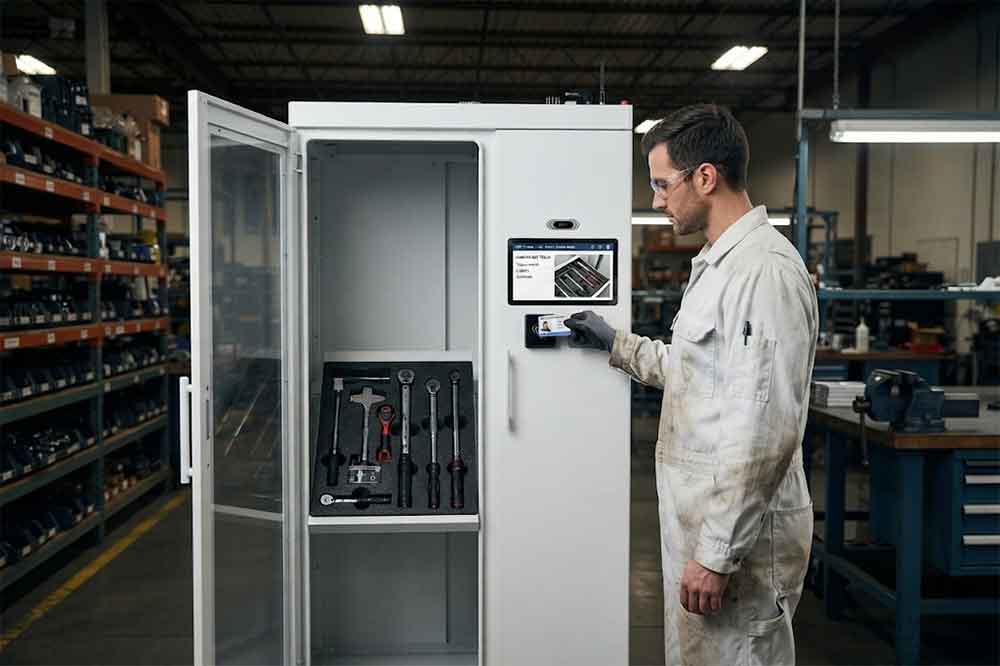
A typical checkout process may look like this:
User authentication → Tool selection → RFID identification → Transaction recording → Tool status update
The user may authenticate using an employee ID, RFID card, PIN, biometric method, or another supported method.
The exact authentication method depends on the system.
After the tool is issued, the software can record information such as:
This creates a digital checkout record without requiring every transaction to be entered manually.
For detailed checkout workflows, see RFID tool checkout system.
Tool return is equally important.
A tool may physically return to the crib but still remain listed as checked out if the record is not updated.
RFID can help close this gap.
A return workflow could be:
Tool placed into cabinet → RFID detection → Tool identified → Return event recorded → Status changed to available
The system can also support an inspection step.
For example:
Returned → Inspection required → Passed → Available
Or:
Returned → Damaged → Maintenance required
This is useful for tools that need condition checks before they are issued again.
Inventory is one of the most obvious applications.
Traditional inventory checks often require staff to:
RFID can automate part of this process.
A cabinet can detect tagged tools within its reading area and compare the results with the expected inventory.
This can help identify:
RFID does not guarantee perfect inventory accuracy. Cabinet structure, tag placement, tool materials, reader configuration, and surrounding RF conditions can affect results.
A tool crib may contain several storage areas.
For example:
Tool Crib → Cabinet A → Drawer 3 → Tool 025
Or:
Maintenance Room → RFID Cabinet B → Compartment 6 → Torque Wrench
The exact level of location detail depends on the cabinet and software.
Location information becomes particularly useful when employees ask:
“Where is the tool now?”
The answer may be more useful than simply saying that the tool exists in the database.
The system can potentially show its latest recorded location or transaction.
For larger operations, see RFID tool cabinet for multi-location tool management.
Tool cribs often contain equipment that several departments share.
Examples include:
The same tool may be needed by different teams during the same shift.
RFID can provide a clearer record of who has the tool and whether it is currently available.
For expensive or restricted equipment, access permissions can also be added.
See RFID tool cabinet for high-value tools and RFID tool cabinet access control for related workflows.
Shift changes can create a surprisingly common problem.
The outgoing team may know which tools are outside the crib. The incoming team may not.
A digital RFID record can provide a shared view of tool status.
A shift supervisor can review:
This can make handover discussions more concrete.
Instead of relying only on verbal information, both shifts can reference the same tool records.
Some tool cribs manage equipment that is frequently shared.
In this situation, availability information becomes important.
A user may check whether a tool is:
Available → Reserved → Checked Out → Under Maintenance → Available
The reservation function can help maintenance planners coordinate shared equipment.
However, reservation should not be confused with actual possession.
A tool can be reserved but physically remain in the crib.
The RFID checkout event confirms when the tool actually leaves the controlled storage process.
See RFID Tool Cabinet Tool Reservation and Availability Management for a more detailed discussion.
Tool crib staff may also manage tools with inspection or calibration requirements.
For example:
Tool returned → Inspection → Calibration status checked → Available or restricted
The RFID system can identify the physical tool and connect it to its digital record.
Possible statuses include:
This helps prevent the physical tool from becoming separated from its management record.
For this workflow, see RFID Tool Cabinet for Tool Calibration.
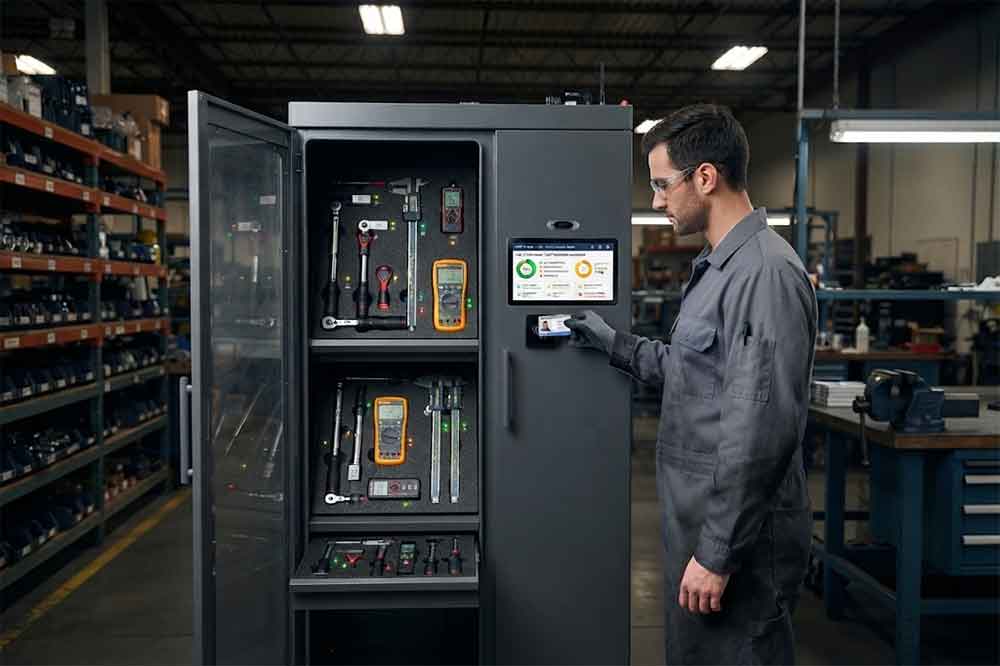
RFID tool crib management can also support exception alerts.
Common examples include:
The expected return time has passed.
Expected inventory does not match detected inventory.
A user attempts to access a restricted tool.
A tool approaches its calibration deadline.
Too few tools remain available for a defined operation.
Two users or departments request the same shared tool during overlapping periods.
The goal should be useful alerts rather than a large volume of notifications.
For more detail, see RFID Tool Cabinet Alerts and Notifications.
Larger organizations may already use software for maintenance, production, warehouse, or asset management.
An RFID tool crib can potentially exchange information with:
For example:
CMMS work order → Tool request → RFID cabinet checkout → Tool transaction → Work order update
This can reduce duplicate data entry.
However, integration requirements should be defined before purchasing hardware.
For a detailed technical discussion, see RFID tool cabinet software integration.
Not necessarily.
RFID implementation can be prioritized.
For example, a company may first tag:
Low-value consumables may not justify individual RFID tracking.
A pilot can help determine which tools should be included.
The difference is mainly the level of digital visibility.
| Management Area | Manual Tool Crib | RFID Tool Crib |
|---|---|---|
| Tool identification | Manual | RFID-assisted |
| Checkout | Manual record | Automated or semi-automated |
| Inventory | Manual counting | RFID-assisted |
| Tool location | Often manual | Digitally recorded |
| User tracking | Manual | System-based |
| Access control | Physical/manual | Software-supported |
| Alerts | Manual follow-up | Rule-based |
| Reporting | Spreadsheet/manual | Digital records |
| Multi-location visibility | More difficult | Centralized system possible |
The right choice depends on tool quantity, workflow complexity, labor, existing systems, and project requirements.
A practical deployment does not have to begin with the entire tool room.
Document how tools are currently:
Choose tools with different materials, sizes, shapes, and use frequencies.
Test actual tag placement on real tools.
Evaluate compartments, antennas, access control, and physical workflow.
Use real employees rather than only technical demonstrations.
Test user records, tool records, inventory, transactions, and required integrations.
Monitor actual tool crib operations for a defined period.
Look at:
Then decide what should be changed before wider deployment.
For deployment planning, see RFID tool cabinet pilot project and RFID tool cabinet deployment.
A tag that works well on one surface may behave differently on another.
The physical cabinet is only one part of the system. Workflow and software matter just as much.
Tool crib employees understand daily exceptions that may not appear in a technical specification.
Not every item needs individual RFID tracking.
Automated checkout has limited value if returned tools are not processed correctly.
Damaged, missing, overdue, and restricted tools need clear handling rules.
A pilot can reveal problems with tags, cabinet layout, software, and user behavior before large-scale deployment.
Before implementing an RFID tool cabinet, confirm:
A clear answer to these questions will make supplier discussions much more productive.
An RFID tool crib is a tool storage and issuing area that uses RFID identification and software to manage tools, users, inventory, checkout, return, and related statuses.
It can record the latest known transaction or location when tools pass through connected RFID-controlled points. Additional readers or cabinets may be needed for broader location tracking.
No. Companies can prioritize high-value, shared, frequently used, or difficult-to-track tools and expand later.
Yes. An RFID tool crib can potentially exchange tool and transaction data with a CMMS through available APIs or integration interfaces.
Yes, provided the hardware and software support centralized management. Each cabinet can have its own location while sharing common tool and user records.

Cykeo’s RFID Smart Tool Cabinet enables 10-second tool audits, user access control & real-time alerts for construction/oil/gas. Features 21.5″ touchscreen, IP54 steel body & -30°C~60°C operation. Supports SAP/Oracle integration.

Cykeo’s Intelligent Weighing Tool Cabinet combines weight sensors & RFID for 100% tool accountability. Features solar/4G options, IP54 steel-glass body & nuclear/rail compliance. Supports SAP/Oracle integration.

Cykeo’s solar-powered RFID Inventory Tool Cabinet enables 5-second audits for remote sites. Features 160W solar, Android 7.1, 4G & extreme temp operation for oil/energy/mining sectors.

Cykeo’s industrial RFID Tool Cart features 14″ touchscreen, 400+ tool scanning, and carbon steel construction for aviation MRO, power plants and construction sites. 5-second inventory scans.

Cykeo CYKEO-TC RFID multi-drawer tool cart manages 300+ tools via UHF RFID, features fingerprint/face recognition, Android/Windows OS, and SAP integration for nuclear/railway/fire safety sectors. IP54 rated for harsh environments.

Cykeo CYKEO-GTC4 RFID tool inventory cart manages 300+ tools via UHF RFID, features instant scanning, fingerprint/face recognition, and SAP integration for nuclear/railway/fire safety sectors. IP54 rated for harsh environments.

Cykeo CYKEO-GTC7 RFID aviation maintenance cart features military-grade build, blockchain audits, and predictive tool alerts for aircraft MRO. Achieves EASA/FAA compliance.

Cykeo CYKEO-GTC7A RFID real-time tool tracking cart features 99.9% accuracy, FOD prevention, and SAP integration for aviation/plant maintenance. Military-grade construction.

Cykeo CYKEO-GTC4B RFID mobile tool cart delivers 300-tool verification in 7 seconds with modular drawers, ≤150W power, and SAP integration for industrial/aviation use.

Cykeo CYKEO-GTC4C RFID workshop tool control cart delivers 300-tool inventory in 3 seconds with 10hr battery, SAP integration, and FOD prevention for industrial workshops.

Cykeo’s CYKEO-GTC4A multi-drawer RFID tool cart delivers 7-second aviation tool inventories, 10-hour battery, and dual authentication. ISO 18000-6C compliant for MRO/manufacturing.

Cykeo’s MIL-STD RFID tool tracking cart scans 300 tools in 7 seconds, with -20°C~60°C operation and FOD prevention for aviation/energy industries.

Cykeo’s space-saving RFID tool management cabinet offers 1000-tool capacity, ≤5s scans, and 24/7 unmanned operation for manufacturing/assembly plants.

Cykeo’s RFID industrial tool cabinet offers modular shelves, 21.5″ touchscreen, and voice guidance for manufacturing/energy sectors. 24/7 operation with ≤80W power.

Cykeo’s RFID secure tool cabinet features 4 lockable compartments, ≤150W power, and 24/7 monitoring for pharma/aerospace/electronics industries.

Cykeo’s RFID aviation tool cabinet features triple authentication, 14″ HD touchscreen, and thermostatic control for aircraft MRO/FAA compliance.

Cykeo’s RFID tool tracking system delivers self-service check-in/out, real-time alerts, and multilingual interface for correctional/military security.

Cykeo’s off-grid RFID tool inventory system features solar/wind power, -30°C~60°C operation, and military-grade durability for mining/energy/military sectors.

Cykeo’s industrial RFID tool accountability cabinet delivers 99.9% scan accuracy, adjustable shelves, and 24/7 operation for automotive/aerospace manufacturing.

Cykeo’s RFID multi-drawer tool cabinet features 5 adjustable drawers, biometric access, and 99.9% scan accuracy for automotive/aerospace manufacturing.

Cykeo’s RFID Automated Tool Cabinet delivers military security, adjustable shelving, and Java/C# SDK integration for defense/aerospace manufacturing.

Cykeo’s RFID scalable tool cabinet features multi-unit management, voice guidance, and semi-outdoor durability for automotive/construction/logistics.

Cykeo CYKEO-GT1B industrial RFID tool storage cabinet features Impinj R2000 UHF technology, 1,000+ tool capacity, IP54 protection, and Windows/Android OS for manufacturing/aviation MRO. Includes auto check-in/out and SAP/Oracle sync.

Cykeo CYKEO-GT3C industrial RFID tool checkout system Cabinet features millimeter-wave scanning, 280-layer storage, dual OS, and 99.9% accuracy for aviation/semiconductor sectors. Supports auto check-in/out and real-time SAP sync.


Cykeo CYKEO-GT3D RFID smart tool cabinet offers 5-second inventory scanning for 300+ tools, dual authentication, and 24/7 automated management for industrial facilities.

Discover the CYKEO-B1A Industrial RFID Backpack featuring advanced tool tracking technology with 25cm RF shielding, 7-day battery life, and wearable design for field maintenance professionals.
RFID Industry Writer | IoT & Asset Tracking Analyst
James writes about RFID technology, asset tracking, and the practical challenges of digital transformation across warehousing, retail, manufacturing, and logistics.
His work focuses on how RFID is applied in real-world operations—improving inventory visibility, automating workflows, and helping businesses manage assets with greater accuracy and efficiency.
He regularly covers topics including UHF RFID, smart cabinets, RFID portals, tool tracking, warehouse automation, and industrial IoT trends..

Custom RFID tags explained by real projects: materials, shapes, costs, mistakes, and how companies customize RFID tags that actually work.
More
A RFID tag is read by a compatible RFID reader that sends radio signals, receives tag data, and transfers information to software for processing and tracking.
More
A practical, step-by-step guide on how to use an RFID reader writer to program tags. Learn the crucial steps of data formatting, writing, and verification most software glosses over.
More
Curious about how RFID technology reads the details from the chip? CYKEO breaks down the RF activation, memory bank access, and backscatter process. Learn the mechanics today.
More