All RFID Product

RFID Tool Cabinet Tool Reservation and Availability Management

Why Tool Availability Matters

A technician may walk into a tool room looking for a specific instrument.

The tool is not there.

That does not necessarily mean it is lost.

It could be:

  • Checked out by another technician
  • Stored in another cabinet
  • Being used on a production line
  • Under maintenance
  • Waiting for calibration
  • Reserved for another job
  • Temporarily restricted

This difference matters.

A simple inventory system may only tell the manager whether the tool exists.

A more complete RFID tool management system can provide information about the tool’s current status and location.

For example:

Tool ID: TQ-025
Status: Checked Out
User: Maintenance Technician
Location: Production Line 2
Expected Return: 15:30

This information can be much more useful than simply seeing “not in cabinet.”


1. Define Tool Availability Clearly

Before introducing reservations, define what “available” means.

A tool could have several states:

Tool StatusAvailable for Reservation?
AvailableYes
ReservedNo or limited
Checked OutUsually no
Under MaintenanceNo
Calibration DueDepends on rules
Calibration OverdueUsually no
RestrictedNo
MissingNo

The exact rules should be determined by the organization.

For example, a tool that is currently checked out but expected back within 30 minutes might be reservable for a later time.

Another company may not allow reservations until the tool is physically returned.

The system should support the business rule rather than assuming one universal approach.


2. Connect RFID Tracking With Availability

RFID tracking answers an important question:

Where is the tool?

Reservation management answers another:

Who plans to use the tool and when?

Combining both creates a more useful workflow.

For example:

RFID Location → Tool Status → Reservation Calendar → User Request → Checkout

If the tool is currently inside Cabinet A, the system can show its location.

If it is checked out, the system can show its assigned status.

If it is reserved for a future maintenance job, other users can see that information according to their permissions.

This reduces uncertainty around shared tools.


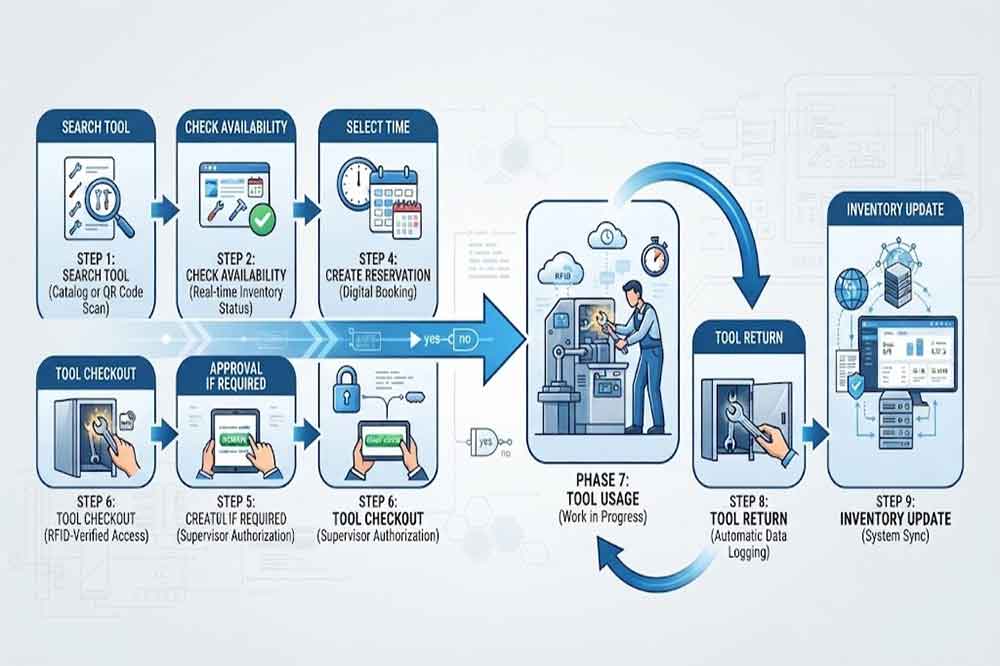
3. Create a Tool Reservation Workflow

A basic reservation process may look like:

Search Tool → Check Availability → Select Time → Submit Reservation → Approval if Required → Confirmation → Checkout

The actual process depends on the organization.

For ordinary tools, approval may not be necessary.

For high-value or specialized instruments, approval may be required.

For example:

Standard Tool

Request → Reservation → Checkout

Restricted Tool

Request → Supervisor Approval → Reservation → Checkout

Calibration-Controlled Tool

Request → Availability Check → Calibration Check → Reservation → Checkout

This is where reservation management connects with [RFID Tool Cabinet for Tool Calibration].

RFID tool reservation workflow from tool search to checkout

4. Let Employees Check Availability Before Going to the Cabinet

One practical benefit of digital availability management is reducing unnecessary trips.

Imagine a maintenance technician needs a specific torque wrench.

Without a system, the technician may:

  1. Walk to the tool room
  2. Search the cabinet
  3. Discover the tool is unavailable
  4. Ask another technician
  5. Search another location
  6. Wait for the tool to return

A connected system could instead provide:

Tool Search → Available at Cabinet B → Reserve → Go to Cabinet B

This does not eliminate every operational problem, but it can make planning easier.

The exact location information depends on the RFID architecture and software.


5. Support Shared and High-Demand Tools

Not every tool needs a reservation function.

Reservation is more useful when several employees depend on the same equipment.

Examples include:

  • Torque calibration equipment
  • Specialized electrical testers
  • Inspection instruments
  • Precision measuring tools
  • Hydraulic equipment
  • Specialized maintenance tools
  • Portable diagnostic devices

If ten technicians need the same instrument during a maintenance shutdown, availability becomes a scheduling issue rather than a simple inventory issue.

A reservation workflow can help organize those competing requests.


6. Connect Reservations With Maintenance Jobs

Tool reservations become more useful when they are connected to planned work.

For example:

Maintenance Work Order → Required Tool → Reservation → Technician → Checkout

A maintenance planner may know that a specific instrument will be required tomorrow morning.

The tool can be reserved in advance.

When the job begins, the technician completes the normal checkout process.

The reservation does not replace checkout.

It simply prepares the tool for the planned job.

This distinction is important for maintaining accurate accountability.

Maintenance technicians reserving shared industrial tools

7. Keep Reservation and Checkout Separate

A reservation does not mean that the employee physically has the tool.

For example:

Reserved: 09:00–11:00
Checked Out: 09:15
Returned: 10:35

These are three different events.

The system should ideally distinguish:

  • Reservation created
  • Reservation approved
  • Reservation cancelled
  • Tool checked out
  • Tool returned
  • Reservation expired

This creates cleaner reporting.

It also helps managers understand whether reservations are actually being used.


8. Handle Competing Reservations

Two employees may request the same tool at nearly the same time.

The system needs a defined rule.

Possible approaches include:

First-Come Rule

The earliest valid reservation receives the available time slot.

Approval Rule

A supervisor reviews competing requests.

Priority Rule

Certain work orders or maintenance activities receive priority based on company policy.

Department Rule

Specific departments receive access during defined periods.

There is no universal rule that fits every factory.

The important point is to define the rule before the system goes live.


9. Manage Reservation Cancellation

Plans change frequently in industrial environments.

A maintenance job may be postponed.

A production line may change its schedule.

A tool may no longer be required.

The reservation system should therefore support cancellation.

A simple workflow could be:

Reservation → Cancel → Tool Becomes Available

If the tool is already checked out, cancellation should not automatically change the physical tool status.

Again, reservation and actual tool movement are separate events.


10. Handle Overdue Reservations

What happens if someone reserves a tool but never arrives?

Without a defined rule, the tool may remain unavailable to other employees unnecessarily.

Possible policies include:

  • Automatic expiration
  • Reminder notification
  • Supervisor review
  • Reservation release after a grace period
  • Automatic cancellation

For example:

Reserved 10:00–11:00 → No Checkout → Grace Period → Reservation Released

The exact timing should depend on the operational environment.

A factory with frequent emergency maintenance may need shorter reservation windows.

A planned shutdown may require longer reservation periods.


11. Consider Emergency Maintenance

Planned reservations are not the only use case.

Factories also have emergency maintenance events.

A critical machine may suddenly stop.

A technician needs a specialized tool immediately.

That tool may already be reserved by another department.

The system therefore needs a policy for emergency requests.

Possible approaches include:

  • Supervisor override
  • Emergency priority
  • Temporary reassignment
  • Reservation cancellation
  • Alternative tool recommendation

The software should record the override rather than silently changing the reservation.

This maintains a clearer audit trail.


12. Connect Reservation With User Permissions

Not every employee should necessarily see or reserve every tool.

The system may apply user permissions based on:

  • Department
  • Job role
  • Skill level
  • Tool category
  • Location
  • Project
  • Work order

For example, an electrical testing instrument may only be visible to authorized technicians.

A restricted tool may require supervisor approval before reservation.

This works alongside [RFID tool cabinet access control].

Reservation determines planned use.

Access control determines whether the user is actually authorized to use the tool.


13. Include Tool Condition and Calibration Status

Availability should not be based only on physical location.

Consider a torque wrench that is physically inside the cabinet.

It may still be:

  • Calibration overdue
  • Waiting for inspection
  • Damaged
  • Under maintenance

Therefore, the availability calculation should consider multiple statuses.

A useful model is:

Physical Location + Tool Condition + Calibration Status + User Permission + Reservation

Only when the relevant conditions are satisfied should the system present the tool as normally available.

This provides a more realistic picture of tool readiness.


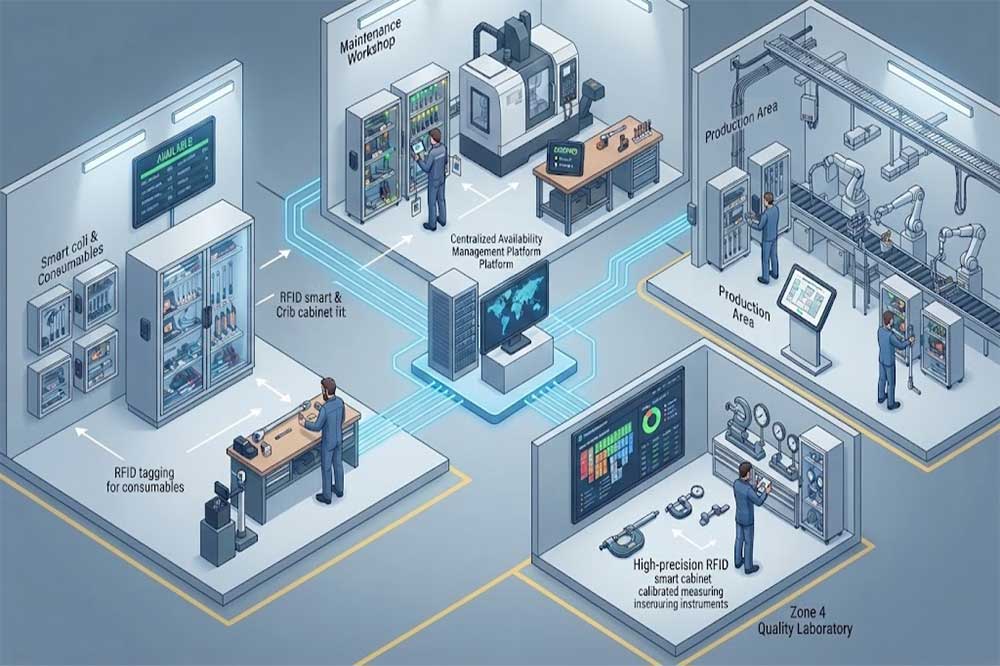
14. Support Multiple RFID Tool Cabinets

Large factories may have several cabinets.

A technician may search for a tool across:

  • Maintenance workshop
  • Production department
  • Tool room
  • Quality laboratory
  • Warehouse
  • Field maintenance area

A centralized system can show the last known cabinet or location.

For example:

Torque Wrench TQ-025

  • Current location: Maintenance Cabinet 2
  • Status: Available
  • Reservation: Tomorrow 09:00
  • Calibration: Valid

This can save time compared with searching several physical locations.

For broader multi-location management, see [RFID tool cabinet for multi-location tool management].

Centralized RFID system showing tool availability across multiple factory locations

15. Create a Tool Availability Dashboard

A dashboard can give supervisors a quick overview.

Useful fields may include:

  • Tool name
  • Tool ID
  • Current location
  • Current status
  • Current user
  • Reservation status
  • Calibration status
  • Maintenance status
  • Expected return
  • Next reservation

A manager could filter the dashboard by:

Department → Tool Category → Location → Status

This is especially useful when managing many cabinets.

Reporting functions can be connected with [RFID tool cabinet reporting and analytics].


16. Use Availability Data for Maintenance Planning

Historical availability data can reveal patterns.

For example, managers may discover that:

  • A certain instrument is constantly reserved
  • One tool is frequently unavailable
  • Two departments repeatedly need the same tool
  • A cabinet does not contain enough specialized tools
  • Certain tools remain reserved but unused
  • Some equipment spends long periods under maintenance

These observations can support future procurement and tool allocation decisions.

The data should be treated as operational evidence rather than assuming every reservation indicates actual tool usage.


17. Measure Reservation Performance

After deployment, companies can monitor indicators such as:

Reservation Utilization

How often are reserved tools actually checked out?

Reservation Conflicts

How often do employees request the same tool at overlapping times?

Reservation Cancellations

How often are reservations cancelled?

Reservation Expiration

How many reservations expire without checkout?

Search Reduction

How often can users find the required tool without manually searching multiple locations?

Tool Availability

How frequently are high-demand tools unavailable?

These metrics can help managers adjust the workflow.


18. Avoid Overcomplicating the System

Not every factory needs a sophisticated booking platform.

For a small maintenance team with plenty of tools, a simple availability display may be enough.

A reservation system becomes more useful when:

  • Tools are expensive
  • Tools are shared
  • Tools are limited in quantity
  • Several departments use the same equipment
  • Maintenance work is scheduled
  • Tool locations are distributed
  • Tool availability affects job planning

The system should solve a real coordination problem.


19. Test Reservation Workflows Before Deployment

Pilot testing should include normal and unusual situations.

Normal Tests

  • Search available tool
  • Create reservation
  • Approve reservation
  • Check out tool
  • Return tool
  • Complete reservation

Exception Tests

  • Tool becomes unavailable
  • Reservation conflict
  • User lacks permission
  • Tool calibration expires
  • Tool is damaged
  • Reservation is cancelled
  • User does not arrive

Multi-Location Tests

  • Tool moves to another cabinet
  • Tool is reserved from another department
  • User checks out at a different location
  • Inventory updates after movement

These scenarios should be included in the [RFID tool cabinet pilot project].


Common Tool Reservation Mistakes

Treating Reservations as Actual Checkout

A reservation does not mean the employee has the physical tool.

Ignoring Tool Status

A reserved tool may become damaged or overdue for calibration.

No Cancellation Process

Unused reservations can unnecessarily block other employees.

No Emergency Rule

Emergency maintenance can conflict with planned reservations.

Allowing Unlimited Reservations

One user should not be able to reserve scarce tools indefinitely unless company policy allows it.

Ignoring Multiple Locations

A tool may be available somewhere else even when the local cabinet is empty.

Not Reviewing Reservation Data

Unused reservations and repeated conflicts may indicate that the workflow needs adjustment.


Practical Tool Availability Checklist

Before deploying a reservation workflow, confirm:

  • Tool availability rules are defined
  • Tool statuses are clearly separated
  • Current location is visible
  • User permissions are defined
  • Reservation periods are defined
  • Approval rules are documented
  • Cancellation rules are documented
  • Overdue reservation rules are defined
  • Emergency procedures are defined
  • Calibration status is considered
  • Maintenance status is considered
  • Multiple locations are supported
  • Checkout remains separate from reservation
  • Reports are available
  • Real users test the workflow
  • Acceptance criteria are documented

Conclusion

RFID tool cabinets can provide useful information about more than whether a tool is inside a cabinet. When connected with software, they can help organizations understand tool location, availability, current assignment, maintenance status, calibration status, and planned reservations.

A reservation function is particularly useful for shared or high-demand equipment. It allows maintenance teams to plan tool usage before a job begins while keeping physical checkout and return as separate accountability events.

The most practical approach is to start with the actual coordination problems in the workplace. Define what “available” means, establish reservation rules, consider user permissions and tool condition, support emergency situations, and test the complete workflow with real users.

For larger operations, combining RFID tracking with availability and reservation management can create a clearer view of shared tool resources across departments and locations.


Frequently Asked Questions

1. Can an RFID tool cabinet support tool reservations?

Yes. If the connected software supports reservation functions, users can request tools for defined time periods before completing the physical checkout process.

2. Is a reservation the same as tool checkout?

No. A reservation represents planned use. Checkout confirms that the user actually took the physical tool.

3. Can users reserve tools from another department?

Yes, if the system supports multi-location management and the user’s permissions allow access to tools in other departments.

4. What happens if a reserved tool becomes unavailable?

The system can notify the user or supervisor and follow a predefined process for cancellation, reassignment, or alternative equipment.

5. Are reservations useful for every tool?

Not necessarily. They are more useful for shared, expensive, specialized, limited, or frequently requested tools.

CYKEO-GT1 RFID Intelligent Tool Cabinet

CYKEO-GT1 RFID Intelligent Tool Cabinet

2025-12-31

Cykeo’s RFID Smart Tool Cabinet enables 10-second tool audits, user access control & real-time alerts for construction/oil/gas. Features 21.5″ touchscreen, IP54 steel body & -30°C~60°C operation. Supports SAP/Oracle integration.

CYKEO-GGT1 Intelligent Weighing  Cabinet

CYKEO-GGT1 Intelligent Weighing Cabinet

2025-12-31

Cykeo’s Intelligent Weighing Tool Cabinet combines weight sensors & RFID for 100% tool accountability. Features solar/4G options, IP54 steel-glass body & nuclear/rail compliance. Supports SAP/Oracle integration.

CYKEO-GT7 OUTDOOR RFIDINTELLIGENT TOOL CABINET​

CYKEO-GT7 OUTDOOR RFIDINTELLIGENT TOOL CABINET​

2025-12-31

Cykeo’s solar-powered RFID Inventory Tool Cabinet enables 5-second audits for remote sites. Features 160W solar, Android 7.1, 4G & extreme temp operation for oil/energy/mining sectors.

CYKEO-GTC7C RFID Tool Cart

CYKEO-GTC7C RFID Tool Cart

2025-12-31

Cykeo’s industrial RFID Tool Cart features 14″ touchscreen, 400+ tool scanning, and carbon steel construction for aviation MRO, power plants and construction sites. 5-second inventory scans.

CYKEO-TC RFID Multi-Drawer Tool Cart

CYKEO-TC RFID Multi-Drawer Tool Cart

2025-12-31

Cykeo CYKEO-TC RFID multi-drawer tool cart manages 300+ tools via UHF RFID, features fingerprint/face recognition, Android/Windows OS, and SAP integration for nuclear/railway/fire safety sectors. IP54 rated for harsh environments.

CYKEO-GTC4 INDUSTRIAL RFID TOOL CART

CYKEO-GTC4 INDUSTRIAL RFID TOOL CART

2025-12-30

Cykeo CYKEO-GTC4 RFID tool inventory cart manages 300+ tools via UHF RFID, features instant scanning, fingerprint/face recognition, and SAP integration for nuclear/railway/fire safety sectors. IP54 rated for harsh environments.

CYKEO-GTC7 RFID Aviation Maintenance Cart

CYKEO-GTC7 RFID Aviation Maintenance Cart

2025-12-30

Cykeo CYKEO-GTC7 RFID aviation maintenance cart features military-grade build, blockchain audits, and predictive tool alerts for aircraft MRO. Achieves EASA/FAA compliance.

CYKEO-GTC7A RFID Real-Time Tool Tracking Cart

CYKEO-GTC7A RFID Real-Time Tool Tracking Cart

2025-12-30

Cykeo CYKEO-GTC7A RFID real-time tool tracking cart features 99.9% accuracy, FOD prevention, and SAP integration for aviation/plant maintenance. Military-grade construction.

CYKEO-GTC4B RFID Mobile Tool Cart

CYKEO-GTC4B RFID Mobile Tool Cart

2025-12-30

Cykeo CYKEO-GTC4B RFID mobile tool cart delivers 300-tool verification in 7 seconds with modular drawers, ≤150W power, and SAP integration for industrial/aviation use.

CYKEO-GTC4C RFID Workshop Tool Control Cart

CYKEO-GTC4C RFID Workshop Tool Control Cart

2025-12-30

Cykeo CYKEO-GTC4C RFID workshop tool control cart delivers 300-tool inventory in 3 seconds with 10hr battery, SAP integration, and FOD prevention for industrial workshops.

CYKEO-GTC4A Multi-drawer RFID Tool Cart

CYKEO-GTC4A Multi-drawer RFID Tool Cart

2025-12-29

Cykeo’s CYKEO-GTC4A multi-drawer RFID tool cart delivers 7-second aviation tool inventories, 10-hour battery, and dual authentication. ISO 18000-6C compliant for MRO/manufacturing.

CYKEO-GTC4D RFID Tool Tracking Cart

CYKEO-GTC4D RFID Tool Tracking Cart

2025-12-29

Cykeo’s MIL-STD RFID tool tracking cart scans 300 tools in 7 seconds, with -20°C~60°C operation and FOD prevention for aviation/energy industries.

CYKEO-GT3A COMPACT RFID TOOL CABINET

CYKEO-GT3A COMPACT RFID TOOL CABINET

2025-12-29

Cykeo’s space-saving RFID tool management cabinet offers 1000-tool capacity, ≤5s scans, and 24/7 unmanned operation for manufacturing/assembly plants.

CYKEO-GT1A INDOOR RFID CABINET

CYKEO-GT1A INDOOR RFID CABINET

2025-12-29

Cykeo’s RFID industrial tool cabinet offers modular shelves, 21.5″ touchscreen, and voice guidance for manufacturing/energy sectors. 24/7 operation with ≤80W power.

CYKEO-GT4A RFID Secure Tool Cabinet

CYKEO-GT4A RFID Secure Tool Cabinet

2025-12-29

Cykeo’s RFID secure tool cabinet features 4 lockable compartments, ≤150W power, and 24/7 monitoring for pharma/aerospace/electronics industries.

CYKEO-GT2B RFID Aviation Tool Cabinet

CYKEO-GT2B RFID Aviation Tool Cabinet

2025-12-29

Cykeo’s RFID aviation tool cabinet features triple authentication, 14″ HD touchscreen, and thermostatic control for aircraft MRO/FAA compliance.

CYKEO-GTC5 PRISON RFID TOOLMANAGEMENT SYSTEM

CYKEO-GTC5 PRISON RFID TOOLMANAGEMENT SYSTEM

2025-12-27

Cykeo’s RFID tool tracking system delivers self-service check-in/out, real-time alerts, and multilingual interface for correctional/military security.

CYKEO-GT3B RFID Tool Inventory System Cabinet

CYKEO-GT3B RFID Tool Inventory System Cabinet

2025-12-27

Cykeo’s off-grid RFID tool inventory system features solar/wind power, -30°C~60°C operation, and military-grade durability for mining/energy/military sectors.

CYKEO-GT3 UHF RFID Tool Cabinet

CYKEO-GT3 UHF RFID Tool Cabinet

2025-12-27

Cykeo’s industrial RFID tool accountability cabinet delivers 99.9% scan accuracy, adjustable shelves, and 24/7 operation for automotive/aerospace manufacturing.

CYKEO-GT4 RFID Multi-Drawer Tool Cabinet

CYKEO-GT4 RFID Multi-Drawer Tool Cabinet

2025-12-27

Cykeo’s RFID multi-drawer tool cabinet features 5 adjustable drawers, biometric access, and 99.9% scan accuracy for automotive/aerospace manufacturing.

CYKEO-GT2  INDUSTRIAL RFID TOOL CABINET​

CYKEO-GT2 INDUSTRIAL RFID TOOL CABINET​

2025-12-27

Cykeo’s RFID Automated Tool Cabinet delivers military security, adjustable shelving, and Java/C# SDK integration for defense/aerospace manufacturing.

CYKEO-GT2A INDUSTRIAL RFID CABINET

CYKEO-GT2A INDUSTRIAL RFID CABINET

2025-12-27

Cykeo’s RFID scalable tool cabinet features multi-unit management, voice guidance, and semi-outdoor durability for automotive/construction/logistics.

CYKEO-GT1B INDUSTRIALRFID TOOL CABINET​

CYKEO-GT1B INDUSTRIALRFID TOOL CABINET​

2025-12-27

Cykeo CYKEO-GT1B industrial RFID tool storage cabinet features Impinj R2000 UHF technology, 1,000+ tool capacity, IP54 protection, and Windows/Android OS for manufacturing/aviation MRO. Includes auto check-in/out and SAP/Oracle sync.

CYKEO-GT3C RFID Tool Checkout System Cabinet

CYKEO-GT3C RFID Tool Checkout System Cabinet

2025-12-27

Cykeo CYKEO-GT3C industrial RFID tool checkout system Cabinet features millimeter-wave scanning, 280-layer storage, dual OS, and 99.9% accuracy for aviation/semiconductor sectors. Supports auto check-in/out and real-time SAP sync.

CYKEO-B1 SMART RFID TOOL BAG

CYKEO-B1 SMART RFID TOOL BAG

2025-12-27

Cykeo CYKEO-B1 RFID smart tool bag features

CYKEO-GT3D RFID TOOL TRACKING CABINET

CYKEO-GT3D RFID TOOL TRACKING CABINET

2025-12-27

Cykeo CYKEO-GT3D RFID smart tool cabinet offers 5-second inventory scanning for 300+ tools, dual authentication, and 24/7 automated management for industrial facilities.

CYKEO-B1A  INDUSTRIAL RFID BACKPACK FOR FIELD M...

CYKEO-B1A INDUSTRIAL RFID BACKPACK FOR FIELD MAINTENANCE

2025-12-27

Discover the CYKEO-B1A Industrial RFID Backpack featuring advanced tool tracking technology with 25cm RF shielding, 7-day battery life, and wearable design for field maintenance professionals.

RFID Tool Cabinet Tool Reservation and Availability Management(images 1)

James Wilson

RFID Industry Writer | IoT & Asset Tracking Analyst

James writes about RFID technology, asset tracking, and the practical challenges of digital transformation across warehousing, retail, manufacturing, and logistics.

His work focuses on how RFID is applied in real-world operations—improving inventory visibility, automating workflows, and helping businesses manage assets with greater accuracy and efficiency.

He regularly covers topics including UHF RFID, smart cabinets, RFID portals, tool tracking, warehouse automation, and industrial IoT trends..

PgUp: PgDn:

Relevance

View more