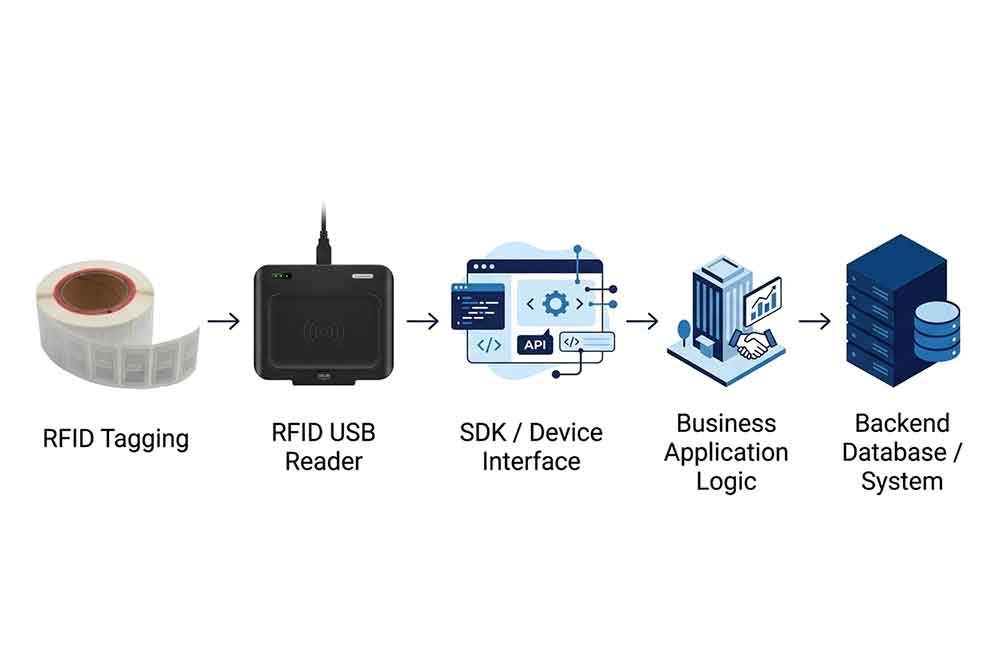
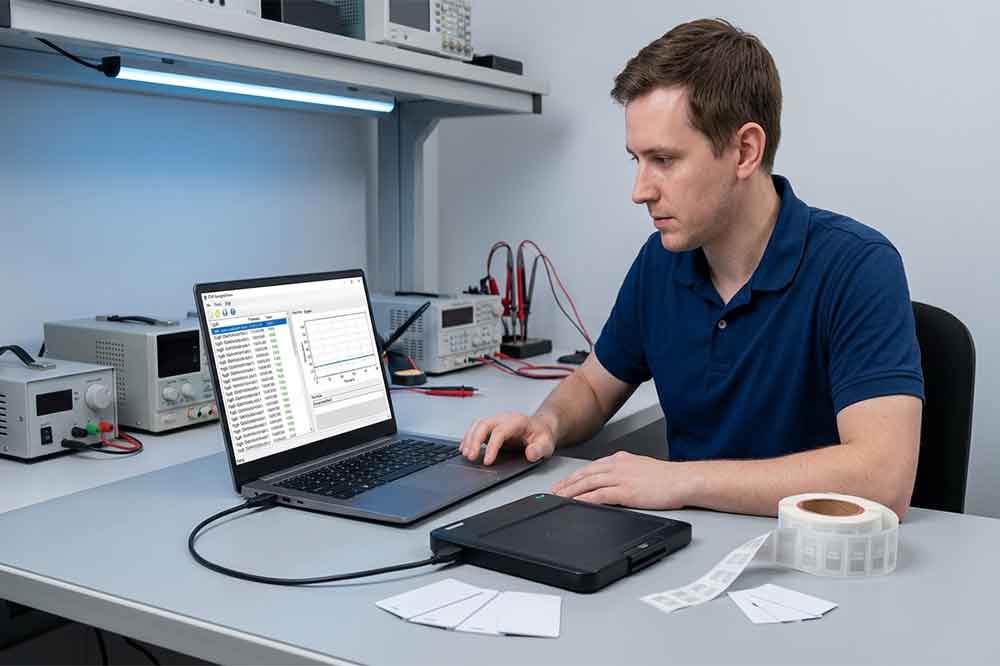
A USB RFID reader can identify tagged products, tools, cards, and equipment. However, when a business needs to connect RFID data to its own software, basic plug-and-play operation may not be enough.
An inventory platform may need to retrieve tag identifiers and update stock records. A manufacturing application may need to configure the reader, write data to supported tags, and verify each operation. These workflows often require a software development kit (SDK), an application programming interface (API), or another documented communication interface.
For B2B buyers, system integrators, and software developers, understanding these options before purchasing hardware can reduce integration costs and avoid unnecessary development work.
Why SDK and API Support Matters
An SDK or API gives an application a defined way to communicate with a device or software service.
Depending on the reader model, the available interface may support tag identification, device configuration, read/write commands, or access to additional device information. The exact functions vary by manufacturer and product.
Without a suitable interface, developers may be limited to basic keyboard input or a small set of predefined operations. That may work for a simple scanning station, but it can become restrictive when a project needs automated workflows or detailed error handling.
Consider an asset-management application. When an employee scans a tagged tool, the software needs to receive the identifier, find the corresponding asset record, and update its status. If the reader only sends keyboard input, the application may be able to capture the identifier but have limited control over the reader itself.
A supported SDK or command interface can provide more control, provided that the required functions are included.
The important point is not simply whether an SDK exists. Buyers should confirm that it supports the operations, programming environment, and operating systems required by their project.
Understanding the Main Integration Methods
1. USB keyboard emulation
Some USB RFID readers send tag data as keyboard input. When a tag is read, its identifier appears in the active text field.
This method can be convenient for basic applications, including simple inventory lookup forms, attendance terminals, or asset identification stations.
It may require little custom development, but it offers limited control compared with a dedicated device interface. The application may not be able to configure reading parameters, retrieve detailed error information, or perform advanced tag operations.
Keyboard focus and data formatting also matter. If the cursor is in the wrong field, the tag value may be entered incorrectly.
2. Serial or command-based communication
Some readers expose a serial-style interface through USB or provide a documented command protocol. The application sends a command and receives a response from the device.
This approach can be useful when developers need to control supported functions directly. Depending on the product, those functions may include configuring the reader, requesting tag data, or performing selected operations.
Before using this method, confirm the communication protocol, supported commands, response format, and operating system requirements.
3. SDK-based integration
An SDK typically provides libraries, documentation, example code, and sometimes testing tools. It helps developers use supported reader functions without implementing every low-level communication detail themselves.
For example, a software developer may use a vendor SDK to retrieve tag identifiers and pass them to an inventory application. A more advanced workflow might also use supported functions to configure the reader or write tag data.
An SDK is only useful if it supports the required environment. Check the available programming languages, library dependencies, architecture, firmware requirements, and platform support before starting development.
4. API-based integration
An API defines how one software component communicates with another. The term can refer to different interfaces depending on the product.
A local device API may expose reader functions to an application. A web API may connect a local application with a remote inventory or ERP platform. These are different integration layers and should not be confused.
For example, the RFID reader may communicate with a desktop application through an SDK, while that application sends validated inventory transactions to an ERP system through the ERP platform’s API.
In this architecture, the reader interface and the enterprise software interface have separate responsibilities.
What to Check in an RFID Reader SDK
Before selecting a USB RFID reader, review the SDK documentation and confirm that it supports the project’s essential operations.
Supported reader functions
Determine whether the SDK can perform the required tasks. These may include reading tag identifiers, selecting tags, configuring reader parameters, accessing supported memory, or writing data.
Do not assume that every function supported by the hardware is automatically exposed in the SDK.
Programming language and development environment
Check whether the supplier provides libraries or examples for the development environment used by your team.
Common enterprise environments include C/C++, C#, Java, and Python, but availability varies by product. Confirm the actual supported languages and dependencies rather than relying on general product-category expectations.
Operating system compatibility
Confirm support for the required versions of Windows, macOS, or Linux. Some SDKs are available only for selected operating systems.
For cross-platform projects, ask whether the supplier provides separate libraries, consistent function support, and test examples for each target system.
Good documentation should explain how to initialize the device, issue commands, receive responses, handle errors, and release resources.
Sample code is particularly useful during evaluation. It allows developers to test basic operations before committing to a larger application architecture.
Version and maintenance policy
Ask how SDK updates are delivered, which reader firmware versions are supported, and whether older interfaces remain available after updates.
For long-term deployments, version management can be as important as the initial development process.
A Practical SDK Integration Workflow
A structured workflow makes development easier to test and maintain.
Step 1: Define the application requirements
Write down the business process the reader must support. For example, the application may need to identify assets, update inventory records, encode new tags, or verify production steps.
Identify which functions must run on the reader and which belong in the business application.
Step 2: Confirm the hardware and tag specifications
Record the reader model, RFID frequency, supported tag protocol, tag model, and required read/write operations.
The reader must support the intended tags and operations. USB connectivity alone does not establish RFID compatibility.
Step 3: Obtain the SDK and documentation
Request the correct SDK package, supported operating system list, sample code, API documentation, and any required drivers.
Confirm that the supplied materials match the exact reader model and firmware.
Step 4: Build a small proof of concept
Start with a minimal application that initializes the reader and retrieves a tag identifier. Verify that the returned data matches the expected value.
If the project requires writing tag data, test that operation separately with compatible sample tags and the required permissions.
Step 5: Add application logic
Once basic communication works, add validation, database lookup, user feedback, and business rules.
For example, an inventory application should distinguish between an unknown tag and a known item that cannot be checked out. These are different business conditions and should produce different responses.
Step 6: Test failures and recovery
Test disconnected readers, unsupported tags, invalid input, repeated scans, failed write operations, and interrupted database requests.
The application should report errors clearly and avoid treating an incomplete transaction as successful.
Step 7: Deploy and document
Record the SDK version, reader firmware, operating system, configuration settings, and installation steps.
A repeatable deployment process reduces the time required to set up replacement computers or additional workstations.
Example: Connecting a USB RFID Reader to Inventory Software
Imagine a company that tracks reusable tools across several departments.
Each tool has an RFID tag with an identifier. The company wants a desktop application that lets employees check tools in and out.
The reader retrieves the tag identifier. The application validates the data and searches the asset database. If the tool exists and is available, the software records the transaction and displays a confirmation.
If the tag is unknown, the application asks the operator to check the tag or register the asset. If the database is unavailable, it reports that the transaction could not be completed.
In this design, the reader handles RFID communication, while the application manages inventory rules and transaction records.
An SDK may be useful when the application needs more control over the reader than keyboard emulation provides. The enterprise software may separately use an API or database service to store asset transactions.
This separation makes it easier to test the hardware independently from the business rules.
Testing, Error Handling, and Data Validation
A successful read is not proof that the complete integration works correctly.
Testing should cover both the reader and the application. Confirm that tag identifiers are received accurately, data is mapped to the correct fields, and repeated scans follow the intended business rules.
For write operations, use supported verification methods where available. If a tag is written successfully but the application fails to update its database, the software should report the incomplete transaction rather than presenting a misleading success message.
Developers should also consider timeouts, device disconnections, unavailable services, and invalid responses. Depending on the workflow, the application may retry an operation, ask for operator confirmation, or record the failure for later investigation.
Avoid blindly retrying operations that may create duplicate transactions or change tag data more than once. The recovery logic should reflect the behavior of the reader and the business process.
Security and Access Control
RFID software can interact with inventory records, production data, or tag memory. Access to these operations should follow the organization’s security policies.
For example, reading a tag identifier may be available to ordinary operators, while writing protected tag data or changing device configuration may require additional authorization.
Do not place sensitive business information on RFID tags unless the application has a clear reason and suitable protection measures. In many systems, a tag identifier linked to a controlled database is easier to manage.
Where the reader supports protected tag operations, confirm how the SDK handles authorization, credentials, and error responses. Security responsibilities should be clearly divided between the hardware, local application, and enterprise system.
Common SDK and API Integration Mistakes
One common mistake is assuming that an SDK supports every function available in the reader. Always confirm the documented capabilities for the exact device model.
Another is selecting a device before checking the development environment. A reader may work on one operating system while the required SDK is unavailable on another.
Some projects also confuse a reader’s local interface with an ERP or cloud API. The reader interface provides access to device functions; the business system interface manages data exchange with the wider application.
Finally, teams sometimes test only a successful scan and postpone error handling until deployment. Testing failed operations early helps avoid unreliable records and expensive changes later.
How to Evaluate an RFID Reader Supplier
For B2B projects, ask the supplier for more than a product datasheet.
Request the SDK or API documentation, supported programming environments, operating system list, sample code, firmware requirements, and details of the functions available through the software interface.
If the project requires tag encoding, confirm the relevant write commands and supported tag memory operations. If the reader must connect to an existing inventory or ERP system, explain the intended data flow and ask how the device interface can support it.
For OEM or ODM projects, also discuss firmware customization, interface requirements, test procedures, and long-term technical support.
SDK and API support can turn a basic USB RFID reader into part of a wider business application. The right integration method depends on the required reader functions, software architecture, programming environment, and operating system.
Before committing to a device, confirm its documented interface, build a small proof of concept, and test the complete workflow with real tags. This approach helps B2B buyers and system integrators reduce development risk and select hardware that can support their long-term requirements.
If you are planning a USB RFID reader integration project, contact Cykeo with your reader requirements, tag specifications, target operating system, and software environment to discuss a suitable configuration.
FAQ
Q1. Do I always need an SDK to use a USB RFID reader?
No. Keyboard emulation may be enough for simple data entry. Advanced reader control or custom integration may require an SDK or command interface.
Q2. Which programming languages are supported?
Support varies by model. Ask the supplier for the SDK documentation and examples for your intended language and development environment.
Q3. Is an RFID reader API the same as an ERP API?
No. A reader interface controls or communicates with the device, while an ERP API connects software to enterprise business functions.
Q4. How do I test an SDK before bulk purchasing?
Build a small proof of concept using the target computer and real tags. Test identification, required write operations, error handling, and application data flow.
Q5. What should I request from the supplier?
Request SDK/API documentation, supported platforms, sample code, reader firmware requirements, supported commands, and technical support details.
SSD-D3AL is a USB-HID UHF RFID reader with 0–30 cm reading, 0–15 cm writing, over 600 tags/s recognition, USB plug-and-play operation and OEM Logo customization.
SSD-D1AL is a compact USB UHF RFID reader with Impinj E710/X3M1 chipset, USB-HID, 600+ tags/s recognition, 4/8/16 antenna support and plug-and-play USB power.
CYKEO CYKEO-D1LA USB RFID Reader is a compact desktop solution with near-field control for precise tag reading and encoding. Powered by USB, supporting ISO 18000-6C, and built for stable batch writing, this usb rfid tag reader fits retail, libraries, offices, and controlled RFID encoding tasks.
CYKEO CYKEO-D1L RFID scanner USB is a compact desktop UHF RFID scanner designed for short-range tag writing and verification. This usb rfid scanner supports batch encoding, stable 0–26 dBm output, and works across Windows, Linux, and Android systems.
CYKEO CYKEO-D1C USB RFID Card Reader is a near-field UHF desktop writer designed for secure, short-range tag encoding. With USB-C connectivity and stable 26 dBm output, this rfid reader usb c is ideal for badge issuance, label encoding, and controlled desktop RFID workflows.
CYKEO CYKEO-D2L RFID Reader USB is a compact desktop encoder built on the Impinj R500 chip. With near-field control and stable USB power, this usb rfid card reader delivers precise tag writing for offices, retail counters, and small-scale logistics encoding tasks.
CYKEO CYKEO-D3L USB RFID Tag Reader delivers stable UHF tag reading and writing for daily desktop and light industrial tasks. Designed for controlled short-range operation, this USB RFID Tag Reader works reliably with rfid tag and reader systems in libraries, tool tracking, and inventory registration.
The CYKEO CYKEO-D4L UHF RFID Tag Reader is a stable Desktop RFID Reader designed for accurate tag registration, borrowing, and return workflows. Built with the Impinj R2000 chip, this UHF RFID Tag Reader delivers controlled short-range reads for libraries, asset tracking, and inventory management environments.
The CYKEO CYKEO-D5L Desktop RFID Card Reader is a stable UHF RFID Card Reader designed for controlled short-range reading and writing. Built for libraries, tool rooms, and asset desks, this UHF RFID Card Reader supports dense tag handling, secure data processing, and easy USB integration.
The CYKEO CYKEO-D6L RFID Reader Writer is a heavy-duty Desktop RFID Reader designed for short-range, high-accuracy tag programming. Built for libraries, labs, and asset desks, this RFID Reader Writer supports batch processing, stable 33dBm output, and seamless integration with existing management systems.
Cykeo CYKEO-D8A embedded RFID badge reader offers 30+ tags/sec scanning, 20cm anti-crosstalk precision, and DC 12V power for unmanned stores, warehouses, and smart inventory systems.
Cykeo’s CYKEO-D8C UHF RFID gate reader achieves 200-tag/batch scanning with adjustable power control, ideal for retail inventory and smart warehouse management.
RFID Industry Writer | IoT & Asset Tracking Analyst
James writes about RFID technology, asset tracking, and the practical challenges of digital transformation across warehousing, retail, manufacturing, and logistics.
His work focuses on how RFID is applied in real-world operations—improving inventory visibility, automating workflows, and helping businesses manage assets with greater accuracy and efficiency.
He regularly covers topics including UHF RFID, smart cabinets, RFID portals, tool tracking, warehouse automation, and industrial IoT trends..
Struggling with HF RFID interference in your library? Learn how to reduce signal issues, improve scan accuracy, and keep your inventory system running smoothly.
RFID (radio frequency identification) uses radio waves to identify tagged objects without conventional optical scanning. A compatible reader captures tag dat...
A look at RFID technology, from HF reader design quirks to real-world applications in security, retail, and smart systems, including the challenges and lessons learned along the way.
RFID card enables secure contactless access control and identification in offices, transport, and industry. Learn real deployments, standards, and insights with Cykeo.
 Cykeo RFID IoT Solution Products R&D Manufacturer