 Cykeo RFID IoT Solution Products R&D Manufacturer

Heat Resistant RFID Tag: What Actually Works Under Heat?
302Looking for a heat resistant RFID tag? Learn what temperature RFID tags really survive, where they fail, and how CYKEO selects them for heat-heavy sites.
MoreAll RFID Product
A USB RFID reader can identify tagged products, tools, equipment, and other assets. However, reading a tag is only one part of a complete business solution. The tag data must also reach the correct software system, match the right record, and trigger the appropriate business action.
For example, when a warehouse employee scans a tagged item, the inventory system may need to identify the product, update its location, and record who handled it. In a manufacturing environment, the same RFID event may need to update a work order or confirm that a component has reached a particular production stage.
This is where USB RFID reader integration becomes important. Choosing a reader with the right interface, software support, and data-handling capabilities can make the difference between a quick demonstration and a reliable business deployment.
USB RFID reader integration connects RFID hardware to an application that uses the information collected from RFID tags.
The reader communicates with a compatible tag and receives the available data. A host computer or connected application then processes that information and passes it to the relevant business system.
Depending on the project, the application may be a desktop inventory tool, warehouse management system (WMS), enterprise resource planning (ERP) platform, manufacturing execution system (MES), or custom software.
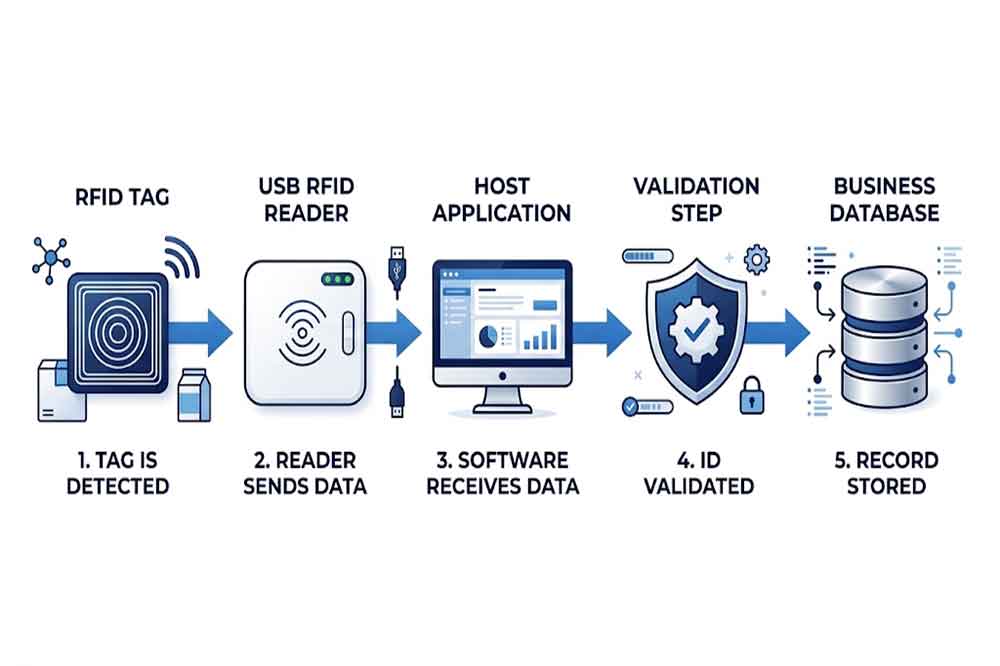
A simple workflow may look like this:
The reader does not automatically perform every step. In many projects, the business application controls the database lookup, validation rules, permissions, and transaction logic.
Understanding this separation helps buyers identify which functions belong to the reader and which must be implemented in software.
Inventory applications use RFID identifiers to look up products, record stock movements, and associate items with storage locations.
For example, a staff member may scan a tagged tool before moving it to another department. The application reads the identifier, retrieves the tool record, and asks the operator to confirm the destination.
In this workflow, the RFID reader supplies identification data. The application remains responsible for updating the correct record and recording the transaction.
An ERP platform may connect purchasing, inventory, production, sales, and financial processes. RFID data can support item identification within these workflows.
A USB RFID reader may operate at a workstation where employees receive goods, issue materials, or verify products before dispatch. The integration could pass the tag identifier to a local application, which then communicates with the ERP system through an approved interface.
The exact integration method depends on the ERP platform, available APIs, network architecture, and the organization’s software policies.
A WMS manages warehouse locations, stock movements, picking, receiving, and shipping. A USB RFID reader can support workstation-based tasks where employees need to identify tagged products or containers.
The application may validate whether an item belongs to a shipment, confirm its assigned location, or flag an unexpected identifier.
A desktop reader is not a replacement for every fixed or handheld RFID solution. It is most useful when the workflow is based around a computer workstation, controlled scanning position, or individual item verification.
In manufacturing, a USB RFID reader may be installed at a workstation to identify a component, product, tool, or work-in-progress item.
The software may use the identifier to retrieve a work order, record a production step, or check whether the correct item is being processed.
Where the process requires writing data to the tag, the reader must support the relevant tag protocol and write commands. The application also needs to manage data validation and verify the result when the hardware supports read-back checking.
One of the first integration decisions is how the reader will communicate with the application.
Some RFID readers send tag data to the computer as keyboard input. The identifier appears in the active text field, much like information typed by a keyboard.
This method can be convenient for simple applications that accept a tag value in a form. It may require little custom development.
However, keyboard emulation offers limited control compared with a dedicated software interface. The application may not receive detailed device status, structured error codes, or advanced tag operation results. Focus management and data formatting also need to be considered.
Some readers expose a serial-style interface through USB. An application sends commands and receives responses through that interface.
This approach can provide more direct control, depending on the device’s command protocol. It may be suitable for projects that require configuration, repeated reading, or other supported operations.
Before selecting this option, confirm the communication protocol, supported operating systems, command documentation, and available sample code.
A software development kit (SDK) or application programming interface (API) can help developers integrate reader functions into a custom application.
Depending on the model, available functions may include reading tag identifiers, configuring reader parameters, accessing supported memory, or performing specific tag operations.
SDKs and APIs are not universal. Their functions, programming languages, dependencies, and supported operating systems vary by supplier and model.
For a custom project, request the relevant documentation and test code early in the development process.
A reliable integration requires more than moving a tag value from the reader to a database.
Consider an asset checkout system. An employee scans a tagged device, and the application receives its identifier. The application must then confirm that the identifier exists, check whether the employee has permission to borrow the device, update its status, and record the transaction.
If the system simply accepts every scanned value, incorrect or duplicate transactions may occur.
A better workflow separates several tasks:
Data capture: Receive the tag value from the reader and identify the source of the event.
Validation: Check the data format and confirm that the identifier is valid for the application.
Record matching: Find the corresponding product, asset, or work order in the business database.
Business rules: Apply permissions, location rules, inventory checks, or other required conditions.
Database update: Save the transaction through the application’s approved data interface.
User feedback: Show success, failure, or the next required action.
This structure makes it easier to diagnose problems. If a tag is read correctly but the wrong record appears, the cause may be in the database mapping rather than the RFID hardware.
When integrating with an existing system, begin by reviewing its available interfaces. Some applications offer APIs, database integration options, or import functions. Others may require a local application that acts as a bridge between the reader and the main system.
Avoid assuming that direct database access is the best option. In enterprise environments, the approved API or integration service may be necessary to preserve business rules, access controls, and data consistency.
A practical implementation process includes the following steps.
Determine what should happen after a tag is read. Is the goal to identify a product, receive inventory, issue a tool, verify a shipment, or encode a tag?
The required event determines what data the application needs and which reader functions are necessary.
Record the RFID frequency, tag protocol, tag model, required read/write operations, and expected reading conditions.
The USB interface does not determine whether a reader supports LF, HF, or UHF tags. The hardware and tag must be compatible.
Decide whether keyboard emulation, a serial-style interface, an SDK, or an API best fits the application.
Consider the development environment, supported operating systems, error handling, and future maintenance requirements.
Decide which field in the business system corresponds to the tag identifier. Ensure that identifiers are formatted consistently and that the application handles unknown or duplicate values.
Where identifiers may change, define how the tag data and database records will remain synchronized.
Test more than a successful scan. Include unknown tags, duplicate scans, disconnected readers, unavailable network services, invalid data, and database update failures.
The application should respond clearly and avoid recording incomplete transactions as successful.
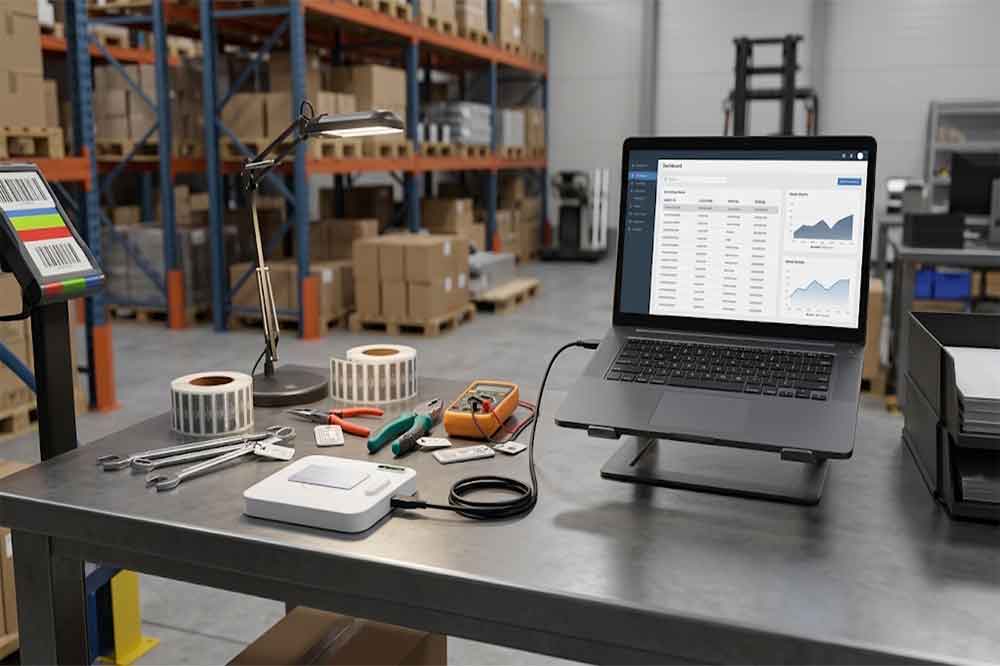
RFID integration can fail at several points. The reader may not detect the tag, the application may not receive the data, the identifier may not match a record, or the database may reject an update.
These problems should be handled separately.
For example, if the reader receives a valid identifier but the ERP connection is temporarily unavailable, the application should not report that the entire transaction has been completed. Depending on the business requirements, it may show an error, queue a retry, or ask the operator to repeat the transaction.
Duplicate scans are another consideration. Some workflows should treat repeated scans as separate events, while others should ignore duplicates within a defined period. The correct behavior depends on the process and should be implemented deliberately.
For traceability, the application may also record the timestamp, workstation, operator, transaction result, and relevant error details. This information can help teams investigate problems without relying on guesswork.
Integration should follow the organization’s security requirements.
Not every user should be allowed to change every inventory record or write new data to RFID tags. The application should enforce permissions for actions such as asset checkout, stock adjustment, product commissioning, and tag encoding.
Where RFID tag memory is protected, the system must also handle the required authorization and supported security operations correctly.
Avoid storing unnecessary sensitive information directly on tags. In many applications, storing an identifier on the tag and keeping detailed records in a controlled database is easier to manage and update.
Security requirements should be reviewed with the IT team before deployment, especially when RFID data is connected to ERP or production systems.
A frequent mistake is choosing a reader before defining the software workflow. A device may read tags successfully but lack the interface needed for the application’s required operations.
Another problem is assuming that a USB reader automatically integrates with every ERP or WMS. USB provides a hardware connection; the application still needs a supported method for receiving data and communicating with the business system.
Poor error handling can also create unreliable records. A scan may succeed while the database update fails, leaving the operator unsure whether to repeat the action.
Finally, testing only under ideal conditions can hide practical issues. Test the intended tags, workstation, operating system, application, and network environment before deploying readers across multiple locations.
Before requesting a quotation or sample, prepare a short integration specification.
Include the RFID frequency and tag model, required reading and writing functions, host operating system, software platform, preferred communication interface, and expected workflow.
Ask the supplier whether an SDK, API, command protocol, example code, and technical documentation are available. If your application requires multiple operating systems or a specific programming language, confirm support explicitly.
For OEM projects, also discuss firmware requirements, device configuration, enclosure options, and the process for testing future updates.
You can learn more from our USB RFID reader compatibility guide for Windows, macOS, and Linux, and review the USB RFID reader read/write function if your project requires tag encoding or data updates.
USB RFID reader integration connects physical identification with business processes. The reader captures supported tag data, while the application validates that data, finds the right record, and performs the required business action.
For reliable deployment, define the workflow first, choose an appropriate communication interface, confirm software support, and test both normal operations and failure scenarios. These steps help purchasing teams and system integrators select hardware that fits the wider business solution.
If you are planning to connect USB RFID readers to inventory, ERP, WMS, or custom software, contact Cykeo with your tag specifications, target platform, and integration requirements to discuss a suitable configuration.
Q1. Can a USB RFID reader connect directly to an ERP system?
Not always. The reader needs a supported interface, and the ERP system must provide an approved integration method. A bridge application may be required.
Q2. Do I need an SDK to integrate a USB RFID reader?
Not necessarily. Keyboard emulation may suit simple workflows, while advanced operations or custom software often require an SDK, API, or command interface.
Q3. Can I use a USB RFID reader with warehouse management software?
Yes, if the reader and software can exchange the required data. Verify the interface, identifier format, and transaction workflow before deployment.
Q4. How can I prevent duplicate inventory records?
Use application-level validation, duplicate detection, and clear transaction rules. The correct method depends on whether repeated scans represent separate business events.
Q5. What information should I provide when requesting an integration quote?
Provide the tag model, RFID frequency, target operating system, software platform, required reader functions, preferred interface, and expected workflow.

Discover SSD-D4AL, a USB-HID UHF RFID reader with 4/8/16 antenna options, Impinj E710/X3M1 chipset, plug-and-play USB power, and OEM customization.

SSD-D3AL is a USB-HID UHF RFID reader with 0–30 cm reading, 0–15 cm writing, over 600 tags/s recognition, USB plug-and-play operation and OEM Logo customization.

SSD-D1AL is a compact USB UHF RFID reader with Impinj E710/X3M1 chipset, USB-HID, 600+ tags/s recognition, 4/8/16 antenna support and plug-and-play USB power.

CYKEO CYKEO-D1LA USB RFID Reader is a compact desktop solution with near-field control for precise tag reading and encoding. Powered by USB, supporting ISO 18000-6C, and built for stable batch writing, this usb rfid tag reader fits retail, libraries, offices, and controlled RFID encoding tasks.

CYKEO CYKEO-D1L RFID scanner USB is a compact desktop UHF RFID scanner designed for short-range tag writing and verification. This usb rfid scanner supports batch encoding, stable 0–26 dBm output, and works across Windows, Linux, and Android systems.

CYKEO CYKEO-D1C USB RFID Card Reader is a near-field UHF desktop writer designed for secure, short-range tag encoding. With USB-C connectivity and stable 26 dBm output, this rfid reader usb c is ideal for badge issuance, label encoding, and controlled desktop RFID workflows.

CYKEO CYKEO-D2L RFID Reader USB is a compact desktop encoder built on the Impinj R500 chip. With near-field control and stable USB power, this usb rfid card reader delivers precise tag writing for offices, retail counters, and small-scale logistics encoding tasks.

CYKEO CYKEO-D3L USB RFID Tag Reader delivers stable UHF tag reading and writing for daily desktop and light industrial tasks. Designed for controlled short-range operation, this USB RFID Tag Reader works reliably with rfid tag and reader systems in libraries, tool tracking, and inventory registration.

The CYKEO CYKEO-D4L UHF RFID Tag Reader is a stable Desktop RFID Reader designed for accurate tag registration, borrowing, and return workflows. Built with the Impinj R2000 chip, this UHF RFID Tag Reader delivers controlled short-range reads for libraries, asset tracking, and inventory management environments.

The CYKEO CYKEO-D5L Desktop RFID Card Reader is a stable UHF RFID Card Reader designed for controlled short-range reading and writing. Built for libraries, tool rooms, and asset desks, this UHF RFID Card Reader supports dense tag handling, secure data processing, and easy USB integration.

The CYKEO CYKEO-D6L RFID Reader Writer is a heavy-duty Desktop RFID Reader designed for short-range, high-accuracy tag programming. Built for libraries, labs, and asset desks, this RFID Reader Writer supports batch processing, stable 33dBm output, and seamless integration with existing management systems.

Cykeo CYKEO-D8B UHF RFID tunnel and RFID Desktop Reader features 30+ items batch reading,

Cykeo CYKEO-D8A embedded RFID badge reader offers 30+ tags/sec scanning, 20cm anti-crosstalk precision, and DC 12V power for unmanned stores, warehouses, and smart inventory systems.

Cykeo’s CYKEO-D8C UHF RFID gate reader achieves 200-tag/batch scanning with adjustable power control, ideal for retail inventory and smart warehouse management.
RFID Industry Writer | IoT & Asset Tracking Analyst
James writes about RFID technology, asset tracking, and the practical challenges of digital transformation across warehousing, retail, manufacturing, and logistics.
His work focuses on how RFID is applied in real-world operations—improving inventory visibility, automating workflows, and helping businesses manage assets with greater accuracy and efficiency.
He regularly covers topics including UHF RFID, smart cabinets, RFID portals, tool tracking, warehouse automation, and industrial IoT trends..

Looking for a heat resistant RFID tag? Learn what temperature RFID tags really survive, where they fail, and how CYKEO selects them for heat-heavy sites.
More
Discover whether RFID or barcode scanners are faster for logistics. Compare bulk scanning speeds, error rates, and use cases for warehouses and shipping hubs.
More
RFID automatically identifies, counts, and tracks tagged objects without direct line-of-sight scanning across inventory, logistics, retail, manufacturing, an...
More
Understand why CYKEO UHF RFID Fixed Reader is ideal for procurement. Discover its integration-friendly design, secondary development capabilities, and applications in logistics, manufacturing, and smart access control.
More