USB RFID reader can do more than identify an RFID tag. Depending on the device, tag type, and software configuration, it may also write information to a tag, update selected memory fields, or support tag encoding during production.
For businesses evaluating RFID hardware, this distinction matters. A reader designed mainly for identification may be sufficient for checking equipment in and out. A manufacturer preparing RFID labels, however, may need a reader with reliable write commands, memory access, and verification functions.
Before purchasing a USB RFID reader, it is important to understand what read and write functions actually mean, which tag technologies are compatible, and how the device will communicate with your application.
What Does a USB RFID Reader Read/Write Function Mean?
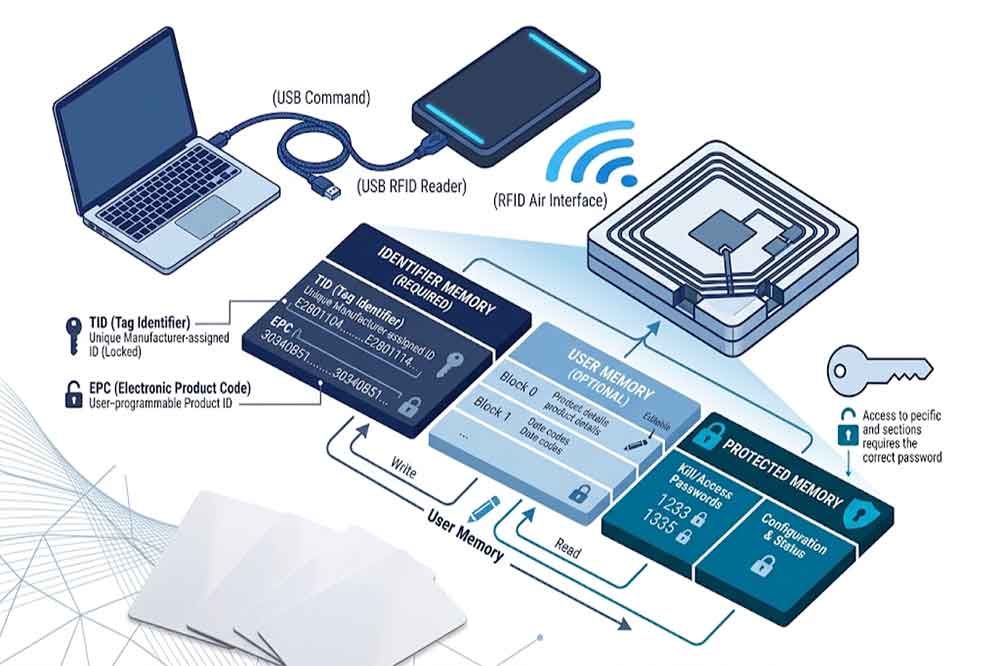
The read function retrieves information stored on an RFID tag. The write function changes or adds information to writable tag memory, subject to the tag’s technology, memory structure, access permissions, and security settings.
A USB connection describes how the reader communicates with a host computer. It does not automatically mean that the device supports every RFID frequency or every read/write operation.
For example, a USB reader may support 13.56 MHz HF tags but not UHF tags. Another device may support UHF EPC Gen2 tags and provide commands for reading EPC data or writing selected memory banks. These readers are not interchangeable simply because both connect through USB.
When comparing devices, buyers should confirm three separate capabilities:
The RFID frequency and tag protocols supported by the reader.
The memory areas and operations supported by the reader and tag.
The software interface available for sending commands and receiving results.
Understanding these points helps prevent a common purchasing mistake: choosing a reader based on its USB interface without checking its actual RFID functions.
How RFID Reading Works
When a compatible tag enters the reader’s operating field, the reader communicates with the tag using the supported radio-frequency technology. The reader receives the available tag response and transfers the result to a connected computer or application.
The information returned depends on the tag and the reader’s configuration. It may include a unique identifier, an EPC value, selected memory data, or other supported fields.
In an inventory application, for example, an operator may scan a tagged tool and use its identifier to retrieve the tool’s record from a database. The database can contain the tool’s owner, storage location, maintenance history, and current status.
The reader does not necessarily store this complete business record on the tag. In many systems, the tag contains an identifier while the application maintains the detailed information.
This approach can simplify data management because the business can update its database without rewriting every tag. However, the best design depends on the application, offline requirements, and the amount of information that must be available directly from the tag.
How RFID Writing Works
Writing involves sending a command that changes data in a writable area of a compatible RFID tag. The exact procedure varies by frequency, tag protocol, reader firmware, and software interface.
A typical workflow includes selecting a tag, preparing the data, issuing the write command, and checking whether the operation succeeded.
For example, a production line may assign an EPC identifier to a newly manufactured product. A workstation application sends the required value to a compatible UHF reader, which writes the data to the appropriate tag memory area. The system then reads the value back to verify the result.
Not every tag supports the same write operations. Some tags have read-only identifiers, while others provide writable user memory or configurable identification fields. Some memory areas may be locked or protected by access passwords.
Writing may also require additional permissions or configuration. A reader that can retrieve a tag’s identifier may not automatically support writing to every memory bank or changing protected data.
For this reason, buyers should request a clear description of the supported write commands instead of relying only on a general claim that a product supports RFID reading and writing.
Understanding RFID Tag Memory
RFID tag memory is one of the most important factors when selecting a read/write reader. Different RFID technologies use different memory structures, and the available fields vary by chip model.
EPC or identification memory
In many UHF RFID applications, the EPC memory bank stores an electronic product code or another identifier used by the application. A compatible reader may be able to read this value and, where supported, write a new one.
Changing an identifier requires careful control. If the tag is already associated with an inventory record, rewriting its EPC without updating the database may create duplicate records or cause the system to lose track of the item.
User memory
Some tags provide user memory for additional data. Depending on capacity and system design, this area may store a batch number, production reference, or other application-specific information.
User memory is not available in the same form or capacity on every tag. Before development begins, confirm the actual chip model, memory capacity, data format, and supported commands.
Reserved or protected memory
Certain RFID technologies provide reserved or security-related memory areas. These may contain access credentials, kill passwords, or other protected information.
Access to such memory can be restricted. A compatible reader, suitable software, and correct authorization may all be required. Security-related operations should be designed and tested carefully, particularly when tags are deployed in production or shared environments.
Read-Only Readers vs. Read/Write Readers
The right choice depends on what the business needs to accomplish.
A read-only workflow is often suitable when the system only needs to identify items. Examples include retrieving a tool record, checking an asset into a location, or looking up a product in a database.
A read/write workflow is more suitable when tags must be encoded, reassigned, or updated during operation. Examples include product commissioning, label encoding, or updating a supported tag field as part of a controlled manufacturing process.
A useful comparison is shown below.
Requirement
Read-focused reader
Read/write reader
Identify a compatible tag
Usually supported
Usually supported
Retrieve supported tag data
Depends on model
Depends on model
Write data to writable memory
Not supported or limited
Supported only for specified operations
Encode tags during production
Usually unsuitable
Potentially suitable
Software command requirements
May be simpler
Often needs additional write commands and verification
Security and access control
Relevant to some read operations
Especially important for protected writes
The term “read/write” is not a guarantee of universal compatibility. Buyers should still verify the exact tag type, memory area, protocol, and operation before approving a device for deployment.
What to Check Before Buying a USB RFID Reader
1. Confirm the frequency and tag protocol
Start with the tags already used by your business, or the tag model planned for the project. Confirm whether the reader supports the required LF, HF, or UHF technology and the specific tag protocol.
For UHF projects, check the supported protocol and regional frequency requirements. For HF projects, verify the applicable standard and tag compatibility. A reader’s USB connection does not determine its frequency.
Ask the supplier which memory areas can be read and written, whether encoding is supported, and whether the reader can verify written data.
If your project requires EPC programming, password-protected access, or specific memory commands, list these requirements before requesting a quotation.
3. Check the SDK, API, and software interface
Some readers provide a keyboard-emulation mode or a standard interface for sending tag data to a computer. Other applications require an SDK, API, serial commands, or a dedicated software library.
For integration projects, confirm the supported operating systems, programming languages, sample code, command documentation, and firmware requirements. A device may work with a basic desktop tool but still require development work before it can communicate with an existing business system.
4. Test write verification and error handling
A successful command response should not be the only test for a production encoding workflow. Where the device and tag support it, read the data back after writing and compare it with the intended value.
Testing should include incorrect data formats, interrupted operations, duplicate identifiers, inaccessible tags, and tags with restricted memory. The goal is to make failures visible rather than allowing incorrectly encoded items to enter the production process.
5. Evaluate the physical setup
Tag material, antenna position, distance, orientation, nearby metal, and other radio-frequency conditions can affect performance. A reader that works well with a sample tag on a desk may behave differently when labels are attached to metal equipment or packed products.
Test the actual tag, mounting method, and work environment. For workstation encoding, also confirm that operators can position tags consistently and identify failed writes without confusion.
Common Applications for USB RFID Read/Write Readers
Product and label encoding: Manufacturers can assign identifiers to products or labels before they enter the supply chain. The workflow should include data validation and verification after writing.
Asset management: A system may read a tag to retrieve an asset record, while a controlled commissioning process writes an identifier or supported field during initial setup.
Manufacturing workstations: USB RFID hardware can connect a reader to a computer-based production application. The application may validate a product identifier, record a process step, and trigger a write operation when the tag and workflow allow it.
Laboratory and sample management: RFID can help identify containers, samples, or reusable equipment. Whether data should be written directly to the tag depends on the tag’s capacity, the required traceability, and the application’s data-management design.
System integration and device testing: Developers can use a compatible USB reader to test tag communication, validate commands, and connect RFID identification with inventory, ERP, or other business software.
One frequent mistake is assuming that every RFID tag can be rewritten. Some tags do not support the required write operation, and others restrict access to certain memory areas.
Another mistake is selecting a reader by frequency alone. Two devices using the same frequency may support different protocols, commands, SDKs, or tag memory functions.
Software integration is also easy to underestimate. A reader may successfully read tags in the supplier’s demonstration software but require additional development to work with the buyer’s inventory or manufacturing platform.
Finally, avoid testing only one tag under ideal conditions. Use representative samples and test the full workflow, including verification, error handling, and the final database update.
How to Select a Reader for Your Project
Before choosing a USB RFID reader, prepare a short requirement list covering the tag model, frequency, intended read/write operations, host operating system, software interface, and expected daily workload.
If you are purchasing for an existing system, provide the supplier with the tag specifications and integration requirements. If the project is still in development, request a sample for evaluation before placing a bulk order.
For OEM projects, discuss firmware behavior, command support, enclosure requirements, interface options, and the testing process with the supplier. A clear specification is more useful than choosing a device based on a general read/write label.
Conclusion
A USB RFID reader’s read/write capability depends on the reader hardware, supported protocol, tag memory, permissions, and software interface. Reading an identifier is not the same as writing new data, and a reader that supports one tag family may not work with another.
For B2B purchasing and integration projects, confirm the required operations, test with the actual tags, and verify the complete software workflow before bulk deployment. These steps help reduce compatibility problems and create a more reliable RFID solution.
If you are evaluating USB RFID readers for tag encoding, workstation integration, or a customized RFID project, contact Cykeo with your tag model, application requirements, and expected workflow to discuss a suitable configuration.
FAQ
Q1. Can every USB RFID reader write data to tags?
No. Some readers are designed mainly for identification. Confirm that the model supports the required write commands and tag memory operations.
Q2. Can I write data to any RFID tag?
No. The tag must support the required write operation, and some memory areas may be locked or password-protected.
Q3. Does USB mean the reader supports all RFID frequencies?
No. USB describes the host connection. The reader must separately support the required LF, HF, or UHF technology and tag protocol.
Q4. How can I confirm that tag data was written correctly?
Where supported, read the relevant memory area again and compare it with the intended data. Also test error handling and database updates.
Q5. Do I need an SDK to use a read/write reader?
Not always. Basic applications may use a standard interface or vendor software, while custom systems may need an SDK, API, or command interface.
SSD-D3AL is a USB-HID UHF RFID reader with 0–30 cm reading, 0–15 cm writing, over 600 tags/s recognition, USB plug-and-play operation and OEM Logo customization.
SSD-D1AL is a compact USB UHF RFID reader with Impinj E710/X3M1 chipset, USB-HID, 600+ tags/s recognition, 4/8/16 antenna support and plug-and-play USB power.
CYKEO CYKEO-D1LA USB RFID Reader is a compact desktop solution with near-field control for precise tag reading and encoding. Powered by USB, supporting ISO 18000-6C, and built for stable batch writing, this usb rfid tag reader fits retail, libraries, offices, and controlled RFID encoding tasks.
CYKEO CYKEO-D1L RFID scanner USB is a compact desktop UHF RFID scanner designed for short-range tag writing and verification. This usb rfid scanner supports batch encoding, stable 0–26 dBm output, and works across Windows, Linux, and Android systems.
CYKEO CYKEO-D1C USB RFID Card Reader is a near-field UHF desktop writer designed for secure, short-range tag encoding. With USB-C connectivity and stable 26 dBm output, this rfid reader usb c is ideal for badge issuance, label encoding, and controlled desktop RFID workflows.
CYKEO CYKEO-D2L RFID Reader USB is a compact desktop encoder built on the Impinj R500 chip. With near-field control and stable USB power, this usb rfid card reader delivers precise tag writing for offices, retail counters, and small-scale logistics encoding tasks.
CYKEO CYKEO-D3L USB RFID Tag Reader delivers stable UHF tag reading and writing for daily desktop and light industrial tasks. Designed for controlled short-range operation, this USB RFID Tag Reader works reliably with rfid tag and reader systems in libraries, tool tracking, and inventory registration.
The CYKEO CYKEO-D4L UHF RFID Tag Reader is a stable Desktop RFID Reader designed for accurate tag registration, borrowing, and return workflows. Built with the Impinj R2000 chip, this UHF RFID Tag Reader delivers controlled short-range reads for libraries, asset tracking, and inventory management environments.
The CYKEO CYKEO-D5L Desktop RFID Card Reader is a stable UHF RFID Card Reader designed for controlled short-range reading and writing. Built for libraries, tool rooms, and asset desks, this UHF RFID Card Reader supports dense tag handling, secure data processing, and easy USB integration.
The CYKEO CYKEO-D6L RFID Reader Writer is a heavy-duty Desktop RFID Reader designed for short-range, high-accuracy tag programming. Built for libraries, labs, and asset desks, this RFID Reader Writer supports batch processing, stable 33dBm output, and seamless integration with existing management systems.
Cykeo CYKEO-D8A embedded RFID badge reader offers 30+ tags/sec scanning, 20cm anti-crosstalk precision, and DC 12V power for unmanned stores, warehouses, and smart inventory systems.
Cykeo’s CYKEO-D8C UHF RFID gate reader achieves 200-tag/batch scanning with adjustable power control, ideal for retail inventory and smart warehouse management.
RFID Industry Writer | IoT & Asset Tracking Analyst
James writes about RFID technology, asset tracking, and the practical challenges of digital transformation across warehousing, retail, manufacturing, and logistics.
His work focuses on how RFID is applied in real-world operations—improving inventory visibility, automating workflows, and helping businesses manage assets with greater accuracy and efficiency.
He regularly covers topics including UHF RFID, smart cabinets, RFID portals, tool tracking, warehouse automation, and industrial IoT trends..
A practical guide for RFID integrators and warehouse operators. Learn how antenna height, mounting angle, and gate placement affect RFID performance in real-world deployments.
Learn practical RFID read zone control methods for warehouse gates and industrial tracking systems. Discover how beam width, metal environments, and antenna placement affect RFID reading areas in real deployments.
Learn how RFID works with real-world data, UHF reader performance, and deployment insights. Discover how Cykeo improves tracking efficiency and accuracy.
Learn how RFID gate readers are used for parking lot access control, vehicle entry management, warehouse security, and automatic gate systems. Discover how RFID technology improves traffic flow and access efficiency.
 Cykeo RFID IoT Solution Products R&D Manufacturer