Industrial tools are assets, even when they are too small to appear on a company’s main equipment register. Torque wrenches, measuring instruments, maintenance tools, power tools, and specialized production equipment can all carry a purchase cost and an operational responsibility. When these items move between departments, technicians, workshops, and storage locations, maintaining reliable records becomes difficult.
An RFID tool cabinet can help connect physical tools with digital asset records. Instead of relying entirely on spreadsheets or manual sign-out sheets, a company can use RFID identification, cabinet transactions, and management software to improve visibility into tool identity, location, availability, and responsibility.
The objective is not simply to count tools. It is to make tool assets easier to identify, manage, audit, and allocate throughout daily operations.
What Is RFID Tool Asset Management?
RFID tool asset management is the process of identifying, recording, locating, and controlling tools with the help of radio frequency identification technology and connected management software.
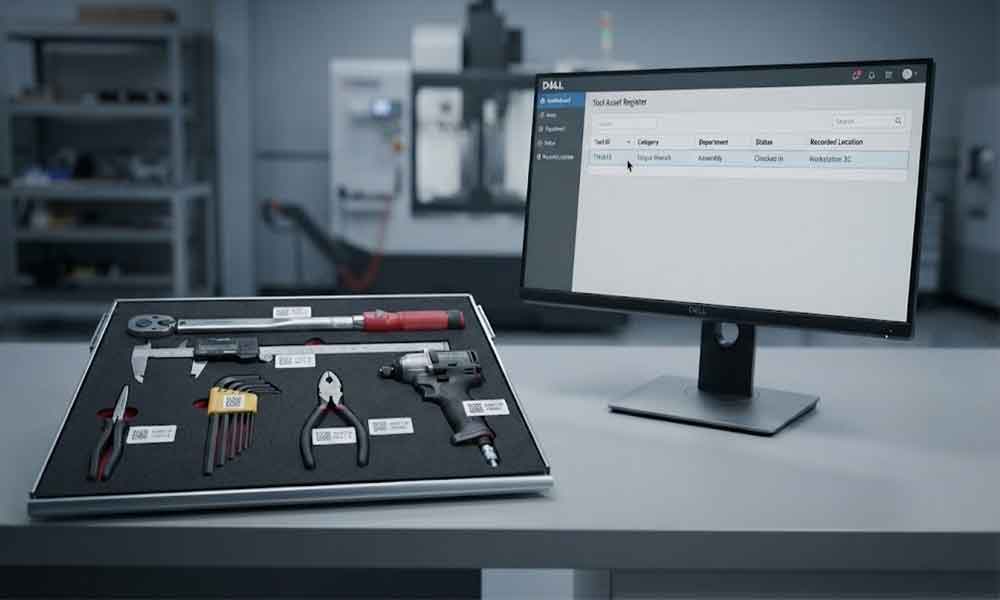
Each managed tool is associated with a digital record. Depending on the application, this record may contain a tool ID, description, category, department, assigned location, purchase information, responsible user, condition, and maintenance references.
An RFID tag provides a way to identify the physical tool. An RFID reader or cabinet reading system detects compatible tags, while software associates the captured identification data with the corresponding asset records.
An RFID smart tool cabinet adds a practical control point to this process. It can support tool storage, user authentication, checkout and return recording, and inventory checks. The exact functions depend on the cabinet hardware, software configuration, and integration requirements.
For factories managing hundreds or thousands of tools, this connection between physical storage and digital records can make routine asset management more consistent.
Why Industrial Tool Assets Are Difficult to Manage
Many factories already have an asset register. The problem is that the register does not always reflect what happens on the workshop floor.
A spreadsheet may show that a tool belongs to the maintenance department, but the tool could be in a technician’s toolbox, on a production line, awaiting inspection, or temporarily stored in another workshop.
These gaps create several practical problems.
Asset records become outdated
Tools may be transferred between departments without updating their assigned locations. Staff may also replace a damaged tool, change its storage position, or lend it to another team without updating the relevant records.
Over time, the asset register and physical inventory can become inconsistent.
Responsibility is difficult to establish
When several technicians share the same equipment, it may be unclear who last checked out a tool or who should return it. This is especially challenging for expensive, specialized, or frequently shared tools.
Manual audits consume time
A conventional asset audit may require employees to visit storage locations, read labels, compare serial numbers, and update spreadsheets. If tools are distributed across multiple locations, the work becomes more complicated.
Asset availability is not always clear
A tool may exist in the asset register but still be unavailable for work. It could be checked out, misplaced, damaged, reserved, or awaiting inspection.
For maintenance and production teams, knowing that a tool exists is not enough. They also need to understand its current operational status.
How RFID Tool Cabinet Supports Asset Management
Connect each tool with digital asset record
The first step is to establish a reliable identity for every managed tool.
A tool can receive a unique asset ID and a suitable RFID tag. The corresponding software record stores the tool’s basic information and links the physical item to its digital identity.
The record might include the tool category, model, serial number, department, storage location, and asset status. Additional fields can be included when needed.
RFID tags do not necessarily need to store all this information themselves. In many deployments, the tag provides an identifier, while the main record remains in the management system.
This arrangement makes it easier to update asset information without rewriting the entire record on the physical tag.
Improve visibility into tool locations
An RFID tool cabinet provides a defined location where tools can be stored and identified.
When a tool is checked out or returned through a supported workflow, the system can record the transaction and update the associated location or custody information. Where several cabinets are connected to a shared platform, authorized users may be able to view tool records across departments or facilities.
However, a cabinet transaction does not automatically prove the exact real-time location of a tool after it leaves the cabinet. If a technician carries the tool to another work area, the system needs an additional recording method or tracking infrastructure to establish its subsequent location.
Clear rules for transfers, returns, and temporary storage help keep location records useful.
Record tool custody and responsibility
Asset management often requires more than knowing where a tool is stored. Managers also need to know who has taken responsibility for it.
A connected cabinet can support user authentication and tool checkout records. Depending on the configuration, a transaction may link a tool, user, timestamp, and cabinet location.
These records help supervisors investigate missing tools, review borrowing history, and identify repeated problems in a shared tool room.
For high-value assets, permission rules can also restrict access to selected tools or categories. The system should match these rules to actual job responsibilities rather than making access unnecessarily complicated.
Make asset inventory easier to maintain
RFID identification can reduce the amount of manual work required for routine tool checks.
A compatible cabinet may identify multiple tagged tools during an inventory process, depending on the tag design, tool materials, cabinet structure, antenna arrangement, and reading configuration.
The resulting records can be compared with the expected inventory to identify discrepancies. Staff can then investigate missing, unexpected, or incorrectly registered tools.
RFID does not guarantee perfect reading in every environment. Metal surfaces, closely packed tools, tag orientation, and overlapping read zones can affect performance. Representative tools should be tested before a system is deployed at scale.
Connect asset status with daily operations
A tool’s asset record becomes more useful when it reflects operational conditions.
For example, a tool may be registered and present in a cabinet but unavailable because it is damaged or overdue for inspection. Another tool may be available but assigned to a different department.
A well-designed system can distinguish between statuses such as available, checked out, under maintenance, awaiting inspection, and retired. The exact status model should reflect the company’s operating procedures.
Where calibration or maintenance records are important, the asset management system can link to the relevant maintenance or quality software instead of keeping disconnected copies of the same information.
What Information Should Tool Asset Record Contain?
The required data depends on tool value, risk, usage, and company procedures. A practical starting point is to define a consistent record structure.
Asset information
Management purpose
Unique asset ID
Distinguishes one tool from another
RFID tag ID
Connects the physical tag with the digital record
Tool name and category
Makes search and reporting easier
Model or serial number
Supports identification and verification
Assigned department
Shows organizational responsibility
Current recorded location
Helps users find the tool
Asset status
Shows availability or restrictions
Current custodian
Supports accountability for checked-out tools
Transaction history
Records issue, return, and transfer events
Maintenance or inspection reference
Connects the tool with relevant service records
Purchase or asset value
Supports financial and replacement reviews where required
Not every tool needs every field. Adding too many mandatory fields can make registration slow and increase the chance of incomplete records.
A better approach is to define the minimum information needed for all tools, then add specialized fields for high-value equipment, calibrated instruments, or tools subject to stricter controls.
RFID Tool Cabinets and Enterprise Asset Management Software
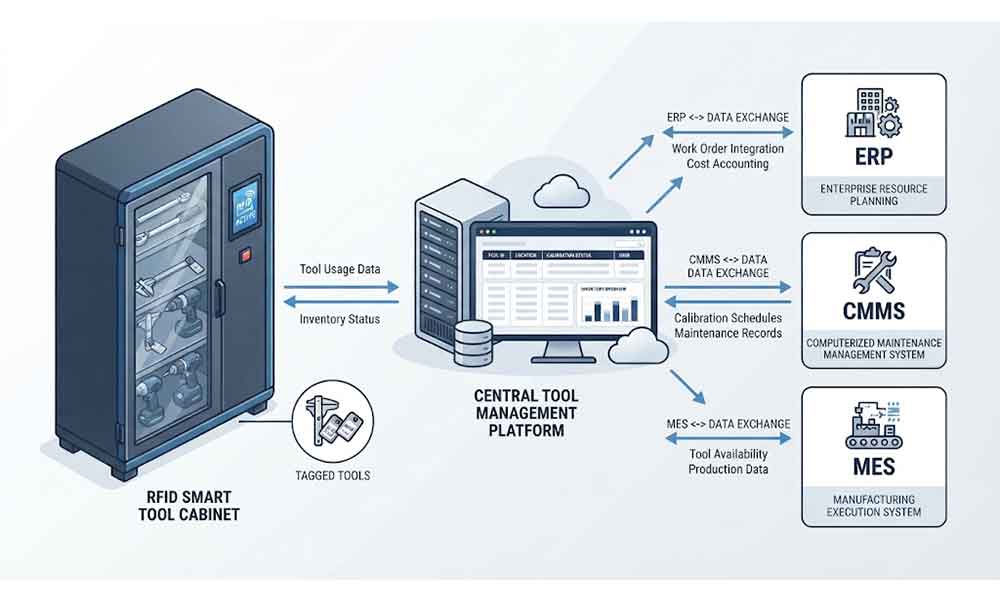
An RFID cabinet can manage a defined tool storage and transaction workflow, but larger organizations may already use ERP, CMMS, MES, warehouse software, or an enterprise asset management platform.
Integration can connect cabinet activity with these existing records.
For example, ERP software may hold purchasing and financial information. A CMMS may manage maintenance activities and work orders. MES software may coordinate production operations. The RFID tool management layer can supply tool identification and transaction events where the interface supports them.
Before integration, the project team should define which system owns each data field. If two systems can independently update a tool’s department or status, conflicting records may appear.
The technical design should also specify how events are transmitted, how failed synchronization is handled, and how duplicate transactions are prevented. APIs, scheduled data exchange, or other supported interfaces may be appropriate depending on the existing software.
A small pilot involving representative tools and actual users is often a practical way to validate these decisions before connecting multiple cabinets.
How to Implement RFID Tool Asset Management
Start with an asset audit
Review the existing tool register and compare it with the tools physically available. Identify duplicate records, missing asset IDs, outdated locations, and inconsistent tool names.
There is little value in automating a database that already contains major identification problems.
Classify tools by management requirements
Not every item needs the same level of control. Frequently shared tools, high-value equipment, precision instruments, and general-purpose hand tools may require different tag types, permissions, and record fields.
Classification helps control implementation costs and keeps the workflow appropriate for each tool category.
Test tags and cabinet reading performance
Select representative tools, including metal tools and items with unusual shapes or dense storage arrangements. Test whether the proposed tags can be read reliably in the intended cabinet.
Confirm how the system handles multiple tools, unexpected reads, and tools placed close together. Actual test results are more useful than relying on a reader’s maximum advertised range.
Define location, custody, and status rules
Decide what happens when a tool is issued, returned, transferred, sent for repair, or retired.
For example, a checkout transaction might update custody without changing the tool’s home department. A transfer transaction might change the assigned location. Keeping these meanings separate helps avoid misleading records.
Validate reports and integration
Before full deployment, compare cabinet records with physical checks. Confirm that users can locate tools, supervisors can review transaction histories, and exceptions can be investigated.
If the project includes ERP, CMMS, or MES integration, test synchronization failures and record updates as well as the normal workflow.
Common Mistakes in Tool Asset Management Projects
One common mistake is treating the RFID tag as the complete asset management solution. Identification is important, but useful records also depend on accurate master data, sensible workflows, and consistent user behavior.
Another problem is assuming that a tool’s last cabinet transaction provides continuous location tracking. Tools taken to a work area may need separate transfer or return procedures to keep location information current.
Companies may also create too many asset statuses or require unnecessary data entry. The resulting process becomes difficult to follow, and employees may work around it.
Finally, deploying multiple cabinets before validating the asset data and user workflow can multiply small errors across the organization. A pilot helps reveal these problems while the scope is still manageable.
Choosing RFID Tool Cabinet for Asset Management
When evaluating an RFID tool cabinet, review the complete solution rather than the cabinet enclosure alone.
Consider whether the cabinet supports the required tool types, RFID tags, authentication methods, inventory workflows, and transaction records. Check how it manages multiple tools, whether it can support several cabinets, and which software interfaces are available.
Ask the supplier to demonstrate the actual tools and tags you plan to manage. Clarify what is included in the software, installation, data migration, integration, training, and ongoing support.
For an enterprise project, also confirm who owns the asset records, how data can be exported, and what happens if the network or external software becomes unavailable.
A suitable solution should improve the company’s existing asset management process rather than simply introduce another disconnected database.
Conclusion
RFID tool cabinets can help companies connect physical tools with digital asset records, improve visibility into recorded locations and custody, and simplify routine inventory checks. Their value depends on more than RFID hardware: accurate asset data, reliable reading performance, clear operating rules, and suitable software integration are equally important.
For industrial teams, the practical goal is to maintain a trustworthy picture of each managed tool: what it is, where it was last recorded, who is responsible for it, and whether it is available for work. Starting with a well-defined pilot gives the organization a realistic basis for improving tool asset management across more departments and locations.
Cykeo’s RFID Smart Tool Cabinet enables 10-second tool audits, user access control & real-time alerts for construction/oil/gas. Features 21.5″ touchscreen, IP54 steel body & -30°C~60°C operation. Supports SAP/Oracle integration.
Cykeo’s industrial RFID Tool Cart features 14″ touchscreen, 400+ tool scanning, and carbon steel construction for aviation MRO, power plants and construction sites. 5-second inventory scans.
Cykeo CYKEO-TC RFID multi-drawer tool cart manages 300+ tools via UHF RFID, features fingerprint/face recognition, Android/Windows OS, and SAP integration for nuclear/railway/fire safety sectors. IP54 rated for harsh environments.
Cykeo CYKEO-GTC4 RFID tool inventory cart manages 300+ tools via UHF RFID, features instant scanning, fingerprint/face recognition, and SAP integration for nuclear/railway/fire safety sectors. IP54 rated for harsh environments.
Cykeo CYKEO-GTC7A RFID real-time tool tracking cart features 99.9% accuracy, FOD prevention, and SAP integration for aviation/plant maintenance. Military-grade construction.
Cykeo CYKEO-GTC4B RFID mobile tool cart delivers 300-tool verification in 7 seconds with modular drawers, ≤150W power, and SAP integration for industrial/aviation use.
Cykeo CYKEO-GTC4C RFID workshop tool control cart delivers 300-tool inventory in 3 seconds with 10hr battery, SAP integration, and FOD prevention for industrial workshops.
Cykeo’s off-grid RFID tool inventory system features solar/wind power, -30°C~60°C operation, and military-grade durability for mining/energy/military sectors.
Cykeo’s RFID multi-drawer tool cabinet features 5 adjustable drawers, biometric access, and 99.9% scan accuracy for automotive/aerospace manufacturing.
Cykeo CYKEO-GT1B industrial RFID tool storage cabinet features Impinj R2000 UHF technology, 1,000+ tool capacity, IP54 protection, and Windows/Android OS for manufacturing/aviation MRO. Includes auto check-in/out and SAP/Oracle sync.
Cykeo CYKEO-GT3C industrial RFID tool checkout system Cabinet features millimeter-wave scanning, 280-layer storage, dual OS, and 99.9% accuracy for aviation/semiconductor sectors. Supports auto check-in/out and real-time SAP sync.
Discover the CYKEO-B1A Industrial RFID Backpack featuring advanced tool tracking technology with 25cm RF shielding, 7-day battery life, and wearable design for field maintenance professionals.
RFID Industry Writer | IoT & Asset Tracking Analyst
James writes about RFID technology, asset tracking, and the practical challenges of digital transformation across warehousing, retail, manufacturing, and logistics.
His work focuses on how RFID is applied in real-world operations—improving inventory visibility, automating workflows, and helping businesses manage assets with greater accuracy and efficiency.
He regularly covers topics including UHF RFID, smart cabinets, RFID portals, tool tracking, warehouse automation, and industrial IoT trends..
Cykeo, a leading IoT hardware solutions provider, announces the grand opening of its Shenzhen smart factory, expanding its national production network to 25,000㎡. Explore how Cykeo leverages RFID technology, 200+ patents, and global certification...
Wondering what is RFID reader technology? We explain how it works, the internal components, communication principles, and why it outperforms barcodes. A clear technical overview from CYKEO engineers.
rfid hospital solutions improve medical inventory visibility, reduce manual errors, and support real-time UHF RFID tracking for hospital consumables and surgical supplies.
 Cykeo RFID IoT Solution Products R&D Manufacturer