 Cykeo RFID IoT Solution Products R&D Manufacturer

what does a rfid scanner look like
122An RFID scanner can be a handheld device, desktop unit, or fixed industrial system that identifies RFID tags through radio frequency communication.
MoreAll RFID Product
A standard USB RFID reader can work well for basic identification tasks, but OEM projects often have requirements that go beyond simply reading a tag. The reader may need to fit inside a particular housing, connect to an existing controller, work with proprietary software, or operate reliably in a specific environment.
For equipment manufacturers and RFID solution providers, these details matter from the beginning. Changing the reader after mechanical design or software development has started can add unnecessary engineering work and delay product release.
A custom USB RFID reader gives OEM teams more control over the hardware, communication method, physical design, and integration process. The right approach is to define the application first, confirm the technical requirements, and then evaluate a suitable design before committing to volume production.
Before deciding whether a standard reader can meet your requirements, review the available USB RFID reader products to compare existing designs and identify a suitable starting point for customization.
Off-the-shelf RFID readers are designed for general applications. They may be suitable for desktop identification, access control, or simple inventory operations, but a dedicated OEM product can have different requirements.
For example, an equipment manufacturer may need a compact reader mounted behind a front panel. A retail system developer may need a reader that sends tag data directly to a POS application. An industrial integrator may require a specific connector, cable length, mounting arrangement, or communication format.
In these situations, customization helps align the reader with the complete product rather than forcing the product design to accommodate a standard device.
Common OEM applications include:
The required level of customization depends on the project. Some buyers only need a modified enclosure or cable. Others require firmware adjustments, a different antenna arrangement, or deeper software integration.
Before selecting a design, establish which requirements are mandatory and which are simply preferences. This helps the engineering team focus on the changes that genuinely affect performance, cost, and integration.
Frequency is one of the first specifications to confirm. Common RFID reader categories include low frequency (LF), high frequency (HF), and ultra-high frequency (UHF). They operate differently and are intended for different tag types and applications.
HF readers operating at 13.56 MHz are frequently used for identification cards, NFC-related applications, library systems, and short-range item identification. LF systems are used in certain identification and access applications. UHF readers are often selected for applications that need to identify compatible tags over greater distances or read multiple tags within a suitable RF environment.
These categories are not interchangeable. The reader must support the frequency and tag protocol required by the target application.
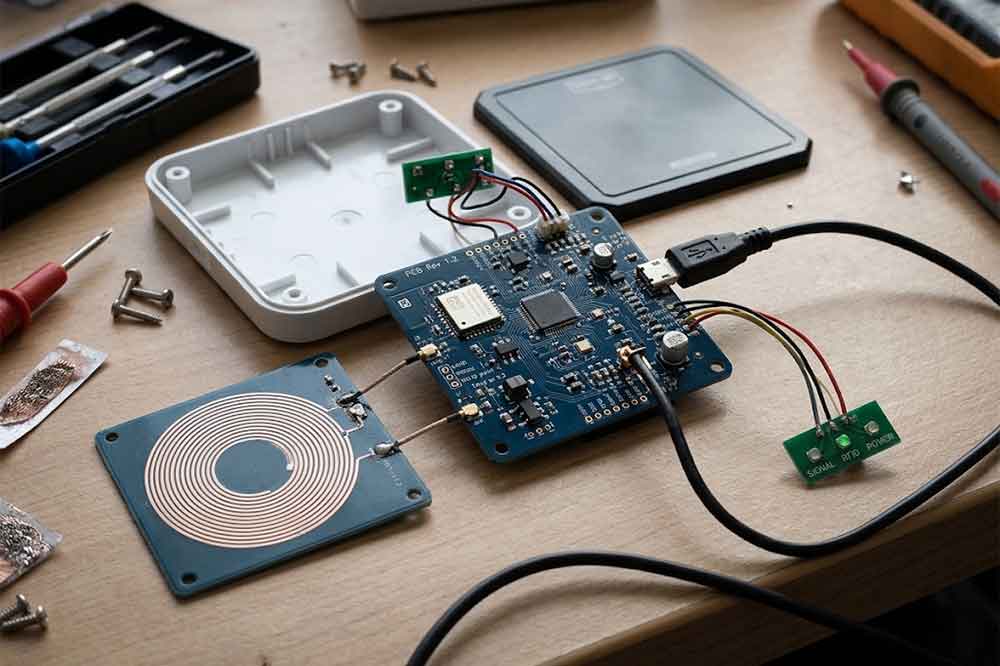
For OEM projects, buyers should confirm:
Do not select a reader based on frequency alone. Tag design, antenna performance, mounting materials, nearby electronics, and the surrounding environment can all affect actual reading performance.
The antenna influences how the reader interacts with RFID tags. Its dimensions, position, orientation, and surrounding materials can affect the effective reading area.
A compact device installed inside a metal enclosure, for example, may behave differently from the same reader tested on an open desktop. A reader designed for close-range card presentation may also be unsuitable for a workflow that requires users to identify small tagged items placed at varying positions.
OEM customization may involve antenna size, placement, orientation, or matching the reader to a particular enclosure. However, the available changes depend on the selected RFID platform and the physical constraints of the product.
When discussing performance with a supplier, describe the real operating conditions. Include the tag type, approximate tag dimensions, expected presentation position, desired reading distance, and nearby materials.
A practical test with the intended tags is more useful than relying on a general reading-distance figure. If the product will be installed behind a panel, test it in that configuration rather than approving the reader only in an open environment.
Physical integration is often one of the main reasons an OEM buyer requests a custom reader.
The required reader may need to fit within a narrow space, align with an existing panel opening, or use mounting points that differ from a standard desktop device. The housing may also need a particular surface finish, label, logo, or cable exit direction.
Depending on the design, customization may cover:
Mechanical changes should be reviewed alongside antenna performance. A smaller enclosure or a change in material can affect the antenna’s operating environment, so physical modifications should not be treated as purely cosmetic.
Provide a mechanical drawing or a three-dimensional model when possible. Include the available installation space, mounting points, panel thickness, connector clearance, and any restrictions on cable routing.
This gives the supplier a clearer basis for assessing feasibility before a prototype is produced.
USB is convenient for OEM integration because it is widely supported by computers and many embedded systems. However, the term “USB RFID reader” does not describe a single communication method.
Depending on the reader design, data may be delivered through a USB Human Interface Device (HID) interface, a virtual serial port, or a vendor-specific interface accessed through an SDK or API.
A keyboard-emulation reader can send a tag identifier to an active text field. This may be sufficient for a simple registration workflow. An application that needs direct control over the reader, event handling, device status, or tag-reading commands may require a different interface.
Before selecting the interface, clarify:
Also confirm the USB connector, power requirements, cable length, and any restrictions imposed by the host device. Compatibility with a standard desktop computer does not automatically guarantee compatibility with every embedded controller or mobile device.
Hardware customization alone may not solve the integration problem. The reader must also behave in a way that fits the host application’s workflow.
A project might require a specific data format, a defined character sequence after each scan, configurable read modes, or a command interface that allows software to start and stop reading. Other applications may need to retrieve tag identifiers, monitor reader status, or process repeated reads without creating duplicate records.
These requirements should be documented before firmware changes are considered.
If the reader will work with an existing application, provide the software team’s expectations for input data, communication methods, error handling, and device initialization. If an SDK is required, confirm the supported operating systems, programming languages, sample code, documentation, and licensing conditions.
For more complex integrations, a proof-of-concept test can identify compatibility issues before the mechanical design and production plan are finalized.
A clear specification makes it easier to assess feasibility and obtain a meaningful quotation. It also reduces the risk of approving a sample that meets the basic reading requirement but fails during actual installation.
Start with the application rather than a list of product features. Explain what the reader identifies, where it will be installed, how users interact with it, and what the host system must do with the resulting data.
A useful OEM specification should include the following information:
1. Application and operating environment
Describe the equipment or system that will use the reader. Mention whether it will be used on a desktop, inside a cabinet, behind a panel, or in an industrial environment.
2. RFID requirements
Specify the frequency, supported tag types, required standards, and expected reading behavior. If the tag model has already been selected, provide its datasheet or a physical sample.
3. Mechanical requirements
Provide the maximum dimensions, mounting details, housing preferences, cable routing, and connector requirements. Identify any metal or other materials close to the antenna.
4. Host and software requirements
State the operating system, host hardware, USB interface preference, application architecture, and required SDK or API functions.
5. Performance and testing criteria
Define what a successful test looks like. Examples include consistent identification at a specified position, acceptable response time, reliable reconnection after a USB interruption, and correct handling of repeated tag presentations.
6. Project and production information
Share the expected prototype quantity, estimated annual demand, target production schedule, branding requirements, and any relevant compliance requirements.
Not every project needs a long specification document. A drawing, a short application description, and a list of mandatory technical parameters can provide a useful starting point. The important point is to identify constraints that would otherwise lead to a redesign.
A prototype should be evaluated in the environment where the finished product will operate. A reader that works on an engineering desk may behave differently after it is installed inside a machine, connected to a long cable, or placed near other electronic components.
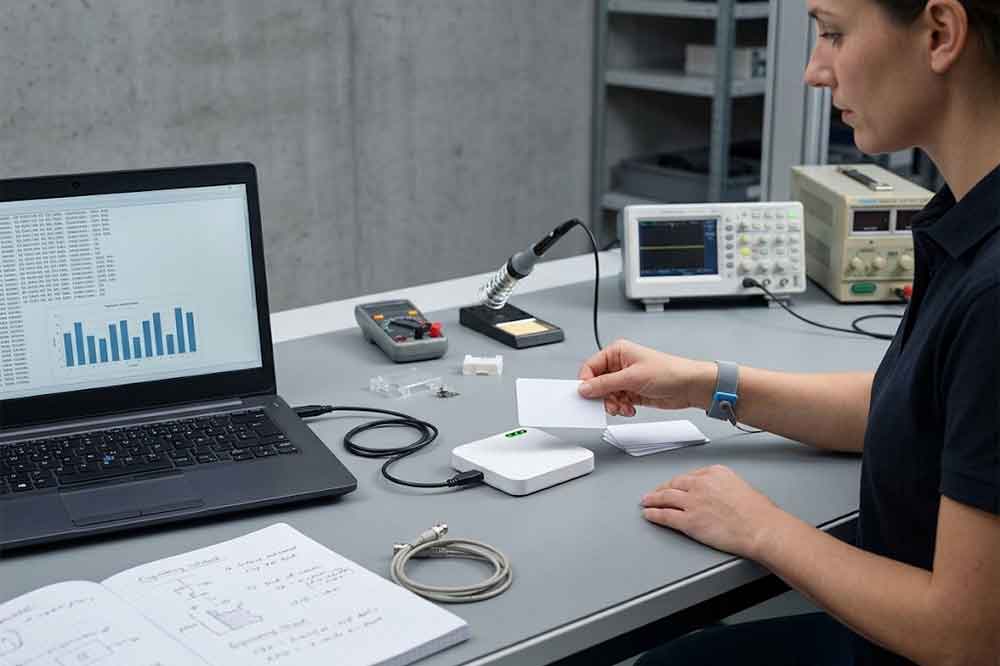
A practical evaluation should cover several areas.
First, verify the basic RFID functions with the actual tags. Test the expected reading position and distance, and check whether nearby tags or surrounding materials affect the result.
Second, confirm the USB connection and data format. Make sure the host recognizes the device correctly, the application receives the expected information, and the reader behaves as intended after disconnection and reconnection.
Third, evaluate mechanical fit. Check mounting points, cable clearance, housing alignment, and accessibility during installation or maintenance.
Finally, test the complete workflow. For a POS system, that may mean presenting a tag and confirming that the correct item appears in the application. For an asset tracking terminal, it may involve reading an asset identifier and passing it to the existing inventory system.
Record the test conditions and results. If a reading problem occurs, note the tag model, tag position, distance, surrounding materials, and software behavior. Specific observations make troubleshooting much faster.
For projects involving firmware or enclosure changes, obtain approval against an agreed specification before moving to the next stage.
Once the prototype meets the agreed requirements, the project can move toward production planning.
At this stage, confirm the final hardware revision, firmware version, enclosure design, cable and connector details, labels, packaging, and quality inspection criteria. If the reader will be installed in another manufacturer’s equipment, the integration drawing and installation instructions should also be finalized.
Production planning should address expected order quantities, forecast changes, component availability, lead times, and how design revisions will be controlled. OEM buyers should also establish how defective units will be identified and handled, and whether firmware or hardware updates require a new approval process.
For recurring projects, a documented reference sample can help both parties maintain consistency between prototype approval and subsequent production batches.
Certification requirements should be reviewed according to the destination market and the complete finished product. A change to the enclosure, radio design, power arrangement, or other regulated feature may affect the compliance assessment. Do not assume that an existing certification automatically covers every customized configuration.
The best time to resolve these details is before production release, when changes are generally easier to manage than after the reader has been incorporated into a larger product.
If a standard RFID reader does not fit your product, the first step is to define the requirements that cannot be compromised. Frequency, tag compatibility, mechanical dimensions, USB communication, and software behavior should be reviewed together.
Cykeo works with B2B customers exploring RFID reader solutions for equipment integration and OEM applications. To start a project discussion, prepare a brief application description, mechanical drawing if available, target tag information, host interface requirements, and estimated order volume.
The more clearly the intended use is described, the easier it is to determine whether an existing platform can be adapted or whether a more substantial design change is needed.
Contact the Cykeo team to discuss your custom USB RFID reader requirements, prototype evaluation, and production planning.
Depending on the platform, customization may include the enclosure, dimensions, mounting method, cable, connector, branding, antenna arrangement, firmware, and communication interface. The available options depend on technical feasibility and project volume.
Potentially, yes. Compatibility depends on the reader’s interface, operating system, data format, and application requirements. Confirm whether the project needs HID keyboard emulation, a virtual serial port, or an SDK/API-based integration, then test the proposed configuration with the actual software.
Start with the tags already used by the application, if any. Confirm their frequency, supported protocols, required reading distance, and operating environment. LF, HF, and UHF serve different purposes, so the reader and tags must be compatible.
A prototype is strongly recommended when the project involves custom dimensions, antenna changes, firmware modifications, or integration with existing software. Testing the complete assembly helps uncover problems before a production order is released.
Provide the application description, RFID frequency and tag type, mechanical dimensions, USB interface requirements, host operating system, required customization, prototype quantity, estimated annual demand, and target schedule. Drawings and tag samples are helpful when available.
Choosing the right hardware is only part of an OEM project. This guide on selecting a [USB RFID reader manufacturer] can help buyers evaluate technical support, manufacturing capabilities, and production requirements before committing to a supplier.
For projects that have moved beyond initial testing, the [USB RFID reader wholesale buying guide] provides additional guidance on order quantities, supplier evaluation, and planning for repeat purchases.
When the application needs more than basic tag input, review the [USB RFID reader SDK and API integration guide] to understand how software can communicate with the reader and access supported functions.
Before finalizing the reader interface, consider the practical steps involved in [integrating a USB RFID reader into existing software], including data handling, application compatibility, and testing.
The choice of communication interface can affect the entire application design. Read the comparison of [HID vs. SDK interfaces for USB RFID readers] before deciding how tag data should reach the host system.
For projects using a desktop or laptop as the host, this guide to [connecting a USB RFID reader to a PC] covers the basic connection and compatibility checks that should be completed before system testing.
For a broader look at integration, testing, and supply requirements, read our guide to a [USB RFID reader supplier for RFID system integrators]
To compare hardware, firmware, interface, and branding options, explore our guide to USB RFID reader OEM and ODM customization options.

Discover SSD-D4AL, a USB-HID UHF RFID reader with 4/8/16 antenna options, Impinj E710/X3M1 chipset, plug-and-play USB power, and OEM customization.

SSD-D3AL is a USB-HID UHF RFID reader with 0–30 cm reading, 0–15 cm writing, over 600 tags/s recognition, USB plug-and-play operation and OEM Logo customization.

SSD-D1AL is a compact USB UHF RFID reader with Impinj E710/X3M1 chipset, USB-HID, 600+ tags/s recognition, 4/8/16 antenna support and plug-and-play USB power.

CYKEO CYKEO-D1LA USB RFID Reader is a compact desktop solution with near-field control for precise tag reading and encoding. Powered by USB, supporting ISO 18000-6C, and built for stable batch writing, this usb rfid tag reader fits retail, libraries, offices, and controlled RFID encoding tasks.

CYKEO CYKEO-D1L RFID scanner USB is a compact desktop UHF RFID scanner designed for short-range tag writing and verification. This usb rfid scanner supports batch encoding, stable 0–26 dBm output, and works across Windows, Linux, and Android systems.

CYKEO CYKEO-D1C USB RFID Card Reader is a near-field UHF desktop writer designed for secure, short-range tag encoding. With USB-C connectivity and stable 26 dBm output, this rfid reader usb c is ideal for badge issuance, label encoding, and controlled desktop RFID workflows.

CYKEO CYKEO-D2L RFID Reader USB is a compact desktop encoder built on the Impinj R500 chip. With near-field control and stable USB power, this usb rfid card reader delivers precise tag writing for offices, retail counters, and small-scale logistics encoding tasks.

CYKEO CYKEO-D3L USB RFID Tag Reader delivers stable UHF tag reading and writing for daily desktop and light industrial tasks. Designed for controlled short-range operation, this USB RFID Tag Reader works reliably with rfid tag and reader systems in libraries, tool tracking, and inventory registration.

The CYKEO CYKEO-D4L UHF RFID Tag Reader is a stable Desktop RFID Reader designed for accurate tag registration, borrowing, and return workflows. Built with the Impinj R2000 chip, this UHF RFID Tag Reader delivers controlled short-range reads for libraries, asset tracking, and inventory management environments.

The CYKEO CYKEO-D5L Desktop RFID Card Reader is a stable UHF RFID Card Reader designed for controlled short-range reading and writing. Built for libraries, tool rooms, and asset desks, this UHF RFID Card Reader supports dense tag handling, secure data processing, and easy USB integration.

The CYKEO CYKEO-D6L RFID Reader Writer is a heavy-duty Desktop RFID Reader designed for short-range, high-accuracy tag programming. Built for libraries, labs, and asset desks, this RFID Reader Writer supports batch processing, stable 33dBm output, and seamless integration with existing management systems.

Cykeo CYKEO-D8B UHF RFID tunnel and RFID Desktop Reader features 30+ items batch reading,

Cykeo CYKEO-D8A embedded RFID badge reader offers 30+ tags/sec scanning, 20cm anti-crosstalk precision, and DC 12V power for unmanned stores, warehouses, and smart inventory systems.

Cykeo’s CYKEO-D8C UHF RFID gate reader achieves 200-tag/batch scanning with adjustable power control, ideal for retail inventory and smart warehouse management.
RFID Industry Writer | IoT & Asset Tracking Analyst
James writes about RFID technology, asset tracking, and the practical challenges of digital transformation across warehousing, retail, manufacturing, and logistics.
His work focuses on how RFID is applied in real-world operations—improving inventory visibility, automating workflows, and helping businesses manage assets with greater accuracy and efficiency.
He regularly covers topics including UHF RFID, smart cabinets, RFID portals, tool tracking, warehouse automation, and industrial IoT trends..

An RFID scanner can be a handheld device, desktop unit, or fixed industrial system that identifies RFID tags through radio frequency communication.
More
The Guide breaks down the working principles, applications, and benefits of RFID technology in warehouses
More
A long range RFID scanner can automate vehicle identification at parking entrances, exits, restricted areas, and other checkpoints. By combining UHF RFID rea...
More
RFID readers identify, read, and sometimes write RFID tag data to connect physical objects with digital systems for inventory, tracking, and automation.
More