 Cykeo RFID IoT Solution Products R&D Manufacturer

RFID Long Range Reader SDK & API: What Actually Matters for Integration Projects
192A practical guide for developers on RFID SDK and API integration. Learn how to handle raw tag data, avoid common mistakes, and build stable RFID systems.
MoreAll RFID Product
RFID labels are used in warehouses, retail stores, manufacturing facilities, laboratories, and asset management systems. They can carry an electronic identifier that allows a reader to identify an item without relying entirely on a printed barcode or manually entered serial number.
However, printing a label and encoding its RFID chip are two different operations. A label may look correct on the outside while its electronic data is missing, incorrect, or duplicated. This is where a USB RFID reader with writing capability becomes useful.
Connected to a computer, a compatible USB RFID reader can help operators encode RFID labels, check the stored information, and prepare tags for use in an existing tracking system. The setup can be relatively simple, but the reader, tag, encoding software, and data format must all work together.
RFID label encoding is the process of writing electronic data into the memory of an RFID tag embedded in a label. The data may identify a product, carton, tool, document, component, or other tracked item.
For example, a manufacturer may produce 2,000 labels for a batch of electronic components. Each label needs a unique identifier linked to a product record in the company’s database. Encoding assigns the electronic data to each compatible tag so that the items can be identified later.
The exact encoding process depends on the RFID technology being used.
UHF RFID labels commonly used in supply chains may store an Electronic Product Code (EPC) in their EPC memory bank. HF and NFC tags use different protocols and memory structures, so the writing procedure and supported data formats may differ.
It is important to distinguish between the information printed on a label and the data stored electronically. A printed serial number does not automatically become the RFID tag’s electronic identifier. The two must be linked through a suitable encoding and verification process.
For different desktop applications, explore our range of [USB RFID readers for tag programming and data collection] to identify a reader that matches your tag type and software requirements.
A USB RFID reader connects to a computer and provides an interface for reading compatible RFID tags. A reader that also supports writing can be used to program tag memory through suitable software or an SDK.
This arrangement is useful for businesses that do not need a large automated encoding line.
At a desktop workstation, an operator can prepare label data, present a tag to the reader, write the required information, and check the result before moving to the next label. Depending on the reader and software, the process can be performed manually or integrated into a more automated application.
Common applications include:
A USB connection also makes it easier to integrate the reader with a computer-based workflow. The actual integration method depends on the device. Some readers support keyboard emulation or standard interfaces, while others require a vendor SDK or application-specific commands.
One important point: not every USB RFID reader can write data. Some models are designed for read-only operations. Before purchasing a device for label encoding, confirm that it supports the required write functions.“Once RFID labels have been encoded, [USB RFID readers for asset tracking] can help businesses identify tagged equipment and connect tag data with asset records.”
The first step is to match the reader to the RFID tags. Two products may both be described as RFID readers but support different frequencies, protocols, and memory operations.
UHF RFID is widely used for logistics, warehouse inventory, and product identification. Many UHF systems operate in the regional frequency bands around 860–960 MHz, with permitted channels depending on the country or region.
HF RFID commonly operates at 13.56 MHz and is used in applications such as cards, document tracking, and NFC-related workflows.
A UHF reader cannot automatically encode an HF tag, and an HF reader cannot automatically encode a UHF label. The tag and reader must use compatible radio technology and protocols.
Some RFID tags contain multiple memory areas. Depending on the tag type, these may include an identifier area, user memory, and other manufacturer-defined or protocol-defined fields.
Before choosing a reader, determine which information needs to be written and where it must be stored. For many UHF inventory applications, programming the EPC is sufficient. Other applications may require additional user memory or access-control functions.
Also check whether the reader’s software or SDK exposes the specific write commands required by the project.
“For workshops and production facilities, [RFID readers for tool identification and tracking] can support workflows that connect encoded tags with tool records and usage information.”
A desktop USB reader may be suitable for sample preparation, small production batches, or manual encoding stations. High-volume operations may require a reader with faster tag handling, automated label feeding, multiple read/write controls, or integration with a printing and encoding system.
The right choice depends on throughput, tag placement, operator workload, and the required error rate rather than the USB connection alone.
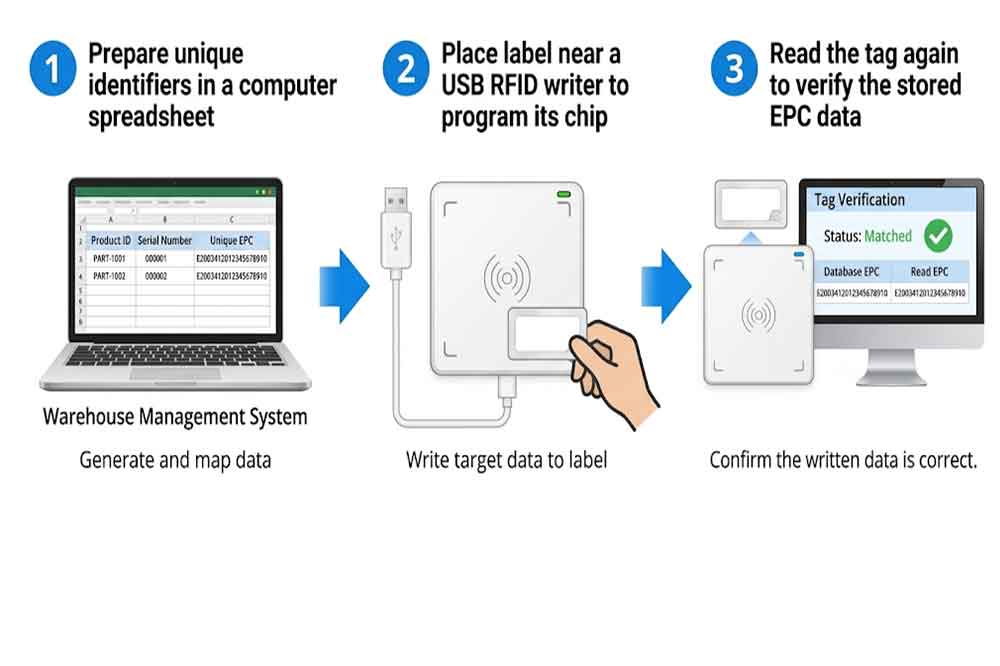
A typical desktop encoding process can be divided into several steps. The exact software screens and commands vary by reader model and tag standard.
Create a data list before writing any tags. Each label should have the correct identifier and a corresponding product or asset record.
For example, a data list might contain:
PART-1001000001The EPC should be formatted according to the tag’s supported memory layout and the application’s identifier scheme. Do not assume that an ordinary product number can be written directly into EPC memory without conversion or validation.
For larger batches, generate identifiers in advance and check for duplicates before encoding starts.
Connect the USB RFID reader to the computer and install any required driver or SDK. Open the manufacturer’s encoding application or the company’s own software.
Confirm that the software detects the reader and can communicate with it. If the reader uses a command interface, check that the appropriate connection settings and permissions are configured.
At this stage, test the setup with a known compatible RFID tag rather than immediately processing an entire batch.
Place one label in the recommended reading area. Read its existing identifier and, if supported, inspect the relevant memory bank.
This helps establish whether the tag is readable and whether it already contains data that should be retained or replaced.
In a batch workflow, it is useful to compare the tag’s existing data with the target record before writing. This reduces the risk of programming the wrong label.
Select the correct memory area and enter or import the target value. Use the reader’s supported write command to program the tag.
For UHF EPC Gen2 or ISO 18000-63-compatible systems, the software must follow the applicable protocol and memory requirements. Writing may involve selecting the tag, accessing the required memory bank, and issuing a write operation.
If access passwords or locked memory are involved, confirm that the operation is authorized and that the correct access procedure is available.
Do not repeatedly issue write commands without checking the tag’s response. A failed write may result from poor tag positioning, incompatible settings, insufficient access permissions, or a tag that does not support the requested memory operation.
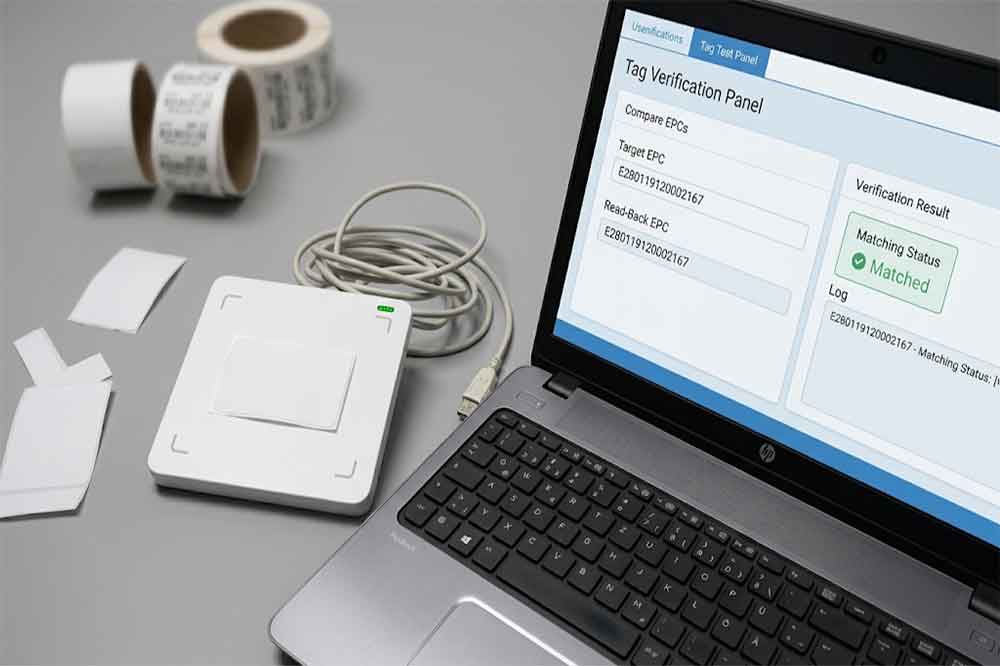
After writing, read the tag again and compare the stored value with the intended data.
For a basic EPC encoding workflow, verification should confirm that the expected EPC is present and correctly formatted. If the application writes additional user data, verify that information separately.
A successful software response alone is not always enough for quality control. Read-back verification provides an additional check that the data can actually be retrieved from the tag.
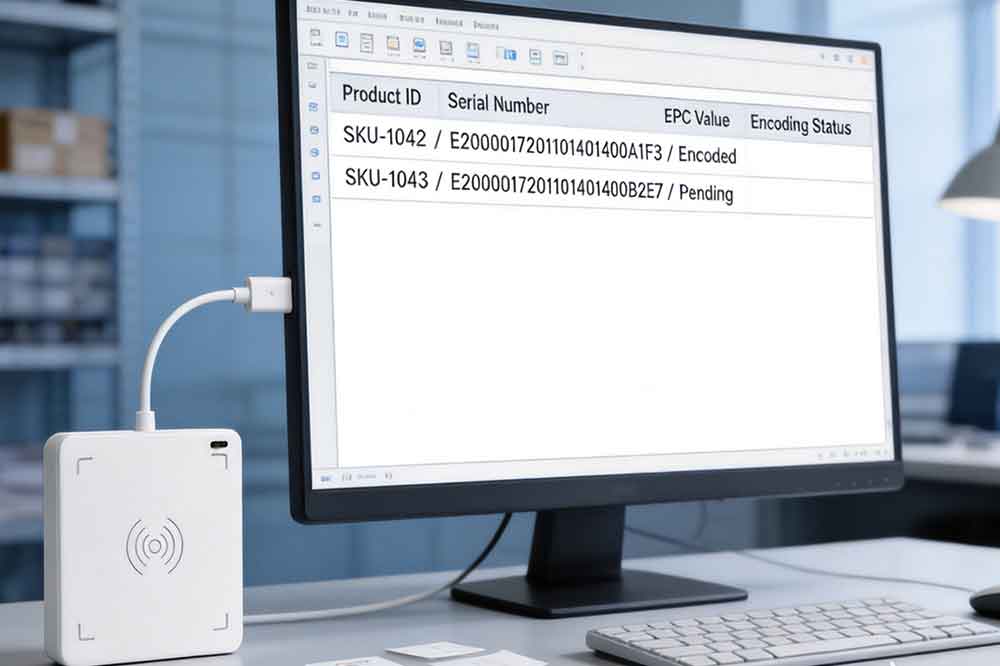
Once the tag passes verification, update the corresponding database or inventory system. This establishes the relationship between the electronic identifier and the physical item.
If an encoding attempt fails, record the result and move the label to a rework or inspection process. Do not mark a label as complete simply because the writing command was sent.
“Businesses working with identification cards can also explore [USB RFID readers for employee ID card registration], where reader compatibility and the card’s RFID technology must be checked before deployment.”
Even when the reader and tag are compatible, encoding errors can occur.
The reader detects the tag but cannot write to it. Check whether the device supports writing, whether the selected memory bank is writable, and whether access passwords or lock settings prevent modification.
The wrong identifier is written. Review the data import process and confirm that each tag is associated with the correct row in the source file. A unique identifier allocation process helps prevent duplicate or mismatched records.
Writing is inconsistent. Tag orientation, distance, antenna placement, nearby materials, and interference can affect performance. Test the labels in the actual operating environment rather than relying only on a bench test.
The tag reads correctly but the printed number does not match. Check the relationship between the print data and the encoding data. The printing application and the RFID encoding software should use a shared record or another controlled method of matching the two.
The software cannot communicate with the reader. Verify the USB connection, driver, device interface, SDK version, and application configuration. If integration uses an SDK, test the reader independently before troubleshooting the larger application.
These checks are particularly important when encoding labels in batches. A small configuration problem can affect many tags before an operator notices the error.
For businesses that encode RFID labels regularly, manual data entry may become a bottleneck. Integrating the reader into an existing application can make the workflow more consistent.
For example, a warehouse application can retrieve a product record, generate an identifier, instruct the reader to write the tag, verify the result, and update the record after successful encoding.
A manufacturing application may follow a similar process while associating each tag with a production order or serial number.
Before implementation, check the reader’s SDK documentation, supported programming languages, communication interface, write-command structure, and error-response handling. These capabilities vary by model and should be confirmed with the manufacturer.
A reliable application should also handle duplicate identifiers, communication failures, retry limits, and incomplete transactions. If a label fails verification, the software should leave the record in a pending or failed state instead of treating the operation as complete.
For teams developing their own RFID applications, reader compatibility and software support can be just as important as the hardware specifications.
A USB RFID reader is a practical choice when encoding takes place at a computer workstation and the required processing volume is manageable.
It can support engineering tests, sample preparation, product identification, inventory label creation, and semi-manual production tasks. It is also useful when developers need to test RFID tags before integrating them into a larger system.
For continuous high-volume production, however, a desktop reader may not provide the throughput or automation required. A dedicated RFID printer-encoder, industrial reader, or automated labeling station may be more appropriate.
The decision should account for daily label volume, required write and verification speed, operator involvement, integration complexity, and the consequences of an incorrectly encoded tag.
In practice, the most useful system is not necessarily the one with the highest advertised reading range. It is the one that encodes the correct data consistently and fits the real workflow.
RFID label encoding connects the electronic identity of a tag with the physical product or asset it represents. A USB RFID reader with compatible writing functionality provides a straightforward way to perform this task at a desktop workstation.
The key is to verify compatibility before purchasing, prepare unique identifiers carefully, read tags before and after writing, and maintain a clear link between encoded data and business records.
For B2B projects, these details help determine whether a reader is suitable for sample testing, manual label preparation, or integration into a larger RFID solution.
RFID label encoding is the process of writing electronic data into a compatible RFID tag’s memory. The data may identify a product, asset, component, or other tracked item.
No. Some USB readers are read-only. Encoding requires a reader that supports writing, compatible tags, and software capable of issuing the required write commands.
Yes, if the reader supports the label’s UHF protocol and EPC memory operations. The software must use the correct data format and writing procedure.
Read the tag again after writing and compare its stored data with the intended identifier. For batch operations, also check for duplicates and confirm that each identifier matches the correct database record.
It can work for desktop and moderate-volume workflows. High-volume operations may benefit from an RFID printer-encoder or automated encoding station, depending on throughput and verification requirements.

Discover SSD-D4AL, a USB-HID UHF RFID reader with 4/8/16 antenna options, Impinj E710/X3M1 chipset, plug-and-play USB power, and OEM customization.

SSD-D3AL is a USB-HID UHF RFID reader with 0–30 cm reading, 0–15 cm writing, over 600 tags/s recognition, USB plug-and-play operation and OEM Logo customization.

SSD-D1AL is a compact USB UHF RFID reader with Impinj E710/X3M1 chipset, USB-HID, 600+ tags/s recognition, 4/8/16 antenna support and plug-and-play USB power.

CYKEO CYKEO-D1LA USB RFID Reader is a compact desktop solution with near-field control for precise tag reading and encoding. Powered by USB, supporting ISO 18000-6C, and built for stable batch writing, this usb rfid tag reader fits retail, libraries, offices, and controlled RFID encoding tasks.

CYKEO CYKEO-D1L RFID scanner USB is a compact desktop UHF RFID scanner designed for short-range tag writing and verification. This usb rfid scanner supports batch encoding, stable 0–26 dBm output, and works across Windows, Linux, and Android systems.

CYKEO CYKEO-D1C USB RFID Card Reader is a near-field UHF desktop writer designed for secure, short-range tag encoding. With USB-C connectivity and stable 26 dBm output, this rfid reader usb c is ideal for badge issuance, label encoding, and controlled desktop RFID workflows.

CYKEO CYKEO-D2L RFID Reader USB is a compact desktop encoder built on the Impinj R500 chip. With near-field control and stable USB power, this usb rfid card reader delivers precise tag writing for offices, retail counters, and small-scale logistics encoding tasks.

CYKEO CYKEO-D3L USB RFID Tag Reader delivers stable UHF tag reading and writing for daily desktop and light industrial tasks. Designed for controlled short-range operation, this USB RFID Tag Reader works reliably with rfid tag and reader systems in libraries, tool tracking, and inventory registration.

The CYKEO CYKEO-D4L UHF RFID Tag Reader is a stable Desktop RFID Reader designed for accurate tag registration, borrowing, and return workflows. Built with the Impinj R2000 chip, this UHF RFID Tag Reader delivers controlled short-range reads for libraries, asset tracking, and inventory management environments.

The CYKEO CYKEO-D5L Desktop RFID Card Reader is a stable UHF RFID Card Reader designed for controlled short-range reading and writing. Built for libraries, tool rooms, and asset desks, this UHF RFID Card Reader supports dense tag handling, secure data processing, and easy USB integration.

The CYKEO CYKEO-D6L RFID Reader Writer is a heavy-duty Desktop RFID Reader designed for short-range, high-accuracy tag programming. Built for libraries, labs, and asset desks, this RFID Reader Writer supports batch processing, stable 33dBm output, and seamless integration with existing management systems.

Cykeo CYKEO-D8B UHF RFID tunnel and RFID Desktop Reader features 30+ items batch reading,

Cykeo CYKEO-D8A embedded RFID badge reader offers 30+ tags/sec scanning, 20cm anti-crosstalk precision, and DC 12V power for unmanned stores, warehouses, and smart inventory systems.

Cykeo’s CYKEO-D8C UHF RFID gate reader achieves 200-tag/batch scanning with adjustable power control, ideal for retail inventory and smart warehouse management.
RFID Industry Writer | IoT & Asset Tracking Analyst
James writes about RFID technology, asset tracking, and the practical challenges of digital transformation across warehousing, retail, manufacturing, and logistics.
His work focuses on how RFID is applied in real-world operations—improving inventory visibility, automating workflows, and helping businesses manage assets with greater accuracy and efficiency.
He regularly covers topics including UHF RFID, smart cabinets, RFID portals, tool tracking, warehouse automation, and industrial IoT trends..
A practical guide for developers on RFID SDK and API integration. Learn how to handle raw tag data, avoid common mistakes, and build stable RFID systems.
More
Upgrade your library’s book management with the CK-DP10 RFID system. Speed up returns, reduce errors, and improve efficiency with automated check-ins. Learn how this smart technology enhances user experience and saves costs. Perfect for libraries ...
More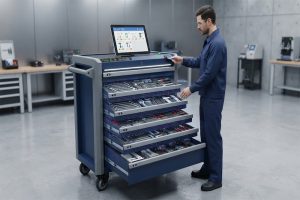
RFID Tools & Devices combine RFID tags, readers, antennas, smart cabinets, carts, handheld devices, and software to improve tool tracking and inventory manag...
More
Discover how rfid chips work and how RFID technology enables fast, accurate tracking in industries. Learn from Cykeo RFID engineering experience and solutions.
More