 Cykeo RFID IoT Solution Products R&D Manufacturer

When Should You Choose Active vs Passive RFID Tracking?
508Confused about active vs passive RFID? Compare range, cost, battery life, and ideal use cases to pick the right technology for your needs.
MoreAll RFID Product
Registering employee ID cards sounds like a small task. In a company with ten employees, it may take only a few minutes. When a factory, warehouse, office building, or service organization hires dozens of people at once, the same task can quickly become repetitive.
An administrator needs to collect employee details, assign a card, record its identifier, and connect that card with the correct employee profile. If the process relies on manually typing card numbers, mistakes can occur. A misplaced digit may cause a card to be linked to the wrong record or prevent an employee from using the access control system.
A USB RFID card reader offers a straightforward way to handle this part of the registration process. It reads the identifier stored on a compatible RFID card and transfers the data to a computer, where registration software can use it to create or update an employee record.
For HR departments, security teams, system integrators, and software developers, the important question is not simply whether a reader can detect a card. The reader must also work with the cards already in use, the registration application, and the company’s existing personnel management process.
A USB RFID reader is a device that communicates with compatible RFID cards or tags and transfers the information it reads to a connected computer. USB provides both a physical connection and, depending on the device, a means of supplying power.
In employee registration, the reader is commonly placed at an HR workstation, security office, reception desk, or access control administration station.
When an administrator presents an employee card, the reader captures its supported identifier. The registration application then associates that identifier with an employee profile.
The profile may contain information such as:
The reader does not necessarily collect all this information from the card itself. In many systems, the card supplies an identifier while the employee details remain in the computer database.
This distinction matters when selecting equipment. A reader that successfully detects a card is not automatically capable of reading every data field stored on it. Card frequency, protocol, memory access, authentication requirements, and software support all affect what information is available.
The administrator opens the employee registration application and creates a new record. Basic details, such as the employee’s name, staff number, and department, are entered into the system.
Some organizations connect this process with existing HR software. Others use a dedicated access control application or an internal database.
The reader’s role is to capture the card data needed to complete the record.
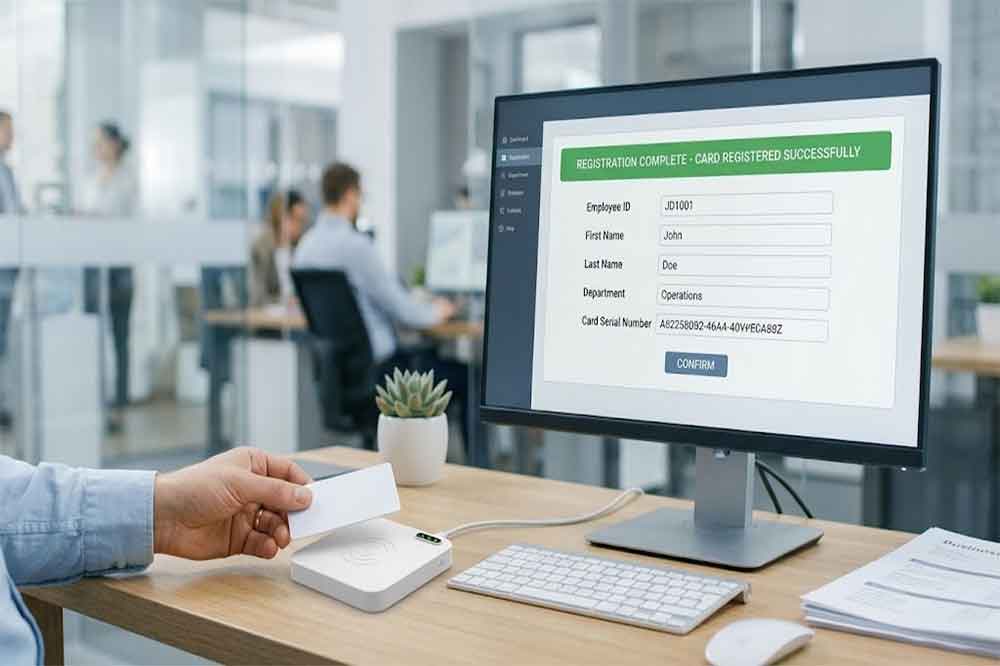
The administrator places the card within the reader’s supported reading range.
The device reads the available card identifier and sends the result to the computer. Depending on the reader, this may happen through keyboard emulation, a serial communication interface, or a vendor-provided SDK.
Keyboard-emulation readers can be convenient for simple registration forms because the identifier may appear in the currently selected input field. Devices using serial communication or an SDK offer other integration options for applications that require more control over the reading process.
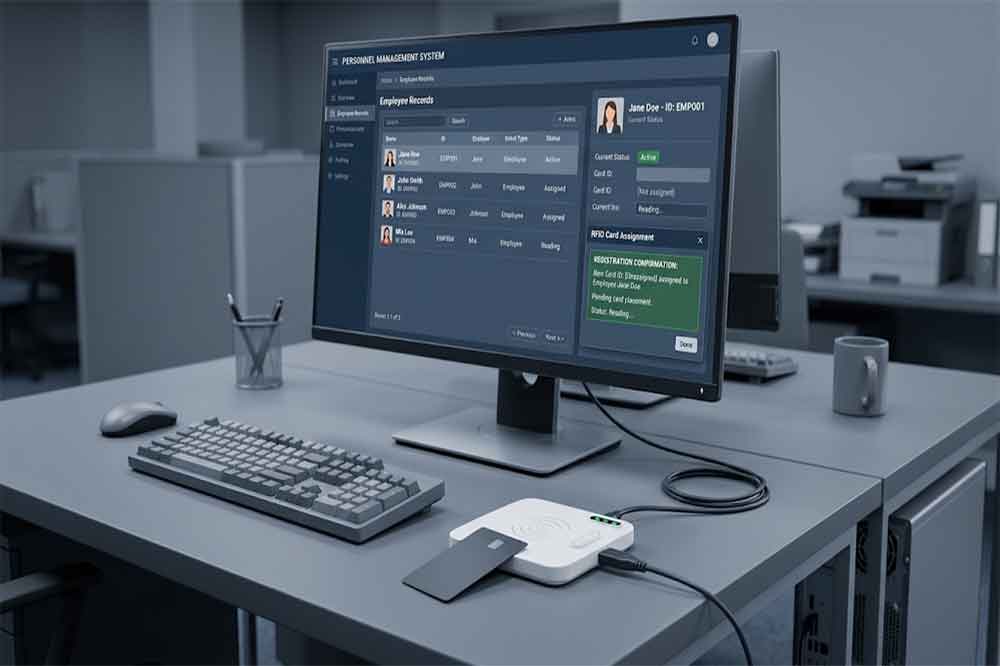
After receiving the identifier, the software links it to the employee’s profile.
For example, a security administrator might register card ID A1029384 against employee number EMP-0256. These values are illustrative; actual identifiers depend on the card technology and reader configuration.
The application should check whether the card has already been assigned. Without this check, the same card could accidentally be registered against multiple employees.
The administrator saves the record and confirms that the card has been assigned successfully.
A practical registration interface should provide clear feedback, such as a successful registration message, a duplicate-card warning, or an unsupported-card notification.
It is also useful to test the newly registered card at an authorized reader or access control terminal. A successful registration at the desk does not, by itself, prove that every access control device has received the correct permissions.
HR staff often handle several tasks when a new employee joins a company. Registering an RFID card at a computer workstation allows card assignment to become part of the onboarding process.
The administrator can enter the employee’s details, scan the card, and save the association without manually copying a long identifier.
For organizations with frequent recruitment, this can make registration more consistent and reduce repetitive data entry.
In office buildings, an administrator may need to issue new cards, replace lost cards, or deactivate cards when employees leave.
A desktop USB reader provides a convenient registration point for these operations, provided it is compatible with the card system and supported by the management software.
The software should also distinguish between registering a card and granting access. A card can be recorded in the database while still awaiting authorization for particular doors, floors, or working hours.
Factories and warehouses may issue ID cards to production workers, warehouse staff, maintenance personnel, contractors, and visitors.
A USB RFID reader can support centralized card registration at an HR or security workstation. For larger sites, the application may also connect card records with departments, shifts, or access groups.
If contractors or temporary workers receive cards, the system should include an expiry date or a defined procedure for disabling access when the assignment ends.
Schools may register staff cards for restricted areas, while hospitals may use employee identification systems across departments and facilities.
In these environments, card registration is only one part of the wider identity management process. The software must apply appropriate authorization rules and protect employee information.
A USB RFID reader is useful when the organization needs a simple, computer-based registration point rather than a standalone enrollment terminal.
Not every USB RFID reader works with every employee card. Before purchasing equipment for a deployment, check the following points.
First, identify the technology used by the existing cards.
Some employee ID systems use 125 kHz proximity cards, while others use 13.56 MHz contactless cards. These are not interchangeable simply because both are described as RFID.
Even when two cards operate at the same frequency, their protocols and supported commands may differ. A reader must support the relevant card technology and the specific information the application needs.
For a new project, confirm card and reader compatibility before ordering a large quantity of devices.
The connection method affects how the reader works with registration software.
Keyboard emulation sends the card identifier as keyboard input. It is often suitable for straightforward forms and existing applications that accept typed data.
Virtual COM or serial communication allows software to receive reader output through a configured communication port. This approach may provide more control over data handling.
SDK-based integration gives developers access to functions supported by the manufacturer’s software development kit. Depending on the model, these may include reading card identifiers, controlling reader operations, or receiving device events.
The right option depends on the application, operating system, and level of integration required.
When registering a large batch of employee cards, consistent reading matters more than an impressive maximum reading range.
The reader should detect compatible cards reliably at its intended operating distance. It should also handle repeated presentations without producing unwanted duplicate entries.
For a busy registration desk, consider the reader’s feedback indicators, reading behavior, and ease of use during continuous operation.
Before choosing a reader, confirm that it works with the registration application and computer environment.
Check operating system support, communication interfaces, available drivers, SDK documentation, and sample code where applicable.
If the application was developed in-house, ask the supplier how the reader’s output can be accessed and whether technical support is available during integration.
A single HR desk may need only one reader. A company with several buildings or hundreds of new employees may require multiple registration stations.
For a multi-site deployment, standardizing the reader model and configuration can make software maintenance and technical support easier.
B2B buyers should also ask about sample availability, integration testing, supply consistency, and the process for handling firmware or software compatibility issues.
Hardware selection is only one part of a working employee registration system. The software must interpret the reader’s output correctly and maintain reliable records.
A typical integration follows this sequence:
Developers should pay attention to data formatting. Some identifiers may be returned in hexadecimal or decimal form, and certain readers may add prefixes, suffixes, or keyboard-entered characters. If the registration application expects a different format, the same card may appear to have different identifiers across systems.
Testing should therefore cover the actual cards, reader configuration, and target software rather than relying only on a manufacturer’s general compatibility statement.
For organizations connecting the reader to an existing access control platform, it is also important to confirm how card records and permissions are synchronized. Some systems update immediately, while others require a separate operation.
Employee data deserves appropriate protection as well. Registration software should limit access to authorized staff, maintain accurate assignment records, and provide a clear procedure for lost, replaced, expired, or returned cards.
The card may use an unsupported frequency or protocol, or the administrator may be presenting it outside the effective reading area.
Check the card specifications and confirm that the reader supports the required technology.
Some readers return different identifier formats or byte orders. Others may add characters when operating in keyboard-emulation mode.
Compare the returned value with the reader documentation and the format expected by the registration application.
The registration software may lack a duplicate check or may not normalize card identifiers consistently.
Use a unique card identifier field and validate it before saving a new assignment.
Card registration and access authorization are separate operations in many systems.
Check whether the employee has been assigned the correct permissions and whether those permissions have synchronized with the relevant access control equipment.
Different applications may expect different communication methods or data formats.
Confirm whether the reader uses keyboard emulation, serial communication, or an SDK, then configure the application accordingly.
A USB RFID card reader can simplify employee ID card registration by capturing card identifiers directly at a computer workstation. For HR teams and security administrators, this reduces manual entry and helps maintain consistent card-to-employee records.
The best device is not necessarily the one with the most features. It is the one that supports the organization’s existing cards, communicates reliably with the registration application, and fits the intended deployment.
For system integrators and software developers, confirming card compatibility and communication methods before purchasing is especially important. A short integration test with actual cards can prevent avoidable problems when the system is rolled out across multiple departments or locations.
When evaluating USB RFID readers for employee registration, consider the complete workflow: card reading, employee record creation, duplicate checking, access authorization, and ongoing card management. Getting these details right makes the registration process easier to operate and maintain.
Q1: What is a USB RFID card reader used for in employee registration?
It reads a compatible employee card identifier and transfers it to registration software, where the identifier can be linked to an employee record.
Q2: Can a USB RFID reader register any employee ID card?
No. The reader must support the card’s frequency, protocol, and required reading functions. Check compatibility before purchasing.
Q3: Can a USB RFID reader work with existing HR software?
Yes, if the reader’s communication method and data format are compatible with the application. Keyboard emulation, serial communication, and SDK-based integration are common options.
Q4: Does registering an employee card automatically grant building access?
Not necessarily. Registration records the card, while access permissions may need to be assigned separately through the access control system.
Q5: Can one USB RFID reader be used for bulk employee registration?
Yes, provided it can reliably read the required cards and the registration software supports efficient record creation and duplicate checking.
For organizations comparing different devices for employee onboarding and desktop registration, explore our range of USB RFID readers for computer-based applications.
For applications that require more than basic keyboard input, look for USB RFID readers with SDK support and verify the available development documentation with the supplier.

Discover SSD-D4AL, a USB-HID UHF RFID reader with 4/8/16 antenna options, Impinj E710/X3M1 chipset, plug-and-play USB power, and OEM customization.

SSD-D3AL is a USB-HID UHF RFID reader with 0–30 cm reading, 0–15 cm writing, over 600 tags/s recognition, USB plug-and-play operation and OEM Logo customization.

SSD-D1AL is a compact USB UHF RFID reader with Impinj E710/X3M1 chipset, USB-HID, 600+ tags/s recognition, 4/8/16 antenna support and plug-and-play USB power.

CYKEO CYKEO-D1LA USB RFID Reader is a compact desktop solution with near-field control for precise tag reading and encoding. Powered by USB, supporting ISO 18000-6C, and built for stable batch writing, this usb rfid tag reader fits retail, libraries, offices, and controlled RFID encoding tasks.

CYKEO CYKEO-D1L RFID scanner USB is a compact desktop UHF RFID scanner designed for short-range tag writing and verification. This usb rfid scanner supports batch encoding, stable 0–26 dBm output, and works across Windows, Linux, and Android systems.

CYKEO CYKEO-D1C USB RFID Card Reader is a near-field UHF desktop writer designed for secure, short-range tag encoding. With USB-C connectivity and stable 26 dBm output, this rfid reader usb c is ideal for badge issuance, label encoding, and controlled desktop RFID workflows.

CYKEO CYKEO-D2L RFID Reader USB is a compact desktop encoder built on the Impinj R500 chip. With near-field control and stable USB power, this usb rfid card reader delivers precise tag writing for offices, retail counters, and small-scale logistics encoding tasks.

CYKEO CYKEO-D3L USB RFID Tag Reader delivers stable UHF tag reading and writing for daily desktop and light industrial tasks. Designed for controlled short-range operation, this USB RFID Tag Reader works reliably with rfid tag and reader systems in libraries, tool tracking, and inventory registration.

The CYKEO CYKEO-D4L UHF RFID Tag Reader is a stable Desktop RFID Reader designed for accurate tag registration, borrowing, and return workflows. Built with the Impinj R2000 chip, this UHF RFID Tag Reader delivers controlled short-range reads for libraries, asset tracking, and inventory management environments.

The CYKEO CYKEO-D5L Desktop RFID Card Reader is a stable UHF RFID Card Reader designed for controlled short-range reading and writing. Built for libraries, tool rooms, and asset desks, this UHF RFID Card Reader supports dense tag handling, secure data processing, and easy USB integration.

The CYKEO CYKEO-D6L RFID Reader Writer is a heavy-duty Desktop RFID Reader designed for short-range, high-accuracy tag programming. Built for libraries, labs, and asset desks, this RFID Reader Writer supports batch processing, stable 33dBm output, and seamless integration with existing management systems.

Cykeo CYKEO-D8B UHF RFID tunnel and RFID Desktop Reader features 30+ items batch reading,

Cykeo CYKEO-D8A embedded RFID badge reader offers 30+ tags/sec scanning, 20cm anti-crosstalk precision, and DC 12V power for unmanned stores, warehouses, and smart inventory systems.

Cykeo’s CYKEO-D8C UHF RFID gate reader achieves 200-tag/batch scanning with adjustable power control, ideal for retail inventory and smart warehouse management.
RFID Industry Writer | IoT & Asset Tracking Analyst
James writes about RFID technology, asset tracking, and the practical challenges of digital transformation across warehousing, retail, manufacturing, and logistics.
His work focuses on how RFID is applied in real-world operations—improving inventory visibility, automating workflows, and helping businesses manage assets with greater accuracy and efficiency.
He regularly covers topics including UHF RFID, smart cabinets, RFID portals, tool tracking, warehouse automation, and industrial IoT trends..
Confused about active vs passive RFID? Compare range, cost, battery life, and ideal use cases to pick the right technology for your needs.
More
A detailed look at the CK-M8 UHF RFID 8-port module, its features, real-world performance, specs, and how it compares to Impinj R2000-based modules. Suitable for warehouses, logistics, manufacturing, and retail tracking systems.
More
RFID access management isn’t just about tapping a card to open doors. This word guide explores real-world use cases in offices, warehouses, hospitals, and schools—highlighting benefits, common pitfalls, and practical lessons learned.
More
Need a low-cost low-power UHF RFID reader transceiver for mobile applications? Discover key specs, trade-offs, and integration tips for handhelds, drones, and IoT devices.
More