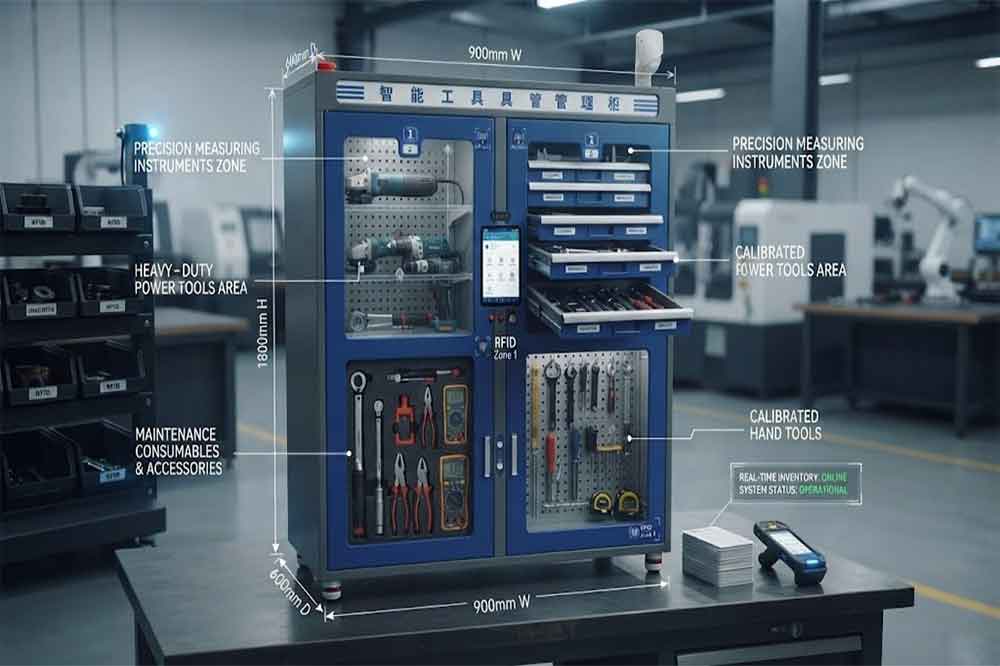
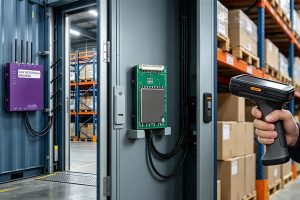
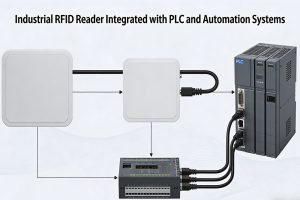
Buying RFID tool cabinet is not simply a matter of comparing cabinet sizes and prices.
A suitable procurement process should also consider the tools being managed, RFID tag compatibility, reading performance, user authentication, software, integration, installation, testing, and future expansion.
A clear checklist helps procurement teams avoid missing technical requirements before requesting quotations from RFID tool cabinet suppliers.
Start With the Tools You Actually Manage
The first step is surprisingly simple: look at the tools.
Before contacting a supplier, prepare information about the tools that will be stored and tracked.
Record:
Tool type
Tool quantity
Tool dimensions
Tool weight
Material
Surface shape
Current storage method
Usage frequency
Whether the tool requires calibration
Whether the tool is restricted or high-value
This information affects cabinet structure and RFID tag selection.
For example, metal tools may require RFID tags designed for metal surfaces. Long tools may need shelves instead of small compartments. Frequently used tools may need to be positioned where technicians can access them quickly.
The cabinet should follow the workflow of the tools, not the other way around.
1. Define the Number of Tools
Tool quantity directly affects cabinet capacity.
Do not calculate capacity only from today’s inventory.
Consider expected growth as well.
A cabinet containing 100 tools today may need to support 150 or 200 tools later. Leaving some expansion space can be more practical than replacing the cabinet after a short period.
Also separate different tool groups.
For example:
Hand tools
Power tools
Measuring instruments
Maintenance tools
Production tools
Calibration tools
High-value tools
Different categories may require different storage positions or access permissions.
2. Confirm Cabinet Structure
Cabinet design should match the physical tools and daily workflow.
Ask the supplier about:
Shelves
Drawers
Compartments
Adjustable positions
Tool dividers
Locking mechanisms
Door configuration
Cabinet dimensions
Maximum load
Cable routing
A large cabinet is not automatically more useful.
Poor internal organization can make tools difficult to find and can also affect RFID reading performance.
For a procurement project, request a cabinet layout or drawing before final approval.
3. Check RFID Tag Compatibility
RFID tags are a critical part of the project.
The same tag does not necessarily work equally well on every tool.
Check:
Tool material
Tag size
Mounting location
Reading orientation
Temperature exposure
Oil or chemical exposure
Cleaning conditions
Mechanical impact
Expected service life
Metal tools often require RFID tags designed for metal surfaces.
The supplier should explain which tag type is recommended for the actual tools rather than providing a generic tag specification.
4. Ask About RFID Reading Performance
RFID reading performance should be tested with the real cabinet and actual tools.
Ask the supplier how the system handles:
Multiple tagged tools
Closely positioned tools
Metal tools
Different tool orientations
Tools placed at different cabinet positions
Tools entering and leaving together
Unexpected tags
Tags outside the intended reading area
The objective is not simply to achieve a long theoretical read range.
For a tool cabinet, controlled and reliable reading inside the storage area is usually more important.
5. Test Multiple-Tool Identification
A real tool cabinet may contain many tools at the same time.
The procurement checklist should therefore include multiple-tool testing.
For example, test whether the system can identify:
One tool
Five tools
Ten tools
A larger mixed group
The exact test quantity should match the expected workflow.
Also test both removal and return scenarios.
A cabinet that performs well with one tag may require additional configuration when many tagged tools are stored close together.
6. Define User Authentication
Tool management is also user management.
Before purchasing, define how employees will identify themselves.
Possible methods can include:
RFID employee cards
ID cards
PIN codes
Passwords
Biometric authentication
Other company-approved authentication methods
The procurement team should confirm whether the selected method can connect with existing employee records.
Temporary workers and contractors should also be considered.
7. Define Tool Permissions
Not every employee needs access to every tool.
A procurement checklist should identify different permission levels.
For example:
General tools: Available to authorized maintenance employees.
Specialized tools: Available to trained technicians.
High-value tools: Restricted to approved users.
Calibration tools: Available according to department or qualification requirements.
The system should support the company’s actual access rules.
8. Confirm the Checkout and Return Workflow
Ask the supplier to demonstrate the complete transaction process.
A typical workflow may include:
User authentication
Cabinet access
Tool removal
RFID identification
Transaction recording
Cabinet closing
Tool return
RFID identification again
Inventory status update
Do not evaluate the system only from a product demonstration.
Test the workflow with actual users and actual tools.
A technically capable system still needs to be practical during a busy maintenance shift.
9. Review Inventory Functions
The procurement checklist should also cover inventory management.
Ask whether the system can show:
Tools currently in the cabinet
Tools checked out
Overdue tools
Missing tools
Unexpected tools
Tool locations
Transaction history
Inventory changes
This information becomes especially useful when several cabinets are installed across different departments.
10. Confirm Software Functions
The software should match the management requirements.
Ask about:
Tool records
User records
Tool status
Access permissions
Checkout records
Return records
Inventory
Alerts
Reports
User management
Cabinet management
Also ask whether administrators can configure these functions without depending on the supplier for every small change.
11. Check API and System Integration
Many factories already use enterprise software.
The RFID tool cabinet may need to communicate with:
ERP
MES
WMS
CMMS
Asset management software
Maintenance systems
Custom applications
Ask the supplier about API availability, communication protocols, data formats, authentication, and event handling.
The important question is not simply whether an API exists.
It is whether the available interface supports the actual data exchange required by the project.
The cabinet may depend on a local or factory network.
Ask what happens when communication is interrupted.
For example:
Can users still access the cabinet?
Are transactions stored locally?
Can records synchronize later?
Are duplicate transactions prevented?
Can administrators identify communication failures?
This becomes more important when cabinets are installed in large factories or separate buildings.
13. Check Physical Installation Requirements
Before purchasing, confirm the installation environment.
Measure:
Available floor space
Cabinet height
Door clearance
Power supply
Network connection
Temperature
Humidity
Dust
Oil exposure
Maintenance access
The cabinet should also be positioned where technicians can use it without obstructing production or maintenance traffic.
14. Ask About Installation and Commissioning
Supplier quotations should clearly state what installation includes.
Check whether the quotation covers:
Cabinet installation
RFID reader configuration
Antenna configuration
Software installation
Network setup
RFID tag registration
Tool database creation
User setup
System testing
Training
Two quotations with similar cabinet prices may represent very different project scopes.
15. Confirm Testing Requirements
Testing should be part of procurement rather than an afterthought.
Define acceptance criteria before signing the final order.
Possible test items include:
Test Area
Example Requirement
Tool Identification
Correctly identify tagged tools
Multiple Reading
Detect several tools together
Checkout
Record tool removal
Return
Update tool status
Authentication
Verify authorized users
Permissions
Restrict selected tools
Inventory
Show current cabinet contents
Reporting
Record transaction history
Integration
Exchange required data
Network Failure
Handle temporary communication loss
The exact acceptance criteria should be agreed according to the project.
16. Review Supplier Support
After installation, the project still needs maintenance and support.
Ask:
Who provides technical support?
What is the response process?
Are spare parts available?
Can software be updated?
How are RFID reading issues diagnosed?
Can the system be expanded later?
Is remote support available?
What documentation is provided?
For long-term industrial projects, support capability can be as important as the initial product specification.
17. Prepare a Supplier RFQ
A clear RFQ helps suppliers provide comparable quotations.
Include:
Project Information
Application
Factory location
Number of cabinets
Number of tools
Number of users
Number of departments
Tool Information
Tool types
Dimensions
Materials
Approximate quantities
Special requirements
System Requirements
RFID identification
User authentication
Access permissions
Inventory
Reporting
Software integration
API requirements
Deployment Requirements
Installation
Training
Testing
Acceptance
Support
The more complete the RFQ, the easier it becomes to compare different technical proposals.
18. Compare Suppliers Beyond Price
Price is one part of procurement, but it should not be the only comparison field.
Create a supplier comparison sheet covering:
Cabinet configuration
RFID hardware
Tag compatibility
Reading performance
Software
Authentication
Access control
Integration
Installation
Testing
Warranty
Technical support
Expansion options
This creates a clearer technical comparison.
19. Common Procurement Mistakes
Choosing the Cabinet Before Studying the Tools
The cabinet should be designed around the actual tool inventory and workflow.
Asking Only for a Product Price
A complete project may include tags, software, installation, integration, and testing.
Testing Only One Tool
Single-tag testing does not represent a cabinet filled with multiple tools.
Ignoring Metal Tools
Metal surfaces can affect RFID tag performance, so tag selection should be tested early.
Forgetting Future Expansion
A system designed only for today’s tool quantity may become restrictive later.
Not Defining Acceptance Criteria
Without agreed testing requirements, it can be difficult to determine whether the completed system meets expectations.
20. Final Procurement Checklist
Before placing an order, confirm the following:
Tool types and quantities documented
Cabinet structure confirmed
RFID tags tested
Multiple-tool reading tested
User authentication selected
Tool permissions defined
Checkout workflow confirmed
Inventory functions confirmed
Software requirements documented
API requirements documented
Network requirements checked
Installation scope confirmed
Testing requirements agreed
Training included
Support terms confirmed
Future expansion considered
Conclusion
A good RFID tool cabinet procurement checklist covers much more than cabinet dimensions and price. The buyer should evaluate the actual tools, RFID tags, reading performance, storage structure, user authentication, permissions, software, integration, installation, testing, and long-term support.
The most practical procurement process starts with the real workflow and ends with a clear acceptance test.
For larger projects, a pilot can also help confirm RFID performance and user workflow before multiple cabinets are deployed across the factory.
Cykeo’s RFID Smart Tool Cabinet enables 10-second tool audits, user access control & real-time alerts for construction/oil/gas. Features 21.5″ touchscreen, IP54 steel body & -30°C~60°C operation. Supports SAP/Oracle integration.
Cykeo’s industrial RFID Tool Cart features 14″ touchscreen, 400+ tool scanning, and carbon steel construction for aviation MRO, power plants and construction sites. 5-second inventory scans.
Cykeo CYKEO-TC RFID multi-drawer tool cart manages 300+ tools via UHF RFID, features fingerprint/face recognition, Android/Windows OS, and SAP integration for nuclear/railway/fire safety sectors. IP54 rated for harsh environments.
Cykeo CYKEO-GTC4 RFID tool inventory cart manages 300+ tools via UHF RFID, features instant scanning, fingerprint/face recognition, and SAP integration for nuclear/railway/fire safety sectors. IP54 rated for harsh environments.
Cykeo CYKEO-GTC7A RFID real-time tool tracking cart features 99.9% accuracy, FOD prevention, and SAP integration for aviation/plant maintenance. Military-grade construction.
Cykeo CYKEO-GTC4B RFID mobile tool cart delivers 300-tool verification in 7 seconds with modular drawers, ≤150W power, and SAP integration for industrial/aviation use.
Cykeo CYKEO-GTC4C RFID workshop tool control cart delivers 300-tool inventory in 3 seconds with 10hr battery, SAP integration, and FOD prevention for industrial workshops.
Cykeo’s off-grid RFID tool inventory system features solar/wind power, -30°C~60°C operation, and military-grade durability for mining/energy/military sectors.
Cykeo’s RFID multi-drawer tool cabinet features 5 adjustable drawers, biometric access, and 99.9% scan accuracy for automotive/aerospace manufacturing.
Cykeo CYKEO-GT1B industrial RFID tool storage cabinet features Impinj R2000 UHF technology, 1,000+ tool capacity, IP54 protection, and Windows/Android OS for manufacturing/aviation MRO. Includes auto check-in/out and SAP/Oracle sync.
Cykeo CYKEO-GT3C industrial RFID tool checkout system Cabinet features millimeter-wave scanning, 280-layer storage, dual OS, and 99.9% accuracy for aviation/semiconductor sectors. Supports auto check-in/out and real-time SAP sync.
Discover the CYKEO-B1A Industrial RFID Backpack featuring advanced tool tracking technology with 25cm RF shielding, 7-day battery life, and wearable design for field maintenance professionals.
RFID Industry Writer | IoT & Asset Tracking Analyst
James writes about RFID technology, asset tracking, and the practical challenges of digital transformation across warehousing, retail, manufacturing, and logistics.
His work focuses on how RFID is applied in real-world operations—improving inventory visibility, automating workflows, and helping businesses manage assets with greater accuracy and efficiency.
He regularly covers topics including UHF RFID, smart cabinets, RFID portals, tool tracking, warehouse automation, and industrial IoT trends..
Learn about RFID implant Sweden—how thousands of Swedes use microchip implants for access control, payments, and convenience. Discover the technology, benefits, and privacy considerations. Expert insights from CYKEO.
Compare fixed, integrated, and handheld RFID readers in real industrial use cases. Learn which RFID reader type fits warehouse, parking, logistics, and asset tracking projects for system integrators and distributors.
Learn how industrial RFID readers are integrated into automation systems. Covers system architecture, PLC connectivity, long-range reader deployment, and real-world integration considerations.
Looking for a long range RFID scanner for warehouse, logistics, manufacturing, or asset tracking? Learn key factors including reading distance, antenna design, frequency, integration, and OEM options before bulk purchasing.
 Cykeo RFID IoT Solution Products R&D Manufacturer