 Cykeo RFID IoT Solution Products R&D Manufacturer

RFID Tool Cabinet Inventory Management: Smarter Tool Counting and Visibility
101Learn how RFID tool cabinet inventory management helps factories count tools, detect missing items, track locations, and improve inventory visibility.
MoreAll RFID Product
In a busy factory, the problem is not always a shortage of tools. Sometimes the same tool is needed by three departments at once, while other tools remain unused in a storage cabinet. One maintenance team may keep a specialized instrument longer than expected, while another team has an urgent work order waiting for it.
Without clear allocation rules, employees may rely on phone calls, spreadsheets, or informal agreements to decide who gets access to shared equipment.
An RFID tool cabinet can help companies make tool allocation more transparent by connecting tool identification, availability records, user information, and checkout transactions. When combined with practical allocation rules, it becomes easier to determine which tools are available, who can use them, and how they should be assigned to departments or jobs.
The objective is not simply to track tools. It is to distribute available tools according to actual operational requirements.
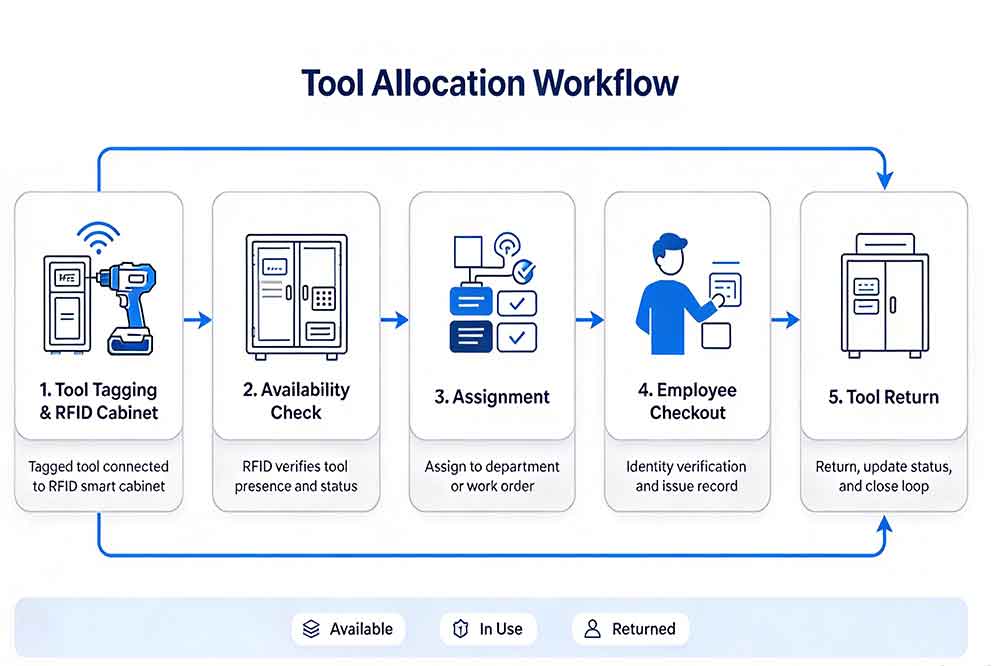
RFID tool allocation management is the process of assigning tools to departments, employees, work orders, production activities, or storage locations according to defined business rules.
In an industrial environment, allocation decisions may depend on several factors. A tool could be assigned to a maintenance team for regular use, reserved for a planned repair, temporarily transferred to another department, or restricted to employees with the appropriate qualifications.
An RFID-enabled tool cabinet supports this process by identifying tagged tools and recording supported transactions. The associated software can link each tool with a digital record containing its category, current status, assigned department, recorded location, and transaction history.
Depending on the system configuration, users may also be able to check tool availability before requesting an item or confirm an assignment during checkout.
The cabinet does not make every allocation decision automatically. The company still needs to define its priorities, permissions, assignment rules, and exception procedures. RFID supplies identification and transaction data that can help these rules work more consistently.
Maintenance, production, quality inspection, and engineering teams may use similar equipment but follow different schedules.
For example, a torque wrench may be required for a planned maintenance task in the morning and a production inspection later in the same shift. If neither team can see its current assignment, both may assume that the tool will be available.
This creates unnecessary coordination work and may delay scheduled activities.
A shared RFID tool management platform can improve visibility into recorded availability and checkout status. Supervisors can use that information to coordinate assignments before conflicts occur.
Some factories assign tools to departments, while others allow equipment to move between teams. These arrangements can work, but problems arise when the original department remains responsible for the asset even though another team is using it.
A digital assignment record can distinguish between a tool’s home department, its current custodian, and its temporary destination.
These fields should not be treated as interchangeable. A tool can belong to the maintenance department while being checked out by a production technician for an approved task.
In some workplaces, experienced employees know where specialized tools are stored and who usually uses them. When these employees are absent or shift schedules change, the process becomes less reliable.
Clear allocation rules and shared records reduce dependence on informal knowledge.
An RFID cabinet can support a more consistent process by recording tool transactions and making relevant information accessible to authorized users.
A tool may be physically present but unavailable for a particular job because it is damaged, awaiting inspection, reserved for another task, or restricted to qualified personnel.
Allocation decisions must consider these conditions.
A reliable process checks both whether the tool can be located and whether it is suitable for the intended use. Where required, inspection, calibration, maintenance, and permission records should be connected to the allocation workflow.
Effective allocation starts with reliable tool identification.
Each managed tool should have a unique asset or tool ID linked to its RFID tag. The associated record can include the tool category, home department, storage location, current status, and any relevant usage restrictions.
For example, a factory may distinguish general-purpose hand tools from calibrated measuring instruments and specialized electrical testing equipment. Each category can follow different allocation rules.
The RFID tag does not need to contain the entire tool record. In many implementations, it provides a unique identifier that the management software uses to retrieve the relevant information.
This makes it easier to update department assignments, status fields, and other records without changing the physical tag whenever the tool’s role changes.
Before a tool is allocated, the system should establish whether it is actually available.
An RFID tool cabinet may provide inventory and checkout information that helps employees check whether a tool is recorded as present, already checked out, or otherwise unavailable.
Where reservation and maintenance records are integrated, the system may also show whether the tool is committed to another job or awaiting inspection.
Consider a maintenance team preparing a repair. The planner needs a particular measuring instrument, but another department has already reserved it. With clear availability information, the planner can arrange an alternative or adjust the work schedule before the technician arrives at the cabinet.
Availability information is only as reliable as the underlying records. Unrecorded transfers and outdated status updates can still lead to incorrect decisions.
Some tools should remain primarily available to a particular department. Others may be shared across the factory.
An allocation policy can define these arrangements.
For example, frequently used production tools may be assigned to a dedicated line-side cabinet, while specialized maintenance equipment remains in a central tool room. Expensive instruments may require supervisor approval before being transferred between departments.
An RFID tool cabinet can support these policies through recorded locations, user permissions, and transaction workflows, depending on the system’s capabilities.
The important point is to distinguish permanent assignment from temporary allocation. A tool’s home location does not necessarily need to change every time another department borrows it.
Work-order-based allocation is useful when a specific job requires a known set of tools.
A maintenance work order may specify a torque wrench, electrical tester, and a particular set of hand tools. Checking these requirements against recorded availability helps the team prepare before work begins.
Where RFID tool management software integrates with a CMMS or another maintenance platform, the system may connect tool records with work orders and responsible technicians.
This can help answer practical questions:
The exact workflow depends on the available interfaces and software configuration. The project team should decide which system owns the work-order data and how assignment changes are synchronized.
An allocation decision and a physical checkout are different events.
A supervisor may assign a tool to a work order before the employee collects it. The checkout transaction then confirms that the tool has actually been issued through the supported workflow.
Keeping these events separate helps prevent the system from showing a tool as physically checked out when it has only been planned for a future task.
A useful transaction record may include the tool ID, user ID, timestamp, cabinet location, assignment reference, and transaction type.
When the tool is returned or transferred, the corresponding record should be updated according to the company’s procedures.

Different factories need different allocation arrangements. The right model depends on how often tools are shared, how critical they are, and how departments organize their work.
| Allocation model | How it works | Suitable applications |
|---|---|---|
| Department-based allocation | Tools are assigned to a department or team | Production areas and maintenance departments |
| Employee-based allocation | A tool is assigned to a specific user | High-value or individually controlled tools |
| Work-order-based allocation | Tools are allocated to a defined job | Planned maintenance and repair work |
| Time-based allocation | Access is arranged around a time window | Shared instruments and scheduled inspections |
| Centralized shared allocation | Several departments use a common tool pool | Tool rooms and multi-department factories |
| Location-based allocation | Tools are assigned to a cabinet, workshop, or production area | Multi-cabinet and multi-location operations |
These models can be combined. A calibrated instrument, for example, may belong to the quality department, be allocated to a particular inspection job, and be checked out by an authorized employee.
The system should record these relationships clearly without creating unnecessary administrative work.
Allocation conflicts happen when several employees or departments need the same tool at the same time.
A useful system needs a defined method for handling these situations rather than simply recording who collected the tool first.
Companies can define priorities according to operational requirements. An emergency repair may take priority over routine work, while a tool required for a scheduled quality inspection may need to remain available during a fixed time window.
The rules should be approved by the relevant managers and communicated to employees.
An RFID cabinet can provide information about recorded assignments and availability, but the priority decision may still require a supervisor or scheduling system.
Sometimes the fastest solution is not to transfer the original tool. Another department may have a compatible tool, or a different model may be approved for the job.
Alternative tools must meet the technical and safety requirements of the task. Similar appearance alone does not mean two tools are interchangeable.
A tool database can support this decision when it includes reliable categories, specifications, and approved alternatives.
If an urgent job requires a tool to be reassigned, the change should be recorded.
The original assignment may need to be cancelled, postponed, or transferred to another tool. Without a clear record, the next employee may arrive expecting equipment that is no longer available.
An exception workflow can document who approved the change, which assignment was affected, and what action was taken.
RFID transaction history can help managers understand whether tools are distributed appropriately.
For example, one department may frequently request a specialized instrument from another department. This pattern could indicate a need to change the allocation policy, move a tool closer to the point of use, or purchase additional equipment.
In another situation, a tool may be assigned to a department but rarely used there. Reviewing its usage and transfer history could reveal an opportunity to share the resource more effectively.
Useful indicators include:
These figures need context. A tool with low usage may still be essential for rare emergency work, and a long assignment period may reflect a legitimate project requirement.
Allocation data should support operational decisions rather than trigger automatic redistribution without considering the purpose of the tool.
Allocation, reservation, and checkout are related, but they represent different stages of tool management.
A reservation indicates that a tool is intended for a future time or task. Allocation determines who or what the tool is assigned to under the company’s rules. Checkout records the actual issue of the physical tool.
For example, a technician may reserve a specialized instrument for a Friday maintenance job. The planner may then allocate it to the work order, and the technician checks it out when the job begins.
Separating these steps prevents confusion between planned demand and actual tool movement.
An RFID tool cabinet can support part of this process through identification and transaction recording. Reservation and allocation functions may be provided by the connected software or an integrated planning system.
The implementation should define what happens when a reservation is cancelled, a job is postponed, a tool becomes unavailable, or an urgent request changes the allocation.
Start by documenting how tools are assigned today. Identify who approves requests, how employees check availability, where transactions are recorded, and how conflicts are resolved.
Review several real examples, including normal work, shift changes, urgent maintenance, and cross-department borrowing.
This helps identify which problems require RFID identification and which require clearer allocation policies.
Group tools according to their purpose, risk, value, sharing pattern, and operational requirements.
Define which tools belong to a department, which can be shared, which require approval, and which must only be issued to authorized users.
Keep the initial rules practical. An overly complicated approval process may create new delays even if tool tracking improves.
Choose RFID tags suitable for the actual tools and storage environment. Metal tools and tightly packed equipment may require specific tag designs and reading adjustments.
Configure cabinet locations, tool IDs, user permissions, allocation records, and status rules. If several cabinets are involved, define how tools are transferred between locations and how shared records are updated.
Test more than ordinary checkout and return.
Include situations such as two departments requesting the same tool, a reserved tool becoming unavailable, a damaged tool being returned, and an employee attempting to collect a restricted instrument.
Check whether the system records each event correctly and whether users understand the required actions.
Run a pilot with a representative tool group and actual employees. Measure allocation conflicts, unplanned transfers, search time, and tool-related delays before and after implementation.
Collect feedback from technicians, planners, and supervisors. Adjust rules that cause unnecessary approvals or fail to protect critical tools.
Expand only after the workflow and technical performance meet the agreed acceptance criteria.
One mistake is treating allocation as a simple department assignment. A tool may belong to one department while being temporarily used by another, so the system needs to distinguish ownership, home location, assignment, and custody.
Another mistake is allocating tools based only on availability. A tool may be present but unsuitable for the task because of condition, calibration, inspection, or authorization requirements.
Companies may also rely on the RFID cabinet to make every scheduling decision automatically. RFID supplies useful identification and transaction data, but priority rules, approval logic, and conflict resolution must be designed separately or provided by compatible software.
Finally, some organizations create too many mandatory approval steps. For ordinary low-risk tools, a simple checkout process may be enough. More restrictive rules should be reserved for tools that genuinely require them.
When evaluating a solution, check whether it supports the allocation workflow your factory actually needs.
Consider tool identification, user authentication, checkout and return recording, status management, multi-cabinet visibility, reporting, and integration with work-order or reservation software.
Ask the supplier to demonstrate how the system handles temporary assignments, cross-department transfers, competing requests, and restricted tools. Confirm whether allocation rules are native software features or require customization.
For larger projects, review data ownership, synchronization, network interruption handling, user permissions, training, and ongoing support.
Most importantly, test the solution with representative tools and realistic workplace scenarios. A cabinet that identifies tags successfully may still require workflow changes before it can support effective tool allocation.
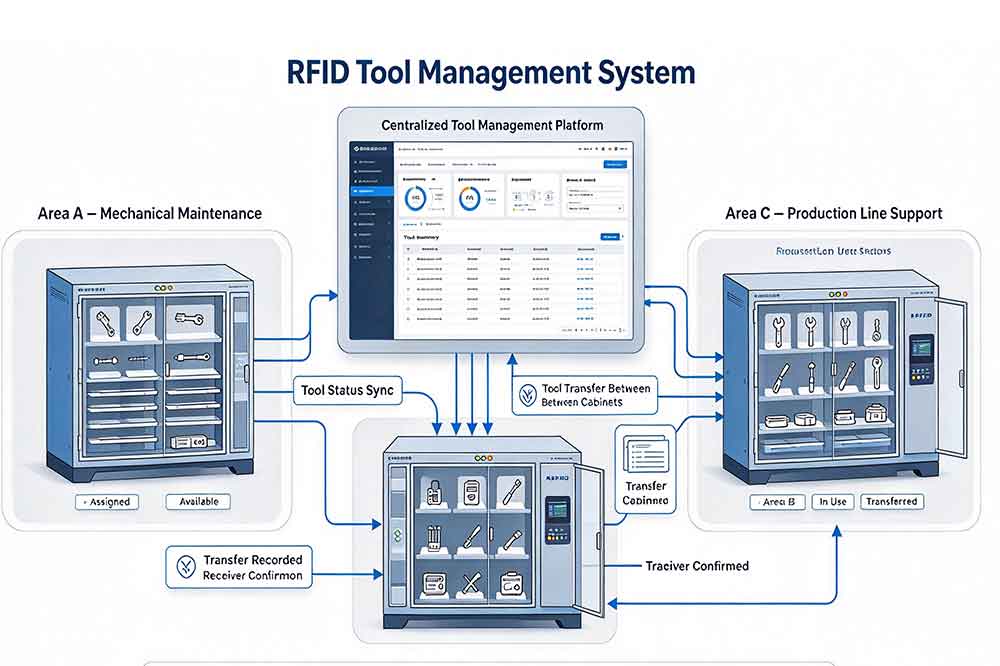
RFID tool cabinets can help industrial companies improve tool allocation by connecting physical tools with recorded availability, users, locations, and transaction history. When these records support clear allocation rules, teams can assign shared tools more consistently, coordinate competing requests, and prepare equipment for planned work.
The best results come from combining RFID identification with practical assignment policies, reliable status records, and appropriate software integration. Start by identifying the tools and departments that experience the most allocation conflicts, test the workflow with actual users, and refine the rules before expanding to additional cabinets or locations.
The goal is simple: make sure the right tool is assigned to the right person, department, or job at the right time.
What is RFID tool allocation management?
It is the process of assigning tools to users, departments, jobs, or locations using RFID identification and supporting management software.
Can an RFID tool cabinet automatically assign tools?
It depends on the software. RFID can identify tools and record transactions, while automated assignment requires suitable allocation rules and system functionality.
How should factories handle competing tool requests?
Define clear priorities based on urgency, job requirements, and tool restrictions. Use availability records to support decisions and record approved reassignment changes.
What is the difference between allocation and reservation?
Reservation expresses planned future demand. Allocation assigns a tool under defined rules, while checkout records its actual issue to a user or task.
Can tool allocation software connect with a CMMS or ERP?
Yes, when compatible interfaces are available. Integration can link tool assignments with work orders, departments, maintenance records, and other relevant operational data.
An effective allocation process begins with accurate inventory and clear workflow rules. An RFID tool cabinet can support tool identification and transaction recording, while RFID tool cabinet inventory management helps teams review recorded availability. For shared equipment, tool reservation and availability management can help coordinate competing requests. Companies managing several departments can also review RFID tool cabinet workflow design before introducing allocation rules across multiple locations.

Cykeo’s RFID Smart Tool Cabinet enables 10-second tool audits, user access control & real-time alerts for construction/oil/gas. Features 21.5″ touchscreen, IP54 steel body & -30°C~60°C operation. Supports SAP/Oracle integration.

Cykeo’s Intelligent Weighing Tool Cabinet combines weight sensors & RFID for 100% tool accountability. Features solar/4G options, IP54 steel-glass body & nuclear/rail compliance. Supports SAP/Oracle integration.

Cykeo’s solar-powered RFID Inventory Tool Cabinet enables 5-second audits for remote sites. Features 160W solar, Android 7.1, 4G & extreme temp operation for oil/energy/mining sectors.

Cykeo’s industrial RFID Tool Cart features 14″ touchscreen, 400+ tool scanning, and carbon steel construction for aviation MRO, power plants and construction sites. 5-second inventory scans.

Cykeo CYKEO-TC RFID multi-drawer tool cart manages 300+ tools via UHF RFID, features fingerprint/face recognition, Android/Windows OS, and SAP integration for nuclear/railway/fire safety sectors. IP54 rated for harsh environments.

Cykeo CYKEO-GTC4 RFID tool inventory cart manages 300+ tools via UHF RFID, features instant scanning, fingerprint/face recognition, and SAP integration for nuclear/railway/fire safety sectors. IP54 rated for harsh environments.

Cykeo CYKEO-GTC7 RFID aviation maintenance cart features military-grade build, blockchain audits, and predictive tool alerts for aircraft MRO. Achieves EASA/FAA compliance.

Cykeo CYKEO-GTC7A RFID real-time tool tracking cart features 99.9% accuracy, FOD prevention, and SAP integration for aviation/plant maintenance. Military-grade construction.

Cykeo CYKEO-GTC4B RFID mobile tool cart delivers 300-tool verification in 7 seconds with modular drawers, ≤150W power, and SAP integration for industrial/aviation use.

Cykeo CYKEO-GTC4C RFID workshop tool control cart delivers 300-tool inventory in 3 seconds with 10hr battery, SAP integration, and FOD prevention for industrial workshops.

Cykeo’s CYKEO-GTC4A multi-drawer RFID tool cart delivers 7-second aviation tool inventories, 10-hour battery, and dual authentication. ISO 18000-6C compliant for MRO/manufacturing.

Cykeo’s MIL-STD RFID tool tracking cart scans 300 tools in 7 seconds, with -20°C~60°C operation and FOD prevention for aviation/energy industries.

Cykeo’s space-saving RFID tool management cabinet offers 1000-tool capacity, ≤5s scans, and 24/7 unmanned operation for manufacturing/assembly plants.

Cykeo’s RFID industrial tool cabinet offers modular shelves, 21.5″ touchscreen, and voice guidance for manufacturing/energy sectors. 24/7 operation with ≤80W power.

Cykeo’s RFID secure tool cabinet features 4 lockable compartments, ≤150W power, and 24/7 monitoring for pharma/aerospace/electronics industries.

Cykeo’s RFID aviation tool cabinet features triple authentication, 14″ HD touchscreen, and thermostatic control for aircraft MRO/FAA compliance.

Cykeo’s RFID tool tracking system delivers self-service check-in/out, real-time alerts, and multilingual interface for correctional/military security.

Cykeo’s off-grid RFID tool inventory system features solar/wind power, -30°C~60°C operation, and military-grade durability for mining/energy/military sectors.

Cykeo’s industrial RFID tool accountability cabinet delivers 99.9% scan accuracy, adjustable shelves, and 24/7 operation for automotive/aerospace manufacturing.

Cykeo’s RFID multi-drawer tool cabinet features 5 adjustable drawers, biometric access, and 99.9% scan accuracy for automotive/aerospace manufacturing.

Cykeo’s RFID Automated Tool Cabinet delivers military security, adjustable shelving, and Java/C# SDK integration for defense/aerospace manufacturing.

Cykeo’s RFID scalable tool cabinet features multi-unit management, voice guidance, and semi-outdoor durability for automotive/construction/logistics.

Cykeo CYKEO-GT1B industrial RFID tool storage cabinet features Impinj R2000 UHF technology, 1,000+ tool capacity, IP54 protection, and Windows/Android OS for manufacturing/aviation MRO. Includes auto check-in/out and SAP/Oracle sync.

Cykeo CYKEO-GT3C industrial RFID tool checkout system Cabinet features millimeter-wave scanning, 280-layer storage, dual OS, and 99.9% accuracy for aviation/semiconductor sectors. Supports auto check-in/out and real-time SAP sync.


Cykeo CYKEO-GT3D RFID smart tool cabinet offers 5-second inventory scanning for 300+ tools, dual authentication, and 24/7 automated management for industrial facilities.

Discover the CYKEO-B1A Industrial RFID Backpack featuring advanced tool tracking technology with 25cm RF shielding, 7-day battery life, and wearable design for field maintenance professionals.
RFID Industry Writer | IoT & Asset Tracking Analyst
James writes about RFID technology, asset tracking, and the practical challenges of digital transformation across warehousing, retail, manufacturing, and logistics.
His work focuses on how RFID is applied in real-world operations—improving inventory visibility, automating workflows, and helping businesses manage assets with greater accuracy and efficiency.
He regularly covers topics including UHF RFID, smart cabinets, RFID portals, tool tracking, warehouse automation, and industrial IoT trends..
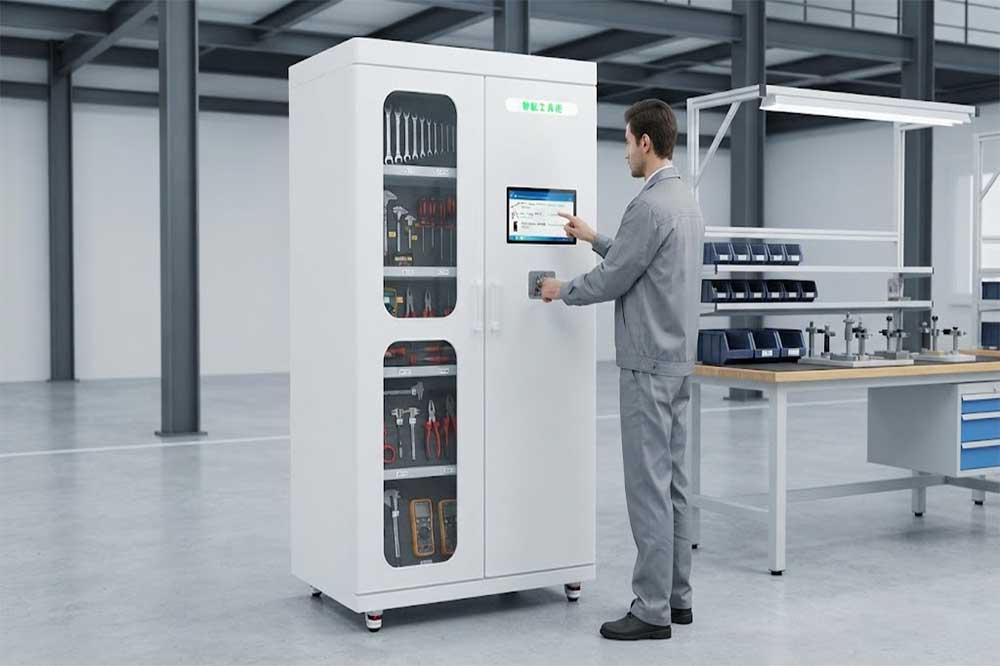
Learn how RFID tool cabinet inventory management helps factories count tools, detect missing items, track locations, and improve inventory visibility.
More
A long range RFID scanner helps smart factories track materials, work-in-process products, tools, equipment, pallets, and reusable containers. By connecting ...
More
How rfid improves inventory accuracy by enabling real-time tracking, automated counting, and reliable stock visibility. Discover Cykeo RFID inventory solutions.
More
Tool tracking tool for facilities helps maintenance teams automate tool control, improve accountability, reduce losses, and complete inventory checks in seconds using RFID technology.
More