 Cykeo RFID IoT Solution Products R&D Manufacturer
How RFID Reader Works: The Simple Explanation
304Curious about the technology? Learn how RFID reader works in plain language—from powering tags to decoding data for inventory and tracking systems.
MoreAll RFID Product
To program RFID stickers, use an RFID reader writer, connect it with programming software, select the correct tag memory area, write required data, and verify the result. A reliable RFID encoder ensures accurate writing and stable tag registration for inventory, payment, and tracking applications.
Programming RFID stickers is the process of storing identification information inside an RFID label through an RFID writer. Unlike traditional printed labels, RFID stickers contain an electronic chip and antenna, allowing information to be read wirelessly after encoding.
In practical projects, I have seen many teams underestimate the importance of the writing process. The tag itself is small, but the programming environment determines whether the system works reliably. A weak writing setup may create inconsistent encoding, failed writes, or duplicate identification problems after thousands of labels are deployed.
A professional RFID sticker programming workflow normally combines:
For Cykeo RFID applications, desktop RFID writing platforms are designed specifically for controlled tag registration environments. The combination of near-field antenna technology and high-performance RFID chips helps create a stable writing area for daily operations.
The information stored in an RFID sticker depends on the tag type and application requirements.
Common programmable data includes:
| Data Type | Application Example |
|---|---|
| EPC number | Product identification |
| Unique asset ID | Equipment tracking |
| User memory data | Additional information storage |
| Access password | Security control |
| Tag status information | Inventory management |
For UHF RFID stickers based on EPC Gen2 / ISO 18000-63 standards, the tag memory is commonly divided into different sections, including EPC, TID, User memory, and Reserved memory areas. These standardized structures allow RFID systems to identify and manage tagged objects consistently.
Before programming, the most important question is not “what can be written?”
It is:
What information does the application actually need after the sticker leaves the programming station?
A retail label, warehouse pallet tag, and equipment identification sticker may use completely different encoding strategies.
The first step is selecting compatible hardware.
A typical setup includes:
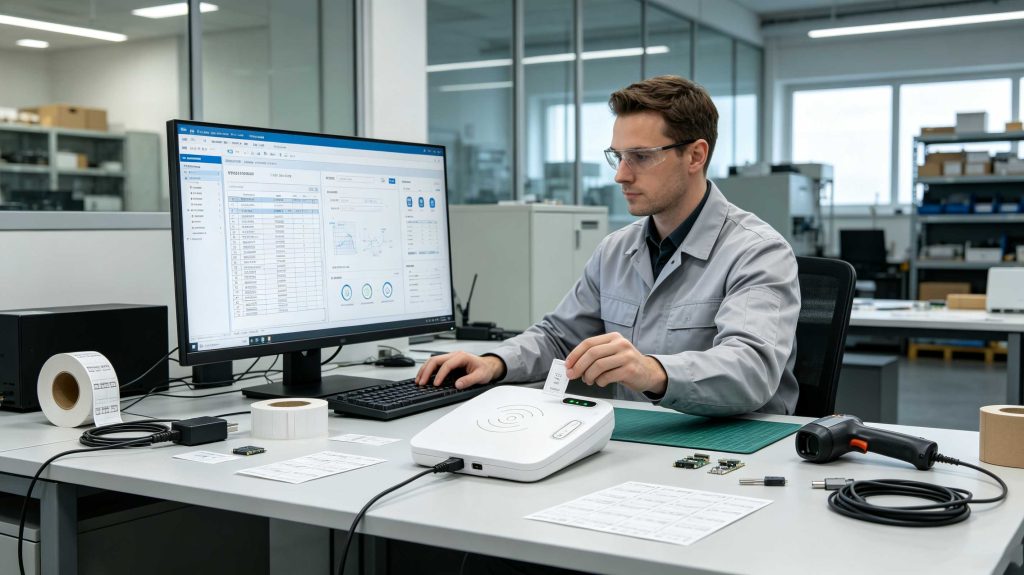
For small-scale and controlled applications, desktop RFID writers are commonly preferred because they provide a defined writing area.
Cykeo RFID desktop card/tag writers use near-field antenna technology to control the reading and writing range. The reading range can be controlled within approximately 30 cm, while the writing range is controlled within approximately 10 cm, reducing accidental writing to nearby tags.
This approach is especially useful for:
After connecting the RFID writer through USB, the programming software communicates with the device.
A typical workflow:
Professional RFID systems usually provide software tools to simplify this process.
Cykeo provides automatic card/tag writing and reading demo software, allowing customers to quickly complete RFID sticker registration and batch writing operations.
For developers, C# and Java development resources are also available, making it easier to integrate RFID writing functions into custom applications.
Reading an RFID sticker and writing an RFID sticker are not identical operations.
Writing requires:
A failed read may simply require another scan.
A failed write can create a wrongly encoded asset that enters the supply chain.
This is why professional RFID registration stations focus heavily on write reliability.
Cykeo RFID desktop writing platforms use the IMPINJ R500 RFID reader chip to improve reading and writing performance, especially in tag-writing scenarios where stability is critical.
The device supports:
Different applications require different writing methods.
| Programming Method | Suitable Application |
|---|---|
| Single sticker writing | Manual registration |
| Batch writing | Large inventory preparation |
| Automatic writing | Production environments |
| Database-linked writing | Enterprise applications |
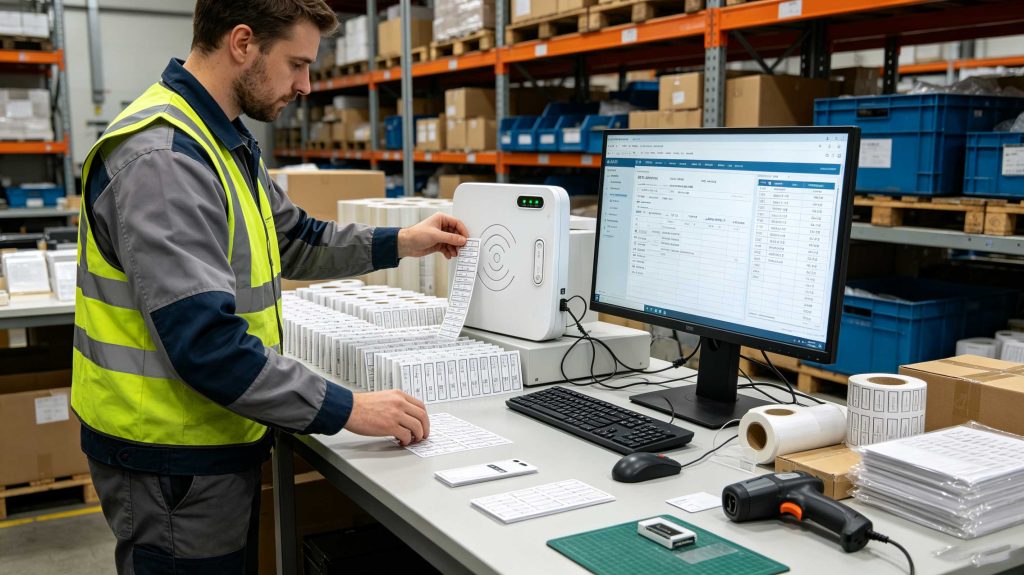
Batch writing is particularly valuable when hundreds or thousands of RFID stickers must be prepared.
A practical example:
A warehouse receives 5,000 new asset labels.
The operator does not manually enter each number.
Instead:
This reduces manual errors and improves preparation speed.
A successful command does not always mean the data was stored correctly.
Always verify:
Long-range writing environments can create risks:
Near-field RFID writing systems solve this by creating a controlled operating area.
When thousands of RFID stickers are prepared, manual processes become inefficient.
Professional systems should support:
In real RFID deployments, programming speed is only one measurement.
The better question is:
Can the system repeatedly create correct RFID identities without additional manual correction?
A desktop RFID writer used in a hospital, warehouse, retail environment, or asset-management project must provide:
Cykeo RFID desktop writing platforms are designed around these practical requirements, combining compact hardware design, controlled near-field operation, IMPINJ R500 performance, USB communication, and software support.
The objective is not just writing data into RFID stickers.
The objective is creating dependable digital identities that remain accurate throughout the entire lifecycle.
Programming RFID stickers successfully in a laboratory environment is relatively simple. The real challenge appears when hundreds, thousands, or even millions of RFID labels must be prepared consistently.
In production environments, RFID sticker programming requires more than writing information into the chip. It requires a controlled process that ensures:
A professional RFID encoding workflow normally includes three stages:
Skipping the third step is one of the most common mistakes.
A tag that receives data but is not verified can become a hidden problem later. For example, an incorrectly encoded warehouse label may not fail immediately. It may fail weeks later when inventory records no longer match physical assets.
Before placing RFID stickers on the desktop writer, the encoding data should already be organized.
Typical preparation includes:
| Data Preparation Item | Example |
|---|---|
| Unique ID generation | Asset number, product code |
| EPC assignment | RFID electronic identity |
| Database connection | ERP/WMS/MES synchronization |
| Batch number | Production tracking |
| Operator information | Responsibility records |
A professional RFID sticker programming system does not treat each label as an isolated object.
The RFID sticker is usually connected to a larger information system.
For example:
A medical equipment department may encode:
A warehouse may encode:
The RFID sticker becomes a digital identity, not just a replacement barcode.
The writing environment directly affects success rate.
Desktop RFID writers are often preferred for sticker programming because they provide:
Cykeo RFID desktop writing equipment uses a near-field antenna design to limit the operating area. The read range can be controlled within approximately 30 cm and writing range within approximately 10 cm.
This design is valuable when operators handle many RFID stickers on a desk because it reduces accidental communication with nearby tags.
A typical operator workflow:
The RFID reader chip inside the writer directly influences:
Cykeo RFID desktop writers use the IMPINJ R500 reader chip platform to improve RFID reading and writing performance.
According to Impinj technical specifications, the R500 supports RAIN RFID / ISO 18000-63 and EPCglobal Gen2v2 compliant air-interface protocols. The published specifications list receiver sensitivity of -68 dBm under stated test conditions.
This type of RF performance is especially important for writing operations because writing requires accurate communication between the reader and tag.
A stable encoding station should not only detect a sticker.
It should maintain communication until the complete data-writing process finishes.
For organizations handling large quantities of labels, manual programming quickly becomes inefficient.
A batch RFID sticker programming process may include:
| Function | Benefit |
|---|---|
| Automatic writing | Reduce manual operation |
| Tag filtering | Avoid duplicate processing |
| Data import | Improve preparation speed |
| Write verification | Reduce failed labels |
| Operation logs | Support traceability |
Example:
A company prepares 20,000 RFID stickers for asset management.
A manual process requires:
A professional RFID writing station can instead:
The difference is not only speed.
It is consistency.
Some RFID applications require additional protection after writing.
Common security functions include:
For example:
A retail RFID sticker may only require EPC identification.
A pharmaceutical tracking label may require stricter control because the information is connected with regulated inventory.
The programming strategy should match the risk level.
For companies building their own RFID applications, hardware-level programming flexibility is important.
Cykeo provides development resources including:
A typical integration structure:
Business Software
        ↓
RFID Programming Application
        ↓
Cykeo SDK / Communication Interface
        ↓
RFID Desktop Writer
        ↓
RFID Sticker
The software can control:
This makes RFID sticker programming easier to integrate into existing enterprise workflows.
Hospitals use RFID stickers to identify:
Programming accuracy is critical because every sticker may represent an individual asset record.
RFID stickers can support:
Fast and reliable writing helps retailers prepare large quantities of tagged products.
Factories may use RFID stickers for:
The sticker must maintain reliable identification throughout its lifecycle.
When RFID stickers fail during programming, check the following:
| Problem | Possible Cause | Solution |
|---|---|---|
| Sticker not detected | Poor placement | Adjust position |
| Writing failure | RF instability | Retry with controlled distance |
| Duplicate data | Database issue | Check ID generation |
| Slow programming | Incorrect software settings | Optimize batch process |
| Nearby tags affected | Excessive range | Use controlled near-field writing |
| Inconsistent results | Hardware limitation | Improve writer performance |
A good troubleshooting process starts with the physical layer before changing software.
Check:
You need an RFID reader writer or RFID encoder, compatible programming software, and RFID stickers that support writing operations. Desktop RFID writers are commonly used for controlled label programming.
Some RFID stickers support rewriting depending on chip type and memory protection settings. Once memory is locked, modification may no longer be possible.
The time depends on the data size, hardware performance, and workflow design. Batch programming systems can process large quantities more efficiently than manual writing.
Yes. Many desktop RFID writers support USB communication, allowing direct connection with computers and programming software.
Common reasons include incorrect tag placement, unsuitable sticker type, RF interference, unstable communication, or insufficient writing distance control.
Yes. Depending on the RFID chip memory capacity, stickers can store identification numbers and additional application-specific information.
Manufacturers usually provide demo software, SDKs, or APIs. Cykeo provides RFID reading and writing demo software together with development materials for application integration.
The practical answer to how to program RFID stickers is not simply writing information into an RFID chip.
Reliable RFID sticker programming requires:
In real projects, the best RFID programming system is not the one that writes the fastest once.
It is the one that writes correctly thousands of times.
Cykeo RFID desktop writers combine near-field antenna control, IMPINJ R500-based performance, USB communication, automatic writing software, and developer support to help organizations build reliable RFID sticker registration workflows.

Discover SSD-D4AL, a USB-HID UHF RFID reader with 4/8/16 antenna options, Impinj E710/X3M1 chipset, plug-and-play USB power, and OEM customization.

SSD-D3AL is a USB-HID UHF RFID reader with 0–30 cm reading, 0–15 cm writing, over 600 tags/s recognition, USB plug-and-play operation and OEM Logo customization.

SSD-D1AL is a compact USB UHF RFID reader with Impinj E710/X3M1 chipset, USB-HID, 600+ tags/s recognition, 4/8/16 antenna support and plug-and-play USB power.

CYKEO CYKEO-D1LA USB RFID Reader is a compact desktop solution with near-field control for precise tag reading and encoding. Powered by USB, supporting ISO 18000-6C, and built for stable batch writing, this usb rfid tag reader fits retail, libraries, offices, and controlled RFID encoding tasks.

CYKEO CYKEO-D1L RFID scanner USB is a compact desktop UHF RFID scanner designed for short-range tag writing and verification. This usb rfid scanner supports batch encoding, stable 0–26 dBm output, and works across Windows, Linux, and Android systems.

CYKEO CYKEO-D1C USB RFID Card Reader is a near-field UHF desktop writer designed for secure, short-range tag encoding. With USB-C connectivity and stable 26 dBm output, this rfid reader usb c is ideal for badge issuance, label encoding, and controlled desktop RFID workflows.

CYKEO CYKEO-D2L RFID Reader USB is a compact desktop encoder built on the Impinj R500 chip. With near-field control and stable USB power, this usb rfid card reader delivers precise tag writing for offices, retail counters, and small-scale logistics encoding tasks.

CYKEO CYKEO-D3L USB RFID Tag Reader delivers stable UHF tag reading and writing for daily desktop and light industrial tasks. Designed for controlled short-range operation, this USB RFID Tag Reader works reliably with rfid tag and reader systems in libraries, tool tracking, and inventory registration.

The CYKEO CYKEO-D4L UHF RFID Tag Reader is a stable Desktop RFID Reader designed for accurate tag registration, borrowing, and return workflows. Built with the Impinj R2000 chip, this UHF RFID Tag Reader delivers controlled short-range reads for libraries, asset tracking, and inventory management environments.

The CYKEO CYKEO-D5L Desktop RFID Card Reader is a stable UHF RFID Card Reader designed for controlled short-range reading and writing. Built for libraries, tool rooms, and asset desks, this UHF RFID Card Reader supports dense tag handling, secure data processing, and easy USB integration.

The CYKEO CYKEO-D6L RFID Reader Writer is a heavy-duty Desktop RFID Reader designed for short-range, high-accuracy tag programming. Built for libraries, labs, and asset desks, this RFID Reader Writer supports batch processing, stable 33dBm output, and seamless integration with existing management systems.

Cykeo CYKEO-D8B UHF RFID tunnel and RFID Desktop Reader features 30+ items batch reading,

Cykeo CYKEO-D8A embedded RFID badge reader offers 30+ tags/sec scanning, 20cm anti-crosstalk precision, and DC 12V power for unmanned stores, warehouses, and smart inventory systems.

Cykeo’s CYKEO-D8C UHF RFID gate reader achieves 200-tag/batch scanning with adjustable power control, ideal for retail inventory and smart warehouse management.
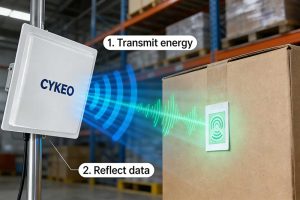
Curious about the technology? Learn how RFID reader works in plain language—from powering tags to decoding data for inventory and tracking systems.
More
An RFID printer can print and encode RFID labels in one process. This guide explains how RFID printers work, common types, key features, and how to choose the right RFID label printer for your application.
More
An RFID chip stands for Radio Frequency Identification chip. It is the electronic component inside an RFID tag that stores identification data and communicat...
More
Discover how Impinj RFID reader solutions transform retail inventory management and enable unmanned store operations with real-time tracking and automation.
More