In many RFID projects, people spend most of their time discussing readers, antennas, and software platforms. But there is another piece of equipment that quietly sits at the beginning of the RFID workflow: the RFID printer.
If your system relies on RFID labels or tags attached to products, cartons, or assets, you usually need a way to print and encode those tags before they enter the system. That’s exactly what an RFID printer does.
This guide explains what RFID printers are, how they work, and when businesses actually need them.
What Is an RFID Printer?
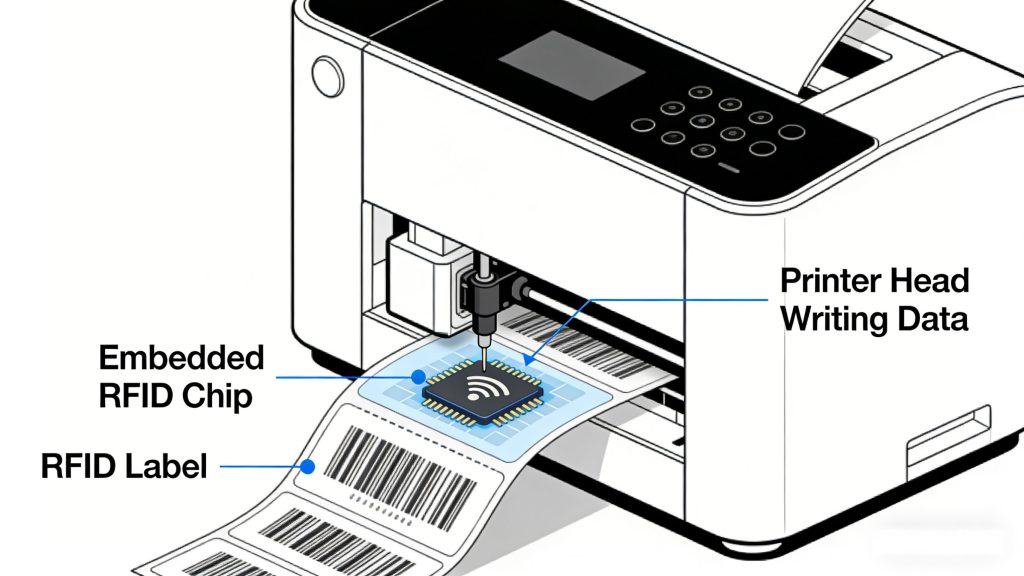
An RFID printer is a specialized printer that can print information on a label while simultaneously writing data to the RFID chip embedded inside the label.
In a typical RFID label, there are several layers:
The printer not only prints visual information like product names, SKUs, or barcodes, but also encodes digital data into the chip so it can later be read by an RFID system such as UHF RFID infrastructure.
Because both processes happen in one device, RFID printers are often called print-and-encode systems.
How RFID Printers Work
At first glance, an RFID printer looks very similar to a standard thermal label printer. The key difference is that it contains an RFID encoding module inside.
The basic process usually works like this:
A blank RFID label enters the printer.
The RFID encoder writes a unique ID or data to the RFID chip.
The printer prints human-readable information on the label.
The system verifies that the tag was encoded successfully.
The finished RFID label exits the printer ready for use.
If encoding fails, the printer will usually mark the label as invalid to prevent errors in the tracking system.
This verification step is important because RFID systems depend on accurate tag data to function properly.
RFID Printer vs Barcode Printer
Many companies wonder whether they need a dedicated RFID printer or if a normal barcode printer is enough.
The main difference is functionality.
A barcode printer only prints visual data. An RFID printer prints the label and writes electronic data to the chip.
That means barcode systems require line-of-sight scanning, while RFID systems allow tags to be read wirelessly through an RFID reader such as those used in EPC Gen2 RFID deployments.
For operations handling large volumes of inventory or logistics items, RFID printing can significantly improve efficiency because tags can be read automatically without manual scanning.
Common Types of RFID Printers
RFID printers are generally divided into a few categories depending on their intended usage.
Desktop RFID Printers
Desktop printers are compact devices used in small offices, labs, or light production environments.
Typical use cases include:
Small inventory systems
Retail product tagging
Asset tracking in offices
They are easy to install and operate but usually have lower print volumes.
Industrial RFID Printers
Industrial RFID printers are built for high-volume environments.
They are commonly used in:
Warehouses
manufacturing facilities
distribution centers
These printers support continuous printing and can handle thousands of labels per day.
Mobile RFID Printers
Mobile RFID printers are portable devices designed for field work.
Workers can carry them to print and encode tags directly at the point of use, such as in warehouses or retail floors.
Common Applications of RFID Label Printing
RFID printers are widely used across industries that rely on item-level tracking.
Retail Inventory Management
Retailers often print RFID labels directly onto clothing tags or product labels. This allows automated inventory counting using handheld RFID readers.
Warehouse and Logistics
Distribution centers attach RFID labels to cartons or pallets so shipments can be tracked automatically through RFID gates.
Asset Tracking
Companies managing large numbers of tools or equipment often generate RFID labels using in-house printers to track assets across locations.
Healthcare Equipment Tracking
Hospitals use RFID labels to monitor medical equipment and supplies, improving visibility and reducing loss.
Key Factors to Consider When Choosing an RFID Printer
Not every RFID printer is suitable for every deployment. Choosing the right one usually depends on several factors.
RFID Frequency Compatibility
Make sure the printer supports the RFID standard used in your system, such as UHF RFID.
Label Type Support
Different printers support different label sizes and tag formats.
Encoding Accuracy
Reliable tag encoding and verification are critical for avoiding tracking errors later.
Printing Volume
Low-volume environments may only need a desktop printer, while industrial operations require high-throughput machines.
Software Integration
The printer should integrate smoothly with your existing inventory or warehouse management system.
Practical Tip: Plan Your RFID Label Workflow Early
One mistake companies often make is treating RFID printing as an afterthought.
In reality, the label creation process is the starting point of the entire RFID system. If the tag data structure or printing workflow is poorly designed, it can create problems throughout the tracking process.
A good approach is to define:
what information will be stored on each tag
how labels will be generated
where printing will take place in the workflow
Planning these details early helps avoid costly changes later.
Final Thoughts
RFID printers may not be the most visible part of an RFID system, but they play an essential role in preparing RFID tags for real-world use.
By printing and encoding labels in a single step, these devices simplify the deployment of RFID-based tracking systems across retail, logistics, healthcare, and industrial environments.
For businesses planning to implement RFID, understanding how RFID printers work—and choosing the right one—can make the entire system easier to manage and scale.
Is your RFID antenna reading tags in the next room or outside the intended area? Learn the common causes of unstable RFID performance, oversized read zones, and cross-reading, plus practical solutions for gate control and warehouse deployments.
In the era of efficient and precise warehouse management, RFID access control technology, with its unique non-contact identification advantage, is gradually becoming a key tool for optimizing inventory control, accelerating inbound and outbound pr...
Wondering "can smartphone read RFID NFC tag"? Discover which RFID frequencies phones can read, NFC vs UHF limitations, and solutions for mobile RFID reading with CYKEO.
 Cykeo RFID IoT Solution Products R&D Manufacturer