 Cykeo RFID IoT Solution Products R&D Manufacturer

Long Range RFID Scanner for Airports: How to Track Baggage and Ground Equipment
116A long range RFID scanner can help airports automatically track baggage, carts, containers, and ground equipment at defined checkpoints. By combining UHF RFI...
MoreAll RFID Product
USB RFID reader is a device that connects to a computer or another compatible host through a USB interface and communicates with RFID tags. It allows software to identify tagged items without requiring a person to scan each barcode individually.
For many businesses, a USB RFID reader is a practical starting point for building an RFID application. It can be used at a desktop workstation, a registration counter, an inventory station, or an equipment management desk. Instead of installing a large RFID system across an entire facility, a business can begin with one reader and a small group of tags.
However, not every USB RFID reader works with the same tags or offers the same functions. Frequency, communication protocol, antenna design, read range, and software compatibility all affect how a reader performs in a real project.
This guide explains how USB RFID readers work, the main types available, and what businesses should consider before choosing one.
USB RFID reader is RFID device that uses a USB connection to communicate with a host system, such as a desktop computer, laptop, industrial PC, or compatible Android device.
RFID stands for Radio Frequency Identification. The technology uses radio waves to exchange information between a reader and an RFID tag. Depending on the tag type and system design, the reader may retrieve an identification number or other stored data.
The USB interface provides a convenient connection to the host device. It can carry commands, identification data, and other communications required by the reader’s software and firmware.
A typical USB RFID setup includes three main components:
For example, a company may attach RFID tags to electronic components stored in a cabinet. An employee places a tagged component near a desktop reader, and the connected software retrieves its identifier. The software can then display the corresponding item record or update an inventory database.
The reader does not automatically manage the entire inventory process. That depends on the application software, database, business rules, and integration with other systems.
Although the physical device may look simple, several steps take place when it identifies an RFID tag.
The reader connects to a compatible computer or host through USB. Depending on the model, the connection may use USB-A, USB-C, or another supported interface.
Some readers appear to the host as a keyboard-like device, while others communicate through a vendor SDK, API, serial interface, or dedicated application. These connection methods are not interchangeable, so the correct option depends on the device and software requirements.
The reader uses radio-frequency signals to communicate with tags within its effective operating area.
For passive RFID tags, the reader typically supplies the RF energy needed for the tag to respond. The exact communication method depends on the RFID frequency and protocol.
A tag must be compatible with the reader. A UHF reader, for example, cannot automatically read every HF or LF tag simply because both are RFID products.
When a compatible tag responds, the reader receives its data. This may include a unique identifier or additional memory content, depending on the tag, protocol, and reader capabilities.
In some applications, the reader only needs to identify a tag. In others, it may also need to read or write supported memory areas.
The reader sends the retrieved information to the connected host. Software can then match the tag identifier with a product record, employee profile, equipment record, or inventory database.
For instance, a tool management application might associate a tag with a tool number, storage location, assigned employee, and maintenance history.
This is where RFID becomes useful to business operations: the reader captures the tag data, while the software turns that data into information people can act on.
USB RFID readers differ in frequency, supported protocols, antenna configuration, and intended application. Choosing a device based only on the USB connector can lead to compatibility problems.
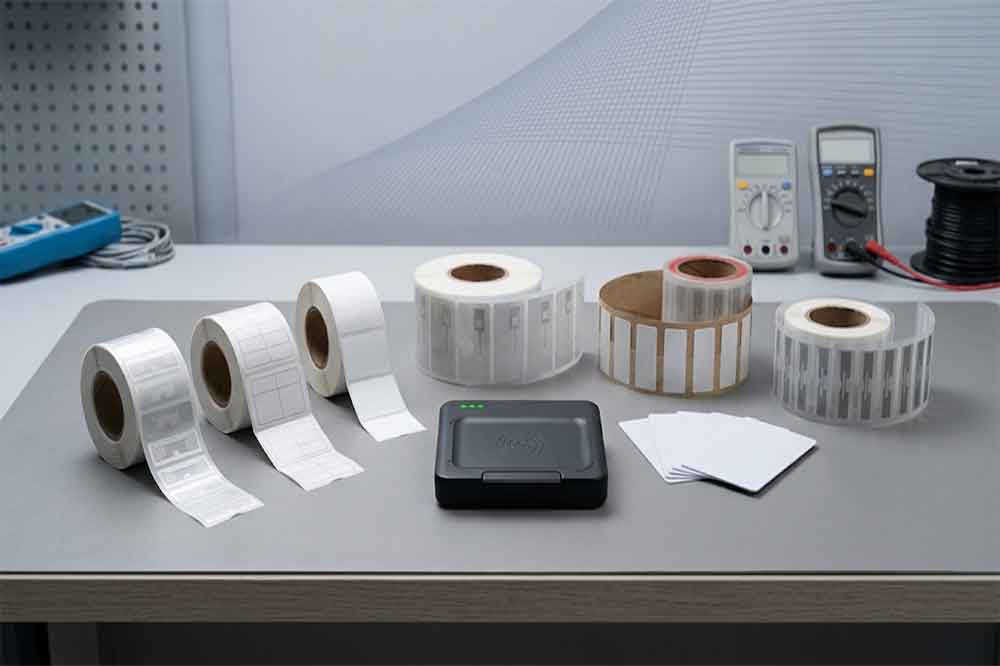
Low-frequency RFID generally operates at 125 kHz or 134.2 kHz, depending on the system.
LF readers are commonly used in certain identification and access-control applications. They require compatible LF tags, and support for one LF tag format does not guarantee compatibility with every other format.
High-frequency RFID commonly operates at 13.56 MHz. NFC is also based on 13.56 MHz technology, but compatibility depends on the supported standards and communication modes.
These readers are used in applications such as card identification, document management, product authentication, and selected desktop encoding tasks.
An HF reader should not be assumed to support every NFC function or every 13.56 MHz card. Check the exact standards and chip types before ordering.
Ultra-high-frequency RFID is widely used for item identification and inventory applications where multiple tagged objects may need to be detected within a suitable reading area.
Many UHF systems use the EPC Gen2 / ISO 18000-63 air-interface standard, although the exact supported protocols should always be confirmed for the model.
A USB UHF RFID reader may suit desktop inventory, RFID label testing, tag registration, and item-level identification. Its actual performance depends on antenna design, tag orientation, surrounding materials, regional frequency regulations, and the operating environment.
Some desktop readers support both reading and writing, while others focus mainly on identification.
A reader-writer may be used to encode supported tags during product preparation, register RFID labels, or update permitted memory areas. Writing requires compatible tags and suitable software, and certain memory areas may be locked or password-protected.
For a project that needs encoding, confirm write support explicitly instead of assuming that every RFID reader can modify tag data.
The terms “RFID reader” and “RFID scanner” are sometimes used interchangeably in product searches. However, the word scanner can refer to different types of devices.
A barcode scanner captures information from a printed barcode or QR code using an optical sensor. An RFID reader communicates with an RFID tag using radio waves.
A USB RFID scanner generally refers to an RFID reader with a USB connection or a device marketed for RFID scanning tasks. It does not necessarily use the same technology as a barcode scanner.
The distinction matters when designing an inventory process. Barcode scanning typically requires the barcode to be visible to the scanner. RFID may identify a compatible tag without direct optical line of sight, although range, interference, tag placement, and nearby materials can still affect reading performance.
Some business applications use both technologies. For example, a receiving workstation may use a barcode scanner for shipping documents and a USB RFID reader to register RFID-tagged products.
USB RFID readers are particularly useful when identification happens at a fixed workstation rather than across a large area.
A warehouse or retail team can register tagged products at a desktop station. Depending on the reader and tags, staff may identify individual items or read multiple tags in one operation.
Organizations can associate RFID tags with tools, instruments, IT equipment, or other assets. A USB reader can support check-in, check-out, registration, and periodic verification workflows when connected to suitable software.
Compatible RFID tags can help identify books, files, and other tagged materials. A desktop reader can be used for registration, data verification, or selected circulation workflows.
Manufacturers and system integrators may use a reader-writer to encode compatible tags before products enter distribution. This can include assigning identifiers or writing supported data fields.
A compatible HF or LF reader may be used to read supported identification cards at a registration desk. The card technology must match the reader, and access permissions must be handled by the connected application.
Not every USB reader suits every scenario. A desktop reader is generally intended for nearby tag interaction; projects requiring long-distance detection, mobile operation, or continuous monitoring may need a different reader type.

A few specifications can make the difference between a straightforward integration and an expensive redesign.
Start with the tags you already use or plan to purchase. Confirm the frequency, chip or card type, protocol, and required read/write functions.
Do you need to read one tag directly above the device, or identify several items in a defined area? A compact desktop antenna may be suitable for workstation use, but it should not be expected to deliver the same performance as a purpose-built long-range system.
Check the connector, supported host devices, driver requirements, and operating systems. If the reader will connect to Android, confirm that the specific model supports the required Android version and USB OTG arrangement.
Determine whether your application needs keyboard-emulation output, a serial interface, an SDK, an API, or another integration method. Developers should check the documentation, supported programming environments, sample code, and available technical support.
If the project involves tag encoding, confirm that the reader supports the required write commands and memory operations. Also verify whether the intended tags allow the data changes you need.
Metal surfaces, liquids, tag orientation, nearby readers, and dense tag populations can affect RFID performance. Test the proposed reader with representative tags and actual items before committing to a large deployment.
A USB RFID reader is often a good option when a business needs RFID identification at a computer-based workstation. It can simplify tag registration, item verification, desktop inventory, and software integration without requiring a large fixed-reader installation.
It may not be the right choice when the application requires handheld mobility, wide-area coverage, automated portal reading, or continuous monitoring across a production line. Those situations may call for handheld, fixed, or specialized RFID equipment.
The most reliable approach is to begin with the application requirements rather than the connector type. Identify the tags, reading distance, required data, host platform, and software interface first. Then test a suitable reader under real operating conditions.
For businesses comparing different models, Cykeo provides a range of USB RFID reader options for desktop and integration projects. You can review the available devices, interfaces, and functions in the USB RFID Reader product category.
For OEM projects, system integration, or bulk purchasing, prepare the tag specifications, expected reading distance, host platform, and target application before contacting the supplier. These details help the engineering team recommend a suitable configuration and identify compatibility issues early.
A USB RFID reader connects RFID tag identification with a computer-based workflow. The USB connection makes the device convenient to deploy, but the real choice depends on frequency, tag compatibility, antenna performance, read/write functions, and software integration.
For businesses building an inventory, asset tracking, card identification, or tag encoding solution, matching the reader to the actual application is more important than choosing a device based on its connector alone.
Understanding how a USB RFID reader works is only the first step. Choosing a suitable device also requires checking tag compatibility, reading distance, USB connectivity, and software requirements. Read our guide on [how to choose the right USB RFID reader for your application] to compare these factors before selecting a device.

Discover SSD-D4AL, a USB-HID UHF RFID reader with 4/8/16 antenna options, Impinj E710/X3M1 chipset, plug-and-play USB power, and OEM customization.

SSD-D3AL is a USB-HID UHF RFID reader with 0–30 cm reading, 0–15 cm writing, over 600 tags/s recognition, USB plug-and-play operation and OEM Logo customization.

SSD-D1AL is a compact USB UHF RFID reader with Impinj E710/X3M1 chipset, USB-HID, 600+ tags/s recognition, 4/8/16 antenna support and plug-and-play USB power.

CYKEO CYKEO-D1LA USB RFID Reader is a compact desktop solution with near-field control for precise tag reading and encoding. Powered by USB, supporting ISO 18000-6C, and built for stable batch writing, this usb rfid tag reader fits retail, libraries, offices, and controlled RFID encoding tasks.

CYKEO CYKEO-D1L RFID scanner USB is a compact desktop UHF RFID scanner designed for short-range tag writing and verification. This usb rfid scanner supports batch encoding, stable 0–26 dBm output, and works across Windows, Linux, and Android systems.

CYKEO CYKEO-D1C USB RFID Card Reader is a near-field UHF desktop writer designed for secure, short-range tag encoding. With USB-C connectivity and stable 26 dBm output, this rfid reader usb c is ideal for badge issuance, label encoding, and controlled desktop RFID workflows.

CYKEO CYKEO-D2L RFID Reader USB is a compact desktop encoder built on the Impinj R500 chip. With near-field control and stable USB power, this usb rfid card reader delivers precise tag writing for offices, retail counters, and small-scale logistics encoding tasks.

CYKEO CYKEO-D3L USB RFID Tag Reader delivers stable UHF tag reading and writing for daily desktop and light industrial tasks. Designed for controlled short-range operation, this USB RFID Tag Reader works reliably with rfid tag and reader systems in libraries, tool tracking, and inventory registration.

The CYKEO CYKEO-D4L UHF RFID Tag Reader is a stable Desktop RFID Reader designed for accurate tag registration, borrowing, and return workflows. Built with the Impinj R2000 chip, this UHF RFID Tag Reader delivers controlled short-range reads for libraries, asset tracking, and inventory management environments.

The CYKEO CYKEO-D5L Desktop RFID Card Reader is a stable UHF RFID Card Reader designed for controlled short-range reading and writing. Built for libraries, tool rooms, and asset desks, this UHF RFID Card Reader supports dense tag handling, secure data processing, and easy USB integration.

The CYKEO CYKEO-D6L RFID Reader Writer is a heavy-duty Desktop RFID Reader designed for short-range, high-accuracy tag programming. Built for libraries, labs, and asset desks, this RFID Reader Writer supports batch processing, stable 33dBm output, and seamless integration with existing management systems.

Cykeo CYKEO-D8B UHF RFID tunnel and RFID Desktop Reader features 30+ items batch reading,

Cykeo CYKEO-D8A embedded RFID badge reader offers 30+ tags/sec scanning, 20cm anti-crosstalk precision, and DC 12V power for unmanned stores, warehouses, and smart inventory systems.

Cykeo’s CYKEO-D8C UHF RFID gate reader achieves 200-tag/batch scanning with adjustable power control, ideal for retail inventory and smart warehouse management.
RFID Industry Writer | IoT & Asset Tracking Analyst
James writes about RFID technology, asset tracking, and the practical challenges of digital transformation across warehousing, retail, manufacturing, and logistics.
His work focuses on how RFID is applied in real-world operations—improving inventory visibility, automating workflows, and helping businesses manage assets with greater accuracy and efficiency.
He regularly covers topics including UHF RFID, smart cabinets, RFID portals, tool tracking, warehouse automation, and industrial IoT trends..
A long range RFID scanner can help airports automatically track baggage, carts, containers, and ground equipment at defined checkpoints. By combining UHF RFI...
More
Embeddable RFID tags are RFID transponders designed to be permanently integrated inside tools, equipment, products, or industrial assets, enabling automated identification, tracking, and lifecycle management without exposing the tag to external da...
More
Discover how RFID laundry tags improve inventory accuracy in commercial textile management by reducing manual errors, automating tracking, and improving visibility across laundry operations.
More
A detailed look at the CK-M8 UHF RFID 8-port module, its features, real-world performance, specs, and how it compares to Impinj R2000-based modules. Suitable for warehouses, logistics, manufacturing, and retail tracking systems.
More