Buying an RFID reader module is easy. Getting it to work reliably inside a real product is where most projects actually struggle.
On paper, everything looks simple—connect power, send commands, read tags. In practice, integration is where performance issues, instability, and “it works sometimes” problems show up.
This guide walks through how RFID modules are actually integrated into real systems, especially for OEM devices and industrial applications.
The antenna is not an accessory—it defines system performance.
Even a good RFID module will perform poorly with a bad antenna setup.
Key points:
Match antenna impedance (typically 50Ω)
Keep antenna cable as short as possible
Avoid sharp bends in RF cables
Separate antenna from metal surfaces when possible
Test polarization (linear vs circular)
Real-world issue:
Most “bad RFID performance” cases are actually antenna placement problems, not module defects.
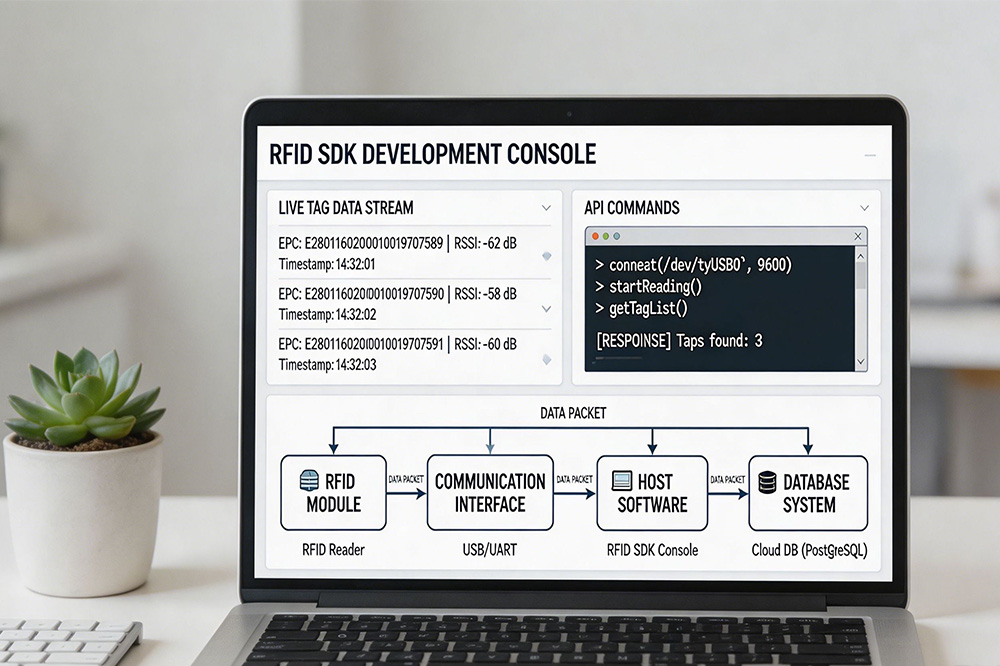
Step 4: SDK Integration and Command Flow
A good RFID module should come with an SDK or command protocol.
Typical workflow:
Initialize module
Set frequency and power level
Configure antenna port
Start inventory (tag scanning)
Receive EPC/TID data stream
Process data in host system
Common mistakes:
Not handling continuous data streams correctly
Ignoring buffer overflow situations
Skipping error handling in SDK calls
Not managing multi-threaded reads
SDK quality often determines integration speed more than hardware itself.
Step 5: Testing Single Tag vs Multi-Tag Scenarios
A system that works with one tag can fail completely with multiple tags.
You should test:
Single tag stability
5–10 tags performance
20–50 tags collision handling
Continuous reading for long periods
Tags moving at different speeds
What usually breaks first:
Anti-collision performance
Duplicate reads
Missed tags under load
Step 6: Real Environment Testing (Not Lab Only)
Lab testing is not enough for RFID systems.
Real environments introduce:
Metal reflections
Liquid interference
Human body absorption
Electromagnetic noise
Moving objects
Example scenarios:
Warehouse metal racks
Hospital equipment rooms
Factory conveyor lines
Retail storage environments
Many RFID systems fail only after leaving the lab.
Step 7: Firmware and Stability Tuning
Once hardware is working, tuning begins.
Important parameters:
Read power level
Inventory speed
Session control (S0/S1/S2/S3)
Filter settings (duplicate suppression)
Trigger timing control
Small tuning changes can significantly improve stability.
Step 8: Heat and Long-Time Operation Testing
RFID modules used in industrial systems often run 24/7.
You should verify:
Continuous operation for 24–72 hours
Temperature stability under load
No performance degradation over time
Stable communication after long runtime
Heat buildup can silently reduce RF performance.
Common Integration Problems
Most real-world issues fall into a few categories:
Power instability
Antenna mismatch
Poor SDK implementation
Incorrect reading logic
Environmental interference
Over-optimistic lab testing
The module is rarely the root cause.
OEM Integration Best Practice
Experienced engineers usually follow this flow:
Validate module in isolation
Test antenna in real environment
Build minimal SDK integration
Run multi-tag stress tests
Optimize firmware parameters
Only then move to full system design
Skipping steps usually leads to redesign later.
Where to Start for Embedded RFID Development
For OEMs building RFID-enabled devices, starting with a stable and well-documented module is critical for reducing integration time and avoiding system-level issues.
CYKEO provides RFID reader modules designed for embedded systems, industrial automation, and OEM device integration.
RFID asset tracking manufacturing improves production visibility, reduces equipment loss, and automates inventory. Discover how Cykeo delivers reliable industrial RFID solutions for modern factories.
A field-style breakdown of directional RFID antennas for integrators and wholesalers. Real deployment notes, beam control issues, warehouse gate behavior, and what actually matters when building stable RFID reading zones.
Looking for a simple, reliable RFID antenna? The CK-A11 UHF RFID Reader Antenna offers wide coverage, minimal interference, and easy integration for efficient asset tracking in logistics, retail, healthcare, and more. Durable, easy-to-use, and bui...
Learn how to link RFID tag IDs to data in a MySQL database for asset tracking, inventory management, and more. Follow step-by-step integration tips with Cykeo’s solutions.
 Cykeo RFID IoT Solution Products R&D Manufacturer