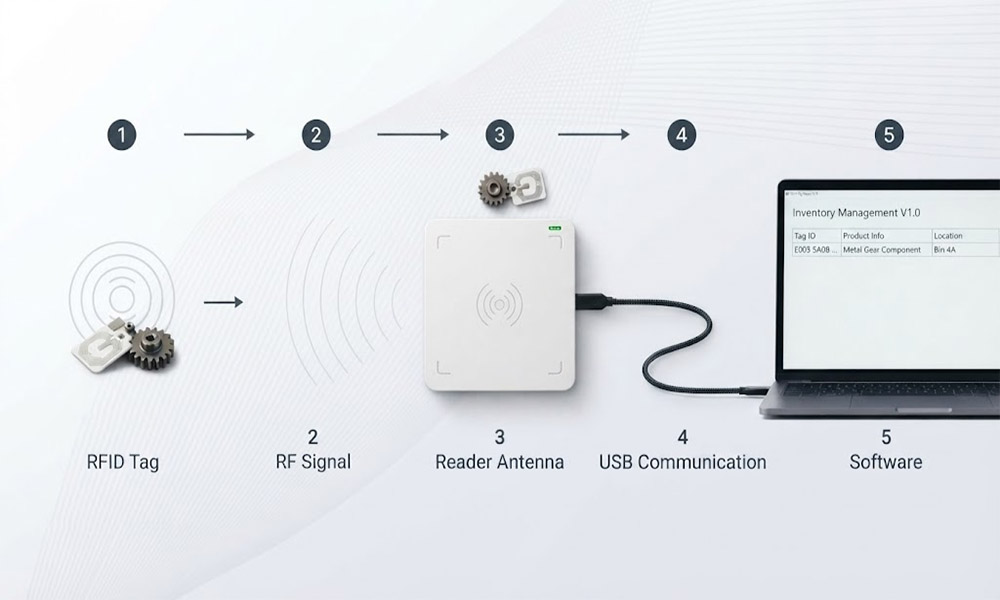
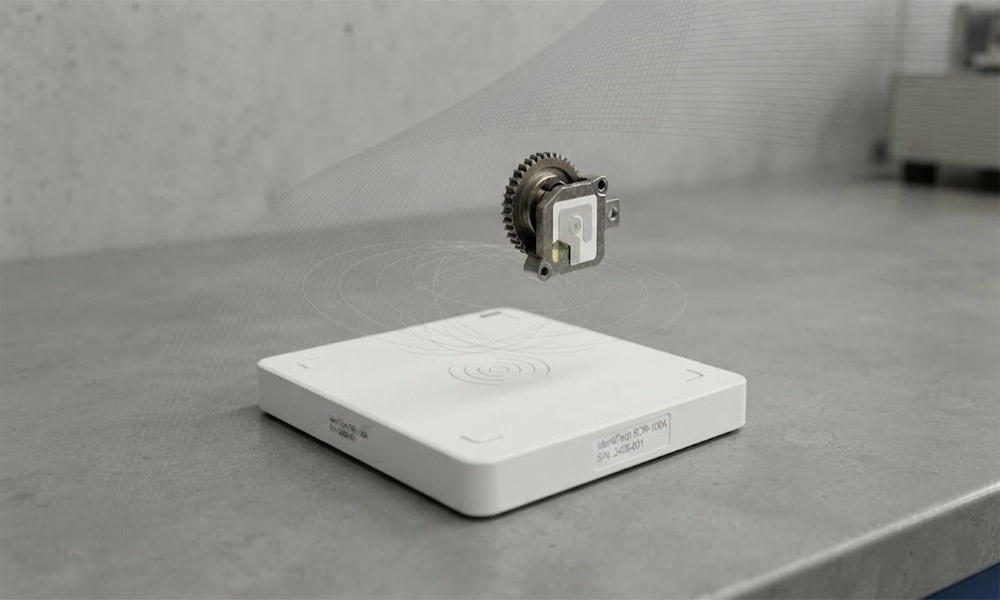
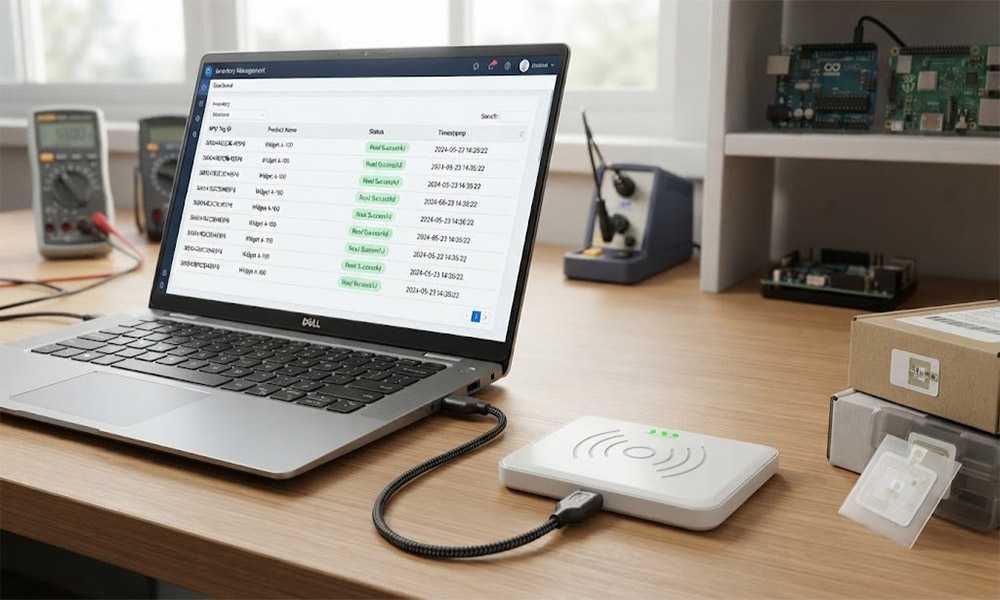
A USB RFID scanner works by using radio signals to communicate with a compatible RFID tag, capture the tag’s information, and send the resulting data to a computer through USB. The basic path is:
RFID Tag → RF Signal → Reader Antenna → USB Communication → Software
It sounds straightforward, but there are a few details behind that process that matter when choosing an RFID reader for a real project.
If you are comparing different types of USB RFID scanners before choosing a device, our USB RFID Scanner Guide covers reader types, applications, tag compatibility, and the main factors to consider when sourcing RFID hardware.
What Actually Happens When You Scan an RFID Tag?
Picture a small inventory desk.
A USB RFID scanner is sitting beside a laptop. A worker brings a tagged product close to the reader. There is no barcode to line up and, depending on the RFID technology, the worker may not even need to place the tag in an exact position.
The scanner sends an RF signal through its antenna.
The RFID tag receives that signal and responds with its stored identification information.
The reader receives the response, processes it, and passes the tag data to the computer through USB.
The software then decides what to do with that information.
Maybe it adds a product to inventory. Maybe it records an employee ID. Maybe it simply displays the tag number on screen.
The reader itself is only one part of this chain.
1. RFID Tag
Everything starts with the RFID tag.
An RFID tag normally contains a chip and antenna. Depending on the RFID technology, the tag may be passive, active, or semi-passive.
For many common inventory applications, passive RFID tags are used.
A passive tag does not normally contain its own battery. Instead, it uses energy from the reader’s RF field to power the chip sufficiently to respond.
This is one reason RFID can be useful for product identification. The tag can be very small and does not need a battery replacement schedule.
But there is an important limitation.
The tag and reader must be compatible.
A UHF RFID reader cannot simply read every RFID tag. HF, LF, and UHF systems use different frequencies and technologies.
So when a customer asks for a USB RFID scanner, one of the first things I would ask is:
What RFID tag are you trying to read?
That question can save a surprising amount of time.
2. The RF Signal
Once the reader is active, its antenna generates an RF field.
The exact behavior depends on the RFID frequency and reader design.
For a passive tag, the RF energy can be used by the tag to respond with its stored information.
The process is happening wirelessly, but it is not magic. The distance and reliability depend on several physical factors.
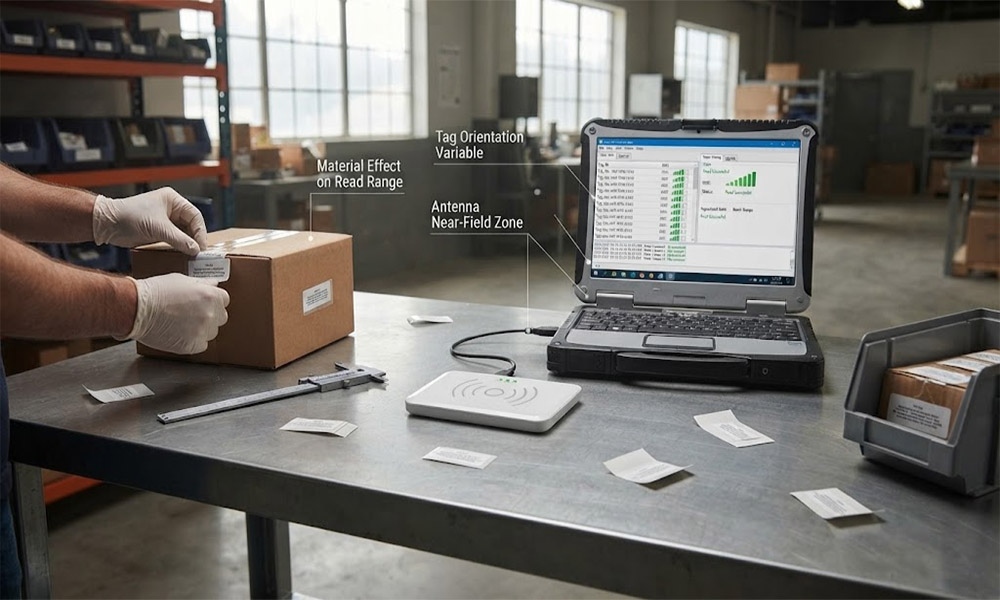
Tag orientation matters.
Antenna position matters.
The surrounding material matters.
Metal surfaces can be particularly troublesome for some RFID tags. Liquids can also affect RF performance.
This is why a reader that works well on a cardboard box may behave differently when the same tag is placed directly on metal equipment.
The specification sheet might say a reader can reach a certain distance, but the real application can be less predictable.
Testing the actual tag on the actual product is still the better approach.
3. Reader Antenna
The antenna is the part of the scanner that communicates with the RFID tag through the RF field.
In a USB RFID scanner, the antenna may be built into the reader housing or connected as part of the reader design.
The antenna affects the reading area, direction, and overall performance.
For a small desktop application, you might only need a relatively focused reading area.
For inventory checking, you may want a wider area.
This is one reason two RFID readers with similar specifications can behave differently in practice.
The antenna design, tag characteristics, power level, environment, and software settings all interact.
When evaluating an RFID scanner for a commercial project, I would not look only at the reader’s advertised maximum range.
Ask about the actual reading environment.
4. The Reader Processes the Tag Data
After the RFID tag responds, the reader receives and processes the information.
At this point, the reader is doing more than simply “seeing” a tag.
It needs to communicate using the relevant RFID protocol, handle the response, and provide usable data to the host system.
For a basic application, the output might simply be an RFID tag ID.
For a more advanced system, the reader may need to handle multiple tags, read memory data, write compatible tags, or communicate with application software through an SDK or API.
That is where the difference between a basic RFID scanner and a more capable RFID reader becomes noticeable.
5. USB Communication
The next step is the part that makes this type of reader especially convenient for desktop systems.
The reader communicates with the computer through USB.
Depending on the model, the USB connection may use different communication methods, such as HID or virtual COM, while some systems rely on SDKs or APIs for software integration.
For a simple application, the computer may receive tag data almost like input from another peripheral.
For a custom inventory system, the developer may want much more control over how the reader behaves.
Before purchasing a reader for software integration, it is worth checking:
USB communication mode
SDK availability
API support
Supported operating systems
Programming examples
Data output format
The physical USB connector is only the beginning. How the software talks to the reader is usually more important.
6. Software Uses the RFID Data
The final stage is the software.
This is where a raw RFID tag ID becomes useful business information.
For example:
RFID Tag ID:E200...
The software might connect that ID to:
Product: Power Tool A Asset Number: PT-1048 Location: Warehouse B Status: Available
The RFID reader does not necessarily know that it is reading a power tool.
It simply provides the RFID data.
The inventory or asset management software gives that data meaning.
This is an important distinction when planning an RFID project.
Why USB RFID Scanners Are Useful
USB RFID scanners are particularly practical when RFID reading happens at a workstation.
Typical applications include:
Inventory registration
Product receiving
Asset management
Tool tracking
RFID tag testing
Desktop identification
Small warehouse operations
Software development
For example, a company receiving 100 tagged products could connect a USB RFID scanner to a computer and use the reader to identify each item during registration.
For a large warehouse entrance, however, a fixed RFID gate reader may be more appropriate.
The best hardware depends on where the reading happens.
Does the RFID Reader Need the Internet?
No.
The basic RFID reading process does not require an internet connection.
The reader communicates with the RFID tag through RF signals and with the computer through USB.
Internet access may become necessary if the software sends the RFID data to a cloud database, ERP system, or remote inventory platform.
So it helps to separate the two:
RFID communication ≠ Internet communication
That distinction is sometimes overlooked when planning a system.
What Affects RFID Reading Distance?
There is no single number that guarantees performance in every environment.
Reading distance can be affected by:
RFID frequency
Reader output power
Antenna design
Tag antenna
Tag orientation
Product material
Metal
Liquid
Reader placement
Environmental interference
A tag placed flat on cardboard may behave very differently from the same tag attached to a metal tool.
For this reason, Cykeo or another RFID supplier should ideally test the reader with the customer’s actual tag and product before a large deployment.
That is especially important for wholesale and OEM projects.
What Should You Ask an RFID Supplier?
If you are sourcing USB RFID scanners for resale or system integration, a short technical request can include:
1. What RFID frequency does the reader support? 2. Which RFID protocols and tag types are compatible? 3. What is the practical reading distance? 4. Can it read multiple tags? 5. What USB communication modes are supported? 6. Is an SDK or API available? 7. Can samples be provided for testing?
Those questions are usually more useful than simply asking for the “best USB RFID scanner.”
For wholesale orders, sample testing also gives you a chance to check the reader with your own software and tags before committing to volume.
Cykeo provides USB RFID reader solutions for inventory, asset tracking, RFID testing, and system integration projects.
If you need a short explanation for someone who has never worked with RFID, this is probably enough:
The USB RFID scanner sends a radio signal → the compatible RFID tag responds → the reader receives the response → the reader sends the tag data to the computer through USB → software turns that data into useful information.
That is the basic RFID reader working principle.
The details become more complicated when you introduce multiple tags, metal products, long reading distances, write operations, or custom software. But the basic chain stays the same.
Short Summary
A USB RFID scanner uses radio signals to communicate with compatible RFID tags, receives their identification data, and transfers that information to a computer through USB. The complete process moves from the RFID tag and RF signal to the reader antenna, USB communication, and finally the application software.
CYKEO CYKEO-D1LA USB RFID Reader is a compact desktop solution with near-field control for precise tag reading and encoding. Powered by USB, supporting ISO 18000-6C, and built for stable batch writing, this usb rfid tag reader fits retail, libraries, offices, and controlled RFID encoding tasks.
CYKEO CYKEO-D1L RFID scanner USB is a compact desktop UHF RFID scanner designed for short-range tag writing and verification. This usb rfid scanner supports batch encoding, stable 0–26 dBm output, and works across Windows, Linux, and Android systems.
CYKEO CYKEO-D1C USB RFID Card Reader is a near-field UHF desktop writer designed for secure, short-range tag encoding. With USB-C connectivity and stable 26 dBm output, this rfid reader usb c is ideal for badge issuance, label encoding, and controlled desktop RFID workflows.
CYKEO CYKEO-D2L RFID Reader USB is a compact desktop encoder built on the Impinj R500 chip. With near-field control and stable USB power, this usb rfid card reader delivers precise tag writing for offices, retail counters, and small-scale logistics encoding tasks.
CYKEO CYKEO-D3L USB RFID Tag Reader delivers stable UHF tag reading and writing for daily desktop and light industrial tasks. Designed for controlled short-range operation, this USB RFID Tag Reader works reliably with rfid tag and reader systems in libraries, tool tracking, and inventory registration.
The CYKEO CYKEO-D4L UHF RFID Tag Reader is a stable Desktop RFID Reader designed for accurate tag registration, borrowing, and return workflows. Built with the Impinj R2000 chip, this UHF RFID Tag Reader delivers controlled short-range reads for libraries, asset tracking, and inventory management environments.
The CYKEO CYKEO-D5L Desktop RFID Card Reader is a stable UHF RFID Card Reader designed for controlled short-range reading and writing. Built for libraries, tool rooms, and asset desks, this UHF RFID Card Reader supports dense tag handling, secure data processing, and easy USB integration.
The CYKEO CYKEO-D6L RFID Reader Writer is a heavy-duty Desktop RFID Reader designed for short-range, high-accuracy tag programming. Built for libraries, labs, and asset desks, this RFID Reader Writer supports batch processing, stable 33dBm output, and seamless integration with existing management systems.
Cykeo CYKEO-D8A embedded RFID badge reader offers 30+ tags/sec scanning, 20cm anti-crosstalk precision, and DC 12V power for unmanned stores, warehouses, and smart inventory systems.
Cykeo’s CYKEO-D8C UHF RFID gate reader achieves 200-tag/batch scanning with adjustable power control, ideal for retail inventory and smart warehouse management.
RFID Industry Writer | IoT & Asset Tracking Analyst
James writes about RFID technology, asset tracking, and the practical challenges of digital transformation across warehousing, retail, manufacturing, and logistics.
His work focuses on how RFID is applied in real-world operations—improving inventory visibility, automating workflows, and helping businesses manage assets with greater accuracy and efficiency.
He regularly covers topics including UHF RFID, smart cabinets, RFID portals, tool tracking, warehouse automation, and industrial IoT trends..
Discover what is rfid used for in retail and how RFID smart checkout systems improve inventory accuracy, self-service payment, and store automation with Cykeo.
Discover how RFID technology really works in manufacturing. Real-world experiences, practical tips, and lessons learned from implementing RFID systems for inventory, production, and quality control.
A field perspective on RFID key cabinets, how integrators implement them, and the practical lessons from real installations in offices, hospitals, and industrial sites.
Discover how Cykeo bluetooth asset tracker solutions combine UHF RFID and Bluetooth technology for fast industrial asset tracking, warehouse visibility, and real-time inventory control.
 Cykeo RFID IoT Solution Products R&D Manufacturer