 Cykeo RFID IoT Solution Products R&D Manufacturer

how to reprogram rfid card
184RFID card reprogramming requires a writable RFID card, compatible reader writer, proper software, and verified data writing to update stored information safely.
MoreAll RFID Product
In a hospital, finding a piece of equipment can sometimes take longer than using it. A portable monitor may be in another department, a wheelchair may have been moved to a different floor, or a maintenance team may need to confirm which devices have already been inspected. These situations are common in facilities where equipment moves between rooms, departments, storage areas, and service stations throughout the day.
A Healthcare RFID Reader can help make these processes easier to manage. When medical assets carry suitable RFID tags, staff can use a reader to identify them and connect the read data with an asset management system. A USB RFID reader is particularly useful at fixed workstations where equipment records need to be created, checked, or updated.
It does not replace every tracking method used in a hospital. Instead, it provides a practical identification tool for specific tasks that currently depend on manual data entry or repeated barcode scanning.
Medical equipment is expensive, and many facilities share assets across multiple departments. Keeping an accurate record of each item becomes difficult when equipment moves frequently or when several employees are responsible for updating the same inventory.
A spreadsheet may record where an asset was originally assigned, but that information can become outdated after a busy shift. Staff may also enter an incorrect serial number or forget to record a transfer.
RFID offers another way to identify equipment. Depending on the tag type and system design, a reader can obtain an item’s identification data without requiring staff to position a barcode directly in front of a scanner.
Common assets that may benefit from RFID identification include:
The suitability of RFID depends on the asset, its environment, the tag placement, and the hospital’s workflow. For example, metal surfaces and liquid-filled environments can affect radio-frequency performance, so tag selection and testing matter.
A USB RFID reader connects to a computer or compatible workstation. When staff present an RFID-tagged asset within the reader’s effective range, the device reads the tag identifier and transfers the data to the connected application.
The software then determines what the identifier means. It might retrieve an equipment record, register a newly tagged item, or open a maintenance form.
A typical workflow has four steps:
The reader handles identification. The asset management application handles the business rules, record storage, user permissions, and reporting.
This separation is important when selecting a Healthcare RFID Reader. A device may read tags correctly but still require software development before it can support the hospital’s actual procedures.
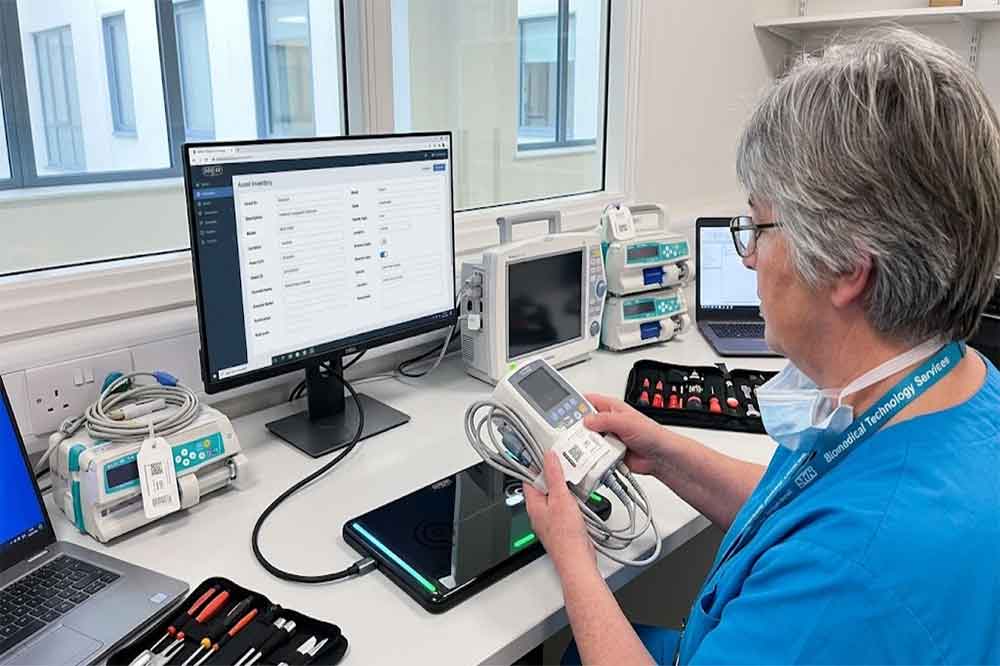
When a hospital purchases new equipment, staff need to create a record for each item. That record may include the asset number, manufacturer, model, serial number, department, purchase date, and maintenance schedule.
A USB RFID reader can simplify registration by reading the assigned tag and passing its identifier to a registration form. Staff can then enter the remaining information or retrieve it from an existing purchasing system.
This reduces repeated typing of long identifiers. It also helps establish a consistent identification process before equipment enters daily use.
Medical supplies and reusable equipment are often kept in central storage rooms, department storerooms, or equipment preparation areas. Staff need to know which assets are present and whether the recorded inventory matches the physical stock.
A desktop USB reader is useful when assets are brought to a workstation for inspection or when staff register equipment returned to a designated storage point.
However, a standard USB reader should not automatically be treated as a whole-room inventory system. Reading multiple tags at once depends on the reader’s technology, antenna design, software, tag placement, and surrounding materials. A fixed desktop model may be better suited to individual-item identification than bulk counting.
Some hospitals operate shared equipment pools. Staff borrow devices for a department or procedure and return them when they are no longer needed.
At a checkout desk, a USB RFID reader can identify the equipment while the application records the employee, department, transaction time, and expected return information.
When the asset comes back, staff scan its tag again to complete the return process. If an item has not been returned as expected, the system can flag the outstanding transaction.
This workflow works best when RFID identification is combined with staff authentication and clear rules for handling equipment transfers.
Medical equipment may require scheduled maintenance, calibration, safety checks, or service inspections. Technicians need to identify the correct device and access its service history before recording their work.
With an RFID-enabled workflow, the technician reads the asset tag at a maintenance workstation and opens the corresponding equipment record. The application can display the last inspection date, outstanding service tasks, and other information relevant to the technician’s role.
The reader does not determine whether a medical device is safe to use. Qualified personnel must still perform the required inspections and follow the facility’s maintenance procedures.
Equipment often moves between wards, treatment rooms, diagnostic departments, and storage areas. When these movements are not recorded, the database may show an item in a location where it is no longer available.
A USB RFID reader can support transfer registration at designated workstations. Staff identify the equipment, select the destination department, and confirm the change in the asset management application.
For hospitals that need continuous location visibility, a desktop reader alone is not enough. Mobile readers, fixed RFID portals, or real-time location technologies may be more appropriate, depending on the required coverage and accuracy.
Not every RFID reader is suitable for every medical environment. Before selecting a USB RFID reader, a hospital or system integrator should check the following points.
The reader and tags must use compatible RFID technology and frequency bands. LF, HF, and UHF systems have different operating characteristics and are not interchangeable. The choice depends on the identification range, tag format, number of tags to be read, and the intended application.
For example, an HF reader may suit controlled identification at a workstation, while a UHF solution may be more appropriate for certain longer-range inventory applications. Actual performance depends on the specific equipment and installation.
A USB connection makes it convenient to install a reader at a desktop workstation, but connection alone does not guarantee application compatibility.
Ask the manufacturer whether the reader supports the required operating system, SDK, API, communication protocol, and development environment. If the hospital already uses an asset management platform, the development team should verify how tag data will be transferred into that platform.
For integrators, testing the reader with the actual application is often more useful than relying on a general compatibility statement.
A longer read range is not always an advantage. In a registration workflow, staff may need to identify one specific device without accidentally reading nearby tagged equipment.
Metal medical carts, equipment housings, liquids, and closely positioned tags can affect reading performance. The installation should be tested with representative assets in the actual working environment.
Asset identification and patient identification should be treated as separate requirements. A healthcare asset tracking system generally needs equipment records, location or department information, and transaction history—not unnecessary patient details stored on RFID tags.
Access permissions, user authentication, audit logs, and secure communication should be handled by the wider information system. RFID itself does not automatically provide these controls.
A Healthcare RFID Reader becomes more useful when it connects to an existing workflow instead of operating as a standalone device.
For example, a software developer could configure the workstation to open an asset record immediately after a tag is read. The employee then confirms the equipment’s department and completes the transaction.
Some projects may require a keyboard-emulation mode for basic data entry. Others need an SDK or API to control reader functions and integrate tag data into a custom application. These approaches have different development requirements, so the choice should be made during system planning.
Hospitals should also consider duplicate reads, failed reads, offline operation, and transaction confirmation. A successful tag read does not necessarily mean the database update has been completed.
A short pilot can identify problems before readers are installed across multiple departments.
The pilot should reflect real working conditions. A reader that performs well on an empty desk may behave differently when surrounded by metal carts, tagged equipment, and other electronic devices.
It depends on what the hospital needs to know.
A USB reader is a practical choice for controlled identification tasks, including registration, checkout, return processing, maintenance records, and workstation inventory checks. It can also be a useful entry point for integrators developing a larger RFID asset management solution.
If the requirement is to locate equipment continuously across an entire building, a desktop reader cannot provide that capability on its own. The project may need a combination of fixed readers, mobile readers, location infrastructure, and asset management software.
The most suitable system is the one that matches the actual workflow, not necessarily the one with the greatest reading distance or the largest number of features.
Healthcare asset tracking involves more than knowing how many devices a hospital owns. Staff need reliable identification, accurate records, and a straightforward way to update equipment information as items move through daily operations.
A USB RFID reader can support these tasks at designated workstations by connecting RFID tag identification with the software used to manage medical equipment. The important decisions are tag compatibility, reading performance, software integration, and the level of location visibility required.
For healthcare solution providers and software developers, evaluating the reader alongside the complete workflow is the best way to determine whether it fits the project.
A Healthcare RFID Reader identifies compatible RFID tags attached to medical equipment and passes their identifiers to an application for asset registration, inventory, or maintenance management.
Not by itself. A USB reader usually identifies assets within its effective reading area. Continuous location tracking may require fixed readers, mobile devices, or dedicated real-time location infrastructure.
Yes, provided the reader and software support a compatible integration method, such as an SDK, API, or supported data-input mode. The complete workflow should be tested before deployment.
There is no single best frequency for every application. Selection depends on tag compatibility, required read range, asset materials, reading volume, and the intended workflow.
They can technically store data, depending on the tag, but patient information should not be stored unnecessarily on asset tags. Use appropriate access controls and secure systems to protect sensitive records.
For projects that require workstation-based equipment identification, explore our range of USB RFID readers for healthcare asset management to evaluate suitable hardware for your application.
For a broader look at equipment identification beyond hospitals, read our guide to USB RFID readers for general asset tracking.
Similar identification workflows can also support shared equipment and technical tools; see our guide to RFID-based tool tracking and inventory control.

Discover SSD-D4AL, a USB-HID UHF RFID reader with 4/8/16 antenna options, Impinj E710/X3M1 chipset, plug-and-play USB power, and OEM customization.

SSD-D3AL is a USB-HID UHF RFID reader with 0–30 cm reading, 0–15 cm writing, over 600 tags/s recognition, USB plug-and-play operation and OEM Logo customization.

SSD-D1AL is a compact USB UHF RFID reader with Impinj E710/X3M1 chipset, USB-HID, 600+ tags/s recognition, 4/8/16 antenna support and plug-and-play USB power.

CYKEO CYKEO-D1LA USB RFID Reader is a compact desktop solution with near-field control for precise tag reading and encoding. Powered by USB, supporting ISO 18000-6C, and built for stable batch writing, this usb rfid tag reader fits retail, libraries, offices, and controlled RFID encoding tasks.

CYKEO CYKEO-D1L RFID scanner USB is a compact desktop UHF RFID scanner designed for short-range tag writing and verification. This usb rfid scanner supports batch encoding, stable 0–26 dBm output, and works across Windows, Linux, and Android systems.

CYKEO CYKEO-D1C USB RFID Card Reader is a near-field UHF desktop writer designed for secure, short-range tag encoding. With USB-C connectivity and stable 26 dBm output, this rfid reader usb c is ideal for badge issuance, label encoding, and controlled desktop RFID workflows.

CYKEO CYKEO-D2L RFID Reader USB is a compact desktop encoder built on the Impinj R500 chip. With near-field control and stable USB power, this usb rfid card reader delivers precise tag writing for offices, retail counters, and small-scale logistics encoding tasks.

CYKEO CYKEO-D3L USB RFID Tag Reader delivers stable UHF tag reading and writing for daily desktop and light industrial tasks. Designed for controlled short-range operation, this USB RFID Tag Reader works reliably with rfid tag and reader systems in libraries, tool tracking, and inventory registration.

The CYKEO CYKEO-D4L UHF RFID Tag Reader is a stable Desktop RFID Reader designed for accurate tag registration, borrowing, and return workflows. Built with the Impinj R2000 chip, this UHF RFID Tag Reader delivers controlled short-range reads for libraries, asset tracking, and inventory management environments.

The CYKEO CYKEO-D5L Desktop RFID Card Reader is a stable UHF RFID Card Reader designed for controlled short-range reading and writing. Built for libraries, tool rooms, and asset desks, this UHF RFID Card Reader supports dense tag handling, secure data processing, and easy USB integration.

The CYKEO CYKEO-D6L RFID Reader Writer is a heavy-duty Desktop RFID Reader designed for short-range, high-accuracy tag programming. Built for libraries, labs, and asset desks, this RFID Reader Writer supports batch processing, stable 33dBm output, and seamless integration with existing management systems.

Cykeo CYKEO-D8B UHF RFID tunnel and RFID Desktop Reader features 30+ items batch reading,

Cykeo CYKEO-D8A embedded RFID badge reader offers 30+ tags/sec scanning, 20cm anti-crosstalk precision, and DC 12V power for unmanned stores, warehouses, and smart inventory systems.

Cykeo’s CYKEO-D8C UHF RFID gate reader achieves 200-tag/batch scanning with adjustable power control, ideal for retail inventory and smart warehouse management.
RFID Industry Writer | IoT & Asset Tracking Analyst
James writes about RFID technology, asset tracking, and the practical challenges of digital transformation across warehousing, retail, manufacturing, and logistics.
His work focuses on how RFID is applied in real-world operations—improving inventory visibility, automating workflows, and helping businesses manage assets with greater accuracy and efficiency.
He regularly covers topics including UHF RFID, smart cabinets, RFID portals, tool tracking, warehouse automation, and industrial IoT trends..

RFID card reprogramming requires a writable RFID card, compatible reader writer, proper software, and verified data writing to update stored information safely.
More
Improve inventory accuracy and speed with RFID stocktake solutions. The CK-DP13A RFID Inventory Tracking Station reads hundreds of items in seconds and integrates with ERP/WMS systems. Flexible setup with RFID readers and antennas makes it ideal f...
More
Deep dive into impresoras RFID (RFID printers): differences between office and industrial models, selection criteria, pitfalls, and real-world experience from interfaces to tag matching.
More
Wondering "RFID is what?" CYKEO breaks down the basics of radio frequency identification, how passive tags work, and where you use them every day.
More