 Cykeo RFID IoT Solution Products R&D Manufacturer
Does Aluminum Foil Stop RFID Signals, or Is That Just a Myth?
92Does aluminum foil stop RFID signals? Learn what really happens, when it works, when it fails, and how RFID behaves around metal in real use.
MoreAll RFID Product
In many RFID projects, people spend most of their time discussing readers, antennas, and software platforms. But there is another piece of equipment that quietly sits at the beginning of the RFID workflow: the RFID printer.
If your system relies on RFID labels or tags attached to products, cartons, or assets, you usually need a way to print and encode those tags before they enter the system. That’s exactly what an RFID printer does.
This guide explains what RFID printers are, how they work, and when businesses actually need them.
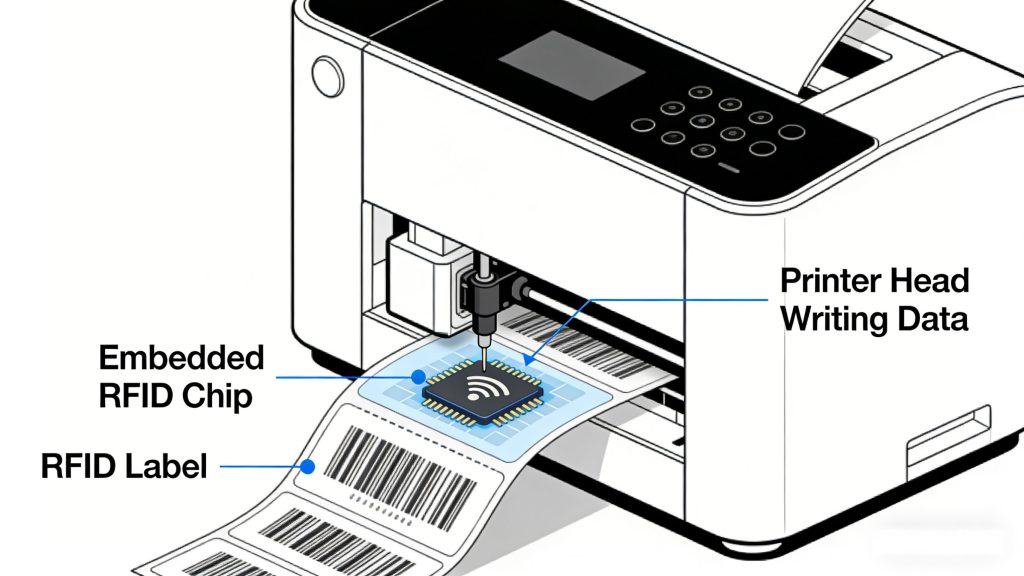
An RFID printer is a specialized printer that can print information on a label while simultaneously writing data to the RFID chip embedded inside the label.
In a typical RFID label, there are several layers:
The printer not only prints visual information like product names, SKUs, or barcodes, but also encodes digital data into the chip so it can later be read by an RFID system such as UHF RFID infrastructure.
Because both processes happen in one device, RFID printers are often called print-and-encode systems.
At first glance, an RFID printer looks very similar to a standard thermal label printer. The key difference is that it contains an RFID encoding module inside.
The basic process usually works like this:
If encoding fails, the printer will usually mark the label as invalid to prevent errors in the tracking system.
This verification step is important because RFID systems depend on accurate tag data to function properly.
Many companies wonder whether they need a dedicated RFID printer or if a normal barcode printer is enough.
The main difference is functionality.
A barcode printer only prints visual data.
An RFID printer prints the label and writes electronic data to the chip.
That means barcode systems require line-of-sight scanning, while RFID systems allow tags to be read wirelessly through an RFID reader such as those used in EPC Gen2 RFID deployments.
For operations handling large volumes of inventory or logistics items, RFID printing can significantly improve efficiency because tags can be read automatically without manual scanning.
RFID printers are generally divided into a few categories depending on their intended usage.
Desktop printers are compact devices used in small offices, labs, or light production environments.
Typical use cases include:
They are easy to install and operate but usually have lower print volumes.
Industrial RFID printers are built for high-volume environments.
They are commonly used in:
These printers support continuous printing and can handle thousands of labels per day.
Mobile RFID printers are portable devices designed for field work.
Workers can carry them to print and encode tags directly at the point of use, such as in warehouses or retail floors.
RFID printers are widely used across industries that rely on item-level tracking.
Retailers often print RFID labels directly onto clothing tags or product labels. This allows automated inventory counting using handheld RFID readers.
Distribution centers attach RFID labels to cartons or pallets so shipments can be tracked automatically through RFID gates.
Companies managing large numbers of tools or equipment often generate RFID labels using in-house printers to track assets across locations.
Hospitals use RFID labels to monitor medical equipment and supplies, improving visibility and reducing loss.
Not every RFID printer is suitable for every deployment. Choosing the right one usually depends on several factors.
Make sure the printer supports the RFID standard used in your system, such as UHF RFID.
Different printers support different label sizes and tag formats.
Reliable tag encoding and verification are critical for avoiding tracking errors later.
Low-volume environments may only need a desktop printer, while industrial operations require high-throughput machines.
The printer should integrate smoothly with your existing inventory or warehouse management system.
One mistake companies often make is treating RFID printing as an afterthought.
In reality, the label creation process is the starting point of the entire RFID system. If the tag data structure or printing workflow is poorly designed, it can create problems throughout the tracking process.
A good approach is to define:
Planning these details early helps avoid costly changes later.
RFID printers may not be the most visible part of an RFID system, but they play an essential role in preparing RFID tags for real-world use.
By printing and encoding labels in a single step, these devices simplify the deployment of RFID-based tracking systems across retail, logistics, healthcare, and industrial environments.
For businesses planning to implement RFID, understanding how RFID printers work—and choosing the right one—can make the entire system easier to manage and scale.

Does aluminum foil stop RFID signals? Learn what really happens, when it works, when it fails, and how RFID behaves around metal in real use.
More
Discover how RFID scanners streamline tasks like inventory tracking, access control, and supply chain management. Learn their real-world uses and benefits.
More
A hands-on look at the CK-T8D RFID Gate Access Control System. This article breaks down real warehouse performance, read accuracy, direction detection, anti-interference capability, and why this industrial RFID gate fits high-volume access points ...
More
Curious about the different types of RFID readers? This guide explains fixed, handheld, and portal RFID readers in simple terms, highlighting their features and real-world applications so you can easily understand their differences.
More