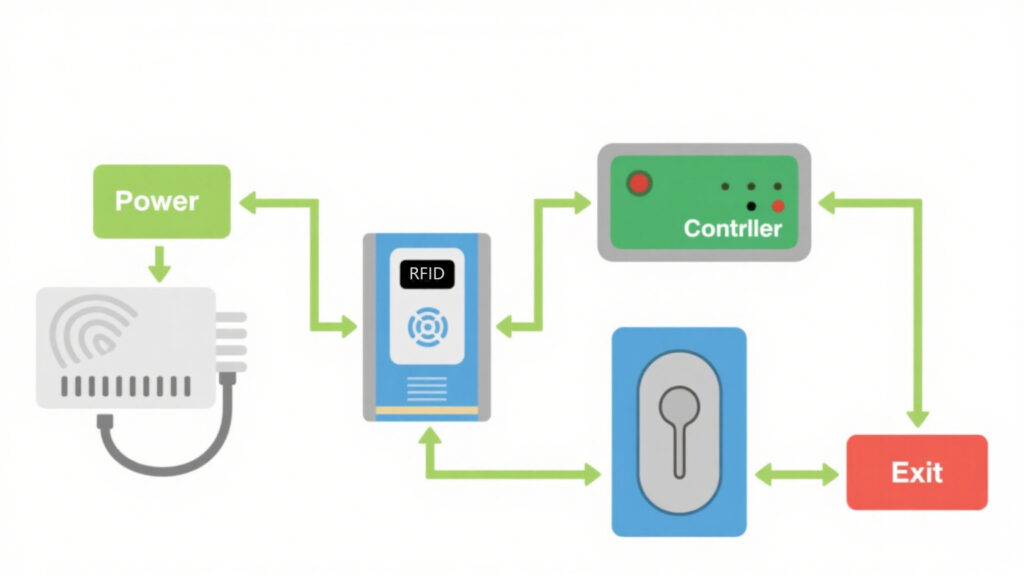
Access control systems aren’t that complicated. It’s basically a card reader + a door lock + a power supply + some wires. Connect them correctly, and it works. Many people think you must hire a professional, but as long as you understand a few basic concepts, you can follow a wiring diagram and do it yourself.
What Materials Do You Need?
Here are the key components you’ll need:
Card Reader: Recognizes cards or PIN codes.
Magnetic Lock (Maglock): The core of the door lock; locks when powered, unlocks when the power is cut.
Exit Button: Press to unlock the door from the inside.
Power Supply: Usually 12V/3A DC; stable output is crucial.
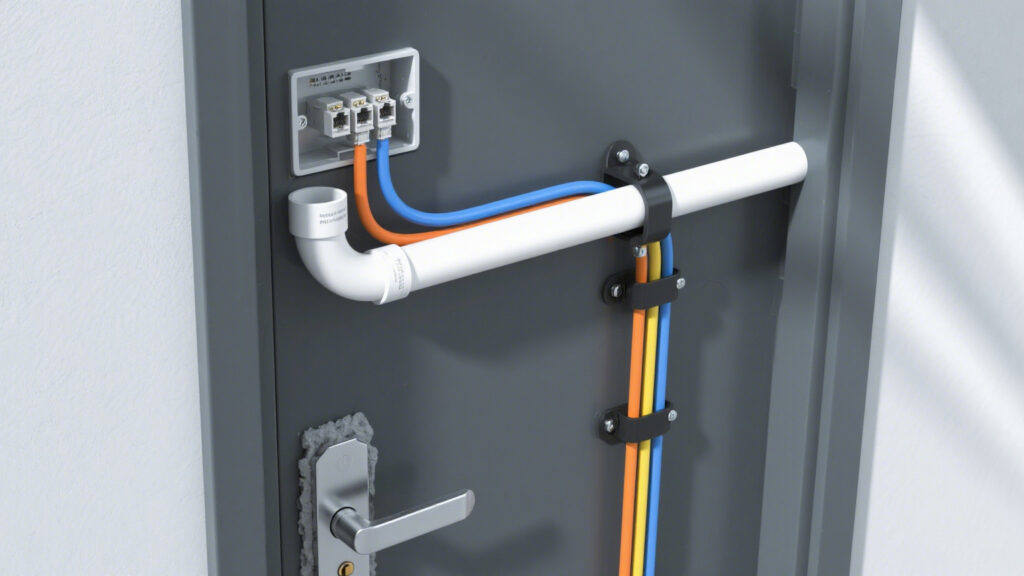
Cables: Commonly CAT6, twisted pair, or specialized access control cables.
Basic Wiring Logic
The wiring logic is actually simple. For the power lines, red goes to positive and black to ground—just make sure the 12V supply is stable.
For data transmission, most readers use the Wiegand protocol: green wire is Data0, white wire is Data1, connect them to the corresponding terminals on the controller.
The door lock is controlled via the controller’s relay. Common connections are COM and NO/NC. Normally locked, the relay triggers when a card is swiped, cuts the power, and the door opens.
The exit button is simpler: connect it to COM and NO. Pressing it sends a signal to unlock.
Tips During Installation
A few details can save a lot of trouble:
Wire first, then install devices. Using conduits helps prevent cable wear over time.
Tighten all connections; poor contact is one of the most common issues.
Before powering on, use a multimeter to check voltage.
If your reader has LEDs or a buzzer, make sure to connect the control lines so you can see feedback when testing—it makes troubleshooting easier.
How to Test Power and Functions
When debugging, don’t connect everything at once:
Test the card reader first. Swipe a card to see if the controller responds.
Connect the maglock and confirm it locks and unlocks properly.
Add the exit button.
If swiping doesn’t work, check the power first, then make sure the data wires aren’t reversed. Green and white wires for Wiegand are commonly mixed up.
Common Pitfalls to Avoid
Using the wrong cable. Thin power wires can overheat or burn when current is high.
Wrong voltage. Maglocks usually require 12V; supplying 24V can damage them.
Reversed data wires (Data0/Data1). If swapped, card swipes won’t work.
Conclusion
Access control isn’t rocket science. Remember three things: stable power, correct data wiring, and that the relay controls the unlocking timing. The rest is wiring and testing. With patience, you can install it yourself, save on installation costs, and fully understand how your access control system works.
Cykeo’s CYKEO-T1D industrial RFID ceiling reader features 500 tags/sec scanning, IP54 protection, and -20℃~60℃ operation for retail/warehouse security. Supports ISO18000-6C and GB/T29768 protocols.
Cykeo’s ceiling-mounted RFID reader enables hands-free 5m inventory tracking with 500 tags/min speed. Features dual alerts, ERP integration, and IP54 rating for warehouse security.
Cykeo CK-T1E RFID gate system features 120° coverage, AI motion filtering, and 5m detection for retail/warehouse security. IP67 rugged design with ERP integration.
This article systematically introduces the application value of rfid stickers for inventory in stock management, covering common tag types, functional features, and applicable scenarios to help enterprises select suitable options and improve asset...
RFID tunnel machine, a cutting-edge technology in modern logistics, is transforming the way warehouses are managed. It is more than just a simple tool; it’s a vital solution to improving warehouse efficiency. By leveraging RFID (Radio Frequ...
Learn how to calculate ROI for RFID implementation in retail stores. Discover Cykeo’s proven framework to quantify cost savings, reduced shrinkage, and revenue growth.
Discover how RFID technology quietly transforms libraries—speeding up borrowing, simplifying inventory, and making books easier to find. Real-world insights, challenges, and reader experiences included.
 Cykeo RFID IoT Solution Products R&D Manufacturer