 Cykeo RFID IoT Solution Products R&D Manufacturer

What is Track RFID,How Track RFID Works?
121Track RFID enables real-time asset visibility, automated inventory control, and loss prevention. Discover how Cykeo RFID systems improve operational efficiency and tracking accuracy.
MoreAll RFID Product
A USB RFID reader can identify an RFID tag in a fraction of a second. However, reading the tag is only one part of the job. The tag information must also reach the right application, in the right format, and at the right point in a business workflow.
For example, an employee may scan an RFID tag and expect its ID to appear in an inventory spreadsheet. A system integrator may need the same tag data to enter a warehouse management system, a desktop application, or a custom database. These projects can use different data output methods, even when the RFID readers connect through USB.
Understanding USB RFID reader data output helps buyers select equipment that fits their software and reduces unnecessary integration work. The three common approaches are HID keyboard emulation, virtual COM port communication, and software integration through an SDK or API.
USB RFID reader data output describes how a reader transfers the information obtained from an RFID tag to a connected computer or application.
Depending on the reader model, the output may include a tag’s unique identifier, selected memory data, status information, or other fields supported by the device. The exact content depends on the RFID technology, reader firmware, tag type, and configuration.
The USB connector alone does not determine how the data appears to the computer. Two readers with similar physical designs may use different communication interfaces or require different software.
Before purchasing a reader, buyers should confirm three things:
These details matter when a reader must work with existing business software or become part of a larger RFID solution.
HID stands for Human Interface Device. In keyboard-emulation mode, a compatible RFID reader sends tag data to the computer in a way that resembles keyboard input.
When a user scans a tag, the tag ID can appear in the active text field, such as a spreadsheet cell, an inventory form, or a customer management application.
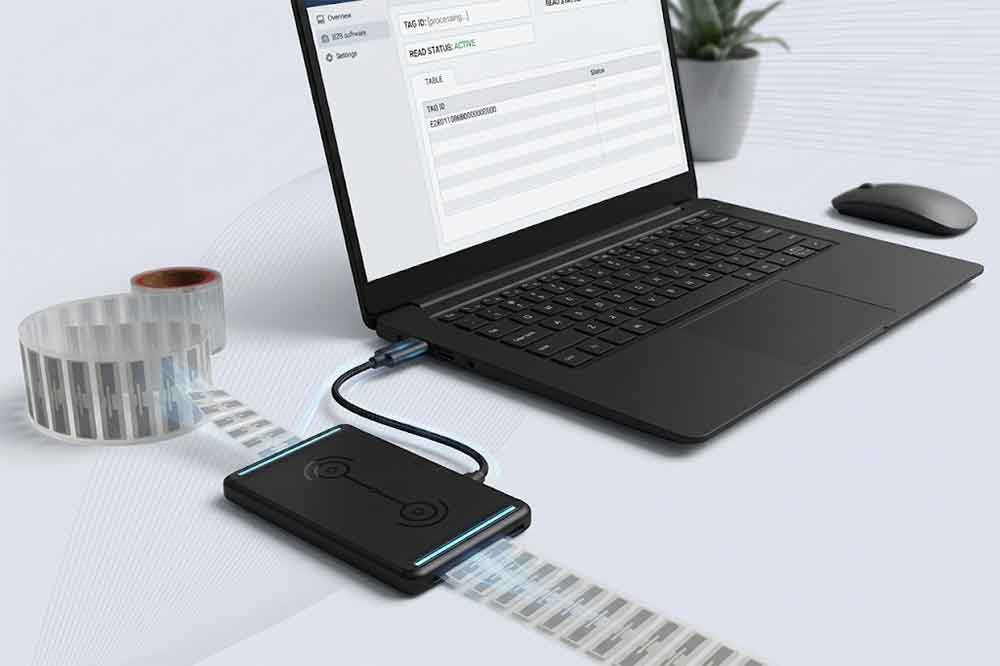
The reader is configured to send the tag data as keystrokes. Some models can also append a suffix, such as Enter or Tab, after each reading. This can help move the cursor to the next field or submit a form, depending on the application.
For example, a warehouse employee may open an inventory spreadsheet, select a cell, and scan several tagged items. Each ID appears in the spreadsheet without requiring a dedicated RFID application.
HID is often a practical choice when the task is mainly data entry. It can reduce software development requirements and make deployment easier for teams that already use standard desktop applications.
Typical applications include:
HID output usually depends on which application field has focus. If the cursor is in the wrong window or field, the data may be entered in the wrong place.
Keyboard emulation also does not automatically provide advanced functions such as detailed reader control, complex filtering, or application-level error handling. These capabilities depend on the reader and the software workflow.
For projects that need automatic background processing, multiple reading parameters, or complex data handling, another communication method may be more appropriate.
Some USB RFID readers support serial communication through a virtual COM port. Depending on the device and computer operating system, the reader may appear as a serial port after the required driver is installed.
An application can then open the port and exchange data with the reader using the communication protocol specified by the manufacturer.
The application sends commands or listens for data through the serial interface. The reader returns information according to its supported protocol.
The details vary by model. A protocol may define commands for starting a reading operation, obtaining tag IDs, changing settings, or checking device status. Not every reader supports all these functions.
For example, a software developer may create a desktop inventory tool that receives a tag ID, checks it against a local database, and displays the item’s status. With a documented serial protocol, the application can handle this process without relying on the user to select a text field.
Serial communication can give developers more control over the data exchange process than basic keyboard emulation.
It may be suitable for:
A COM port does not guarantee that the reader is compatible with a particular application. Buyers should confirm the supported operating systems, driver requirements, serial settings, command protocol, and data format.
They should also ask whether the reader sends data automatically, responds only to commands, or supports both approaches.
If the protocol is undocumented, integrating the device may take more engineering time than expected. A sample application, protocol manual, and technical support can make a significant difference.
An SDK, or Software Development Kit, may include libraries, sample code, documentation, and tools that help developers work with a reader. An API defines the functions or interfaces available to the application. Some products provide both; others provide a protocol or library without a separate API.
This approach is useful when RFID reading must become part of a larger software system rather than simply entering text into a field.
For example, a system integrator may need an application to read a tag, validate the ID, associate it with an asset record, save a timestamp, and send the result to a server. The integration may also need to display errors or manage repeated readings.
An SDK can simplify supported operations, but its availability does not automatically guarantee compatibility with every programming language, operating system, or application architecture.
Before selecting a reader, ask the supplier for:
For enterprise deployments, also consider how the application will handle connection loss, repeated tag readings, invalid responses, and device replacement.
The right method depends on the software environment, required control, and available development resources.
| Requirement | HID Keyboard Emulation | Virtual COM Port | SDK/API Integration |
|---|---|---|---|
| Basic text entry | Often suitable | Requires software handling | Requires software handling |
| Custom application logic | Limited by the workflow | Supported through protocol implementation | Supported within the provided functions |
| Development effort | Usually low | Moderate, depending on protocol | Varies by SDK and project |
| Reader command control | Model-dependent and often limited | Depends on protocol support | Depends on SDK/API functions |
| Best fit | Forms and simple desktop tasks | Custom serial-based applications | More integrated software workflows |
This comparison is a starting point, not a universal specification. Some readers support more than one output mode, while others provide only a particular interface. Always verify the actual model’s documentation.
Selecting HID, serial communication, or an SDK is only part of the decision. The data format must also match the receiving application.
A reader might output a tag ID as hexadecimal text, decimal text, or another documented representation. Some devices can add a prefix or suffix. Others support configurable output fields or memory data, subject to the reader’s capabilities.
Consider a system that stores tag IDs in hexadecimal format. If the reader sends a different representation, the application may fail to match the tag against existing records even though the tag is being read successfully.
Buyers should confirm:
The exact fields available depend on the RFID frequency, tag type, and reader model. Do not assume that every USB reader returns the same data.
First, confirm that the reader recognizes the tag and that the tag is compatible with the reader’s frequency and protocol. Then check the selected output mode, connection status, driver installation, and application settings.
For HID mode, make sure the correct text field is active. For serial communication, confirm the selected port and communication parameters.
Check the reader configuration and compare its output with the format expected by the application. Test with known tags before changing production data or database settings.
If the application expects a particular ID representation, confirm whether the reader can be configured accordingly or whether the software must convert the value.
Check operating system support, driver requirements, permissions, interface selection, and protocol documentation. For SDK-based projects, confirm the supported software versions and architecture.
It is also helpful to test the device with the supplier’s sample application before integrating it into a larger system.
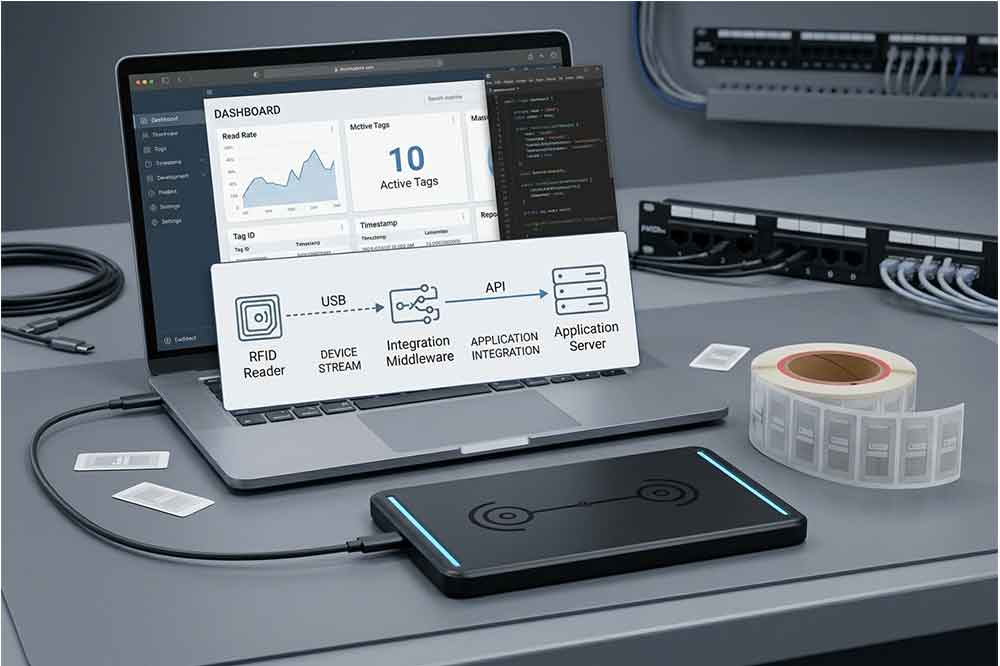
Repeated readings may be normal behavior for some reader configurations. Depending on the device and application, the workflow may need a suitable trigger, reading interval, filtering rule, or duplicate-handling process.
The best solution depends on whether the application needs to record every read event or only one record per item during a particular operation.
For B2B buyers, confirming the communication interface before ordering samples can prevent avoidable delays during deployment.
Ask the supplier:
If the reader will be used in a larger RFID solution, provide the supplier with a short description of the workflow. Explain where the tag data needs to go, which software receives it, and whether the system needs to control the reader or only collect tag IDs.
A small proof of concept can reveal interface and data-format issues before the project moves into bulk purchasing.
USB RFID reader data output determines how tag information moves from the reader into a computer or business application. HID keyboard emulation is often suitable for straightforward data entry, virtual COM communication offers a software-controlled serial interface, and SDK/API integration can support more complex workflows when the required functions are available.
There is no single best method for every project. The practical choice depends on the target software, operating system, data format, required reader controls, and development resources.
Before placing a bulk order, confirm the interface specifications and test the reader with actual RFID tags and the intended application. This simple step helps purchasing teams, developers, and system integrators select equipment that fits the complete workflow—not just the USB connection.
“To understand what determines actual tag detection distance, read our guide to USB RFID reader reading range.
1. What is HID mode on a USB RFID reader?
HID mode allows a compatible RFID reader to send tag data as keyboard input. The data can appear in an active text field without requiring a dedicated application for basic data entry.
2. What is the difference between HID and virtual COM?
HID sends data in a keyboard-like format, while virtual COM allows compatible software to communicate through a serial interface. The best option depends on the application and required reader controls.
3. Does every USB RFID reader support SDK integration?
No. SDK availability and supported functions vary by model. Ask the supplier for documentation, supported operating systems, sample code, and the exact integration functions before purchasing.
4. Can a USB RFID reader send data directly to Excel?
A reader supporting HID keyboard emulation can often enter tag data into an active Excel cell. The output format and optional Enter or Tab suffixes depend on the device configuration.
5. What should I test before bulk purchasing?
Test the reader with the intended RFID tags, operating system, target application, and expected data format. Also verify driver installation, communication stability, and any required read/write functions.

Discover SSD-D4AL, a USB-HID UHF RFID reader with 4/8/16 antenna options, Impinj E710/X3M1 chipset, plug-and-play USB power, and OEM customization.

SSD-D3AL is a USB-HID UHF RFID reader with 0–30 cm reading, 0–15 cm writing, over 600 tags/s recognition, USB plug-and-play operation and OEM Logo customization.

SSD-D1AL is a compact USB UHF RFID reader with Impinj E710/X3M1 chipset, USB-HID, 600+ tags/s recognition, 4/8/16 antenna support and plug-and-play USB power.

CYKEO CYKEO-D1LA USB RFID Reader is a compact desktop solution with near-field control for precise tag reading and encoding. Powered by USB, supporting ISO 18000-6C, and built for stable batch writing, this usb rfid tag reader fits retail, libraries, offices, and controlled RFID encoding tasks.

CYKEO CYKEO-D1L RFID scanner USB is a compact desktop UHF RFID scanner designed for short-range tag writing and verification. This usb rfid scanner supports batch encoding, stable 0–26 dBm output, and works across Windows, Linux, and Android systems.

CYKEO CYKEO-D1C USB RFID Card Reader is a near-field UHF desktop writer designed for secure, short-range tag encoding. With USB-C connectivity and stable 26 dBm output, this rfid reader usb c is ideal for badge issuance, label encoding, and controlled desktop RFID workflows.

CYKEO CYKEO-D2L RFID Reader USB is a compact desktop encoder built on the Impinj R500 chip. With near-field control and stable USB power, this usb rfid card reader delivers precise tag writing for offices, retail counters, and small-scale logistics encoding tasks.

CYKEO CYKEO-D3L USB RFID Tag Reader delivers stable UHF tag reading and writing for daily desktop and light industrial tasks. Designed for controlled short-range operation, this USB RFID Tag Reader works reliably with rfid tag and reader systems in libraries, tool tracking, and inventory registration.

The CYKEO CYKEO-D4L UHF RFID Tag Reader is a stable Desktop RFID Reader designed for accurate tag registration, borrowing, and return workflows. Built with the Impinj R2000 chip, this UHF RFID Tag Reader delivers controlled short-range reads for libraries, asset tracking, and inventory management environments.

The CYKEO CYKEO-D5L Desktop RFID Card Reader is a stable UHF RFID Card Reader designed for controlled short-range reading and writing. Built for libraries, tool rooms, and asset desks, this UHF RFID Card Reader supports dense tag handling, secure data processing, and easy USB integration.

The CYKEO CYKEO-D6L RFID Reader Writer is a heavy-duty Desktop RFID Reader designed for short-range, high-accuracy tag programming. Built for libraries, labs, and asset desks, this RFID Reader Writer supports batch processing, stable 33dBm output, and seamless integration with existing management systems.

Cykeo CYKEO-D8B UHF RFID tunnel and RFID Desktop Reader features 30+ items batch reading,

Cykeo CYKEO-D8A embedded RFID badge reader offers 30+ tags/sec scanning, 20cm anti-crosstalk precision, and DC 12V power for unmanned stores, warehouses, and smart inventory systems.

Cykeo’s CYKEO-D8C UHF RFID gate reader achieves 200-tag/batch scanning with adjustable power control, ideal for retail inventory and smart warehouse management.
RFID Industry Writer | IoT & Asset Tracking Analyst
James writes about RFID technology, asset tracking, and the practical challenges of digital transformation across warehousing, retail, manufacturing, and logistics.
His work focuses on how RFID is applied in real-world operations—improving inventory visibility, automating workflows, and helping businesses manage assets with greater accuracy and efficiency.
He regularly covers topics including UHF RFID, smart cabinets, RFID portals, tool tracking, warehouse automation, and industrial IoT trends..

Track RFID enables real-time asset visibility, automated inventory control, and loss prevention. Discover how Cykeo RFID systems improve operational efficiency and tracking accuracy.
More
Discover how to select the best UHF RFID module for industrial asset tracking. Learn about frequency, durability, compatibility, and real-world performance.
More
Learn how RFID door locks use radio-frequency identification for secure, keyless access. Discover encryption methods, integration, and Cykeo’s smart lock solutions.
More
Discover how RFID systems work from a physics perspective. Learn how energy flows between reader and tag, how backscatter works, and why RFID tags don’t need batteries.
More