 Cykeo RFID IoT Solution Products R&D Manufacturer
How can I connect handheld RFID readers to ERP systems like SAP or Oracle?
1009Learn how to integrate handheld RFID readers with ERP systems like SAP or Oracle. Follow expert steps for data sync, API setup, and real-time inventory updates.
MoreAll RFID Product
When people first get into RFID printers, most of them are honestly a bit confused — is this just a printer, or something else? I’ve worked with quite a few clients on RFID projects, and these are the questions that come up again and again. Let’s break them down in plain English so you don’t waste time figuring it out the hard way.
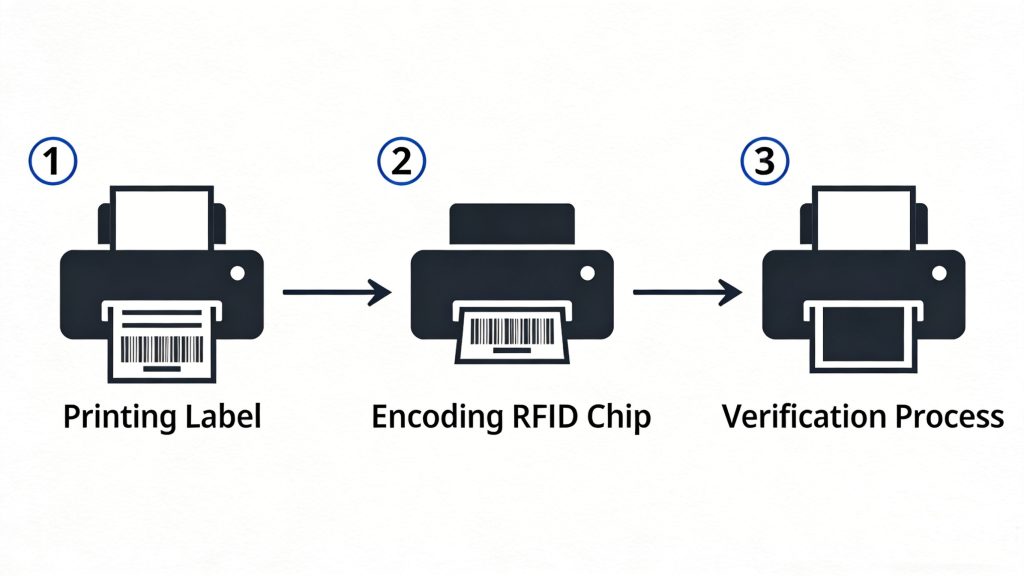
Put simply: it prints a label and writes data into the chip at the same time.
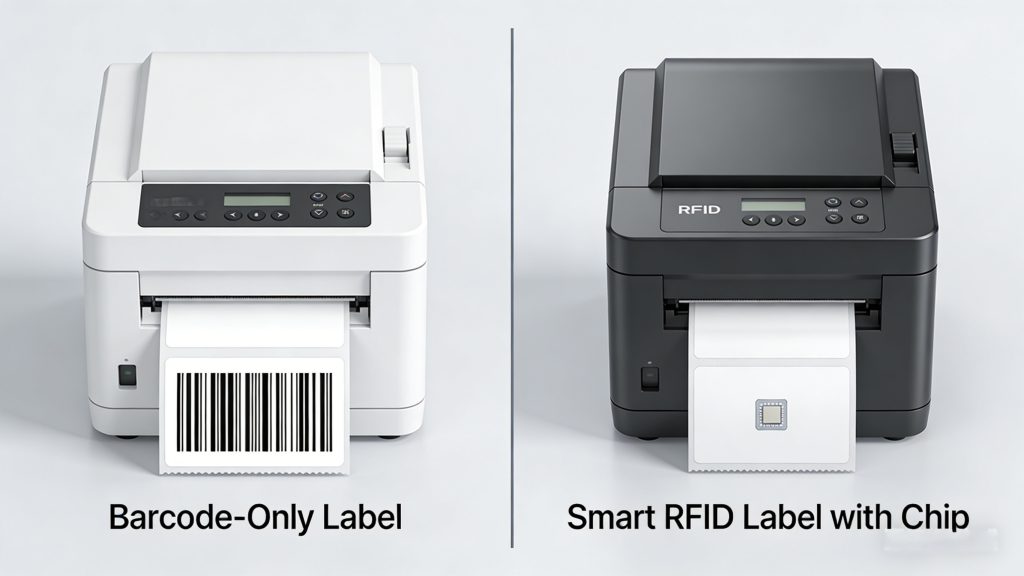
A regular printer just prints text or barcodes. An RFID printer does one extra thing — it encodes data into the RFID chip inside the label. So your label doesn’t just look like something; it can also be read wirelessly.
They look similar, but the inside is very different:
You can think of it as having an “invisible writing” function built in. And that verification step matters a lot — it helps catch errors right away.
No — and this is where a lot of people mess up.
You need to check:
For example, UHF tags usually require a UHF RFID printer. If the antenna position doesn’t match the printer’s encoding area, your write success rate will drop — or fail completely.
At the beginning, yeah, a little.
Main pain points:
But once you get used to it, it’s manageable. Most modern printers come with software that feels similar to barcode printing — just with an extra step for encoding.
Yes — and it’s not rare.
Common reasons:
Good RFID printers will detect failures, retry automatically, or flag bad labels. That feature alone can save you a lot of trouble later.
It’s a bit slower than regular printing, but not dramatically.
Since it adds writing + verification, there’s naturally some delay. But for normal batch jobs like warehouse labeling, it’s usually fast enough.
Depends on what you compare them to.
There’s a big price range between entry-level and industrial models. If you’re just testing, don’t overspend right away.
Not really.
Even with NFC, a phone can only:
But it can’t handle:
For testing, you can use a phone with a Bluetooth RFID reader. But for real work, you’ll still need a proper printer.
Here are the most typical scenarios I’ve seen:
In short: anywhere you need large-scale labeling + automatic identification.
I’ve seen these way too often:
Mistake #1: Choosing the wrong tags
People buy the printer first, then realize the tags don’t work well with it.
Mistake #2: Skipping testing
Always test with a small batch before going big.
Mistake #3: Ignoring software integration
Printing is just step one. You’ll likely need to connect it to WMS or ERP systems — and that’s where things get tricky.
RFID printers can feel complicated at first, but they’re not as scary as they look. The real challenge isn’t the device — it’s how you use it and where you apply it.
If you’re just experimenting, start small. But if you’re planning a real project, spend more time testing upfront — it’ll save you a lot of headaches later.
Learn how to integrate handheld RFID readers with ERP systems like SAP or Oracle. Follow expert steps for data sync, API setup, and real-time inventory updates.
More
Learn how to read RFID tags in Android. We cover using your phone's NFC for simple tags and connecting external UHF readers for real inventory apps. Practical steps included.
More
Discover how RFID technology and smart cabinets transform factories and assembly lines. Track parts, tools, and inventory in real-time, prevent mistakes, and optimize production with full visibility.
More
Understand the differences between NFC and HF RFID technology, including range, applications, and compatibility. Learn how Cykeo’s solutions optimize both for secure data exchange.
More