 Cykeo RFID IoT Solution Products R&D Manufacturer

rfid reader uhf: What Makes It Essential for Long-Range RFID Systems?
186Discover how rfid reader uhf devices enable long-range tracking, fast data capture, and automation across logistics, assets, and security with Cykeo solutions.
MoreAll RFID Product
RFID in library science is a technology that uses radio frequency identification tags and readers to identify, track, and manage library materials wirelessly. It enables libraries to automate book borrowing, returns, inventory checks, security monitoring, and collection management while reducing repetitive manual handling.
RFID stands for Radio Frequency Identification. In a library environment, it connects physical resources—books, journals, DVDs, magazines, and other circulating materials—with the library management system through electronic identification.
Unlike traditional barcode systems, which generally require staff or users to position a scanner directly in front of a printed code, RFID allows compatible readers to identify tagged materials through radio communication. Depending on the tag type, reader configuration, antenna placement, and surrounding environment, several items can be detected during one reading operation.
This difference becomes particularly important in libraries with thousands or hundreds of thousands of physical resources.
Consider a typical university library. A student returns six books at a self-service station. With a barcode-based process, each item generally needs to be presented individually. With an appropriately configured RFID system, the reader can identify multiple tagged books within its designated reading zone, allowing the circulation software to process the return more efficiently.
The technology is not simply a replacement for barcode labels. It changes how libraries handle circulation, inventory, security, and collection visibility.
An RFID-enabled library uses electronic tags attached to individual materials, antennas that transmit and receive radio signals, RFID readers that process tag responses, and software that communicates with the library management system (LMS).
The process involves several connected operations:
The important distinction is that RFID identifies the physical item, while the library management software determines what should happen to it.
For example, a reader may successfully identify a book’s electronic identifier, but that does not automatically mean the book has been properly checked out. The LMS must still confirm the transaction and update the circulation record.
| Component | Function in library operations |
|---|---|
| RFID library tags | Store electronic identification data for books and other materials |
| RFID readers | Communicate with tags and capture their responses |
| RFID antennas | Establish the radio-frequency reading zone |
| Self-service stations | Allow patrons to borrow and return materials |
| Security gates | Detect tagged items passing through designated exit areas |
| Inventory readers | Identify multiple items during shelf-checking operations |
| Library management system | Maintain item records, circulation status, and transaction information |
| Middleware | Connect reader hardware with library applications and databases |
These components must operate as one system. Installing readers without integrating them with the library’s existing circulation software does not create a complete automated library.
Most library RFID applications use passive tags because they do not require an internal battery.
A passive tag receives energy from the reader’s radio-frequency field and uses that energy to communicate its stored information. This makes passive tags suitable for large collections where hundreds or thousands of items need electronic identification without individual battery maintenance.
The choice of RFID frequency affects the reading environment and equipment design.
| RFID frequency | Frequency range | Typical characteristics |
|---|---|---|
| LF | 125–134 kHz | Short-range identification; less common in modern library item-management systems |
| HF | 13.56 MHz | Common in library RFID implementations, depending on the applicable standard and system design |
| UHF | Regional bands around 860–960 MHz | Supports longer-range and multi-tag identification in suitable applications |
A critical technical point: libraries should not select tags simply because a supplier advertises a longer reading distance.
Books contain different materials, binding structures, labels, and sometimes metallic components. The reading performance of an RFID tag depends on its antenna design, reader power, tag orientation, nearby materials, and the physical layout of the reading zone.
For a self-checkout counter, controlled and predictable reading is generally more valuable than detecting tags several metres away.
RFID supports several library operations, from routine circulation to collection-level inventory management. Its greatest operational value often comes from connecting these processes rather than treating each RFID device as an independent piece of equipment.
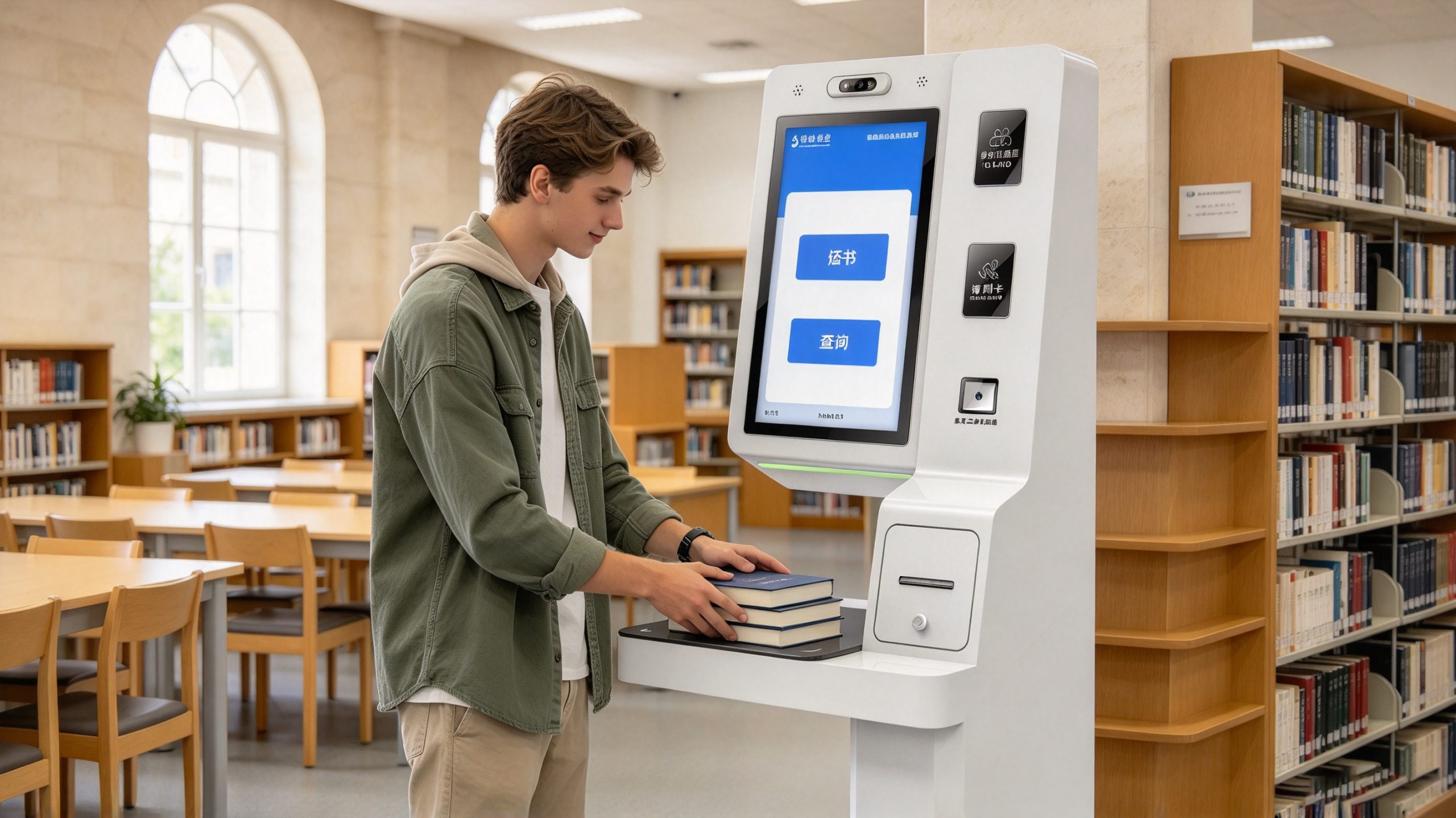
Self-checkout is one of the most recognizable applications of RFID in library science.
A patron places several books in the designated reading area. The RFID reader captures the electronic identifiers, and the connected software retrieves the corresponding library records. After the patron authenticates their account and confirms the transaction, the system updates the circulation status.
This reduces the need for staff to scan every barcode separately.
However, the reading zone requires careful configuration. If a reader captures books belonging to another person standing nearby, the checkout process can become unreliable. Antenna positioning, output power, shielding, and software filtering all influence the result.
A properly designed self-service station should therefore balance reading sensitivity with spatial control.
RFID also simplifies the return process.
When a patron places a book into an RFID-enabled return station or book drop, the reader identifies the item and communicates with the library management system. The software can then process the return, update the item’s circulation status, and initiate the next handling step.
In a larger library, returned materials may be directed toward different sorting destinations.
For example:
Automated returns are particularly useful outside staffed service hours. Nevertheless, a return is only complete when the system has successfully recorded the transaction. Libraries should provide clear confirmation to patrons and maintain exception-handling procedures for unreadable tags, damaged items, or database communication failures.
Inventory management is one of the most technically significant applications of RFID.
Traditional barcode inventory generally requires each item’s barcode to be visible and scanned individually. This makes large-scale stock checking labor-intensive, particularly when books are tightly packed or stored on high shelves.
With a compatible RFID handheld reader, library personnel can scan tagged materials without removing every book from the shelf.
A typical workflow includes:
The most useful outcome is not simply a large number of successful reads. It is the ability to compare the actual shelf condition with the library’s database.
For example, a book recorded as belonging to Section A may be detected in Section C. The system can flag the discrepancy for staff investigation.
There is an important limitation: an RFID inventory reader does not inherently understand where a book belongs. Location accuracy depends on the inventory workflow, reader configuration, shelf identification, and software rules.
A handheld reader may capture a tag from an adjacent shelf if its reading field is too broad. This is why practical inventory systems need controlled reading procedures and location-based verification.
RFID can also support library security through detection gates installed near designated exits.
When a tagged item passes through the gate’s reading zone, the system can identify the tag and check its associated security or circulation status.
If an item has not completed the required borrowing process, the system can trigger an alert.
The process typically involves:
RFID security gates should not be confused with standalone electronic surveillance systems. Their effectiveness depends on the integration of item identification, circulation records, security configuration, and the physical installation environment.
A gate that detects a tag but cannot reliably distinguish authorized circulation from an outstanding security condition will generate unnecessary alerts.
For this reason, the security function should be tested alongside the self-checkout and circulation workflows rather than commissioned separately.
RFID can help libraries maintain more accurate information about the location and circulation status of their physical collections.
This is especially relevant to libraries with multiple floors, specialized collections, or several branches. Materials may be borrowed, returned, transferred, moved temporarily, or placed on the wrong shelf. Without an efficient identification process, these movements can create discrepancies between physical stock and database records.
An RFID-based collection management workflow can support:
One distinction deserves attention: RFID does not automatically provide continuous, precise indoor positioning for every book. A conventional handheld reader identifies tags within its reading field. Determining an item’s exact shelf location requires additional location information and a properly designed scanning procedure.
Larger academic and public libraries may process hundreds or thousands of returned materials throughout the day.
RFID identification can be integrated with automated material-handling equipment to recognize returned items and support sorting decisions.
For instance, a returned book enters a conveyor system. An RFID reader captures its identifier, the library application retrieves its destination, and the sorting mechanism directs the book toward the appropriate collection or processing area.
This arrangement can reduce repetitive manual classification.
However, the sorting equipment must also account for reading reliability, conveyor speed, tag orientation, overlapping materials, and communication delays between the reader and the library management system.
A high-speed reader alone cannot guarantee high-speed sorting. The complete workflow determines the actual processing capacity.
The technical value of RFID becomes clearer when the discussion moves beyond reading distance and reader specifications.
In library applications, three performance considerations deserve particular attention:
Identification reliability. A system must identify the intended books without repeatedly capturing materials outside the designated reading area.
Database consistency. Every successful RFID identification must be correctly associated with the corresponding library record and circulation transaction.
Operational usability. Staff and patrons should be able to complete routine tasks without unnecessary rescanning, confusing error messages, or complicated procedures.
These considerations are important when evaluating desktop readers, self-service stations, handheld inventory equipment, and security gates.
A reader capable of detecting multiple tags is useful, but a library needs to know whether the correct tags are detected under actual operating conditions. That distinction separates a hardware demonstration from a dependable library application.
For Cykeo’s technical content, RFID performance should therefore be evaluated through the complete identification and application workflow, including tag compatibility, antenna placement, reader configuration, software integration, and environmental conditions.
Standardization is one of the most important considerations when selecting RFID equipment for a library. A library may purchase tags, readers, self-service machines, and security gates from different manufacturers. Without compatible data structures and communication interfaces, these components may not work together as expected.
The principal international standard for library RFID applications is the ISO 28560 series.
International standard ISO 28560-1:2023
ISO 28560-1:2023 provides a framework for encoding and exchanging RFID information associated with library materials.
Published in June 2023, the third edition applies to different types of libraries, including public, academic, school, corporate, national, and special libraries.
Its objectives include:
The standard also works alongside other parts of the ISO 28560 series, including:
| Standard | Main purpose |
|---|---|
| ISO 28560-1:2023 | Data elements and general implementation guidelines |
| ISO 28560-2 | Encoding RFID data elements based on ISO/IEC 15962 rules |
| ISO 28560-3 | Fixed-length encoding of RFID data elements |
For libraries planning a new RFID installation, this standard is particularly important when replacing older equipment or exchanging materials between institutions.
A reader should not be considered compatible simply because it supports the same radio frequency. Data encoding, tag memory organization, supported protocols, and application integration also matter.
RFID readers do not independently manage library accounts or circulation records. They communicate with software applications that handle the business logic.
Two important communication standards in library environments are:
SIP2 (Standard Interchange Protocol 2)
SIP2 is widely used to facilitate communication between self-service library equipment and integrated library systems. It supports operations such as patron authentication, item identification, and circulation transactions.
NCIP (NISO Circulation Interchange Protocol)
NCIP supports information exchange between library applications, particularly in circulation and resource-sharing workflows.
A practical implementation should verify which interfaces the existing library management system supports before purchasing RFID equipment.
For example, a self-service kiosk may successfully read an ISO-compatible tag but still fail to complete checkout if its communication interface is not configured correctly.
RFID and barcode technology both provide item identification, but they operate differently.
Barcode systems rely on optical scanning, whereas RFID uses radio-frequency communication. This difference affects how materials are processed, counted, and managed.
| Comparison factor | RFID library system | Barcode library system |
|---|---|---|
| Identification method | Radio-frequency communication | Optical scanning |
| Line of sight | Generally not required | Required |
| Multiple-item reading | Supported by compatible systems | Generally one item at a time |
| Item handling | Can identify tagged materials without individual barcode alignment | Each barcode normally needs to be presented to the scanner |
| Inventory checking | Supports handheld and bulk identification | Usually requires individual scanning |
| Self-service | Supports multiple-item identification in a controlled zone | Typically requires individual scanning |
| Security integration | Can use RFID-enabled security gates | Usually requires a separate compatible security arrangement |
| Initial investment | Generally higher | Generally lower |
| Tag requirements | Electronic RFID tags | Printed barcode labels |
| System integration | Requires compatible readers, tags, software, and data configuration | Often simpler for basic identification |
RFID is particularly suitable when a library has:
For a small specialist library with limited circulation and a modest collection, barcode technology may remain a practical and economical solution.
The decision should be based on operational requirements rather than the assumption that newer technology is always better.
Yes. Many libraries can operate RFID and barcode identification in parallel during a transition period.
For example, an institution may introduce RFID tags for newly acquired books while continuing to use barcode labels for older materials. Existing circulation software can be configured to support the transition, provided the identification and database integration requirements are addressed.
This approach can reduce the disruption associated with converting an entire collection at once.
However, the library should establish a clear migration plan covering tag conversion, record mapping, equipment compatibility, staff training, and inventory verification.
RFID performance should be evaluated using documented research rather than marketing claims such as guaranteed 100% reading accuracy.
Two research examples illustrate why real-world testing matters.
A 2020 study published in Library Hi Tech investigated the factors affecting RFID handheld inventory performance.
The researchers tested:
The study found an overall read rate of approximately 82% after 40 scans when considering books with different tag positions.
For books with tags positioned near the opening side rather than close to the spine, the read rate during a single sweep dropped to 65.7%.
These findings are important because they demonstrate that tag placement and book orientation can significantly influence inventory performance.
A supplier’s laboratory demonstration may show excellent reading results under controlled conditions. A real library shelf presents a different challenge: books are tightly packed, orientations vary, and the radio-frequency environment is less predictable.
For library operators, the practical lesson is to test RFID tags in representative shelving conditions before deploying the system across an entire collection.
Research source: Library inventory using a RFID wand: contribution of tag and book specific factors on the read rate, 2020.
A 2017 Japanese research paper published in the Journal of Japan Society of Information and Knowledge examined the use of library materials through a shelf-mounted RFID system over a two-year period.
The researchers identified a particularly interesting finding: materials were removed from shelves approximately three times as often as external borrowing statistics suggested.
The study also identified a peak usage duration of approximately two to four minutes, indicating that short, in-library browsing activities represented an important part of material use.
This finding reveals a limitation of conventional circulation statistics.
A book can be removed from a shelf, consulted by a visitor, and returned without ever being recorded as borrowed. Traditional checkout data cannot fully describe this type of activity.
RFID-based shelf monitoring can therefore provide additional insight into how library collections are used inside the building.
However, this capability introduces privacy considerations. Libraries must establish appropriate data collection, retention, and access policies before using RFID to analyze patron-related activity.
Research source: Okamoto, Marumo, and Sano, 2017, Investigation of In-Library Use of Materials Using a Shelf-Mounted RFID System.
What these studies tell library managers: RFID performance is not determined by reader specifications alone. Tag positioning, collection arrangement, reading procedures, and the intended use of collected information all affect the results.
A successful RFID project begins with an operational assessment, not a hardware purchase.
The following implementation approach helps libraries avoid common compatibility and deployment problems.
Before choosing RFID equipment, review the existing library environment.
Consider:
A university library with several floors may need a different equipment configuration from a small public library.
The objective is to identify which operations require automation and where RFID will provide measurable benefits.
RFID tags should be selected according to the intended library application.
Important factors include:
The physical tag should also be appropriate for the material.
A tag suitable for a paperback book may not be the best option for a DVD case, metal-containing object, or other special collection item.
Different library workflows require different reader configurations.
Used for circulation desks, tag registration, card encoding, and controlled reading or writing operations.
Used for shelf inventory, item identification, and collection checking without individually removing every book.
Used for automated borrowing, returns, and patron-facing circulation operations.
Used to identify tagged library materials passing through designated exit areas and support configured security alerts.
The selection process should consider reading distance, multi-tag capability, antenna configuration, interface options, SDK availability, and integration requirements.
A reader designed for industrial asset tracking is not automatically the best choice for a library checkout counter. The application determines the appropriate hardware.
The RFID reader must communicate with the library management system.
Integration may involve:
Libraries should test the complete process using real item records rather than relying exclusively on a reader demonstration application.
Before converting the entire collection, select a representative section of the library for testing.
A pilot should include:
Record the results, identify weak points, adjust reader settings, and repeat the tests.
This is particularly important for handheld inventory systems, where a high reading rate under ideal conditions may not translate into equally reliable results across every shelf.
Technology adoption changes daily library procedures.
Staff should understand how to:
After deployment, libraries should monitor transaction errors, missed reads, inventory discrepancies, equipment downtime, and user feedback.
These indicators provide a more meaningful assessment of system performance than reader specifications alone.
Privacy is a fundamental issue in library technology.
Libraries protect more than physical collections. They also protect the confidentiality of users’ reading choices, borrowing records, and research activities.
RFID implementation must therefore account for the possibility that tags can be read by unauthorized readers.
The American Library Association (ALA) addresses these concerns in its RFID in Libraries: Privacy and Confidentiality Guidelines, amended in June 2019.
The guidelines recommend practical safeguards, including:
One especially important recommendation is to avoid placing personally identifiable information on RFID tags.
A tag identifier should not become an unrestricted route to a patron’s identity or borrowing history.
The library should retain control over the relationship between item identifiers and its internal database.
The best equipment depends on the specific library operation.
| Library requirement | Recommended equipment | Key selection consideration |
|---|---|---|
| Book tag registration | RFID desktop reader-writer | Encoding compatibility and writing reliability |
| Borrowing and returns | RFID self-service reader | Controlled reading area and software integration |
| Shelf inventory | Handheld RFID reader | Tag sensitivity and multi-tag identification |
| Exit security | RFID security gate | Detection-zone coverage and security integration |
| Automated sorting | Fixed RFID readers and antennas | Reading stability and conveyor integration |
| Library card encoding | Compatible RFID card reader-writer | Card frequency, protocol, and security compatibility |
Equipment selection should be based on verified product specifications and the library’s tag and software requirements.
Designed for desktop tag reading, card issuance, and encoding workflows. Its near-field antenna supports controlled reading and writing operations, with stated reading distances of up to 30 cm and writing distances of up to 10 cm under specified conditions.
Industrial UHF reader options for fixed reading installations. Potential applications include automated material identification and integrated library equipment, subject to tag compatibility and system integration.
An embedded UHF RFID module supporting integration into customized identification equipment. It provides API and SDK resources for application development and supports multiple RFID protocols.
For a library project, these products should be evaluated against the actual tag frequency, encoding format, antenna arrangement, and application interface. Their specifications should not be interpreted as proof of compatibility with every ISO 28560 library installation.

RFID stands for Radio Frequency Identification. In library science, it refers to a technology that uses radio waves to identify and manage books, journals, DVDs, and other library materials through electronic tags and RFID readers.
RFID works by allowing a reader to communicate wirelessly with electronic tags attached to library materials. The reader captures each tag’s identification data and sends it to the library management system, which processes borrowing, returns, inventory checks, or security operations.
The main advantages include:
The actual benefits depend on collection size, equipment configuration, and software integration.
Barcode systems use optical scanners and generally require individual barcode scanning. RFID uses radio-frequency communication and can identify multiple compatible tags within a reading zone. RFID is particularly useful for automated inventory and self-service applications, although it generally requires a higher initial investment.
ISO 28560 is the principal international standard series for RFID applications in libraries. It defines data elements, encoding approaches, and implementation guidelines to support circulation, inventory, security, and interoperability between library systems.
Yes. Compatible RFID readers can identify multiple tagged books during one reading operation. This capability is commonly used in self-checkout and inventory management. However, the actual reading performance depends on tag placement, book orientation, reader power, antenna design, and surrounding materials.
RFID can be implemented securely, but libraries must establish appropriate privacy safeguards. They should avoid storing personally identifiable information on tags, protect communication with library databases, restrict unauthorized access, and establish transparent policies governing information collection and retention.
RFID in library science is more than a wireless alternative to barcode scanning. It provides a foundation for automating physical collection management, improving circulation workflows, supporting inventory operations, and developing more flexible library services.
Its effectiveness depends on the relationship between electronic tags, readers, antennas, software, international standards, and the actual library environment.
For libraries considering RFID adoption, the most important question is not how far a reader can detect a tag. It is whether the complete system can identify the correct materials, update records accurately, protect user privacy, and operate reliably throughout everyday library activities.
What is RFID in library science? It is an integrated identification and management technology that helps libraries connect physical collections with digital information systems, making modern library operations more efficient, measurable, and adaptable.
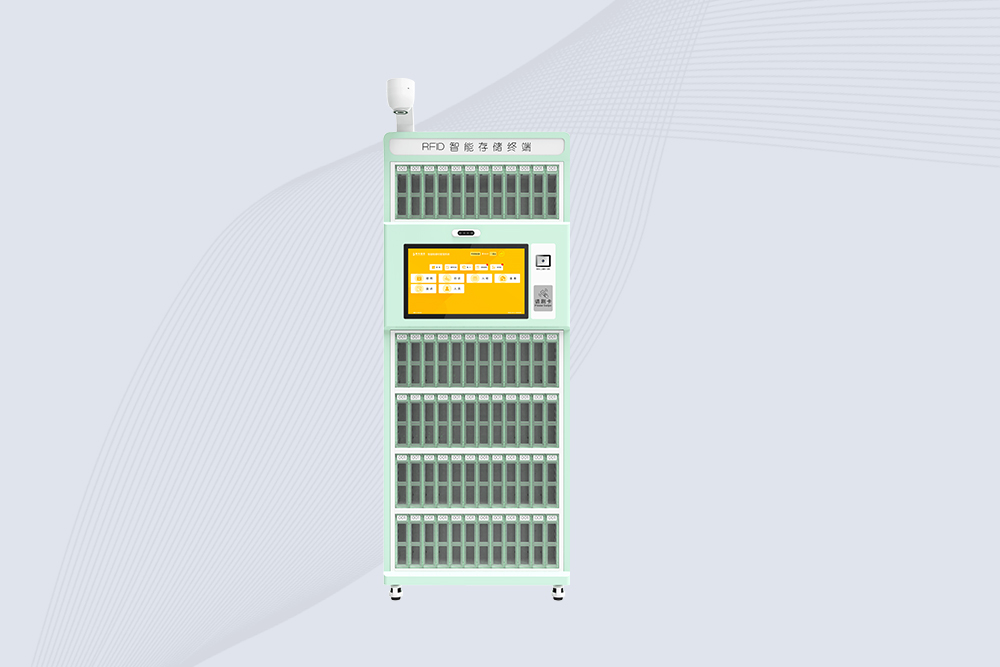
Cykeo’s RFID Library Management Cabinet offers 72-cell precision control for archives/labs/retail. Features dual-band UHF/HF scanning, facial authentication & cloud sync. ISO 18000-6C/15693 certified.
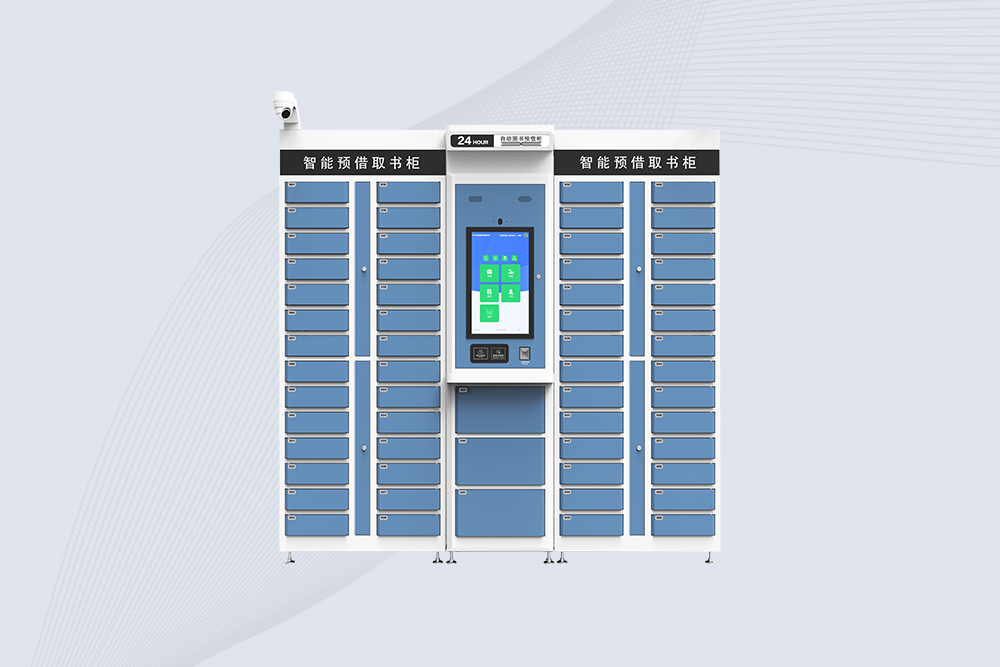
Cykeo’s RFID Smart Library Cabinet enables 24/7 book reservations with 59 compartments, biometric security & cloud sync. Ideal for universities/public libraries. Windows/Android OS.
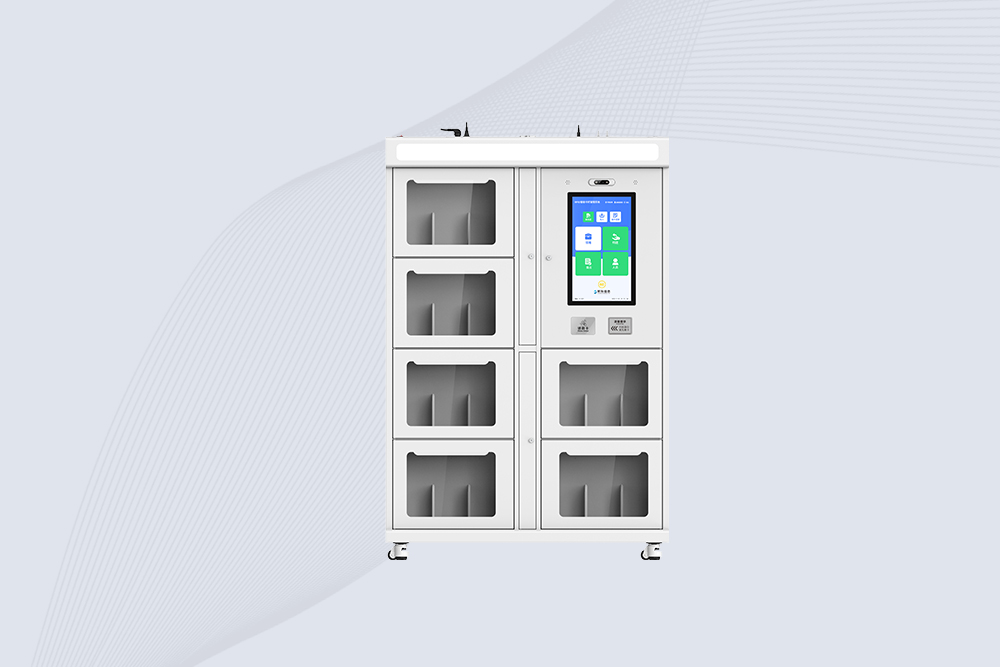
Cykeo’s RFID Book Inventory Cabinet features 7 compartments, Impinj R2000 UHF technology & dual OS for libraries/archives. 99.98% recognition accuracy with solar/cloud options.
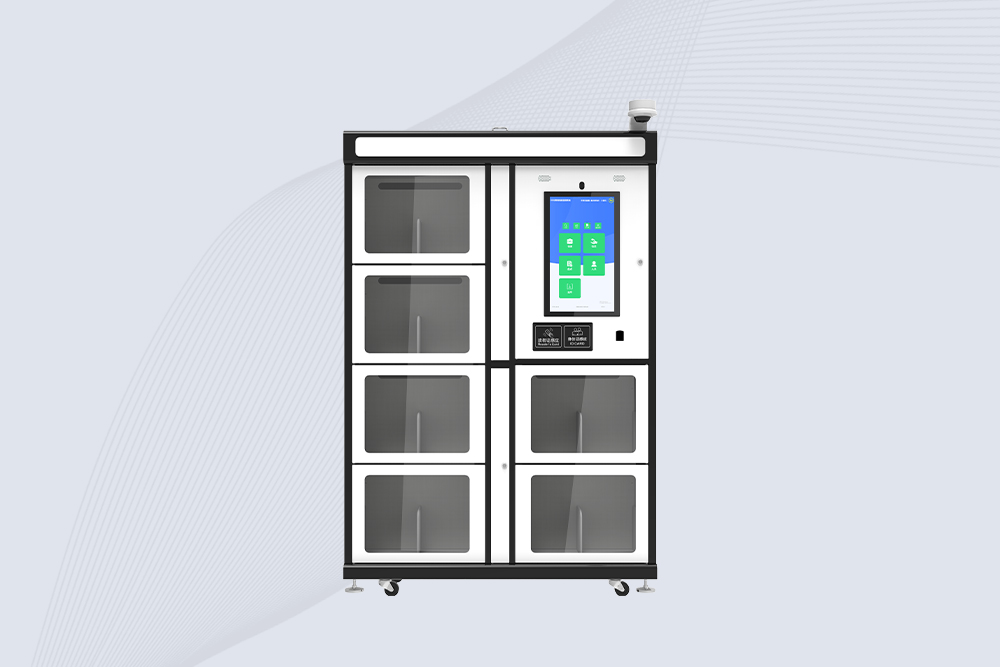
Cykeo’s industrial RFID School Library Cabinet features Impinj R2000 UHF technology, 21.5″ touchscreen & customizable compartments for academic archives, museums and libraries. Dual OS supports Windows/Android.
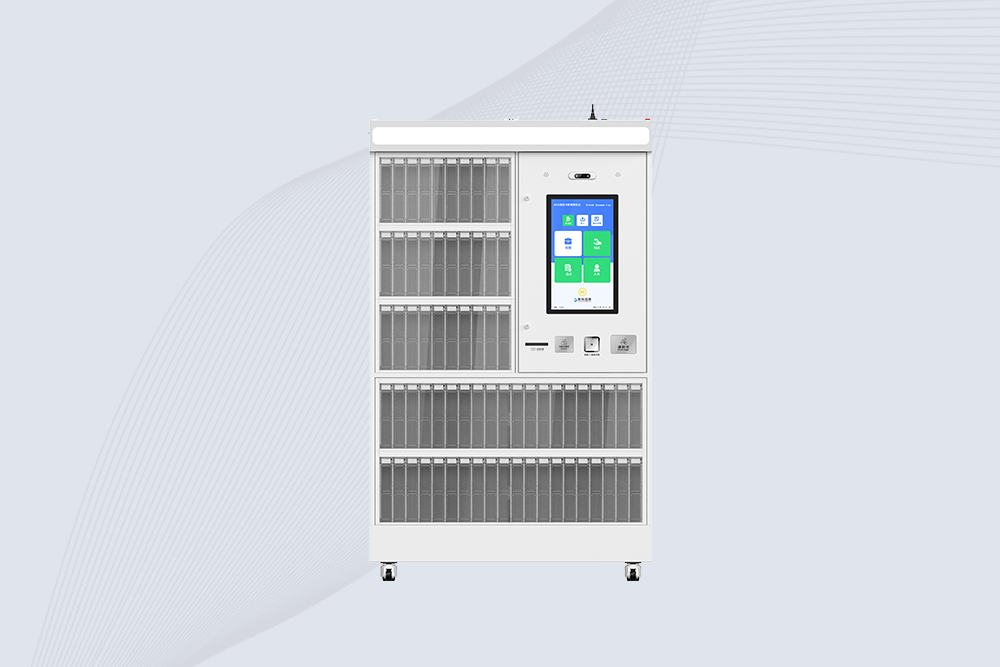
Cykeo’s RFID Mobile Library Cabinet enables 24/7 self-service book lending with 100-tag RFID scanning, facial recognition & solar power. Ideal for schools/communities.
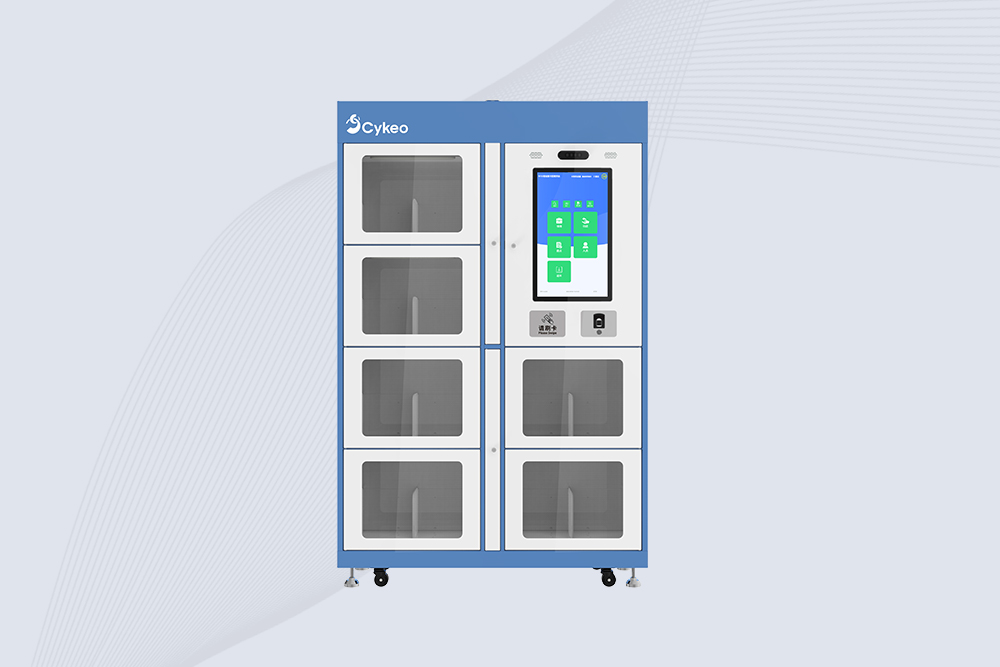
Cykeo CYKEO-G68B RFID smart bookcase features BookEye™ technology, 175-book capacity, and SAP integration for automated library management. Industrial-grade construction for 24/7 unmanned operations.

Discover how rfid reader uhf devices enable long-range tracking, fast data capture, and automation across logistics, assets, and security with Cykeo solutions.
More
Learning how to use USB RFID reader? Step-by-step guide for Windows and Android. Plug-and-play setup, driver installation, software connection, and fixing common issues. Real advice from CYKEO engineers.
More
Confused? We clarify if an RFID antenna and reader are two separate devices, explaining integrated vs. external setups for different applications.
More
Compare handheld and fixed RFID readers for retail. Learn pros, cons, and ideal use cases with Cykeo’s solutions to boost inventory accuracy and theft prevention.
More